
Setup: Panasonic Home Network System Digital Cordless Handset KX-HNH100 User Manual
Content
Panasonic Home Network System Digital Cordless Handset KX-HNH100
Introduction
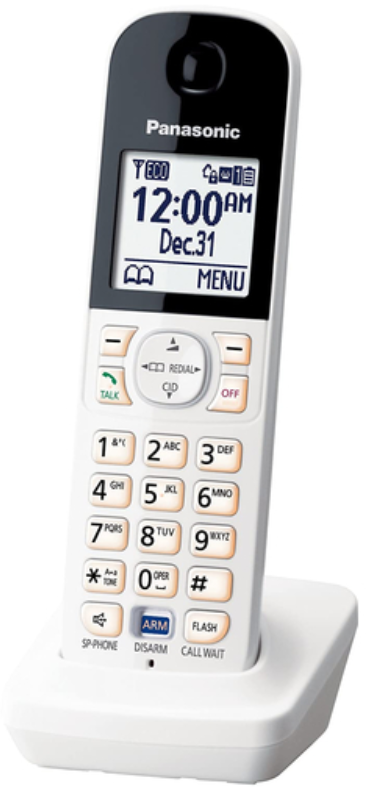
The Panasonic Home Network System Digital Cordless Handset KX-HNH100 is a versatile and innovative accessory designed for the Panasonic Home Monitoring System. This digital cordless handset offers a robust suite of features that enhance home security and convenience. Key benefits include the ability to arm and disarm your home monitoring system, receive system alerts, and control smart plugs directly from the handset. The KX-HNH100 is ideal for homeowners seeking to integrate their security systems seamlessly into their daily routines.
Targeted at homeowners with existing Panasonic Home Monitoring Systems, this product is particularly useful for those needing to manage multiple devices and sensors remotely. The estimated price range for the KX-HNH100 is typically around $60 to $100, depending on availability and retailer offers. It is essential to note that the KX-HNH100 must be used in conjunction with the KX-HNB600 Hub unit.
Setting up
Connections
- Connect the AC adaptor to the power outlet.

Wall mounting
Note:
Make sure that the wall and the fixing method are strong enough to support the weight of the unit.

Battery installation
- USE ONLY rechargeable Ni-MH batteries AAA (R03) size (A).
- Do NOT use Alkaline/Manganese/Ni-Cd batteries.
- Confirm correct polarities ( +,- , ).

Battery charging
- Charge for about 7 hours.
- Confirm “Charging” is displayed (A ). R When the batteries are fully charged, “Fully charged” is displayed.

Note when setting up
Note for connections
- The AC adaptor must remain connected at all times. (It is normal for the adaptor to feel warm during use.)
- The AC adaptor should be connected to a vertically oriented or floor-mounted AC outlet. Do not connect the AC adaptor to a ceiling-mounted AC outlet, as the weight of the adaptor may cause it to become disconnected.
- Note for battery installation..
Use the supplied rechargeable batteries.
For replacement, we recommend using the Panasonic rechargeable batteries noted on pages 3, 7. - Note for battery charging
It is normal for the handset to feel warm during charging.
Clean the charge contacts of the handset and charger with a soft and dry cloth once a month. Before cleaning the unit, disconnect it from power outlets. Clean more often if the unit is exposed to grease, dust, or high humidity.
Battery level
.
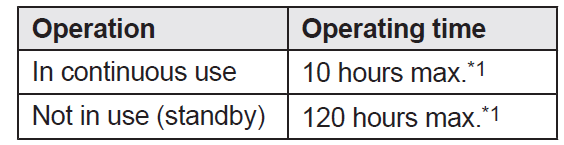
Panasonic Ni-MH battery performance (supplied batteries)
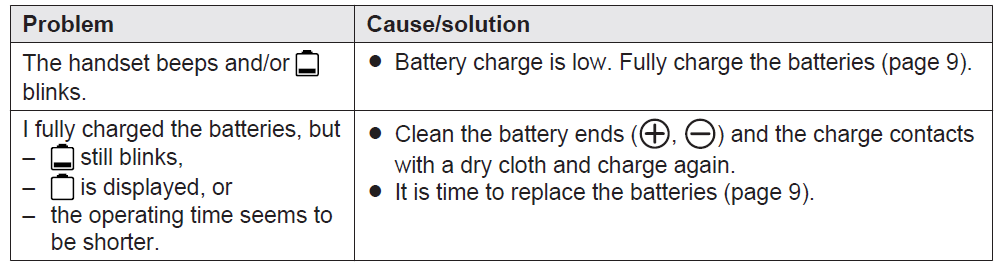
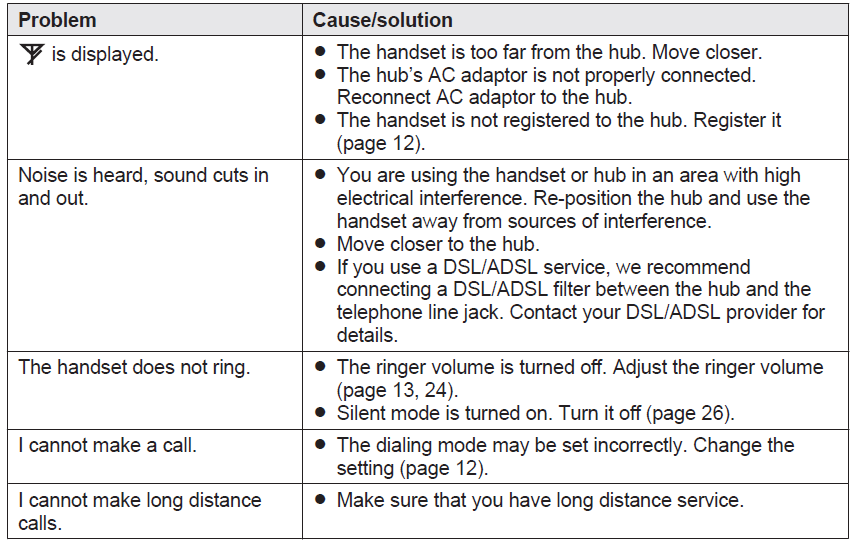
Troubleshooting the Panasonic KX-HNH100
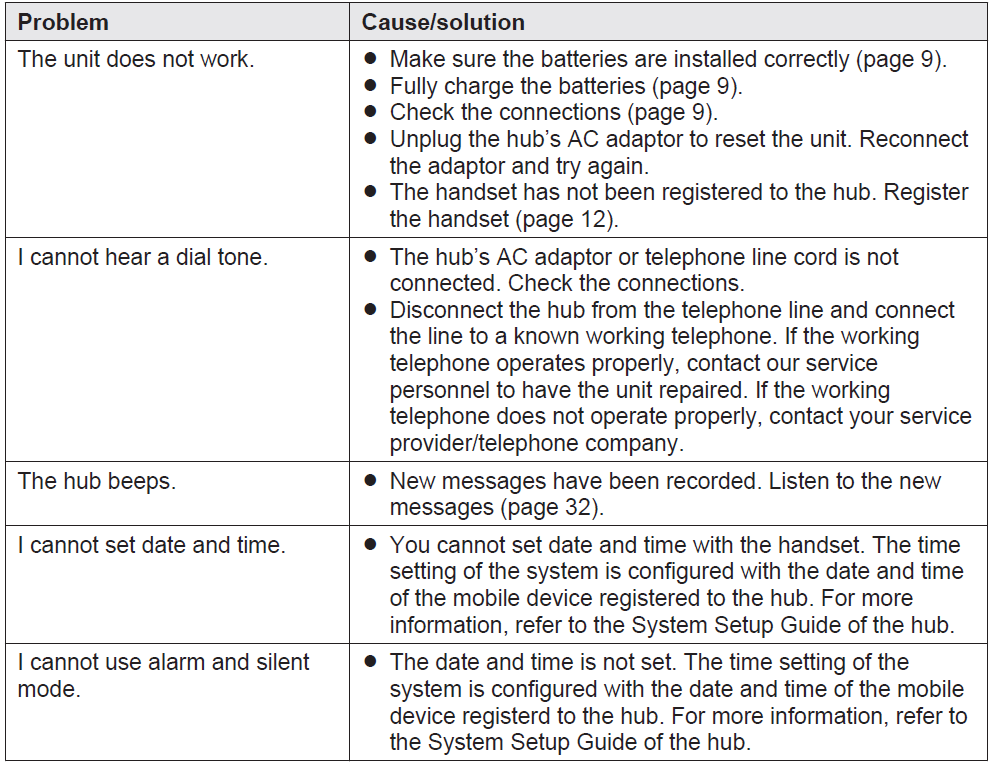
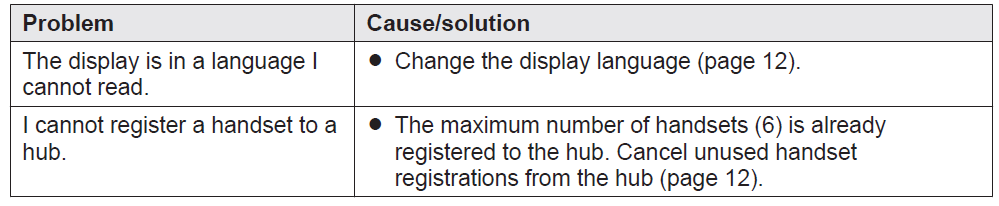
Common issues with the KX-HNH100 include connectivity problems, incorrect system alerts, and difficulties with smart plug control. Solutions typically involve restarting the system, checking for updates, or ensuring proper hub connection. There are no specific error codes listed for this model, but users can refer to the user manual for detailed troubleshooting guides.
Preventive measures include regular software updates and ensuring the handset is within the recommended operating range. Panasonic offers a standard warranty and dedicated customer support. For assistance, users can visit the Panasonic Support website or contact their local customer service centers.
General use

Menu list
Battery recharge
Making/answering calls, intercom
Caller ID/Talking Caller ID


Answering system

Useful Information

Voice mail

Liquid damage

Network connection

Specifications
- Standard:
DECT 6.0 (Digital Enhanced Cordless Telecommunications 6.0) - R Frequency range:
1.92 GHz to 1.93 GHz - RF transmission power
115 mW (max.) - Power source:
Handset: AAA (R03) Ni-MH battery (2 ´ 1.2 V, 400 mAh)
Charger: 120 V AC, 60 Hz - Power consumption:
Charger:
Standby: Approx. 0.1 W
Maximum: Approx. 1.8 W - Operating conditions:
0 °C – 40 °C (32 °F – 104 °F), 20 % – 80 % relative air humidity (dry) - Dimensions:
Handset: Approx. 164 mm ´ 48 mm ´ 29 mm (6 15/32 inches ´ 1 7/8 inches ´ 1 1/8 inches)
Charger: Approx. 39 mm ´ 72 mm ´ 72 mm (1 17/32 inches ´ 2 27/32 inches ´ 2 27/32 inches) - Mass (weight):
Handset: Approx. 109 g (0.24 lb) excluding the batteries
Charger: Approx. 43 g (0.09 lb) excluding the AC adaptor
Warranty (For the United States and Puerto Rico)
Panasonic Home Network System Products Limited Warranty
Limited Warranty Coverage
If your product does not work properly because of a defect in materials or workmanship, Panasonic Corporation of North America (referred to as “the warrantor”) will, for the length of the period indicated on the chart below, which starts with the date of original purchase (“Limited Warranty period”), at its option either (a) repair your product with new or refurbished parts, or (b) replace it with a new or a refurbished equivalent value product, or (c) refund your purchase price. The decision to repair, replace,, or refund will be made by the warrantor.
During the “Labor” Limited Warranty period, there will be no charge for labor. During the “Parts” Limited Warranty period, there will be no charge for parts. You must mail in your product prepaid during the Limited Warranty period. This Limited Warranty excludes both parts and labor for batteries, antennas, and cosmetic parts (cabinet). This Limited Warranty only applies to products purchased and serviced in the United States or Puerto Rico. This Limited Warranty is extended only to the original purchaser and only covers products purchased as new.
- Mail-In Service--Online
- Online Repair Request
To submit a new repair request and for quick repair status, visit our website - When shipping the unit,, carefully pack it in a padded shipping carton, include all accessories, and send it prepaid. Include a letter detailing the complaint, a return address,, and provide a daytime phone number where you can be reached. P.O. Boxes are not acceptable. Keep the tracking number for your records. A copy of a valid registered receipt is required under the 1-year parts and labor Limited Warranty..
- For Limited Warranty service for headsets,, if a headset is included with this product,, please follow the instructions above.
- IF REPAIR IS NEEDED DURING THE LIMITED WARRANTY PERIOD,, THE PURCHASER WILL BE REQUIRED TO FURNISH A SALES RECEIPT/PROOF OF PURCHASE INDICATING DATE OF PURCHASE, AMOUNT PAID,, D AND PLACE OF PURCHASE. CUSTOMER WILL BE CHARGED FOR THE REPAIR OF ANY UNIT RECEIVED WITHOUT SUCH PROOF OF PURCHASE.
- Limited Warranty Limits And Exclusions
This Limited Warranty ONLY COVERS failures due to defects in materials or workmanship, and DOES NOT COVER normal wear and tear or cosmetic damage. The Limited Warranty ALSO DOES NOT COVER damages which occurred in shipment, or failures which are caused by products not supplied by the warrantor, or failures which result from accidents, misuse, abuse, neglect, bug infestation, mishandling, misapplication, alteration, faulty installation, set-up adjustments, misadjustment of consumer controls, improper maintenance, power line surge, lightning damage, modification, introduction of sand, humidity or liquids, commercial use such as hotel, office, restaurant, or other business or rental use of the product, or service by anyone other than a Factory Service Center or other Authorized Servicer, or damage that is attributable to acts of God. - THERE ARE NO EXPRESS WARRANTIES EXCEPT AS LISTED UNDER “LIMITED WARRANTY COVERAGE”. THE WARRANTOR IS NOT LIABLE FOR INCIDENTAL OR CONSEQUENTIAL DAMAGES RESULTING FROM THE USE OF THIS PRODUCT, OR ARISING OUT OF ANY BREACH OF THIS LIMITED WARRANTY. (As examples, this excludes damages for lost time, lost calls or messages, cost of having someone remove or re-install an installed unit if applicable, and travel to and from the servicer.
- The items listed are not exclusive, but are for illustration only.) ALL EXPRESS AND IMPLIED WARRANTIES, INCLUDING THE WARRANTY OF MERCHANTABILITY, ARE LIMITED TO THE PERIOD OF THE LIMITED WARRANTY.
- Some states do not allow the exclusion or limitation of incidental or consequential damages, or limitations on how long an implied warranty lasts, so the exclusions may not apply to you.
- This Limited Warranty gives you specific legal rights,, and you may also have other rights which vary from state to state. If a problem with this product develops during or after the Limited Warranty period, you may contact your dealer or Service..
- Center. If the problem is not handled to your satisfaction, then write to the warrantor’s Consumer Affairs Department at the addresses listed for the warrantor.
- PARTS AND SERVICE, WHICH ARE NOT COVERED BY THIS LIMITED WARRANTY, ARE YOUR RESPONSIBILITY.
- When you ship the product
- Carefully pack your unit, preferably in the original carton. Attach a letter, detailing the symptom.
- Send the unit to the Panasonic Exchange Center, prepaid and adequately insured.
- Do not send your unit to Panasonic Corporation of North America, listed on the back cover or t,o executive or regional sales offices. These locations do not repair consumer products..
Pros and Cons of the Panasonic KX-HNH100
Pros:
- Convenient Control: Allows users to manage their home monitoring systems and smart devices remotely.
- Enhanced Security: Provides real-time alerts and notifications for enhanced home security.
- Clear Communication: Offa ers clear, secure, long-range signal for reliable communication.
- Cost-Effective: Offers good value for money compared to standalone smart home devices.
Cons:
- Compatibility Limitations: Requires the KX-HNB600 Hub unit, which may add to the overall cost.
- Dependence on Hub: Cannot function independently without the hub.
- Limited Availability: May be discontinued or hard to find in some regions.
Customer Reviews and Feedback
Users generally praise the KX-HNH100 for its ease of use and integration with the Panasonic Home Monitoring System. Common praises include the convenience of remote arm/disarm functions and smart plug control. However, some users have reported issues with connectivity and availability. The product typically receives a 4-star rating, with users recommending it for those already invested in the Panasonic ecosystem.
Common complaints focus on the dependency on the hub unit and potential connectivity issues. Despite these, the KX-HNH100 remains a solid choice for enhancing home security and smart home functionality.
Conclusion
The Panasonic Home Network System Digital Cordless Handset KX-HNH100 is a valuable addition to any home equipped with the Panasonic Home Monitoring System. Its features and convenience make it an attractive option for those seeking to enhance their home's security and automation capabilities. For users within the Panasonic ecosystem, this handset offers great value and functionality.
Faqs
How do I set up the panasonic Home Network System Digital Cordless Handset KX-HNH100 with the hub unit?
What should I do if my panasonic Home Network System Digital Cordless Handset KX-HNH100 is not connecting to the hub?
Can the panasonic Home Network System Digital Cordless Handset KX-HNH100 control cameras and sensors in the home monitoring system?
What is the maximum number of panasonic Home Network System Digital Cordless Handset KX-HNH100 units supported on one system?
How can I maintain and care for my panasonic Home Network System Digital Cordless Handset KX-HNH100 to ensure optimal performance?
Is the panasonic Home Network System Digital Cordless Handset KX-HNH100 compatible with all Panasonic Home Network hubs?
What features make the panasonic Home Network System Digital Cordless Handset KX-HNH100 unique compared to other cordless handsets?
How do I troubleshoot audio or signal issues on the panasonic Home Network System Digital Cordless Handset KX-HNH100?
More panasonic manuals
- Setup: Panasonic Home Monitoring Camera with Ambient Light KX-HNC855C User Manual
- How to Use: Panasonic Home Network System Access Keypad KX-HNK101 User Manual
- Setup: Panasonic Home Monitoring Camera with Ambient Light Floor KX-HNC850 User Guide
- How to Use: Panasonic Home Network System Keychain Remote KX-HNK102 User Manual
- Usage: Panasonic Home Monitoring Camera KX-HNC815C User Guide
- Setup: Panasonic Home Network System Indoor Siren KX-HNS105 User Guide
Leave a Comment