
How to Use: Panasonic Home Network System Access Keypad KX-HNK101 User Manual
Content
Panasonic Home Network System Access Keypad KX-HNK101
Introduction
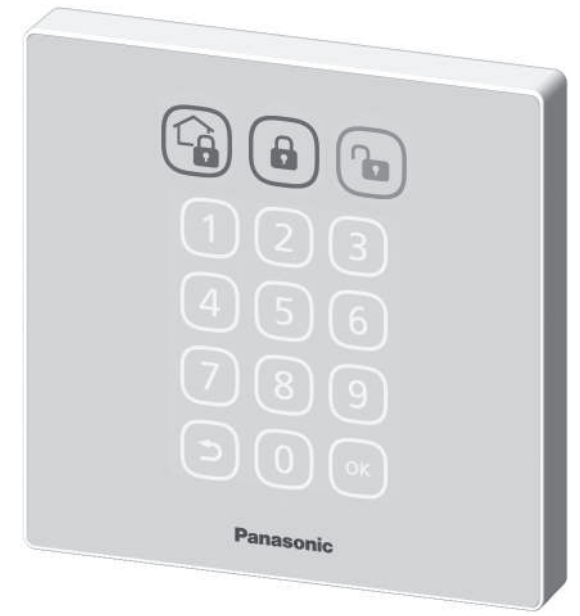
The Panasonic Home Network System Access Keypad KX-HNK101 is a versatile and user-friendly device designed to enhance your home security and automation experience. This keypad allows you to easily arm and disarm your system with the touch of a button, making it an essential accessory for the Panasonic Connected Home DIY security and automation system. It is ideal for homeowners seeking convenience and peace of mind, as it can be wall-mounted near entrances and exits for easy access. The keypad features illuminated buttons for low-light conditions and provides verbal alerts when sensors are triggered, ensuring you stay informed about your home's status.
The target audience includes homeowners looking to integrate smart home technology into their daily lives. The estimated price range for the KX-HNK101 is between $50 and $150, depending on the retailer and any ongoing promotions. As part of the Panasonic Connected Home system, this keypad is available in most electronics stores and online platforms.
Part names and functions

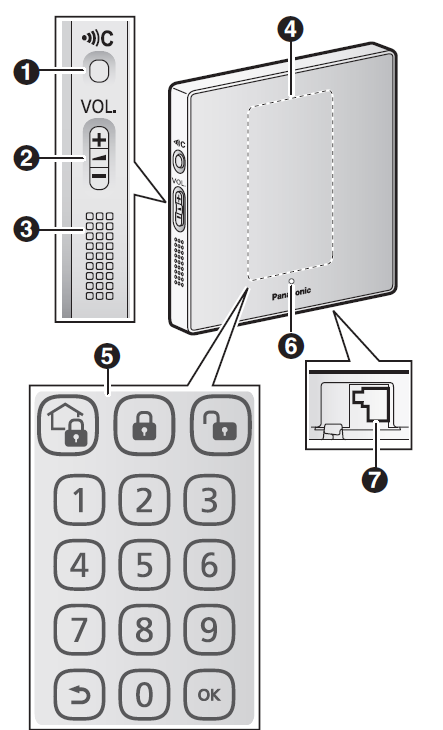
Used when registering the keypad to the hub.- Volume
Used to adjust the volume of the sounds emitted by the keypad. - Speaker
- Touchpanel
When no buttons are displayed here, touch this area to display the buttons. - Touchpanel buttons
- LED indicator
- DC jack
Specifications
- Standards
DECT (Digital Enhanced Cordless Telecommunications) - Frequency range
DECT: 1.92 GHz – 1.93 GHz - RF transmission power
DECT: 115 mW (max.) - Power source
120 V AC, 60 Hz - Power consumption
Standby: Approx. 0.6 W
Maximum: Approx. 2.0 W - Operating conditions
0 °C – 40 °C (32 °F – 104 °F) - Dimensions (height ´ width ´depth)
Approx. 120 mm ´ 120 mm ´ 21 mm (4 23/32 inches ´ 4 23/32 inches ´ 27/32 inches) - Mass (weight)
Approx. 163 g (0.36 lb) (without the mounting bracket attached)
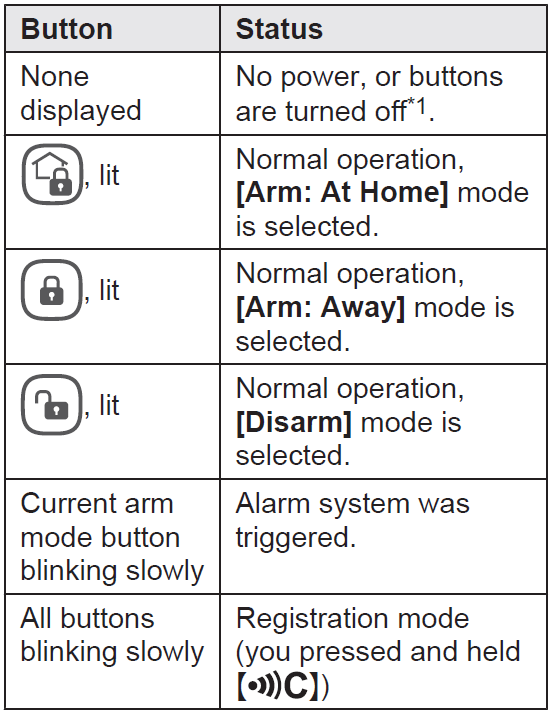
Touchpanel buttons
These buttons allow you to confirm and change the system’s arm mode. During normal operation, the button that corresponds to the current arm mode is lit by default, and all other buttons are dimmed. When you tap the touchpanel, the arm mode buttons light for 10 seconds. During this time, you can tap an arm mode button to switch to the corresponding arm mode.
LED indicator
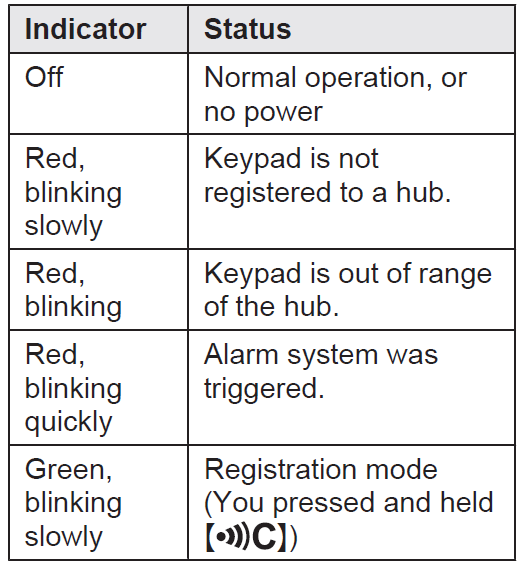
You can use the LED indicator to confirm the keypad’s status.
Accessory information
Supplied accessories
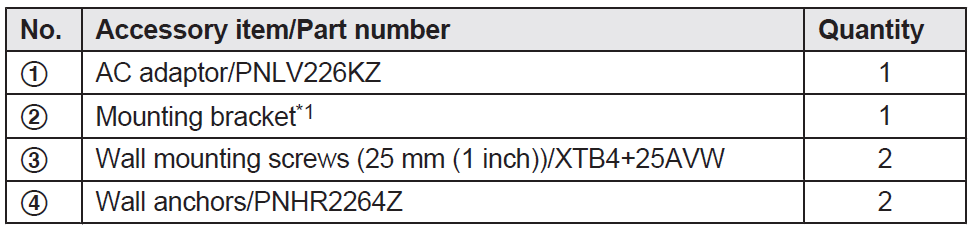
The mounting bracket is attached to the product at the time of shipment.

Installation
- To prevent the risk of fire or electrical shock, do not expose the product to rain or any type of moisture.
- Do not place or use this product near automatically controlled devices such as automatic doors and fire alarms. Radio waves emitted from this product may cause such devices to malfunction, resulting in an accident.
- Do not allow the AC adaptor to be excessively pulled, bent,, or placed under heavy objects.
- Keep small parts (screws, etc.) out of the reach of children. There is a risk of swallowing. In the event they are swallowed, seek medical advice immediately.
Installation
To mount the keypad flat against the wall, use the mounting bracket.
Note:
- Mount the keypad in a stable location where the keypad can be adequately supported when mounting.
- Do not mount the keypad on a soft material. It may fall down, break, or cause injury. R Do not mount the keypad on a plywood surface that is less than 25.4 mm (1 inch) thick.
- The pull-out strength of the installation area must be at least 29.4 N (3 kgf).
Important safety instructions
When using your product, basic safety precautions should always be followed to reduce the risk of fire, electric shock, and injury to persons, including the following:
- Do not use this product near water, for example, near a bathtub, washbowl, kitchen sink, or laundry tub, in a wet basement,, or near a swimming pool.
- Use only the power cord indicated in this document.
Setup overview
- Initial setup
Make sure you can access the system using your mobile device. For details, refer to the System Setup Guide included with your hub. - Registration
Required only if the keypad was purchased separately (i.e., not as part of a bundle). - Confirm the installation area..
Read the information in this document to confirm that the desired installation area is suitable for proper operation. - Installation
Install the keypad in the desired location.
Confirming the usage area
Wireless communication range
The wireless communication range of each device in the system from the hub is approximately 50 m (160 feet) indoors and approximately 300 m (1,000 feet) outdoors. Wireless communication may be unreliable when the following obstacles are located between the hub and other devices.
- Metal doors or screens
- Walls containing aluminum-sheet insulation
- Walls made of concrete or corrugated iron
- Double-pane glass windows
- Multiple walls
- When using each device on separate floors or in different buildings
Troubleshooting the Panasonic Home Network System Access Keypad KX-HNK101
Here are some common issues and solutions to help you troubleshoot the Panasonic KX-HNK101 keypad:
- Keypad Not Registering: Ensure the hub is in registration mode (LED blinks slowly in green). Press and hold the 'OTHER DEVICE' button on the hub until registration is complete.
- Buttons Not Illuminated: Check if the keypad is configured to dim or turn off buttons during normal operation. Refer to the User’s Guide for configuration options.
- No Power: Verify that the DC jack is properly connected and the keypad is receiving power.
For further assistance, Panasonic offers a comprehensive warranty and support program. You can visit their website for troubleshooting guides, manuals, and contact information for customer service support.
Limited Warranty (ONLY FOR U.S.A.)
Panasonic Products Limited Warranty
Limited Warranty Coverage (For USA Only)
If your product does not work properly because of a defect in materials or workmanship, Panasonic Corporation of North America (referred to as “the warrantor”) will, for the length of the period indicated on the chart below, which starts with the date of original purchase (“warranty period”), at its option either (a) repair your product with new or refurbished parts,(b) replace it with a new or a refurbished equivalent value product, or (c) refund your purchase price. The decision to repair, replace,, or refund will be made by the warrantor.
| Product or Part Name | Parts | Labor |
|---|---|---|
| Home Network System Products | One (1) Year | One (1) Year |
| microSD card (Included model only) | 90 days | N/A |
During the “Labor” warranty period,, od there will be no charge for labor. During the “Parts” warranty period, there will be no charge for parts. This Limited Warranty excludes both parts and labor for non-rechargeable batteries, antennas, and cosmetic parts (cabinet). This warranty only applies to products purchased and serviced in the United States. This warranty is extended only to the original purchaser of a new product that was not sold “as is”.
Pros & Cons of the Panasonic Home Network System Access Keypad KX-HNK101
Pros:
- Convenience: Easily arm and disarm your system without needing a smartphone app.
- Easy Installation: Can be wall-mounted near entrances for quick access.
- Verbal Alerts: Provides audio notifications for sensor triggers.
Cons:
- Requires Hub: Must be used with the Panasonic Hub (KX-HNB600) for functionality.
- No Standalone Functionality: Limited features without the Connected Home system.
The Panasonic Home Network System Access Keypad KX-HNK101 offers excellent value for money, especially for those already invested in the Panasonic Connected Home ecosystem. It provides a seamless user experience and integrates well with other Panasonic devices.
Customer Reviews & Feedback for the Panasonic Home Network System Access Keypad KX-HNK101
Users appreciate the keypad's ease of use and convenience, with many praising its ability to quickly arm and disarm their security systems. Some customers have noted that the keypad requires a bit of setup, but overall, it is well-regarded for its functionality and integration with the Panasonic Connected Home system.
Common praises include the keypad's illuminated buttons and verbal alerts, which enhance user experience in low-light conditions. However, some users have mentioned that the keypad's functionality is somewhat limited without the full Connected Home setup.
Ratings typically fall in the 4-star range, with many users recommending the product for its simplicity and effectiveness in a smart home environment. If you're looking for an easy-to-use keypad that integrates well with Panasonic's Connected Home system, the KX-HNK101 is a solid choice.
Faqs
How do I set up the panasonic Home Network System Access Keypad KX-HNK101 for the first time?
What should I do if the panasonic Home Network System Access Keypad KX-HNK101 is not responding or showing no power?
Can the panasonic Home Network System Access Keypad KX-HNK101 be used with other Panasonic home network devices like cameras or hubs?
How do I reset the panasonic Home Network System Access Keypad KX-HNK101 or the connected hub if setup issues occur?
What are the key features of the panasonic Home Network System Access Keypad KX-HNK101 that enhance home security?
How can I maintain and clean my panasonic Home Network System Access Keypad KX-HNK101 to ensure optimal performance?
What power requirements and precautions should I know for the panasonic Home Network System Access Keypad KX-HNK101?
How do I change or set the disarm PIN code on the panasonic Home Network System Access Keypad KX-HNK101?
More panasonic manuals
- Setup: Panasonic Home Network System Digital Cordless Handset KX-HNH100 User Manual
- How to Use: Panasonic Home Network System Keychain Remote KX-HNK102 User Manual
- Setup: Panasonic Home Monitoring Camera with Ambient Light KX-HNC855C User Manual
- Setup: Panasonic Home Network System Indoor Siren KX-HNS105 User Guide
- Setup: Panasonic Home Monitoring Camera with Ambient Light Floor KX-HNC850 User Guide
- Setup: Panasonic Garage Door Sensor KX-HNS107 User Guide
Leave a Comment