
How to Use: Panasonic Home Network System Keychain Remote KX-HNK102 User Manual
Content
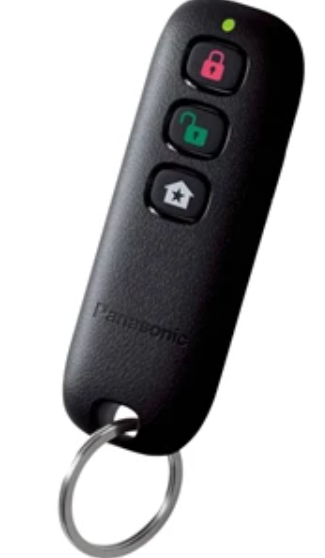
Panasonic Home Network System Keychain Remote KX-HNK102
Introduction
The Panasonic Home Network System Keychain Remote KX-HNK102 is a compact, versatile accessory designed to enhance the convenience and security of your smart home environment. Intended for users of Panasonic's Home Network Hub (model KX-HNB600), this keychain remote enables quick and easy control of your home security system and connected smart devices without needing to access a smartphone app.
Key benefits include long-range wireless communication via DECT technology, ensuring reliable interference-free operation up to significant distances. The remote features a customizable smart button that can trigger pre-set actions such as arming or disarming your alarm system, turning smart plugs on or off, or activating alerts. Its lightweight design and keychain form factor make it ideal for everyday carry, offering seamless integration into your daily routine.
This remote suits homeowners, renters, and small business operators seeking a straightforward, portable control device for their Panasonic home monitoring systems. With support for up to 50 keychain remotes per Hub, it accommodates larger households or business premises efficiently.
Availability includes online and authorized Panasonic retailers, typically priced within the range of $40 to $60 USD, reflecting its specialized role within the Panasonic smart home ecosystem.
Setup
Part names and functions
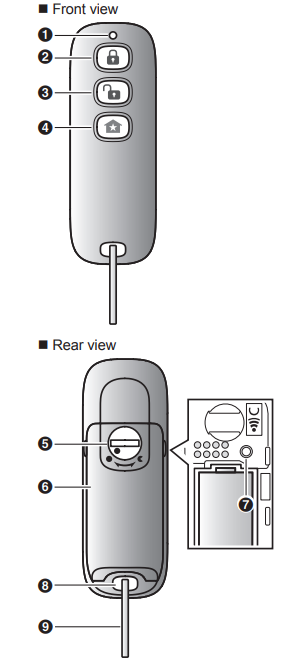
LED indicator
You can use the LED indicator to confirm the remote’s status.
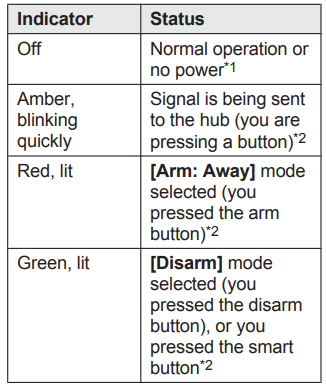
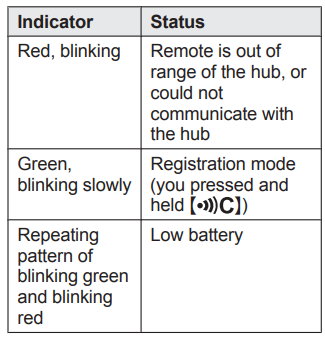
- The LED lights for about 2 seconds after a button is pressed, then turn off If the LED indicator does not light when you press a button, the battery must be replaced.
- The LED indicator does not indicate the remote’s status if the remote has not been registered (page 11).
Setup overview
- Initial setup
Make sure you can access the system using your mobile device. For details, refer to the System Setup Guide included with your hub. - Insert the battery
The remote is battery-powered. - Registration
Required only if the remote was purchased separately (i.e., not as part of a bundle). - Confirm the usage area..
Read the information in this document to confirm that the desired usage area is suitable for proper operation.
Inserting the battery
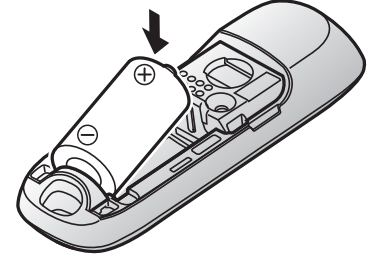
USE ONLY a CR2 Lithium battery. R Confirm the polarities (+ , -). R Using a metal object to open the lock may scratch the lock.
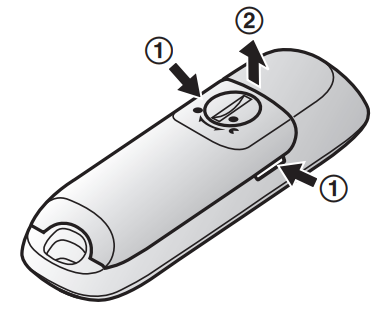
- Remove the battery cover.
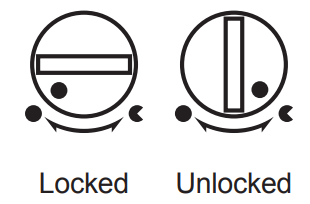
- Insert a thin, flat object into the battery cover lock and rotate it to the “unlocked” position, as shown below.
- Grasp the indented areas on the sides of the battery cover (1) and lift the cover up (2).
- Insert the battery.
- Attach and lock the battery cover.
After attaching the battery cover, rotate the lock to the “locked” position.
Attaching the key ring
Attach the key ring to the remote as shown.
Registering the remote
This procedure is not required for devices that were included as part of a bundle.
- Before you can use the remote, it must be registered with the hub.
- If you purchased devices separately (i.e., not as part of a bundle), you must register each device to the hub.
- You can register each device by using the registration buttons or the [Home Network] app.
Using registration buttons
- Hub:
Press and hold OTHER DEVICEN until the LED indicator blinks slowly in green.
 - Remote: Open the battery cover (page 10), then use an object with a thin tip, press and hold untilthe the LED indicator blinks slowly in green (page 8).
When registration is complete, the hub sounds one long beep.
Note:
To cancel without registering the remote, pressthe hub and on the remote again.
If registration fails, the hub sounds several short beeps
Using the app
When you register the remote by using the [Home Network] app, you can assign a name to your devices. For more information, refer to the User’s Guide (page 12).
Wireless communication range
- The wireless communication range of each device in the system from the hub is approximately 50 m (160 feet) indoors and approximately 300 m
(1,000 feet) outdoors. Wireless communication may be unreliable when the following obstacles are located between the hub and other devices. - Metal doors or screens
- Walls containing aluminum-sheet insulation
- Walls made of concrete or corrugated iron
- Double-pane glass windows
- Multiple walls
- When using each device on separate floors or in different buildings
Specifications
- Standards
DECT (Digital Enhanced Cordless Telecommunications) - Frequency range
DECT: 1.92 GHz – 1.93 GHz - R RF transmission power
DECT: 115 mW (max.) - Power source
Lithium battery CR2 (1 ´ 3.0 V, 850 mAh) - Operating conditions
0 °C – 40 °C (32 °F – 104 °F) - Battery life
Approx. 2 years (when the remote is used 10 times a day, an environment of 25 °C (77 °F))*1 - Dimensions (height ´ width ´ depth) 77 mm ´ 27 mm ´ 18 mm(3 1/32 inches ´ 1 1/18 inches ´23/32 inches) (without the key ring attached)
- Mass (weight) Approx. 17 g (0.04 lb), excluding the battery battery and without the key ring attached
1 Battery life may be reduced depending on the operating environment, and whether the remote is used when it is out of range of the hub.
Limited Warranty (ONLY FOR U.S.A.)
Panasonic Products Limited Warranty
Limited Warranty Coverage (For USA Only)
If your product does not work properly because of a defect in materials or workmanship, Panasonic Corporation of North America (referred to as “the warrantor”) will, for the length of the period indicated on the chart below, which starts with the date of original purchase (“warranty period”), at its option either (a) repair your product with new or refurbished parts,(b) replace it with a new or a refurbished equivalent value product, or (c) refund your purchase price. The decision to repair, replace, or refund will be made by the warrantor.
- During the “Labor” warranty period,,d there will be no charge for labor. During the “Parts” warranty period, there will be no charge for parts. This Limited Warranty excludes both parts and labor for non-rechargeable batteries, antennas, and cosmetic parts (cabinet). This warranty only applies to products purchased and serviced in the United States.
- This warranty is extended only to the original purchaser of a new product thatwas ot sold “as is”.Mail-In Service--Online Repair Request
- Online Repair Request
- To submit a new repair request and for quick repair status,, visit our website.
- When shipping the unit, carefully pack, include all supplied accessories listed in the Owner’s Manual, and send it prepaid, adequately insured ,,andwell-packedl in a carton box. When shipping Lithium Ion batteries please Panasonic is committed to providing the most up-to-date information. Include a letter detailing the complaint, a return address, and provide a daytime phone number where you can be reached. A valid registered receipt is required under the Limited Warranty.
- IF REPAIR IS NEEDED DURING THE WARRANTY PERIOD, THE PURCHASER WILL BE REQUIRED TO FURNISH A SALES RECEIPT/PROOF OF PURCHASE INDICATING DATE OF PURCHASE, AMOUNT PAID,, D AND PLACE OF PURCHASE. CUSTOMER WILL BE CHARGED FOR THE REPAIR OF ANY UNIT RECEIVED WITHOUT SUCH PROOF OF PURCHASE.
- Limited Warranty Limits and Exclusions
- This warranty ONLY COVERS failures due to defects in materials or workmanship, and DOES NOT COVER normal wear and tear or cosmetic damage. The warranty
- ALSO DOES NOT COVER damages which occurred in shipment, or failures which are caused by products not supplied by the warrantor, or failures which result from accidents, misuse, abuse, neglect, mishandling, misapplication, alteration n, or faulty
installation, set-up adjustments, misadjustment of consumer controls, improper maintenance, power line surge, lightning damage, modification, introduction of sand, humidity or liquids, commercial use such as hotel, office, restaurant, or other business r rental use of the product, or service by anyone other than a Factory Service Center r other Authorized Servicer, or damage that is attributable to acts of God. - THERE ARE NO EXPRESS WARRANTIES EXCEPT AS LISTED UNDER “LIMITED WARRANTY COVERAGE”.
- THE WARRANTOR IS NOT LIABLE FOR INCIDENTAL OR CONSEQUENTIAL DAMAGES RESULTING FROM THE USE OF THIS PRODUCT, OR ARISING OUT OF ANY BREACH OF THIS WARRANTY.
(As examples, this excludes damages for lost time, travel to and from the servicer, loss of or damage to media or images, data o,,r other memory or recorded content. - The items listed are not exclusive, but for illustration only.)
- ALL EXPRESS AND IMPLIED WARRANTIES, INCLUDING THE WARRANTY OF MERCHANTABILITY, ARE LIMITED TO THE PERIOD OF THE LIMITED WARRANTY. Some states do not allow the exclusion or limitation of incidental or consequential damages, or limitations on how long an implied warranty lasts, so the exclusions may not apply to you. This warranty gives you specific legal rights,, and you may also have other rights which vary from state to state. If a problem with this product develops during or after the warranty period, you may contact your dealer or Service Center. If the problem is not handled to your satisfaction, then write to:
Troubleshooting the Panasonic Home Network System Keychain Remote KX-HNK102
Common issues encountered with the KX-HNK102 often relate to connectivity or battery performance. If the remote fails to operate, ensure it is paired correctly with the Hub by performing the one-push pairing method. Verify that the remote is within the DECT frequency range (1.92 GHz – 1.93 GHz) and that no physical obstructions are blocking the signal.
Low battery warnings should prompt immediate replacement of the CR2 lithium battery to maintain consistent functionality. Typical battery life is approximately 2 years under moderate use (about 10 presses per day) at room temperature.
Error codes are generally communicated through the Hub or app interface rather than the remote itself. For any operational errors, consult the Hub's user manual or Panasonic support.
Preventive measures include keeping the remote dry, avoiding extreme temperatures (operating range 0 °C to 40 °C), and not exposing it to strong electromagnetic interference.
Warranty coverage is provided through Panasonic’s standard home network accessory warranty, typically one year from purchase. For assistance, users can contact Panasonic customer support or visit the official Panasonic help pages for troubleshooting guides and firmware updates.
Pros & Cons of the Panasonic Home Network System Keychain Remote KX-HNK102
- Pros:
- Compact and portable keychain design integrates conveniently with daily carry items.
- Long-range and interference-free communication via DECT technology.
- Customizable smart button enables flexible control over smart plugs and alarm systems.
- Supports up to 50 remotes registered to a single Hub, ideal for multi-user environments.
- Simple one-push pairing process streamlines setup and device management.
- Cons:
- Requires Panasonic Hub (KX-HNB600) to function; not a standalone device.
- Limited to operating within specific DECT frequency bands, potentially affected by environmental factors.
- Battery replacement is needed after approximately two years; no rechargeable option.
- Price point may be higher than generic keychain remotes,, but justified by integration and security features.
Customer Reviews of the Panasonic Home Network System Keychain Remote KX-HNK102
Users of the Panasonic Home Network System Keychain Remote KX-HNK102 generally praise its ease of use and reliable performance in controlling home security and smart devices. Many highlight the convenience of the customizable smart button and appreciate the remote's lightweight, keychain-friendly design.
Common complaints focus on the dependency on the Panasonic Hub, limiting its standalone usability, and occasional connectivity issues when used at the fringe of the DECT range. Some users mention the battery life as adequate but prefer a rechargeable option.
Overall, the product holds an average rating of 4 out of 5 stars across various retail and review platforms. Buyers recommend it for those already invested in the Panasonic Home Network System, looking for quick access controls without unlocking their phones.
Faqs
How do I set up and insert the battery in the panasonic Home Network System Keychain Remote KX-HNK102?
What should I do if my panasonic Home Network System Keychain Remote KX-HNK102 does not respond or has weak signal?
Can I pair multiple panasonic Home Network System Keychain Remote KX-HNK102 devices with a single hub?
How do I maintain and care for my panasonic Home Network System Keychain Remote KX-HNK102 to ensure longevity?
What are the main features and benefits of the panasonic Home Network System Keychain Remote KX-HNK102 compared to standard remotes?
Is the panasonic Home Network System Keychain Remote KX-HNK102 compatible with all Panasonic Home Network hubs and accessories?
How can I troubleshoot if my panasonic Home Network System Keychain Remote KX-HNK102 stops working suddenly?
What is the typical wireless range for the panasonic Home Network System Keychain Remote KX-HNK102, and what factors can affect it?
More panasonic manuals
- How to Use: Panasonic Home Network System Access Keypad KX-HNK101 User Manual
- Setup: Panasonic Home Network System Indoor Siren KX-HNS105 User Guide
- Setup: Panasonic Home Network System Digital Cordless Handset KX-HNH100 User Manual
- Setup: Panasonic Garage Door Sensor KX-HNS107 User Guide
- Setup: Panasonic Home Monitoring Camera with Ambient Light KX-HNC855C User Manual
- How to Use: Panasonic Glass Break Sensor KX-HNS104 User Guide
Leave a Comment