
How to Use: Panasonic Glass Break Sensor KX-HNS104 User Guide
Content
Panasonic Glass Break Sensor KX-HNS104
Introduction
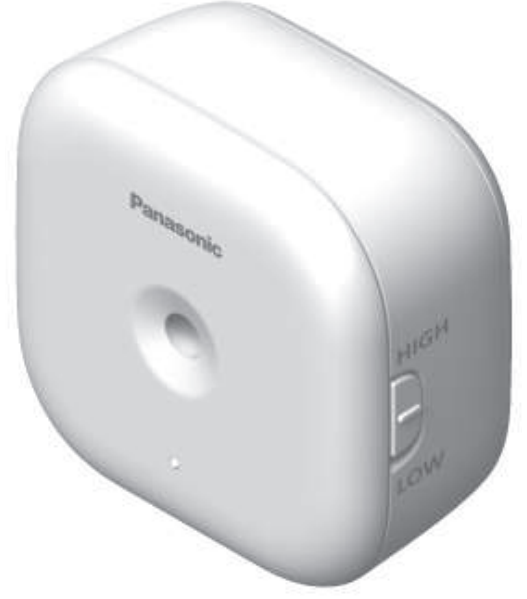
The Panasonic Glass Break Sensor KX-HNS104 is an advanced home security device designed to detect the distinct sound frequencies produced by breaking glass, providing real-time alerts directly to your smartphone. Engineered for seamless integration into Panasonic’s smart home ecosystem, this sensor enhances your home’s protection by promptly notifying you of potential break-in attempts, whether you are inside or away from your property.
Key benefits include its high sensitivity detection range of up to 4.6 meters (15 feet) with a wide 120-degree horizontal and vertical coverage, ensuring large window areas are monitored effectively. The sensor works in tandem with the KX-HNB600 Hub (sold separately), which can support up to 50 devices, including motion sensors, indoor sirens, and smart plugs, enabling comprehensive smart home security management. When activated, the sensor triggers audible alerts from the hub and an optional indoor siren for immediate deterrence.
This device targets homeowners and small business owners seeking reliable, easy-to-install glass break detection as part of an integrated security solution. Ideal for windows, glass doors, and glass partitions, it is perfect for those wanting to augment their existing Panasonic home monitoring kits with specialized glass break detection.
The estimated price range for the Panasonic Glass Break Sensor KX-HNS104 typically falls between $40 and $70 USD, depending on the retailer and availability. It is widely available through online marketplaces and specialized smart home security providers. This sensor complements Panasonic’s modular security systems, making it a valuable addition for improving safety with minimal setup effort.
Part names and functions
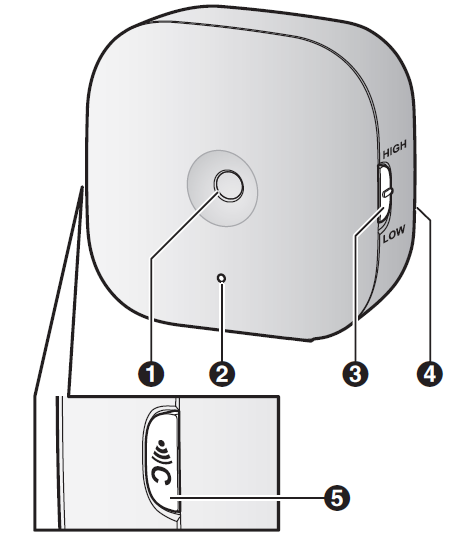
- Microphone
- LED indicator
- HIGH/LOW
Used to change the sensor sensitivity (page 17). - Rear cover

Used to confirm the status of the sensor or register the sensor to the hub.
Specifications
- Standards
DECT (Digital Enhanced Cordless Telecommunications) - Frequency range
DECT: 1.92 GHz – 1.93 GHz - RF transmission power
DECT: 115 mW (max.) - Power source
AA (LR6) Alkaline battery (2 ´ 1.5 V) - Operating conditions
0 °C – 40 °C (32 °F – 104 °F) - Detection method
Acoustic sensor - Sensor detection range
Horizontal: approx. ±60°
Vertical: approx. ±60°
Distance1: approx. 4.6 m (15 feet) when the sensitivity switch is set to MHIGHN; approx. 2.3 m (7.5 feet)when set to MLOWN
Battery life
Up to 1 year 2 - Dimensions (height ´ width ´ depth)
With the rear cover attached:
Approx. 72 mm ´ 73 mm ´ 39 mm (2 27/32 inches ´ 2 7/8 inches ´ 1 17/32 inches)
With the wall mounting adaptor attached:
Approx. 72 mm ´ 73 mm ´ 61 mm (2 27/32 inches ´ 2 7/8inches ´ 2 13/32 inches) - Mass (weight)
With the rear cover attached:
Approx. 69 g (0.15 lb), excluding the batteries
With the wall mounting adaptor attached:
Approx. 76 g (0.17 lb), excluding the batteries- When the surrounding temperature is approximately 25 °C (77 °F).
- When the sensor is triggered once , a month,, and the surrounding temperature is approximately x. 25 °C (77 °F). Note that battery life may be reduced in very cold environments, and in areas where loud noises (such as door slams) occur frequently.
Accessory information
Supplied accessories

- When replacing batteries, see “Power source” of “Specifications”, page 18,, for battery information.
- The sensor can be wall-mounted with or without the wall mounting adaptor.

Important safety instructions
When using your product, basic safety precautions should always be followed to reduce the risk of fire, electric shock, and injury to persons, including the following:
- Do not use this product near water,, for example, near a bathtub, washbowl, kitchen sink, or laundry tub, in a wet basement, or near a swimming pool.
- Use only the batteries indicated in this document. Do not dispose of batteries in a fire. They may explode. Check with local codes for possible special disposal instructions.
LED indicator
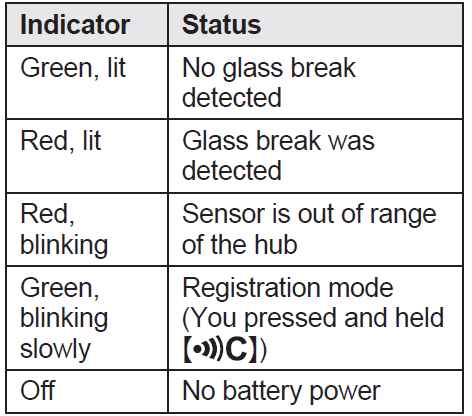
You can press M N and check the LED indicator to confirm the sensor’s status. After confirming the sensor’s status, we recommend turning the LED indicator off by pressing it again as soon as possible; otherwise, battery life may be reduced.
Note:
The LED indicator does not indicate sensor status if the sensor has not been registered (page 9).
Setup overview
- Initial setup
Make sure you can access the system using your mobile device. For details, refer to the System Setup Guide included with yourhub. - Insert the batteries
The sensor is battery-powered. - Registration
Required only if the sensor was purchased separately (i.e., not as part of a bundle). - Confirm the installation
Read the information in this document to confirm that the desired installation area is suitable for proper operation. - Installation
Install the sensor in the desired location.
Confirming the usage area
Wireless communication range
The wireless communication range of each device in the system from the hub is approximately 50 m (160 feet) indoors and approximately 300 m (1,000 feet) outdoors. Wireless communication may be unreliable when the following obstacles are located between the hub and other devices.
- Metal doors or screens
- Walls containing aluminum-sheet insulation
- Walls made of concrete or corrugated iron
- Double-pane glass windows
- Multiple walls
- When using each device on separate floors or in different buildings
Usage area cautions
Using the sensor in the following areas may cause deformation, malfunction, or operational failure.
- In direct sunlight
- Areas exposed to grease or steam, such as kitchens
- Near fire or heating devices
- Near magnetic fields (such as near microwaves and magnets)
- Areas subject to extreme temperature changes, such as those next to air conditioners
- Near devices that emit strong radio waves, such as mobile phones
Information about sensor features
The sensor uses a microphone to detect the unique sound frequencies that are produced when glass breaks. Please read the following information before deciding where to install the sensor.
Note:
- The sensor’s features are not designed to be used in situations that require high reliability. We do not recommend the use of the sensor’s features in these situations.
- Panasonic takes no responsibility for any injury or damage caused by the use of the sensor.
- The sensor may make false detections when there is noise from metallic blinds opening and closing, metallic bells of alarm clocks, etc.
- The sensor is designed to detect the sound of glass breaking as a result of an impact. It will not detect other types of breaks, such as when glass is cut or removed.
- The sensor is designed to detect the sound of glass breaking as a result of an impact. It will not detect other types of breaks, such as when glass is cut or removed.
- If the sensor malfunctions, is out of range, or if its battery power is too low, the hub sounds an alert, the hub’s indicator flashes, and a message is displayed by the [Home Network] app. You can cancel the alert temporarily by pressing the hub’s MWi-Fi SETUP button. When you have remedied the situation (e.g., moved the sensor closer to the hub, replaced the battery, etc.), the alert will not sound again.
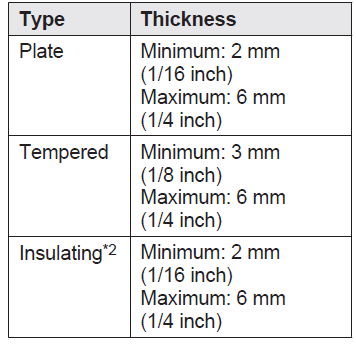
Applicable glass specifications 1
Adjusting the sensor sensitivity
You can use the MHIGHN/MLOWN switch (page 8) to adjust the sensor’s sensitivity.
Set it to MLOWN if the sensor frequently makes false detections.
Features available when using the [Home Network] app
Some of the sensor’s features that are available when using the [Home Network] app are listed below. For more information, refer to the User’s Guide (page 17).
- Alarm system
You can use the app to arm and disarm the alarm system, confirm the current status of the sensor, and view a log of previous events. - Sensor integration
You can configure the sensor to trigger other system events, such as camera recording, turning on an electric device (such as a lamp), etc.( Appropriate device required.) - Telephone alert
You can configure the system to call a preprogrammed phone number when the sensor is triggered.
Troubleshooting Panasonic Glass Break Sensor KX-HNS104
Common issues with the Panasonic Glass Break Sensor KX-HNS104 include false alarms caused by loud noises mimicking glass breaking, sensor non-responsiveness, and connectivity problems with the KX-HNB600 Hub. To resolve false alarms, ensure the sensor is installed away from sources of high-frequency noise, such as microwaves, heating devices, or strong radio wave emitters like mobile phones. Adjusting the sensitivity switch between MHIGHN and MLOWN settings can help optimize detection performance based on the environment.
If the sensor fails to trigger alerts, verify proper registration to the hub and check battery levels, as a low battery status will affect performance. The device uses two AA alkaline batteries, which typically last several months but should be replaced promptly upon low battery notifications.
Preventive measures include installing the sensor in the same room as the glass to be monitored and avoiding placement behind walls or obstacles that may block sound detection. Regular testing via the Panasonic smartphone app ensures the sensor remains operational.
The Panasonic KX-HNS104 comes with a warranty that varies by region, often covering parts and labor for one year. For support, users can contact Panasonic customer service or visit their official support website. Assistance is also available via the Panasonic support portal and authorized dealers.
Panasonic Products Limited Warranty
Limited Warranty Coverage (For USA Only)
If your product does not work properly because of a defect in materials or workmanship, Panasonic Corporation of North America (referred to as “the warrantor”) will, for the length of the period indicated on the chart below, which starts with the date of original purchase (“warranty period”), at its option either (a) repair your product with new or refurbished parts,(b) replace it with a new or a refurbished equivalent value product, or (c) refund your purchase price. The decision to repair, replace,,e or refund will be made by the warrantor.
| Product or Part Name | Parts | Labor |
|---|---|---|
| Home Network System Products | One (1) Year | One (1) Year |
| microSD card (Included model only) | 90 days | N/A |
During the “Labor” warranty period,,iod there will be no charge for labor. During the “Parts” warranty period, there will be no charge for parts. This Limited Warranty excludes both parts and labor for non-rechargeable batteries, antennas, and cosmetic parts (cabinet). This warranty only applies to products purchased and serviced in the United States.
This warranty is extended only to the original purchaser of a new product that was not sold “as is”.
Pros & Cons of Panasonic Glass Break Sensor KX-HNS104
- Pros:
- High sensitivity with adjustable detection range up to 4.6 meters, covering wide window areas effectively.
- Seamless integration with Panasonic KX-HNB600 Hub and other smart home devices for centralized monitoring.
- Instant smartphone notifications enable real-time alerts wherever you are.
- Compact and easy to install with AA battery power, eliminating complicated wiring.
- Works in conjunction with indoor sirens and cameras to enhance overall security response.
- Cons:
- Requires the separate purchase of the Panasonic Hub (KX-HNB600) to function, increasing overall system cost.
- Susceptible to false alarms if placed near high-frequency noise sources or magnetic fields.
- Limited detection distance compared to some competitors may require multiple units for large properties.
- Battery life depends on usage and environmental factors, requiring periodic maintenance.
- Not a standalone security solution—best used as part of a complete Panasonic smart home kit.
- Value for Money: The Panasonic Glass Break Sensor KX-HNS104 offers solid performance within its price segment, especially for users already invested in Panasonic’s ecosystem. While alternatives might provide standalone functionality without a hub, the integrated capabilities and notification system justify the investment for comprehensive smart home security.
Customer Reviews & Feedback on Panasonic Glass Break Sensor KX-HNS104
Authentic user reviews highlight the Panasonic Glass Break Sensor KX-HNS104 as a reliable addition to home security systems, praising its quick alert notifications and easy installation. Many customers appreciate the sensor's sensitivity and the ability to monitor remotely via the smartphone app, noting it provides peace of mind when away from home.
Common complaints include occasional false alarms triggered by loud noises unrelated to glass breaking and the necessity of purchasing the Panasonic Hub separately, which some find inconvenient. Battery life and sensor sensitivity adjustments are often mentioned, with users advising careful placement to avoid unwanted triggers.
Overall, the sensor receives an average rating of around 4 out of 5 stars, with recommendations focusing on its best use as part of the broader Panasonic smart home security kit, emphasizing the value of integration and centralized control for enhanced safety.
Faqs
How do I set up the Panasonic Glass Break Sensor KX-HNS104 for the first time?
What should I do if the Panasonic Glass Break Sensor KX-HNS104 is not working properly?
Can I use the Panasonic Glass Break Sensor KX-HNS104 with other smart home devices?
How often should I maintain the Panasonic Glass Break Sensor KX-HNS104?
What are the key features that make the Panasonic Glass Break Sensor KX-HNS104 different?
How do I troubleshoot low battery alerts for the Panasonic Glass Break Sensor KX-HNS104?
Can I use the Panasonic Glass Break Sensor KX-HNS104 without the Panasonic Hub KX-HNB600?
How do I optimize the placement of the Panasonic Glass Break Sensor KX-HNS104 for maximum effectiveness?
More panasonic manuals
- Setup: Panasonic Garage Door Sensor KX-HNS107 User Guide
- Setup & Usage: Panasonic VACUUM CLEANER MC-UL815 User Manual
- Setup: Panasonic Home Network System Indoor Siren KX-HNS105 User Guide
- Setup: Panasonic VACUUM CLEANER MC-UL910 User Manual
- How to Use: Panasonic Home Network System Keychain Remote KX-HNK102 User Manual
- Usage & Setup: Panasonic VACUUM CLEANER MC-UL915 Instruction Manual
Leave a Comment