
Setup: Panasonic VACUUM CLEANER MC-UL910 User Manual
Content
Panasonic VACUUM CLEANER MC-UL910
Introduction
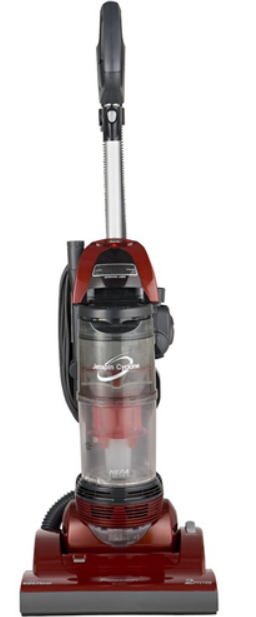
The Panasonic VACUUM CLEANER MC-UL910 is a high-performance, cyclonic vacuum designed for efficient and quiet cleaning across various floor types. Engineered with advanced Japanese technology, it offers powerful suction supported by a 2,500-watt motor while maintaining surprisingly low noise levels thanks to a sound-absorbing motor case and an extended exhaust path. This vacuum cleaner integrates a built-in HEPA filter along with an antibacterial filter that removes 99.97% of household dust, ensuring cleaner air during and after cleaning.
Ideal for homeowners seeking a reliable and versatile vacuum, the MC-UL910 is perfect for those with carpets, hardwood floors, or mixed surfaces. It is well-suited for allergy sufferers due to its superior filtration system. The vacuum features an adjustable telescopic wand and a hose that extends up to 11 meters, allowing comfortable cleaning of large rooms without frequently changing power outlets. Its smart nozzle automatically adjusts to carpet pile height, providing optimal floor contact without manual intervention.
Available globally, this model typically ranges between $250 and $350, depending on the retailer and region. Its strong build, user-friendly design, and advanced filtering make it a standout choice for users prioritizing air quality and cleaning efficiency in their daily routine.
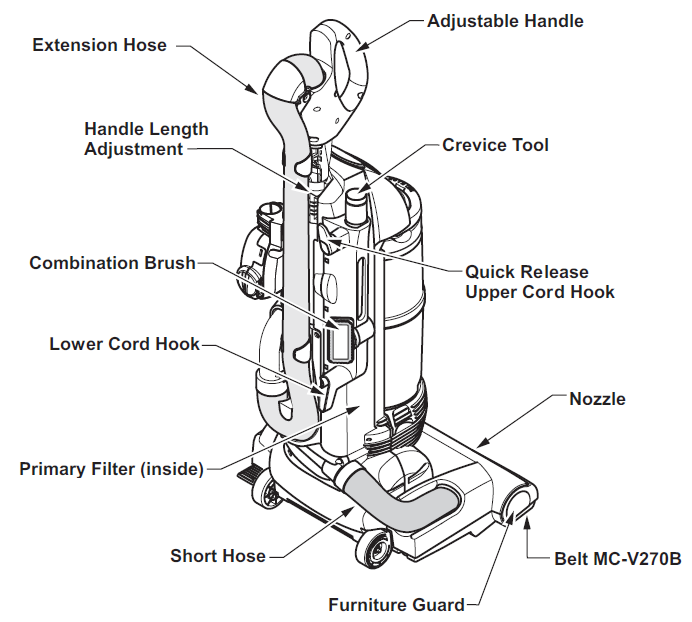
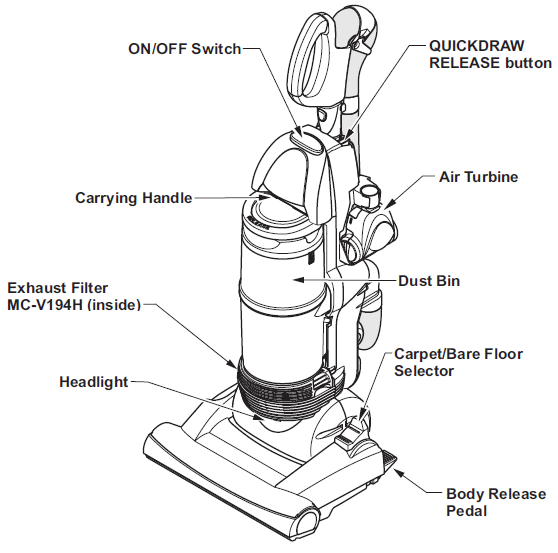
PARTS IDENTIFICATION
Specifications of Panasonic VACUUM CLEANER MC-UL910
- Motor Power: 2,500 watts for strong suction performance
- Filtration System: HEPA and antibacterial filters eliminate 99.97% of dust particles
- Noise Level: Quiet operation enabled by sound-absorbing motor casing
- Hose & Cord Length: 11 meters hose and a long power cord for extended reach
- Automatic Nozzle Adjustment: Floats evenly on carpet pile surfaces, no manual setting needed
- Thermal Protector: Prevents overheating by automatically cutting off power when necessary
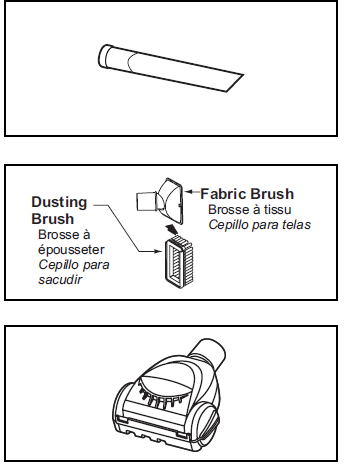
- Accessories: Comes with a power brush, dusting brush, and crevice tool
- Weight: Approximately 17 pounds for manageable maneuverability
- Durability: Robust outer casing with rollers and soft bumpers to protect furniture
Compared to similar products such as the Panasonic MC-UL810, the MC-UL910 offers enhanced filtration and longer hose length, providing superior air quality and convenience for larger cleaning areas.
FEATURE CHART

FEATURES
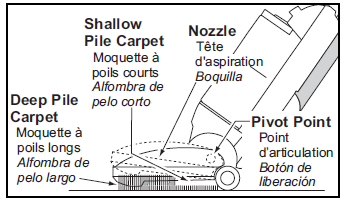
Automatic Self-Adjusting Nozzle
- The nozzle of your Panasonic vacuum cleaner automatically adjusts to any carpet pile height.
- The feature allows the nozzle to float evenly over carpet pile surfaces.
- No manual adjustments required.
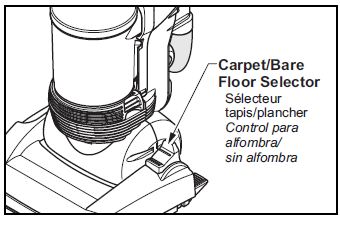
Carpet/Bare Floor Selector
- The selector should be placed in the BARE FLOOR (TOOLS) position when using a vacuum cleaner on bare floors and when using tools. The agitator does not rotate in the BARE FLOOR(TOOLS) position.
- The selector should be placed in the CARPET position when using a vacuum cleaner on carpeted floors.
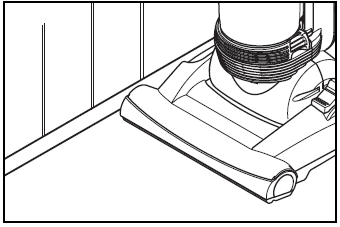
Edge Cleaning
- The edge cleaning feature enables improved cleaning of carpets near walls and furniture.
Thermal Protector
- This vacuum cleaner has a thermal protector that automatically trips to protect the vacuum cleaner from overheating.
- If a clog prevents the normal flow of air to the motor, the thermal protector turns the motor off automatically. This allows the motor to cool in order to prevent possible damage to the vacuum cleaner.
TO CORRECT PROBLEM:
- Turn the vacuum cleaner off and unplug the power cord from the outlet to allow the vacuum cleaner to cool and the thermal protector to reset.
- Check for and remove clogs, if necessary. Also, check and replace any clogged filters and empty the dust bin if necessary.
- Wait approximately fifty (50) minutes and plug the vacuum cleaner in, and turn it back on to see if the motor protector has reset.
IMPORTANT SAFETY INSTRUCTIONS
When using your vacuum cleaner, basic precautions should always be followed, including the following:
Read all instructions in this manual before assembling or using your vacuum cleaner.
WARNING
To reduce the risk of fire, electrical shock, and injury:
- Use your vacuum cleaner only as described in this manual. Use only with Panasonic-recommended attachments.
- Disconnect the electrical supply before servicing or cleaning out the brush area. Failure to do so could result in the brush unexpectedly starting, causing personal injury from moving parts.
- Do not leave the vacuum cleaner when plugged in. Unplug from the outlet when not in use and before servicing.
- To reduce the risk of electrical shock, do not use outdoors or on wet surfaces.
- Do not allow it to be used as a toy. Close attention is necessary when used by or near children.
- Do not use with a damaged cord or plug. If the vacuum cleaner is not working as it should, has been dropped, damaged, left outdoors, or dropped in water, return it to a Panasonic Service Center.
- Do not pull or carry by cord, use cord as a handle, close a door on cord, or pull cord around sharp edges or corners. Do not run a vacuum cleaner over the cord. Keep the cord away from heated surfaces.
- Do not unplug by pulling on the cord. To unplug, grasp the plug, not the cord.
- Do not handle the plug or the vacuum cleaner with wet hands.
- Do not put any objects into openings.
- Do not use with any opening blocked; keep free of dust, lint, hair, and anything that may reduce air flow.
- Keep hair, loose clothing, fingers, and all parts of the body away from openings and moving parts.
- Turn off all controls before unplugging.
- Use extra care when cleaning on stairs.
- Do not put on chairs, tables, etc. Keep on the floor.
- Do not use a vacuum cleaner to pick up flammable or combustible liquids (gasoline, cleaning fluid, perfumes, etc.), or use it in areas where they may be present. The fumes from these substances can create a fire hazard or explosion.
- Do not pick up anything that is burning or smoking, such as cigarettes, matches, or hot ashes.
- Do not use a vacuum cleaner without a dust bin and/or filters in place.
- Always clean the dust bin after vacuuming carpet cleaners or freshener powders, and fine dust. The products clog the filters, reduce airflow, ow and can cause damage to the vacuum cleaner. Failure to clean the dust bin could cause permanent damage to the vacuum cleaner.
- Do not use the vacuum cleaner to pick up sh , arp hard objects, small toys, pins, paper clips, etc. They may damage the vacuum cleaner e or the dust bin.
- Unplug before connecting the Air Turbine.
- You are responsible for making sure that your vacuum cleaner is not used by anyone unable to operate it properly.
BEFORE REQUESTING SERVICE
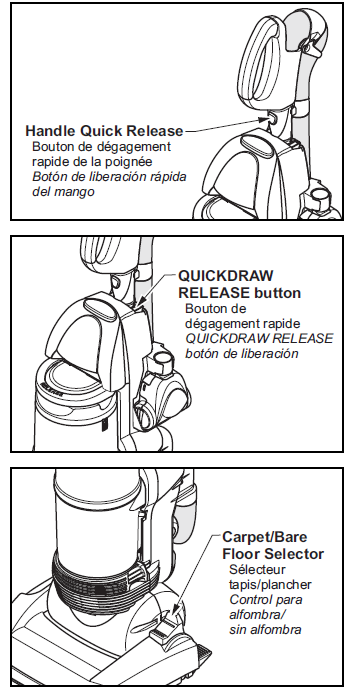
Using Tools
- Press the handle quick-release button on the wand to remove the handle to use the tools on the handle.
- Press the QUICKDRAW RELEASE button to remove the extension wand from the vacuum cleaner to use the tools on the extension wand.
- Add attachments to suit your cleaning needs. (see TOOLS for suggested attachment usage)
- The selector should be placed in the BARE FLOOR (TOOLS) position when using a vacuum cleaner on bare floors and when using tools.
Tools
The Crevice Tool may be used on the following items:
- Furniture
- Cushions
- Drapes
- Stairs
- Walls
The Combination Brush may be used on the following items:
- Furniture
- Drapes
- Stairs
- Walls
The Air Turbine may be used on the following items:
- Furniture
- Stairs
Operating instructions for the Air Turbine are included with the product.
ROUTINE CARE OF VACUUM CLEANER
Performing the following tasks will keep your new Panasonic vacuum cleaner operating at peak performance levels and will ensure these high levels for years to come. Check the BEFORE REQUESTING SERVICE section in this manual for recommendations on performing some of these tasks to help solve various problems that may occur.
Troubleshooting Panasonic VACUUM CLEANER MC-UL910: Common Issues and Fixes
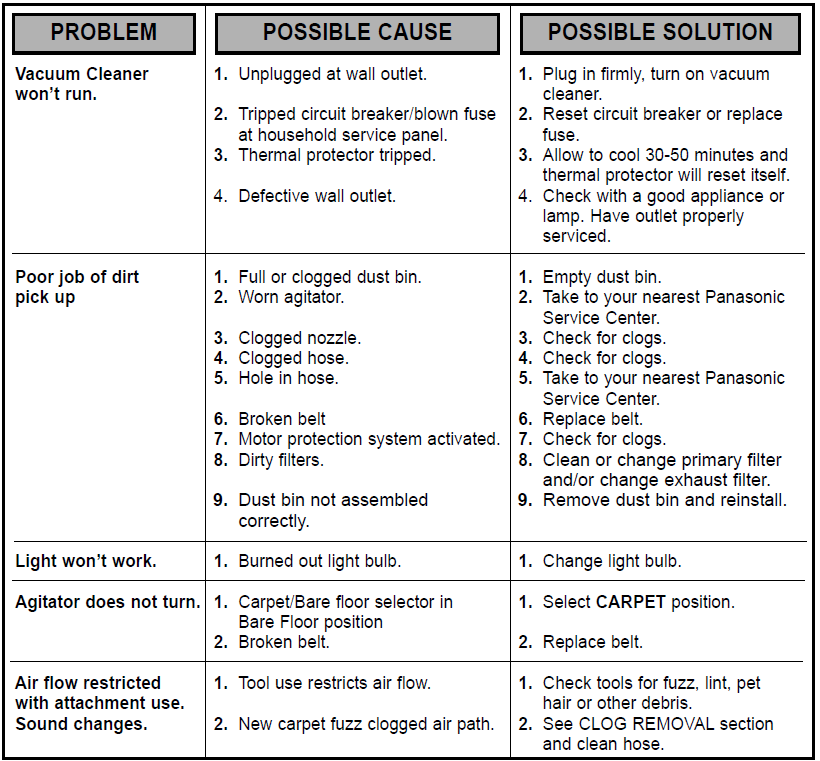
- Vacuum not turning on: Check the power cord connection and ensure the thermal protector has not tripped due to overheating. Let the motor cool down before restarting.
- Loss of suction: Inspect and clean the HEPA filter and secondary filters regularly. Remove any clogs in the hose or nozzle.
- Brush roller not spinning: Check for debris tangled around the roller and remove obstructions. Verify that the belt is intact and replace it if worn.
- Unusual noises: Confirm nothing is stuck in the hose or nozzle. Ensure that rollers and bumpers are not damaged.
Preventive tips include routinely cleaning filters, avoiding vacuuming large debris, and proper storage. The MC-UL910 comes with a manufacturer’s warranty covering defects and certain repairs. For support, Panasonic customer service can be contacted via their official website or helpline.
Pros & Cons of Panasonic VACUUM CLEANER MC-UL910
Pros
- Powerful suction: A 2,500-watt motor ensures deep cleaning, effective on various surfaces.
- Advanced filtration: HEPA and antibacterial filters improve indoor air quality significantly.
- Long reach: 11-meter hose and cord reduce the need to change outlets frequently.
- Automatic nozzle adjustment: Adapts to carpet height for consistent cleaning without manual effort.
- Quiet operation: Innovative sound-absorbing design makes it suitable for homes with noise sensitivity.
Cons
- Weight: At around 17 pounds, it may be less convenient for users needing ultra-light vacuums.
- Limited onboard features: Lacks some smart sensors and overload protection found in newer models.
- Price point: Slightly higher cost compared to basic models may not suit budget buyers.
Compared to alternatives, the MC-UL910 delivers excellent value for users prioritizing filtration and power, although lighter or more feature-packed models may appeal to other customer segments.
Customer Reviews of Panasonic VACUUM CLEANER MC-UL910
Users consistently praise the Panasonic VACUUM CLEANER MC-UL910 for its strong suction and effective HEPA filtration that notably reduces dust and allergens. Many highlight the convenience of the long hose and automatic carpet adjustment, making cleaning less strenuous.
Common complaints mention the unit's weight and occasional difficulty in maneuvering around tight spaces. Some users have noted that the vacuum lacks certain modern features,s such as dirt sensors, but appreciate the straightforward, durable design.
Overall, the product carries an average rating of 4 to 4.5 stars out of 5, with recommendations focusing on users who need a robust and reliable vacuum for medium to large homes, especially those with allergy concerns.
Faqs
How do I set up the panasonic VACUUM CLEANER MC-UL910 for first-time use?
What should I do if my panasonic VACUUM CLEANER MC-UL910 overheats or stops working suddenly?
How does the panasonic VACUUM CLEANER MC-UL910 adjust to different floor types?
Can I use the panasonic VACUUM CLEANER MC-UL910 on all carpet thicknesses without manual adjustments?
What maintenance is required to keep my panasonic VACUUM CLEANER MC-UL910 working efficiently?
How do I troubleshoot suction problems with the panasonic VACUUM CLEANER MC-UL910?
What are the key features of the panasonic VACUUM CLEANER MC-UL910 that enhance cleaning performance?
Is the panasonic VACUUM CLEANER MC-UL910 compatible with additional accessories or attachments?
More panasonic manuals
- Setup & Usage: Panasonic VACUUM CLEANER MC-UL815 User Manual
- Usage & Setup: Panasonic VACUUM CLEANER MC-UL915 Instruction Manual
- How to Use: Panasonic Glass Break Sensor KX-HNS104 User Guide
- Setup: Panasonic VACUUM CLEANER MC-UL955 Instruction Manual
- Setup: Panasonic Garage Door Sensor KX-HNS107 User Guide
- How to Use: Panasonic VACUUM CLEANER MC-UL975 Instruction Guide
Leave a Comment