
Setup: Panasonic VACUUM CLEANER MC-UL955 Instruction Manual
Content
Panasonic VACUUM CLEANER MC-UL955
Introduction
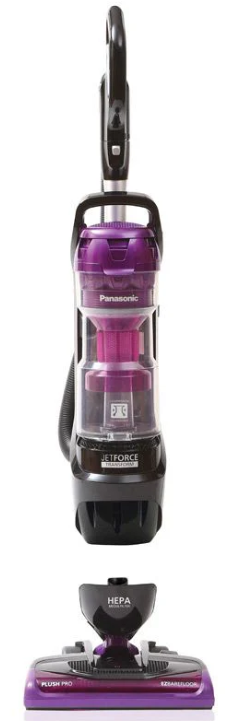
The Panasonic VACUUM CLEANER MC-UL955 is a high-performance, jet-powered upright vacuum designed to deliver powerful, efficient cleaning across all floor types—from bare floors to high-pile carpets. Built for versatility, this bagless upright vacuum cleaner features a unique twin-motor system that maximizes suction power and airflow, ensuring deep-cleaning performance in every corner of your home. The MC-UL955 stands out with its Jet Force technology, which uses cyclonic action to capture dust, pet hair, and fine debris without loss of suction, eliminating the need for replacement bags and reducing ongoing costs.
Ideal for busy households, pet owners, and allergy sufferers, the Panasonic MC-UL955 targets users seeking a reliable, multi-surface vacuum with convenient features. Its lightweight, portable design and easy-to-empty dust cup make it a practical choice for daily cleaning tasks. The vacuum’s advanced filtration system helps trap fine particles, contributing to a healthier indoor environment.
While the Panasonic VACUUM CLEANER MC-UL955 is not widely available through major retailers, it can be found through select online marketplaces and specialty appliance stores. The estimated price range for this model is moderate, offering good value for its feature set compared to premium competitors. Availability may vary by region, so checking with local dealers or online platforms is recommended for the most current purchasing options.
For those seeking a powerful, efficient, and easy-to-maintain upright vacuum cleaner, the Panasonic MC-UL955 is a compelling choice that combines innovative technology with user-friendly operation.
PARTS IDENTIFICATION
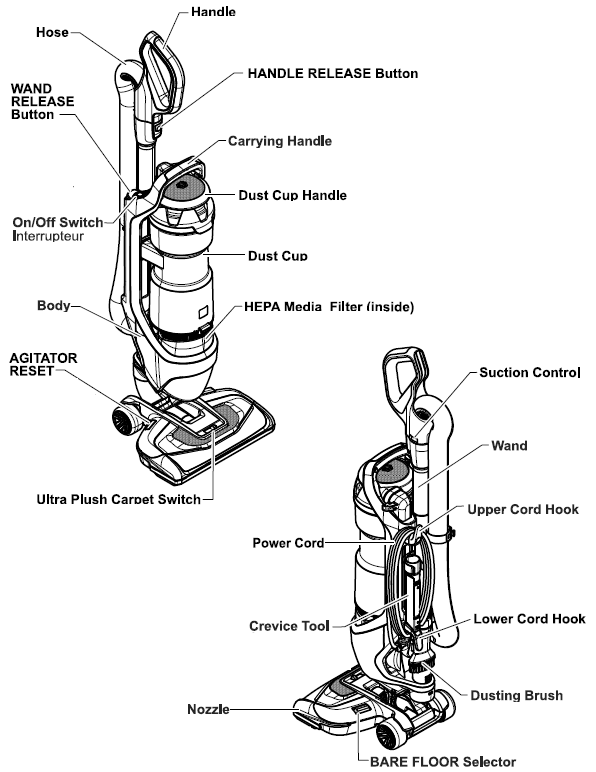
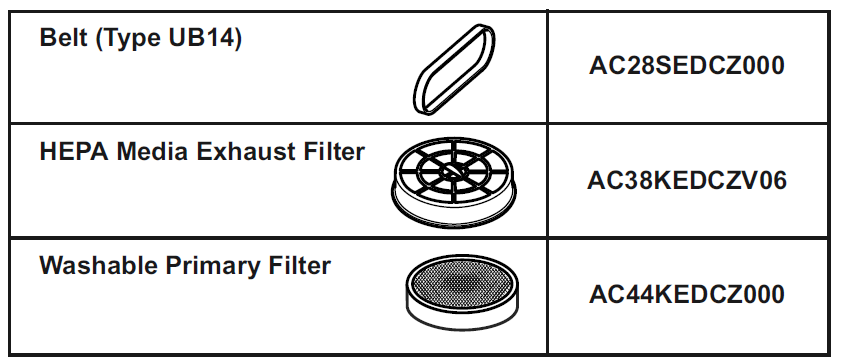
CONSUMABLE PARTS
Specifications
- Power: 120 V AC (60 Hz)
- Amps: 12.0
- Power Cord: 7.3 m (24 ft./pi)
- Thermal Protector: Yes
- Agitator Reset: Yes
- Tools-On-Board: Yes
WARNING: Personal Injury and Product Damage Hazard
- DO NOT place hands or feet under the vacuum cleaner at any time.
- DO NOT plug in if the switch is in the ON position. Personal injury or property damage could result.
- The cord morusheshen rewinding. Keep children away and provide a clear path when rewinding the cord to prevent personal injury.
- DO NOT use outlets above counters. Damage from the cord to items in the surrounding area could occur.
- When any abnormality/failure occurs, stop using the product immediately and disconnect the power plug.
Using Tools
The dusting brush may be used on the following items:
- Furniture
- Drapes
- Stairs
- Walls
The Crevice Tool may be used on the following items:
- Furniture
- Drapes
- Stairs
- Walls
- Cushions
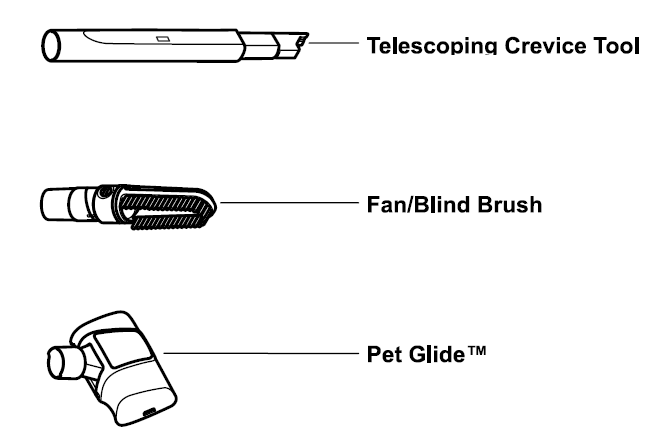
The Pet Glide™ may be used on the following items:
- Furniture
- Stairs
- Rugs
- Bedding
- Pet Beds
Note: The Pet Glide™ is not for use on animals.
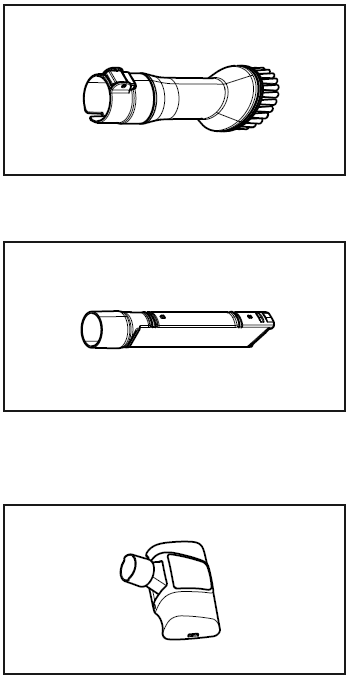
The telescoping crevice tool may be used on the following items:
- Furniture
- Cushions
- Drapes
- Stairs
- Walls
The fan/blind brush may be used on the following items:
- Furniture
- Drapes
- Stairs
- Walls
- Ceiling fans
- Blinds
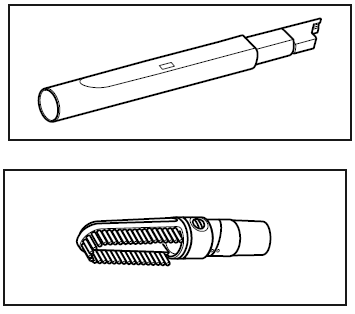
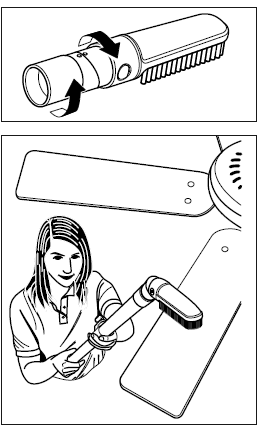
FAN/BLIND BRUSH
To clean fans:
- Rotate the fan/blind brush and lock into place.
- Attach the fan/blind brush to the wand or the telescoping crevice tool.
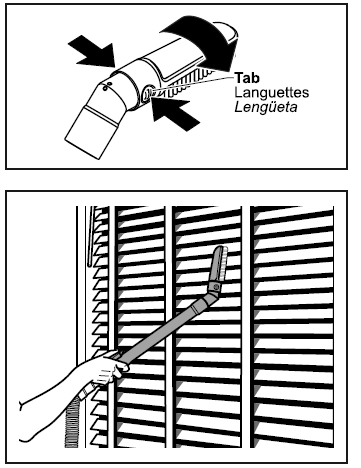
To clean blinds
- The brush of the fan/blind brush can be rotated for cleaning blinds.
- Press tabs on the side of the fan/blind brush.
- Rotate the brush until the tabs snap into place.
Cleaning Exterior and Tools
- Unplug the cord from the wall outlet.
- Clean exterior using a clean, soft cloth that has been dipped in a solution of mild liquid detergent and water and wrung dry.
- DO NOT drip water on the vacuum cleaner. Wipe dry after cleaning.
- DO NOT clean tools in the dishwasher or clothes washer.
- Wash tools in warm, soapy water, rinse,, and air dry.
- DO NOT use tools if they are wet.
IMPORTANT SAFETY INSTRUCTIONS
When using your vacuum cleaner, basic precautions should always be followed, including the following:
Read all instructions in this manual before assembling or using your vacuum cleaner.
WARNING: To reduce the risk of fire, electrical shock, and injury:
- Use your vacuum cleaner only as described in this manual. Use only with Panasonic-recommended attachments.
- Disconnect the electrical supply before servicing or cleaning out the brush area.
- Do not leave the vacuum cleaner when plugged in. Unplug from the outlet when not in use and before servicing.
- To reduce the risk of electrical shock, do not use outdoors or on wet surfaces.
- Do not allow it to be used as a toy. Close attention is necessary when used by or near children.
- Do not use with a damaged cord or plug. If the vacuum cleaner is not working as it should, has been dropped, damaged, left outdoors, or dropped in water, return it to a Panasonic Service Center.
- Do not pull or carry by cord, use cord as a handle, close a door on cord, or pull cord around sharp edges or corners.
- Do not run a vacuum cleaner over the cord. Keep the cord away from heated surfaces.
- Do not unplug by pulling on the cord. To unplug, grasp the plug, not the cord.
- Do not handle the plug or the vacuum cleaner with wet hands.
- Do not put any objects into openings.
- Do not use with any opening blocked; keep free of dust, lint, hair, and anything that may reduce air flow.
- Keep hair, loose clothing, fingers, and all parts of the body away from openings and moving parts.
- Turn off all controls before unplugging.
- Use extra care when cleaning on stairs. Do not put on chairs, tables, etc. Keep on the floor.
- Do not use a vacuum cleaner to pick up flammable or combustible liquids (gasoline, cleaning fluid, perfumes, etc.), or use it in areas where they may be present. The fumes from these substances can create a fire hazard or explosion.
- Do not pick up anything that is burning or smoking, such as cigarettes, matches, or hot ashes.
- Do not use a vacuum cleaner without a dust bin and/or filters in place.
- Unplug before connecting the air turbine (if applicable).
- Hold the plug when rewinding onto the cord reel. DO NOT allow the plug to whip when rewinding.
- You are responsible for making sure that your vacuum cleaner is not used by anyone who is unable to operate it properly.
BEFORE REQUESTING SERVICE
WARNING: Electric Shock or Personal Injury Hazard.
Disconnect the electrical supply before performing maintenance on the vacuum cleaner. Failure to do so could result in electric shock or personal injury from a vacuum cleaner suddenly starting.
Review this chart to find do-it-yourself solutions for minor performance problems. Any service needed, other than those described in these Operating Instructions, should be performed by an authorized service representative.
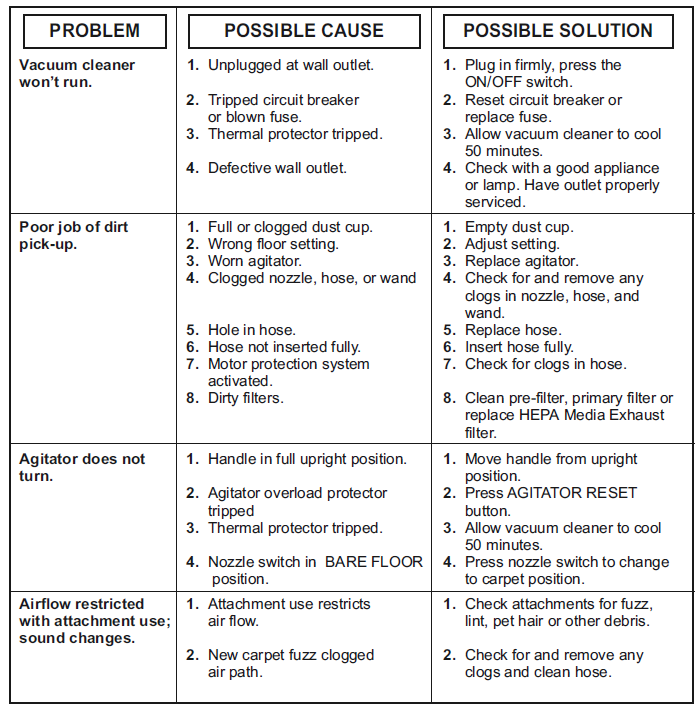
Troubleshooting Your Panasonic VACUUM CLEANER MC-UL955
Encountering issues with your Panasonic VACUUM CLEANER MC-UL955? Here are common problems, solutions, and support options to keep your cleaning routine uninterrupted.
Common Problems and Solutions
- Loss of Suction: Check and empty the dust cup regularly. Clean or replace filters if clogged.
- Vacuum won’t Turn On: Ensure the power cord is properly connected and the outlet is functioning. Inspect the fuse or circuit breaker.
- Strange Noises: Remove any obstructions from the brush roll or hose. Check for loose parts.
- Brush Roll Not Spinning: Turn off the vacuum and unplug it. Clear any tangled hair or debris from the brush roll.
Error Codes and Fixes
Refer to your operating manual for specific error codes. Most issues can be resolved by following the troubleshooting guide included with your Panasonic MC-UL955[2][4].
Preventive Measures
- Empty the dust cup after each use.
- Regularly clean filters and brush rolls.
- Store the vacuum in a dry, cool place.
- Avoid vacuuming large debris or liquids.
Warranty and Support
Panasonic offers a limited warranty on the MC-UL955. For warranty claims or technical support, contact Panasonic customer service directly. Replacement parts, such as filters and nozzles, are available through authorized dealers and online retailers.
Panasonic Products Limited Warranty
Limited Warranty Coverage (For USA Only)
If your product does not work properly because of a defect in materials or workmanship, Panasonic Consumer Electronics Corporation (referred to as “the warrantor”) will, for the length of the period in-dicated on the chart below, which starts with the date of original purchase (“warranty period”), at its option either (a) repair your product with new or refurbished parts, (b) replace it with a new or a refur-bished equivalent value product, or (c) refund your purchase price. The decision to repair, replace,, or refund will be made by the warrantor.
| Product or Part Name | Parts | Labor | Motor |
|---|---|---|---|
| Vacuum Cleaner | 1 year | 1 year | 1 year |
During the “Labor” warranty period,, od there will be no charge for labor. During the “Parts” warranty period, there will be no charge for parts.
This warranty only applies to products purchased and serviced in the United States. This warranty is extended only to the original purchaser of a new product that was not sold “as is”.
Contact Information
For assistance, visit the official Panasonic support website or call their customer service hotline. Always refer to your user manual for model-specific guidance.
Panasonic VACUUM CLEANER MC-UL955: Pros & Cons
Advantages
- Powerful Dual-Motor System: Delivers strong suction for deep cleaning on all surfaces.
- Bagless Design: Reduces ongoing costs and environmental impact.
- Cyclonic Filtration: Maintains suction and traps fine dust and allergens.
- Lightweight and Portable: Easy to maneuver and store.
- Easy Maintenance: Simple dust cup emptying and filter cleaning.
Disadvantages
- Limited Availability: May be harder to find compared to mainstream brands.
- Replacement Parts: Some components may have longer shipping times.
- Noise Level: The powerful motor can be louder than some competitors.
- No Advanced Smart Features: Lacks Wi-Fi connectivity or app integration.
Value for Money
The Panasonic MC-UL955 offers excellent suction and versatility at a competitive price point, making it a solid investment for those seeking reliable, everyday cleaning performance. While it lacks some smart features found in premium models, its core cleaning capabilities and ease of maintenance provide strong value.
Comparison with Alternatives
Compared to other upright vacuums in its class, the Panasonic MC-UL955 stands out for its dual-motor suction and bagless convenience. However, brands like Dyson and Shark may offer more advanced features or wider availability, so consider your specific needs before purchasing.
Customer Reviews of the Panasonic VACUUM CLEANER MC-UL955
User feedback for the Panasonic VACUUM CLEANER MC-UL955 highlights its powerful suction and ease of use, with many customers praising its performance on both carpets and hard floors. The bagless design and easy-to-empty dust cup are frequently mentioned as major conveniences.
Common complaints include limited availability of replacement parts and occasional noise during operation. Some users note that while the vacuum is lightweight, it may feel less sturdy than heavier, premium models. Star ratings from online platforms average around 4 out of 5, with most users recommending the MC-UL955 for its cleaning power and value.
Testimonials often mention satisfaction with pet hair pickup and allergen reduction. If you prioritize suction strength and simplicity over high-tech features, the Panasonic MC-UL955 is a strong contender in the upright vacuum market.
Faqs
How do I set up Panasonic VACUUM CLEANER MC-UL955 for the first time?
What are the key features that make Panasonic VACUUM CLEANER MC-UL955 different?
How often should I clean the filter on Panasonic VACUUM CLEANER MC-UL955?
Can I use Panasonic VACUUM CLEANER MC-UL955 on all types of flooring?
What should I do if Panasonic VACUUM CLEANER MC-UL955 is not working properly?
How do I maintain Panasonic VACUUM CLEANER MC-UL955 for optimal performance?
Are replacement parts available for Panasonic VACUUM CLEANER MC-UL955?
Is Panasonic VACUUM CLEANER MC-UL955 energy-efficient?
More panasonic manuals
- Usage & Setup: Panasonic VACUUM CLEANER MC-UL915 Instruction Manual
- How to Use: Panasonic VACUUM CLEANER MC-UL975 Instruction Guide
- Setup: Panasonic VACUUM CLEANER MC-UL910 User Manual
- Usage: Panasonic VACUUM CLEANER MC-V5210 User Manual
- Setup & Usage: Panasonic VACUUM CLEANER MC-UL815 User Manual
- How to Use: Panasonic VACUUM CLEANER MC-UL555 User Manual
Leave a Comment