
How to Use: Panasonic VACUUM CLEANER MC-UL555 User Manual
Content
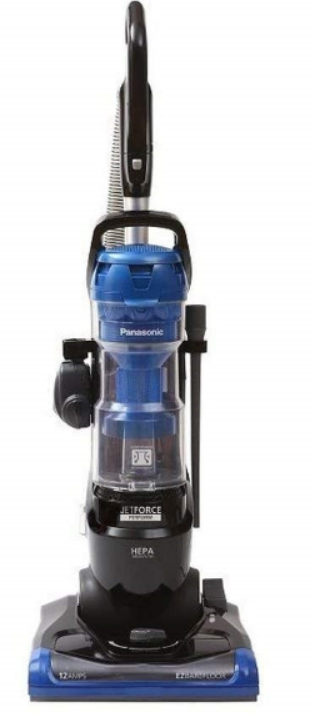
Panasonic VACUUM CLEANER MC-UL555
Introduction
The Panasonic VACUUM CLEANER MC-UL555 is a versatile and efficient vacuum cleaner designed to meet the cleaning demands of modern households. Engineered with Panasonic’s commitment to quality and performance, this model combines robust suction capability with advanced safety features, making it both reliable and user-friendly.
Key benefits of the MC-UL555 include its strong motor protection system, featuring an internal thermal protector and a motor bypass valve that prevents overheating and damage during clogging. This ensures prolonged durability and consistent cleaning performance. The vacuum offers adjustable suction control, allowing users to customize cleaning power based on carpet type or fabric weight, enhancing cleaning efficiency and protecting delicate materials.
Ideal for homeowners, renters, and office spaces alike, the MC-UL555 excels in daily cleaning tasks such as dust removal, carpet vacuuming, and upholstery maintenance. Its ergonomic design and straightforward maintenance make it accessible for users of all skill levels. The vacuum cleaner typically falls in a mid-range price bracket, offering excellent value through its combination of durability, safety features, and cleaning adaptability. It is widely available through authorized Panasonic retailers and online marketplaces, ensuring easy purchase and support access.
Specifications
- Model: MC‑UL555
- Power supply: 120 V AC, 60 Hz (USA version) with a current draw of 12.0 A.
- Power cord length: 7.62 m (25 ft) in the USA version.
- Thermal protector built into motor, plus a motor‑protector bypass valve (to protect from overheating if airflow becomes blocked).
- Suction control (adjustable) for varying fabrics and carpet weights.
- Dirt dust‐cup (bagless style) — as described in marketing material, the JetForce range uses a cyclonic/dust‑cup design (no vacuum bag) in “JetForce Perform” tag..
CONSUMER INFORMATION
Please read the IMPORTANT SAFETY INSTRUCTIONS on page 7 before use. Read and understand all instructions.
TO OUR VALUED CUSTOMER
We are very pleased to welcome you to the Panasonic family of products. Thank you for purchasing this product. We intend that you become one of our many satisfied customers.
Proper assembly and safe use of your vacuum cleaner are your responsibilities. Your vacuum cleaner is intended only for household use. The vacuum cleaner should be stored in a dry, indoor area. Read the Operating Instructions carefully for important use and safety information.
Special care is required when vacuuming certain types of carpet or floor covering. Always check the carpet or floor covering manufacturer's recommended cleaning instructions before vacuuming.
PLEASE PAY CLOSE ATTENTION TO ALL WARNING AND CAUTION STATEMENTS.
IMPORTANT SAFETY INSTRUCTIONS
When using your vacuum cleaner, basic precautions should always be followed, including the following:
Read all instructions in this manual before assembling or using your vacuum cleaner.
WARNING: To reduce the risk of fire, electrical shock, and injury:
- Use your vacuum cleaner only as described in this manual. Use only with Panasonic-recommended attachments.
- Disconnect the electrical supply before servicing or cleaning out the brush area.
- Do not leave the vacuum cleaner when plugged in. Unplug from the outlet when not in use and before servicing.
- To reduce the risk of electroshock ock, do not use outdoors or on wet surfaces.
- Do not allow it to be used as a toy. Close attention is necessary when used by or near children.
- Do not use with a damaged cord or plug. If the vacuum cleaner is not working as it should, has been dropped, damaged, left outdoors, or dropped in water, return it to a Panasonic Service Center.
- Do not pull or carry by cord, use cord as a handle, close a door on cord, or pull cord around sharp edges or corners. Do not run a vacuum cleaner over the cord. Keep the cord away from heated surfaces.
- Do not unplug by pulling on the cord. To unplug, grasp the plug, not the cord.
- Do not handle the plug or the vacuum cleaner with wet hands.
- Do not put any objects into openings.
- Do not use with any opening blocked; keep free of dust, lint, hair, and anything that may reduce air flow.
- Keep hair, loose clothing, fingers, and all parts of the body away from openings and moving parts.
- Turn off all controls before unplugging.
- Use extra care when cleaning on stairs. Do not put on chairs, tables, etc. Keep on the floor.
- Do not use a vacuum cleaner to pick up flammable or combustible liquids (gasoline, cleaning fluid, perfumes, etc.), or use it in areas where they may be present. The fumes from these substances can create a fire hazard or explosion.
- Do not pick up anything that is burning or smoking, such as cigarettes, matches, or hot ashes.
- Do not use a vacuum cleaner without a dust bin and/or filters in place.
- Unplug before connecting the IRIRe IR turbine (if applicable).
- Hold the plug when rewinding onto the cord reel. DO NOT allow the plug to whip when rewinding.
- You are responsible for making sure that your vacuum cleaner is not used by anyone who is unable to operate it properly.
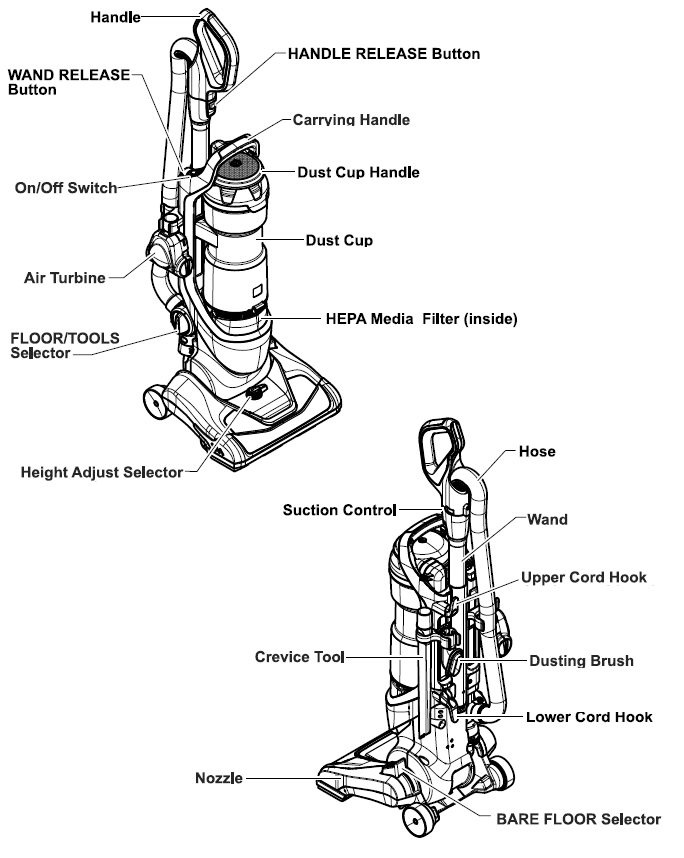
PARTS IDENTIFICATION
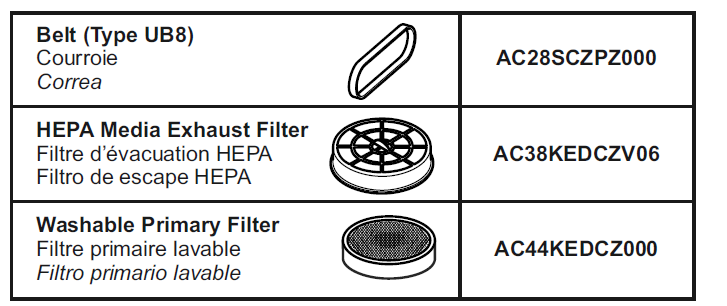
CONSUMABLE PARTS
Using Tools
Note: Always clean tools before using.
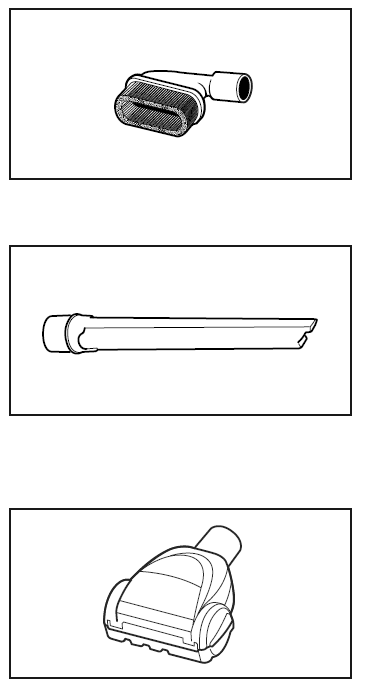
The dusting brush may be used on the following items:
- Furniture
- Drapes
- Walls
The Crevice Tool may be used on the following items:
- Furniture
- Drapes
- Stairs
- Walls
- Cushions
The air turbine may be used on the following items:
- Furniture
- Stairs
Operating instructions for the air turbine are included with the product.
SAFETY FEATURES
Thermal Protector
Protector thermal
This vacuum cleaner has an internal thermal protector that automatically trips to protect the vacuum cleaner from overheating.
TO CORRECT THE PROBLEM:
- Turn the vacuum cleaner off and unplug the power cord from the outlet to allow the vacuum cleaner to cool and the thermal protector to reset.
- Check for and remove clogs, if necessary. Also,,, check and replace any clogged filters and empty the dust cup, if necessary.
- Wait approximately fifty (50) minutes and then plug the vacuum cleaner in and turn it back on to see if the motor protector has reset.
Motor Protector
This vacuum cleaner also has a motor protector by-pass valve, which prevents motor overheating and damage. The valve opens to provide cooling air when a clog prevents normal air flow to the vacuum cleaner's suction motor. You will notice a change of sound as air rushes through the valve opening.
To correct the problem: Empty the dust cup and clean the primary filter and pre-filter. Check for and remove clogs if necessary.
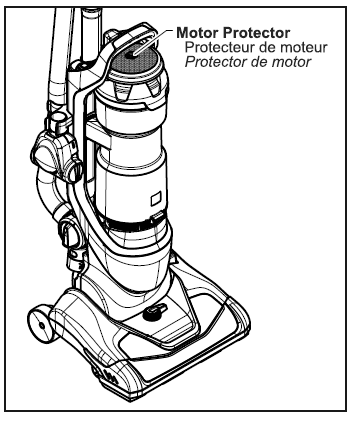
NOTE: Do not block the motor protector.
NOTE: The motor protector may open when using attachments or when cleaning new carpet due to reduced airflow caused by the attachments themselves or by the new carpet.
Suction Control
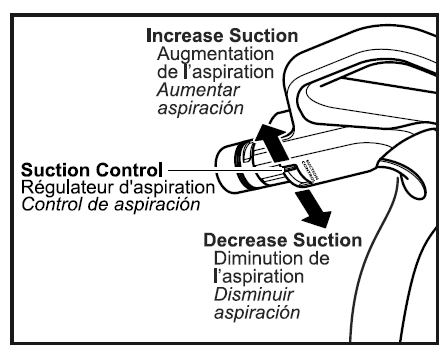
The suction control allows you to change the vacuum cleaner suction for different fabrics and carpet weights.
- Opening control decreases suction for draperies and lightweight rugs.
- Closing the control increases suction for upholstery and carpets.
Cleaning Exterior and Tools
- Unplug the cord from the wall outlet.
- Clean exterior using a clean, soft cloth that has been dipped in a solution of mild liquid detergent and water and wrung dry.
- DO NOT drip water on the vacuum cleaner. Wipe dry after cleaning.
- DO NOT clean tools in the dishwasher or clothes washer.
- Wash tools in warm water,m soapy water, rinse,, and air dry.
- DO NOT use tools if they are wet.
Dust Cup
Always empty the dust cup before the dirt level reaches the “MAX” line.
Pre-Filter
The pre-filter is located inside the dust cup. Check the pre-filter frequently and clean it when dirty.
- Remove the dust cup. (see TO REMOVE DUST CUP, p. 30).
- Make sure the dust cup is empty.
Troubleshooting Guide for Panasonic VACUUM CLEANER MC-UL555
While the Panasonic MC-UL555 is designed for reliable operation, users may encounter occasional issues. Common problems include:
- Vacuum overheating: Caused by clogged filters or blockages; the built-in thermal protector will automatically shut off the unit to prevent damage. Solution: Switch off the vacuum, clear obstructions, and allow it to cool before reuse.
- Reduced suction power: Often due to a full dust bag or dirty filters. Solution: Empty the dust container and clean or replace filters regularly.
- Unusual noises: May indicate motor strain or blockages. Solution: Check for foreign objects in the hose or nozzle and remove them.
The MC-UL555 does not display digital error codes, but auditory or performance changes signal the need for maintenance. Preventive measures include routine cleaning of the filter system and ensuring the suction path is clear. Panasonic provides a warranty covering manufacturing defects, with customer support accessible via their official website or authorized service centers. For direct assistance, users can contact Panasonic support through the hotline or email listed in the product manual.
Panasonic Products Limited Warranty
Limited Warranty Coverage (For USA Only)
If your product does not work properly because of a defect in materials or workmanship, Panasonic Consumer Electronics Corporation (referred to as “the warrantor”) will, for the length of the period in-dicated on the chart below, which starts with the date of original purchase (“warranty period”), at its option either (a) repair your product with new or refurbished parts, (b) replace it with a new or a refur-bished equivalent value product, or (c) refund your purchase price. The decision to repair, replace,, or refund will be made by the warrantor.
Product or Part Name: Vacuum Cleaner
- Parts: 1 year
- Labor: 1 year
- Motor: 1 year
Pros & Cons of Panasonic VACUUM CLEANER MC-UL555
Pros
- Reliable motor protection: Thermal protector and motor bypass valve safeguard against overheating and extend lifespan.
- Adjustable suction control: Ideal for different floor types, from carpets to delicate upholstery, enhancing cleaning versatility.
- Ergonomic design: Lightweight and easy to maneuver, suitable for everyday household cleaning.
- Cost-effective: Offers a strong balance of features and durability at an accessible price point.
Cons
- No digital display or error codes: Troubleshooting relies on user detection of symptoms rather than on-screen alerts.
- Basic accessory set: May require purchasing additional specialized nozzles for niche cleaning needs.
- Moderate noise level: Typical for vacuum cleaners in this category, but may not suit noise-sensitive environments.
When compared to alternatives like Panasonic’s MC-CL603 or MC-YL669 models, the MC-UL555 offers a simpler interface and reliable motor protection but lacks some advanced filtration or smart features found in higher-end models.
Customer Reviews and Feedback on Panasonic VACUUM CLEANER MC-UL555
Users generally praise the Panasonic VACUUM CLEANER MC-UL555 for its durable motor protection features and consistent suction power. Many appreciate the suction control option, which facilitates cleaning various floor types without damaging surfaces. The lightweight and straightforward design receives positive remarks for ease of use and maintenance.
Common complaints include the absence of digital error messages, which can make troubleshooting less intuitive, and the limited accessory package that some users find restrictive for specialized cleaning tasks. Noise level is occasionally mentioned as a downside by users in quieter households.
Overall, ratings cluster around 4 out of 5 stars, with many recommending it for value-conscious buyers seeking a reliable, no-frills vacuum cleaner. Testimonials often note the longevity of the motor and the efficiency of the thermal protection system as key factors in their satisfaction.
Faqs
How do I set up my panasonic VACUUM CLEANER MC-UL555 for the first time?
What should I do if my panasonic VACUUM CLEANER MC-UL555 is not working properly?
What are the key features that make the panasonic VACUUM CLEANER MC-UL555 different?
Can I use the panasonic VACUUM CLEANER MC-UL555 with a specific cleaning solution?
How often should I maintain my panasonic VACUUM CLEANER MC-UL555?
What kind of power outlet does the panasonic VACUUM CLEANER MC-UL555 require?
Can I use the panasonic VACUUM CLEANER MC-UL555 on all types of flooring?
How do I troubleshoot a blocked suction issue with my panasonic VACUUM CLEANER MC-UL555?
More panasonic manuals
- Usage: Panasonic VACUUM CLEANER MC-V5210 User Manual
- Usage: Panasonic VACUUM CLEANER MC-UL671 User Manual
- How to Use: Panasonic VACUUM CLEANER MC-UL975 Instruction Guide
- Setup: Panasonic VACUUM CLEANER MC-UL675 Instruction Manual
- Setup: Panasonic VACUUM CLEANER MC-UL955 Instruction Manual
- How to Use: Panasonic VACUUM CLEANER MC-UL810 Instruction Guide
Leave a Comment