
Usage: Panasonic VACUUM CLEANER MC-V5210 User Manual
Content
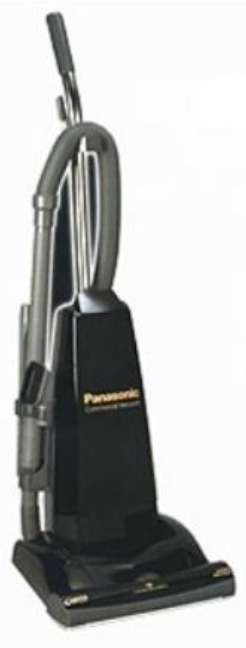
Panasonic Vacuum Cleaner MC-V5210
Introduction
The **Panasonic Vacuum Cleaner MC-V5210** is a robust commercial upright vacuum designed to tackle heavy-duty cleaning tasks with ease. This model boasts a powerful 10-amp motor, a wide 14-inch cleaning path, and a durable metal base plate, making it ideal for commercial environments, large homes, and high-traffic areas. Key benefits include its HEPA filtration system, which captures allergens and dust particles, and a comprehensive motor protection system to ensure longevity. The MC-V5210 is also equipped with a long 50-foot power cord and on-board tools for enhanced versatility.
Targeted at commercial users, facility managers, and homeowners who require a reliable and efficient cleaning solution, the MC-V5210 offers a balance of power and maneuverability. Prices typically range from $200 to $400, depending on the retailer and any available discounts. The product is widely available through major electronics retailers and online marketplaces.
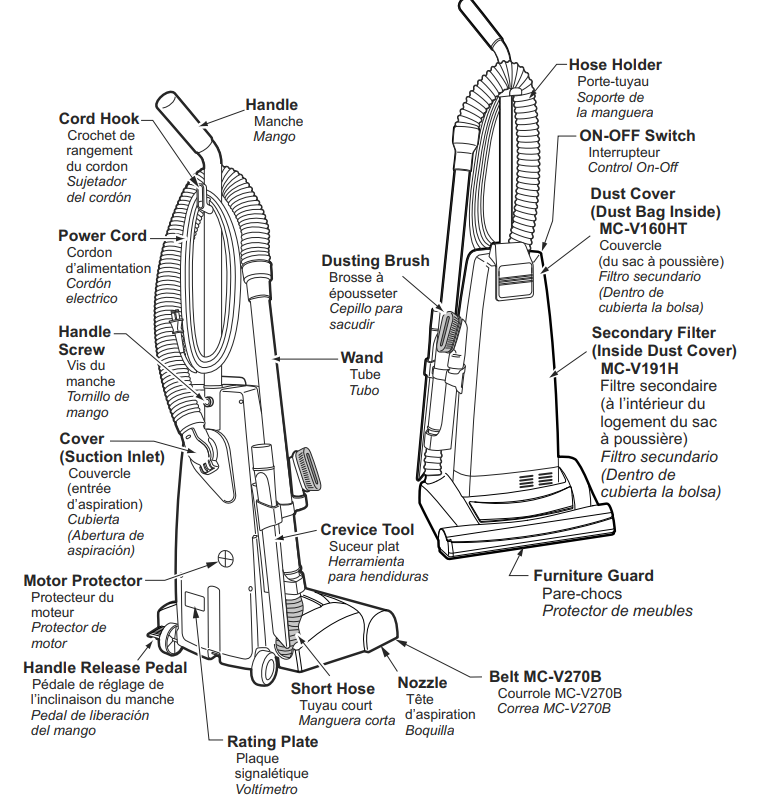
PARTS IDENTIFICATION
ASSEMBLY
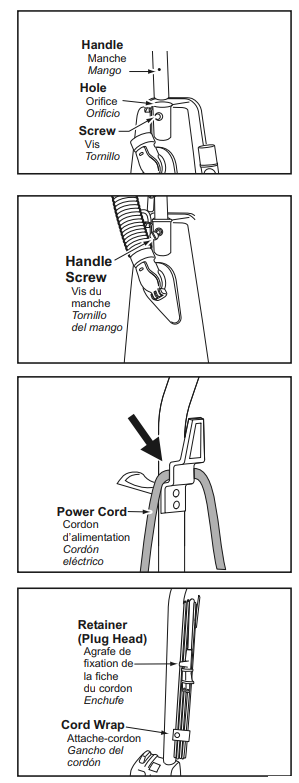
Attaching Handle
- DO NOT plug in until assembly is complete.
- Remove the handle screw.
- Insert handle.
- Insert the screw.
- Tighten the screw.
- Push the power cord into the cord clip.
- Wrap the power cord around the cord hook.
- Secure the retainer (plug head) to the power cord.
FEATURES
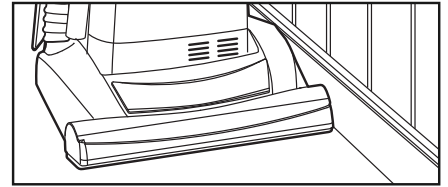
Edge Cleaning
- Edge cleaning feature enables improved cleaning of carpets near walls and furniture.
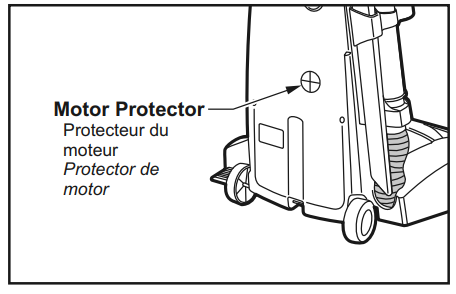
Motor Protector
- Automatically opens to provide cooling air to the motor when a clog occurs or when the dust bag needs changing.
- The motor protector may open when using tools.
- If the motor protector opens, the vacuum cleaner will make a slightly different sound.
Thermal Protector
- This vacuum cleaner has a thermal protector that automatically trips to protect the vacuum cleaner from overheating.
- If a clog prevents the normal flow of air to the motor, the thermal protector turns the motor off automatically. This allows the motor to cool to prevent possible damage to the vacuum cleaner.
TO CORRECT PROBLEM:
- Turn the vacuum cleaner off and unplug the power cord from the outlet to allow the vacuum cleaner to cool and the thermal protector to reset.
- Check for and remove clogs, if necessary (See REMOVING CLOGS p. 36). Also , check and replace any clogged filters and change he dust bag, if necessary.
- Wait approximately fifty (50) minutes and then plug the vacuum cleaner in and turn it back on to see if the motor protector has reset.
TO OPERATE A VACUUM CLEANER
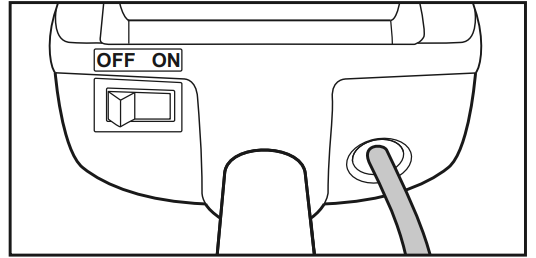
ON-OFF Switch
- Ensure the ON-OFF switch is OFF.
- Plug the power cord into a 120V outlet.
- ON position turns the vacuum cleaner on.
- OFF position turns the vacuum cleaner off.
Handle Adjustments
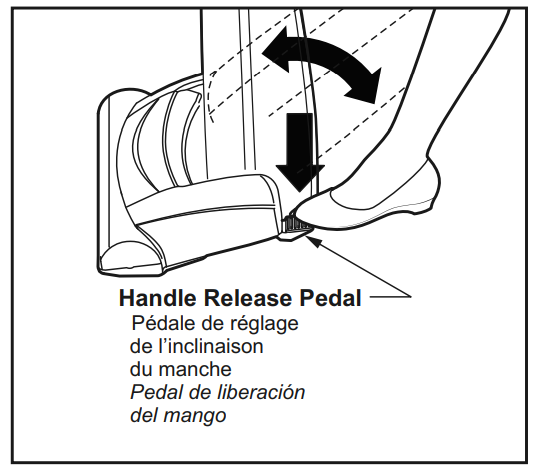
- Step on the handle release pedal to change the handle position.
- Move the vacuum cleaner to the o upright position for storage and tool use.
- Move the vacuum cleaner to the middle position for normal use.
- Use a low position for cleaning under furniture.
ROUTINE CARE OF VACUUM CLEANER
Performing the following tasks will keep your new Panasonic vacuum cleaner operating at peak performance levels and will ensure these high levels for years to come. Check the BEFORE REQUESTING SERVICE section in this manual for recommendations on performing some of these tasks to help solve various problems that may occur.
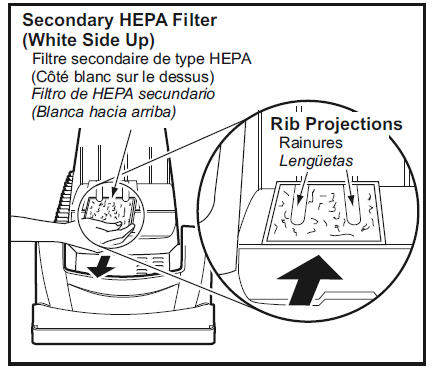
Replacing Secondary HEPA Filter
- Secondary HEPA filter protects the motor.
- Check the filter when installing a new dust bag.
- If dirty, pull the filter from the bottom of the filter cover compartment and replace it.
- Place the new filter, white side up, in the dust compartment. DO NOT CLEAN WITH WATER*.
- Ensure filter is fully inserted under plastic ribs.
- The filter cannot be cleaned and should be replaced at least once each year.
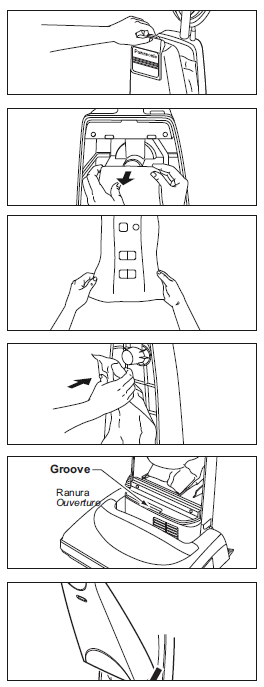
Changing Dust Bag
- Pull outward on the dust cover grip to remove the dust cover.
- Remove the dust bag by grasping the cardboard portion and pulling it out.
- Spread out a new dust bag, taking care not to tear the bag.
- Attach a new dust bag to the the bag holder by holding the cardboard portion and pushing it back.
- Reinsert the tab at the end of the dust cover into the groove on the dust compartment to allow the cover to rotate closed.
- Rotate the dust cover up into the closed position and press it into place without pinching the dust bag.
Specifications
Below are the key specifications of the Panasonic MC-V5210:
- Motor Power: 10-Amp Commercial Motor
- Cleaning Path Width: 14 inches
- Filtration System: HEPA Filtration
- Power Cord Length: 50 feet
- Weight: Approximately 15 lbs
- Agitator: Metal TriForce Agitator
- Base Plate: Durable Metal Construction
- Tools: On-board QuickDraw Tools, Stretch Hose, Extension Wand
Compared to similar commercial vacuums, the MC-V5210 stands out with its robust construction and comprehensive set of on-board tools, making it a versatile choice for various cleaning tasks.
LIMITED WARRANTY (ONLY FOR U.S.A. AND PUERTO RICO)
Panasonic Consumer Marketing Company of North America, Division of Panasonic Corporation of North America, One Panasonic Way, Secaucus, New Jersey 07094
Panasonic Commercial Vacuum Cleaner
Limited Warranty
Limited Warranty Coverage (For USA and Puerto Rico Only)
If your product does not work properly because of a defect in materials or workmanship, Panasonic Consumer Marketing Company of North America (referred to as “the warrantor”) will, for the length of the period indicated on the chart below, which starts with the date of original purchase (“warranty pe-riod”), at its option either (a) repair your product with new or refurbished parts, (b) replace it with a new or a refurbished equivalent value product, or (c) refund your purchase price. The decision to repair, replace, or refund will be made by the warrantor.
- During the “Labor” warranty period, od there will be no charge for labor. During the “Parts” warranty period, there will be no charge for parts.
- This Limited Warranty Excludes both Labor and Parts for the following it, ems which require normal replacement: Disposable Dust Bag, Filters, Belts, Light Bulbs, Agitator Brushes, and Batteries (if supplied).
- This warranty only applies to products purchased and serviced in the United States or Puerto Rico. This warranty is extended only to the original purchaser of a new product that was not sold “as is”.
Carry-In or Mail-in Service: - To find a service center, please call 1-800-211-PANA (7262).
IF REPAIR IS NEEDED DURING THE WARRANTY PERIOD, THE PURCHASER WILL BE REQUIRED TO FURNISH A SALES RECEIPT/PROOF OF PURCHASE INDICATING DATE OF PURCHASE, AMOUNT PAID , D AND PLACE OF PURCHASE. CUSTOMER WILL BE CHARGED FOR THE REPAIR OF ANY UNIT RECEIVED WITHOUT SUCH PROOF OF PURCHASE.
Limited Warranty Limits And Exclusions
- This warranty ONLY COVERS failures due to defects in materials or workmanship, and DOES NOT COVER normal wear and tear or cosmetic damage. The warranty ALSO DOES NOT COVER damages which occurred in shipment, or failures which are caused by products not supplied by the warrantor, or failures which result from accidents, misuse, abuse, neglect, mishandling, misapplication, alteration, faulty installation, set-up adjustments, misadjustment of consumer controls, improper maintenance, power line surge, lightning damage, modification, introduction of sand, humidity or liquids, or service by anyone other than a Factory Service Center or other Authorized Servicer, or damage that is attributable to acts of God.
- THERE ARE NO EXPRESS WARRANTIES EXCEPT AS LISTED UNDER “LIMITED WARRANTY COVERAGE”.
- THE WARRANTOR IS NOT LIABLE FOR INCIDENTAL OR CONSEQUENTIAL DAMAGES RESULTING FROM THE USE OF THIS PRODUCT, OR ARISING OUT OF ANY BREACH OF THIS WARRANTY. (As examples, this excludes damages for lost time, travel to and from the servicer, loss of or damage to media or images, data, a or other memory or recorded content. The items listed are not exclusive, but for illustration only.)
- ALL EXPRESS AND IMPLIED WARRANTIES, INCLUDING THE WARRANTY OF MERCHANTABILITY, ARE LIMITED TO THE PERIOD OF THE LIMITED WARRANTY.
Some states do not allow the exclusion or limitation of incidental or consequential damages, or limitations on how long an implied warranty lasts, so the exclusions may not apply to you. - This warranty gives you specific legal rights, ts and you may also have other rights which vary from state to state. If a problem with this product develops during or after the warranty period, you may contact your dealer or service center. If the problem is not handled to your satisfaction, then write to:
- Consumer Affairs Department
- Panasonic Consumer Marketing Company 661 Independence Pkwy
- Chesapeake, VA 23320
- PARTS AND SERVICE, WHICH ARE NOT COVERED BY THIS LIMITED WARRANTY, ARE YOUR RESPONSIBILITY.
Panasonic Canada Inc. warrants this product to be free from defects in material and workmanship under normal use and for a period as stated below from the date of original purchase agrees to, at its option either (a) repair your product with new or refurbished parts, (b) replace it with a new or a refurbished equivalent value product, or (c) refund your purchase price. The decision to repair, replace, ace, or refund will be made by Panasonic Canada Inc.
- Commercial Vacuum Cleaner
- Ninety (90) days parts and labour
- This warranty is given only to the original purchaser, or the person for whom it was purchased as a gift, of a Panasonic brand product mentioned above sold by an authorized Panasonic dealer in Canada and purchased and used in Canada, which product was not sold "as is", and which product was delivered to you in new condition in the original packaging.
- IN OTR TO BE ELIGIBLE TO RECEIVE WARRANTY SERVICE HEREUNDER, A PURCHASE RECEIPT OR OTHER PROOF OF DATE OF ORIGINAL PURCHASE, SHOWING AMOUNT PAID AND PLACE OF PURCHASE,, IS REQUIRED
LIMITATIONS AND EXCLUSIONS
- This warranty ONLY COVERS failures due to defects in materials or workmanship, and DOES NOT COVER normal wear and tear or cosmetic damage. The warranty ALSO DOES NOT COVER damages which occurred in shipment, or failures which are caused by products not supplied by Panasonic Canada Inc., or failures which result from accidents, misuse, abuse, neglect, mishandling, misapplication, alteration, faulty installation, set-up adjustments, misadjustment of consumer controls, improper maintenance, power line surge, lightning damage, modification, introduction of sand, humidity or liquids, or service by anyone other than a Authorized Servicer, or damage that is attributable to acts of God.
- Parts such as disposable dust bags, filters, belts, light bulbs,,s and agitator brushes are not covered by this warranty.
- THIS EXPRESS, LIMITED WARRANTY INSTEAD OF ALL OTHER WARRANTIES, EXPRESS OR IMPLIED, INCLUDING ANY IMPLIED WARRANTIES OF MERCHANTABILITY AND FITNESS FOR A PARTICULAR PURPOSE. IN NO EVENT WILL PANASONIC CANADA INC. BE LIABLE FOR ANY SPECIAL, INDIRECT, OR CONSEQUENTIAL DAMAGES RESULTING FROM THE USE OF THIS PRODUCT OR ARISING OUT OF ANY BREACH OF ANY EXPRESS OR IMPLIED WARRANTY. (As examples, this warranty excludes damages for lost time, travel to and from the Authorized Servicer, loss of or damage to media or images, data, a or other memory or recorded content. This list of items is not exhaustive, but for illustration only.)
- In certain instances, some jurisdictions do not allow the exclusion or limitation of incidental or consequential damages, or the exclusion of implied warranties, so the above limitations and exclusions may not be applicable. This warranty gives you specific legal rights, ts and you may have other rights which vary depending on your province or territory.
Troubleshooting
Common issues with the Panasonic MC-V5210 and their solutions:
- Motor Not Turning On: Check the power cord for damage or ensure it is properly plugged into a working outlet.
- Reduce the bag or check for blockages in the hose or wand.
- Overheating: Allow the motor to cool down before resuming use.
For more complex issues, refer to the user manual or contact Panasonic support. Warranty options and customer service information are available on the official Panasonic website.
Pros & Cons
Pros:
- Powerful Performance: Effective for heavy-duty cleaning tasks.
- Durable Construction: Metal base plate and agitator ensure longevity.
- HEPA Filtration: Captures allergens and dust particles efficiently.
- On-Board Tools: Enhances versatility for various cleaning tasks.
Cons:
- Weight: May be heavy for some users.
- Noisy Operation: Can be loud during use.
- Cord Length Management: The 50-foot cord requires careful management to avoid tangles.
Overall, the Panasonic MC-V5210 offers excellent value for money, especially in commercial settings where durability and performance are critical.
Customer Reviews
Customers generally praise the MC-V5210 for its robust build quality and effective cleaning performance. Common praises include its ability to handle heavy-duty cleaning tasks and the convenience of on-board tools. Some users mention that it can be heavy and noisy, but overall, it is well-regarded for its value and durability. Rated 4.5 out of 5 stars by many users, it is a recommended choice for those seeking a reliable commercial vacuum.
Purchase recommendations include ensuring the vacuum fits your specific cleaning needs and considering additional storage for the long power cord.
Conclusion
The **Panasonic Vacuum Cleaner MC-V5210** is an excellent choice for those seeking a powerful and durable commercial cleaning solution. With its robust motor, HEPA filtration, and versatile on-board tools, it is well-suited for a variety of heavy-duty cleaning tasks.
Faqs
What are the key features that make Panasonic VACUUM CLEANER MC-V5210 different from other commercial vacuums?
How do I set up the Panasonic VACUUM CLEANER MC-V5210 for the first time?
What should I do if the Panasonic VACUUM CLEANER MC-V5210 is not working properly?
Can I use the Panasonic VACUUM CLEANER MC-V5210 with different types of flooring?
How often should I maintain the Panasonic VACUUM CLEANER MC-V5210?
What are the benefits of the HEPA filtration system in the Panasonic VACUUM CLEANER MC-V5210?
How does the Metal TriForce agitator in the Panasonic VACUUM CLEANER MC-V5210 contribute to its cleaning performance?
Are there any specific safety precautions I should take when using the Panasonic VACUUM CLEANER MC-V5210?
More panasonic manuals
- How to Use: Panasonic VACUUM CLEANER MC-UL975 Instruction Guide
- How to Use: Panasonic VACUUM CLEANER MC-UL555 User Manual
- Setup: Panasonic VACUUM CLEANER MC-UL955 Instruction Manual
- Usage: Panasonic VACUUM CLEANER MC-UL671 User Manual
- Usage & Setup: Panasonic VACUUM CLEANER MC-UL915 Instruction Manual
- Setup: Panasonic VACUUM CLEANER MC-UL675 Instruction Manual
Leave a Comment