
How to Use: Panasonic VACUUM CLEANER MC-UL975 Instruction Guide
Content
Panasonic VACUUM CLEANER MC-UL975
Introduction
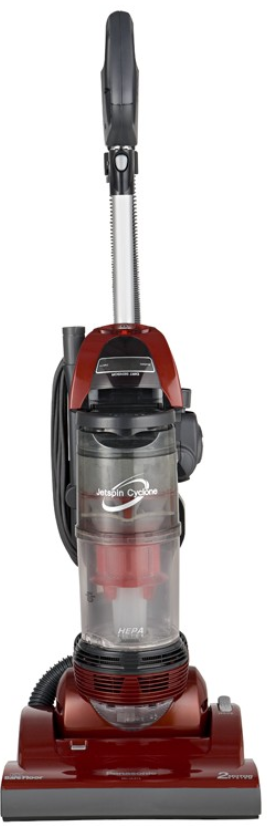
The Panasonic VACUUM CLEANER MC-UL975 is a high-performance upright vacuum designed for homeowners seeking powerful cleaning with convenience. Featuring Panasonic’s advanced PowerBlast™ technology and a dual-motor system, this bagless vacuum efficiently tackles dust, dirt, and pet hair on various floor types. Its extra-wide 14-inch nozzle ensures faster cleaning coverage, while the electronic Dirt Sensor optimizes suction power based on carpet conditions, delivering thorough cleaning results.
This vacuum cleaner is ideal for busy households, pet owners, and allergy sufferers,, thanks to its fan-fold HEPA exhaust filter that traps microscopic allergens and maintains cleaner indoor air. The MC-UL975 also boasts a belt saver system to enhance durability and reduce maintenance hassles. Available through major retailers and online platforms, the Panasonic MC-UL975 typically falls within the mid-range price segment, offering excellent value for its feature set.
Whether cleaning hardwood floors, carpets, or upholstery, the Panasonic VACUUM CLEANER MC-UL975 combines efficiency, durability, and user-friendly controls to provide professional-grade results for everyday cleaning tasks with professional-grade results.
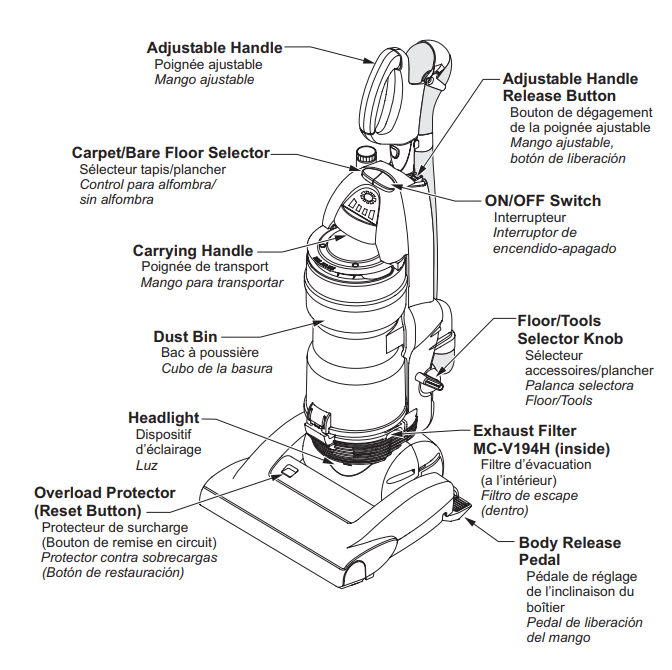
PARTS IDENTIFICATION
Nomenclature
ASSEMBLY
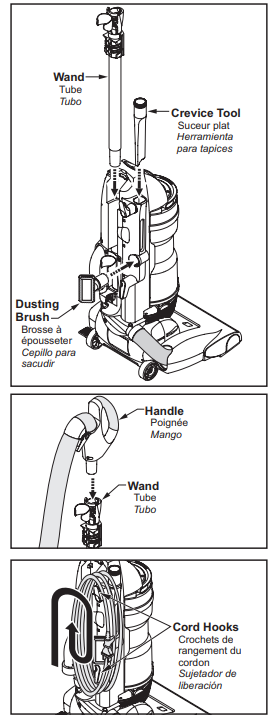
Attaching Components
CAUTION
- DO NOT plug in until assembly is complete.
- Insert the wand into the vacuum cleaner until it locks in place.
- Insert the crevice tool and dusting brush into the storage locations on the vacuum cleaner.
- Insert the handle into the wand.
- Insert the hose into the clips on the wand and the back of the vacuum cleaner.
- Wrap the power cord clockwise around the upper and lower cord hooks as shown.
Cleaning Exterior and Tools
- Unplug the cord from the wall outlet.
- Clean exterior using a clean, soft cloth in a solution of mild liquid detergent and water, and wring dry.
- DO NOT drip water on the vacuum cleaner and wipe dry after cleaning.
- DO NOT clean tools in the dishwasher or clothes washer.
- Wash tools in warm, soapy water, rinse,e and air dry.
- DO NOT use tools if they are wet.
Cleaning Agitator
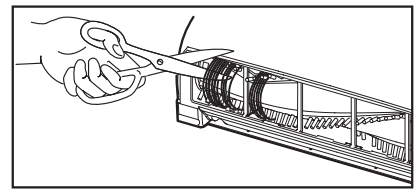
- Clean the agitator after every five uses.
- Turn the vacuum cleaner over, exposing the agitator.
- Cut off any carpet pile and lint entangled around the agitator with a pair of scissors.
FEATURES
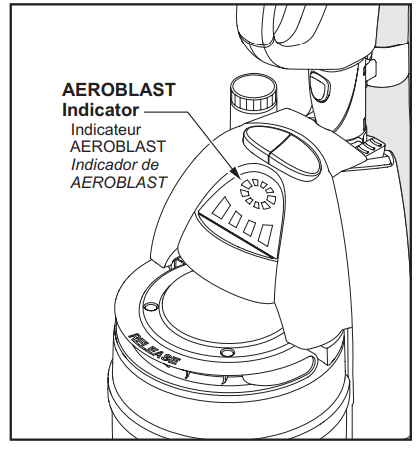
AEROBLAST
- Your Panasonic vacuum cleaner is equipped with the latest technology.
- When the vacuum cleaner is turned on, AEROBLAST automatically cleans the primary filter for 15-20 seconds.
- During the cleaning cycle, it is normal for the vacuum cleaner to make a series of noises,, and the FILTER CLEANING lights on the display will flash to indicate the filter is being cleaned.
- You may use your vacuum cleaner during the cleaning cycle. It is not necessary to wait until the cleaning cycle is finished.
- If the AEROBLAST indicator lights stay lit when the vacuum cleaner is turned on, the dust bin is either not installed, or not installed properly.
Replacing Headlight Bulb
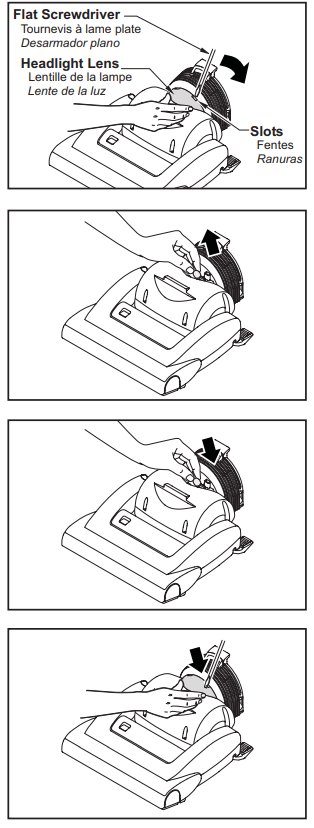
- Disconnect the power cord from the electrical outlet. Lower the body to lay the vacuum cleaner flat.
- Pry the the out light lens at the slots by inserting a screwdriver into the slot, pushing down on the lens,, and rotating the screwdriver handle toward the vacuum cleaner.
- Remove the light bulb by pulling straight out.
- To replace the light bu,l,b carefully insert it securely into the slot. Replace the lens cover.
CAUTION
- Do not use a bulb rated over 9W (13V). During extended use, heat from the bulb could overheat surrounding plastic parts.
- Do not use a bulb rated over 9W (13V). During extended use, heat from the bulb could overheat surrounding plastic parts.
Dirt Sensor
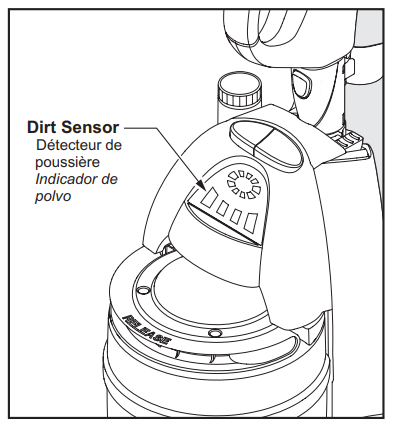
- The electronic dirt sensor is a feature that will detect particles as they pass through the vacuum cleaner.
- The dirt sensor indicator is located on the front of the vacuum cleaner , as illustrated.
- When there is little or no dirt present, the dirt sensor is green.
- With normal dirt concentration, n the dirt sensor is amber.
- With heavy dirt concentration, the dirt sensor is amber and red.
Automatic Self-Adjusting Nozzle
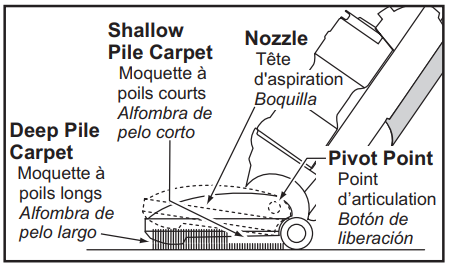
- The nozzle of your Panasonic vacuum cleaner automatically adjusts to any carpet pile height.
- The feature allows the nozzle to float evenly over carpet pile surfaces.
- No manual adjustments required.
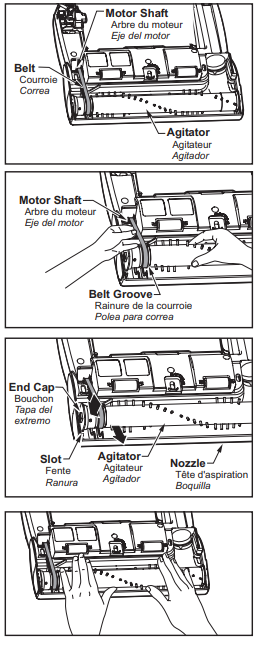
Replacing Belt
- Replace the belt whenever a burning rubber smell caused by excessive slippage occurs.
- Remove the lower plate. See “Removing and Installing Lower Plate”
- Remove the agitator by carefully lifting it out.
- Remove worn or broken belt.
- Clean the agitator and the end caps.
- Loop the new belt around the motor shaft and the agitator belt groove; see illustration for correct belt routing.
- Reinstall the agitator back into the nozzle housing grooves.
- After reinstalling the agitator, turn it by hand to make sure that the belt is not twisted or pinched and that all rotating parts turn freely.
- Reinstall the lower plate. Ensure tabs are locked into slots.
Overload Protection
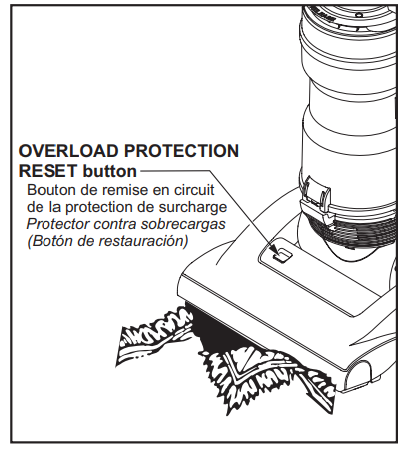
- The OVERLOAD PROTECTION RESET button stops the nozzle motor when the brush jams to prevent belt breakage.
- NOTE: The vacuum cleaner motor will continue to run.
- TO CORRECT PROBLEM:
- Unplug the electrical cord.
- Check nozzle areas for excessive lint buildup or jamming.
- Clean the jammed area.
- TO RESET:
- Press the reset button on top of the nozzle. Plug in and turn on the vacuum cleaner.
Edge Cleaning
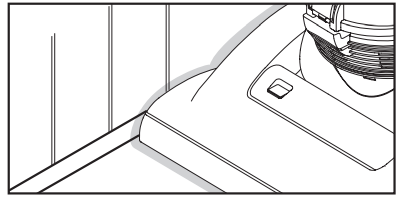
- Edge cleaning feature enables improved cleaning of carpets near walls and furniture.
ROUTINE CARE OF VACUUM CLEANER
Performing the following tasks will keep your new Panasonic vacuum cleaner operating at peak performance levels and will ensure these high levels for years to come. Check the BEFORE REQUESTING SERVICE section in this manual for recommendations on performing some of these tasks to help solve various problems that may occur.
WARNING: Electrical Shock or Personal Injury Hazard
Disconnect the electrical supply before servicing or cleaning the vacuum cleaner. Failure to do so could result in electrical shock or personal injury from a vacuum cleaner suddenly starting.
Dust Bin Cleaning
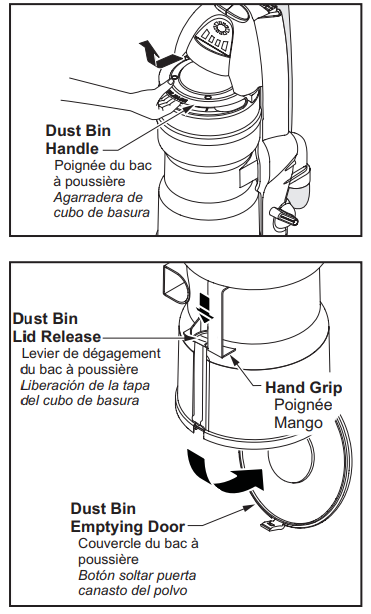
- Always empty the dust bin when the dirt level reaches the “MAX” line.
- Grasp the handle on the top of the dust bin. Lift up and out to remove the dust bin from the vacuum cleaner.
- Remove any clogs that might be located in the pre-filter. (See “Cleaning Pre-Filter”)
CAUTION
- Be sure to hold the dust bin over a proper trash container before releasing the door of the dust bin.
- Press the dust bin lid release, and the dust bin will open, and the debris will fall out.
Specifications of Panasonic VACUUM CLEANER MC-UL975
- Type: Upright, bagless vacuum cleaner
- Motor System: Dual powerful motors for enhanced suction and brush roll operation
- Nozzle Width: Extra-wide 14-inch cleaning path for faster floor coverage
- Filtration: Fan-fold HEPA exhaust filter capturing 99.97% of dust and allergens
- Dirt Sensor: Electronic sensor adjusts suction power for deep cleaning
- Weight: Approximately 17 lbs for balanced maneuverability
- PowerCord: Automatic cord reel for convenient storage
- Brush System: Dual-edge brushing with cog-type belt for effective dirt removal
- Bagless Design: Easy emptying dust cup reduces ongoing costs
- Performance: Suitable for multi-surface cleaning, including carpets, hard floors, and upholstery
Compared to similar models like the Panasonic MC-CG902, the MC-UL975 offers a wider cleaning nozzle and improved motor efficiency, making it a top choice for larger areas and heavier cleaning demands.
Troubleshooting Panasonic VACUUM CLEANER MC-UL975
- Vacuum won’t turn on: Check the power connection and fuse; ensure the dust bin is properly installed.
- Loss of suction: Clean or replace the EPA filter; check for blockages in the nozzle or hose.
- Brush roll stops spinning: Inspect the cog belt for wear and replace if needed; clear any tangled hair or debris.
- Error codes: Refer to the user manual for specific error indicators; common codes relate to motor overheating or filter issues.
- Preventive measures: Regularly clean the dust cup, filters, and brush; avoid vacuuming large debris that can clog the system.
The Panasonic MC-UL975 typically comes with a one-year manufacturer's warranty covering defects. For technical support or replacement parts, contact Panasonic customer service or authorized dealers listed in the user manual.
WARRANTY
- Panasonic Canada Inc.
- PANASONIC PRODUCT - LIMITED WARRANTY
- Panasonic Canada Inc. warrants this product to be free from defects in material and workmanship and agrees to remedy any such defect for a period as stated below from the date of original purchase.
- Vacuum Cleaner - One (1) year, parts and labour
- LIMITATIONS AND EXCLUSIONS
- This warranty does not apply to products purchased outside Canada or to any product which has been improperly installed, subjected to usage for which the product was not designed, misused or abused, damaged during shipping, or which has been altered or repaired in any way that affects the reliability or detracts from the performance, nor does it cover any product which is used commercially. Parts such as disposable dust bags, filters, belts, light bulbs,s and agitator brushes are also excluded from coverage under this warranty. A purchase receipt or other proof of the date of original purchase is required before warranty service is performed.
- THIS EXPRESS, LIMITED WARRANTY IS INSTEAD OF ALL OTHER WARRANTIES, EXPRESS OR IMPLIED, INCLUDING ANY IMPLIED WARRANTIES OF MERCHANTABILITY AND FITNESS FOR A PARTICULAR PURPOSE. IN NO EVENT WILL PANASONIC CANADA INC. BE LIABLE FOR ANY SPECIAL, INDIRECT, OR CONSEQUENTIAL DAMAGES.
- In certain instances, some jurisdictions do not allow the exclusion or limitation of incidental or consequential damages, or the exclusion of implied warranties, so the above limitations and exclusions may not be applicable.
Panasonic Vacuum Cleaner
- Limited Warranty
- (United States)
- Panasonic Consumer Electronics Company (collectively referred to as “the warrantor”) will repair this product with new or refurbished parts free of charge, in the U.S.A. or Puerto Rico,, for one (1) year from the date of original purchase in the event of a defect in materials or workmanship.
- This Limited Warranty Excludes both Labor and Parts for the following items,, which require normal replacement: Disposable Dust Bag, Filters, Belts, Light Bulbs, Agitator Brushes,, and Batteries (if supplied).
- Carry-in or mail-in service in the U.S.A. can be obtained during the warranty period by contacting a Panasonic Services Company (PASC) Factory Servicenter listed in the Servicenter Directory. Or call toll-free, 1-800-211-PANA (7262) to locate a PASC Authorized Servicenter. Carry-in or mail-in service in Puerto Rico can be obtained during the warranty period by calling the local Panasonic Sales Company telephone number listed in the Servicenter Directory.
- This warranty is extended only to the original purchaser. A purchase receipt or other proof of the date of original purchase will be required before warranty performance is rendered.
- This warranty only covers failures due to defects in materials and workmanship which occur during normal use and does not cover damages which occur in shipment, or failures which are caused by products not supplied by the warrantor, or failures which result from accident, misuse, abuse, neglect, mishandling, misapplication, faulty installation, improper operation or maintenance, alteration, modification, power line surge, improper voltage supply, lightning damage, commercial use such as hotel, office, restaurant or other business or rental use of the product, or service by anyone other than a PASC Authorized Servicenter, or damage that is attributable to acts of God.
LIMITS AND EXCLUSIONS: - There are no express warranties except as listed above.
- THE WARRANTOR SHALL NOT BE LIABLE FOR INCIDENTAL OR CONSEQUENTIAL DAMAGES RESULTING FROM THE USE OF THIS PRODUCT, OR ARISING OUT OF ANY BREACH OF THIS WARRANTY. ALL EXPRESS AND IMPLIED WARRANTIES, INCLUDING THE WARRANTIES OF MERCHANTABILITY AND FITNESS FOR A PARTICULAR PURPOSE, ARE LIMITED TO THE APPLICABLE WARRANTY PERIOD SET FORTH ABOVE.
- Some states do not allow the exclusion or limitation of incidental or consequential damages, or limitations on how long an implied warranty lasts, so the above exclusions or limitations may not apply to you.
- This warranty gives you specific legal rights, and you may also have other rights which vary from state to state. If a problem with this product develops during or after the warranty period, you may contact your dealer or Servicenter. If the problem is not handled to your satisfaction, then write to the Consumer Affairs Department at the listed address on the back cover.
Pros & Cons of Panasonic VACUUM CLEANER MC-UL975
- Pros:
- Powerful dual motor system provides strong suction and effective brush operation
- Wide 14-inch nozzle reduces cleaning time on large surfaces
- HEPA filtration improves air quality for allergy sufferers
- Bagless design lowers maintenance costs with easy dust disposal
- Electronic Dirt Sensor adapts suction power for optimized cleaning
- Cons:
- At approximately 17 lbs, it may be heavier than some compact vacuums
- Replacement filters and belts can incur additional costs over time
- No cordless option, limiting flexibility compared to battery-powered models
Overall, the Panasonic VACUUM CLEANER MC-UL975 offers excellent value for users prioritizing power, filtration, and wide coverage, outperforming many in its price range but with some trade-offs in weight and mobility.
Customer Reviews of Panasonic VACUUM CLEANER MC-UL975
Users consistently praise the Panasonic MC-UL975 for its strong suction and efficient cleaning on carpets and hardwood floors, often highlighting the convenience of the wide nozzle and bagless design. The HEPA filter receives positive remarks from allergy sufferers who notice improved indoor air quality.
Common complaints include the vacuum’s weight and occasional difficulty in maneuvering around tight corners. Some customers also mention the need for timely replacement of belts and filters to maintain peak performance.
With an average rating of 4.3 out of 5 stars across retail platforms, the Panasonic VACUUM CLEANER MC-UL975 is frequently recommended for families and pet owners seeking a reliable, powerful upright vacuum for regular home maintenance.
Faqs
How do I set up the panasonic VACUUM CLEANER MC-UL975 for the first time?
What should I do if the panasonic VACUUM CLEANER MC-UL975 loses suction power?
Can I use third-party filters or attachments with the panasonic VACUUM CLEANER MC-UL975?
How can I maintain the panasonic VACUUM CLEANER MC-UL975 to ensure long-lasting performance?
What are the main features of the panasonic VACUUM CLEANER MC-UL975 that improve cleaning efficiency?
Why is the brush roll not spinning on my panasonic VACUUM CLEANER MC-UL975, and how can I fix it?
Is the panasonic VACUUM CLEANER MC-UL975 suitable for homes with pets and how does it handle pet hair?
What troubleshooting steps should I follow if the panasonic VACUUM CLEANER MC-UL975 does not turn on?
More panasonic manuals
- Setup: Panasonic VACUUM CLEANER MC-UL955 Instruction Manual
- Usage: Panasonic VACUUM CLEANER MC-V5210 User Manual
- Usage & Setup: Panasonic VACUUM CLEANER MC-UL915 Instruction Manual
- How to Use: Panasonic VACUUM CLEANER MC-UL555 User Manual
- Setup: Panasonic VACUUM CLEANER MC-UL910 User Manual
- Usage: Panasonic VACUUM CLEANER MC-UL671 User Manual
Leave a Comment