
How to Use: Panasonic VACUUM CLEANER MC-UL810 Instruction Guide
Content
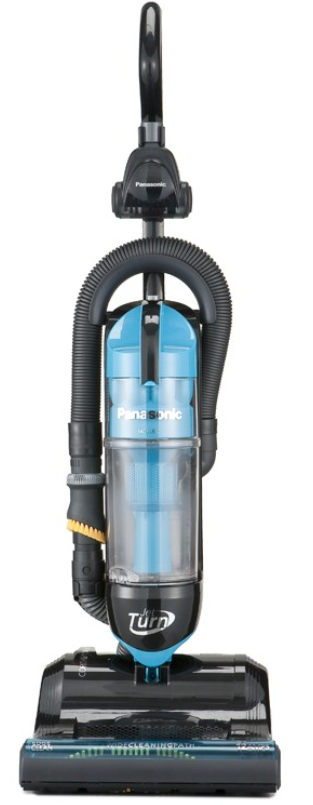
Panasonic Vacuum Cleaner MC-UL810
Introduction
The Panasonic Vacuum Cleaner MC-UL810 is a versatile and powerful bagless upright vacuum designed to make cleaning easier and more efficient. With its unique JetTurn swivel steering feature, users can effortlessly maneuver around furniture, making it ideal for homes with complex layouts. This model benefits those who suffer from allergies, thanks to its HEPA filtration system, and is suitable for both residential and light commercial use. The MC-UL810 is lightweight, weighing approximately 15 to 17 pounds, and features a 12-amp motor that delivers robust cleaning performance. It is available in the market with an estimated price range of $150 to $250, depending on the retailer and location.
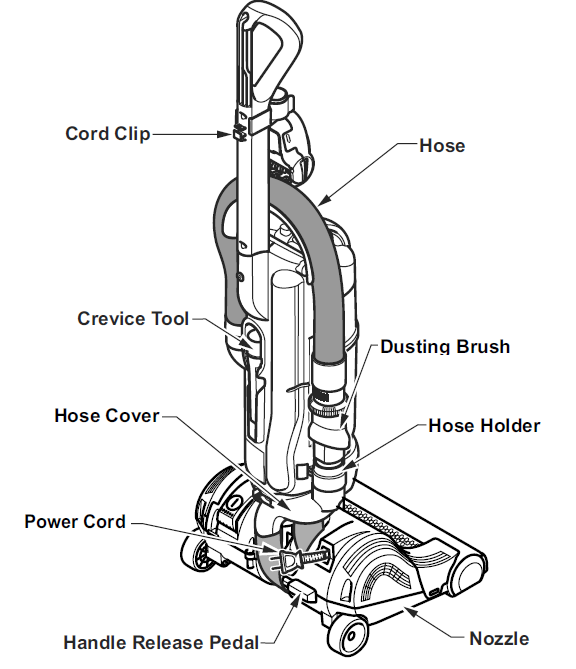
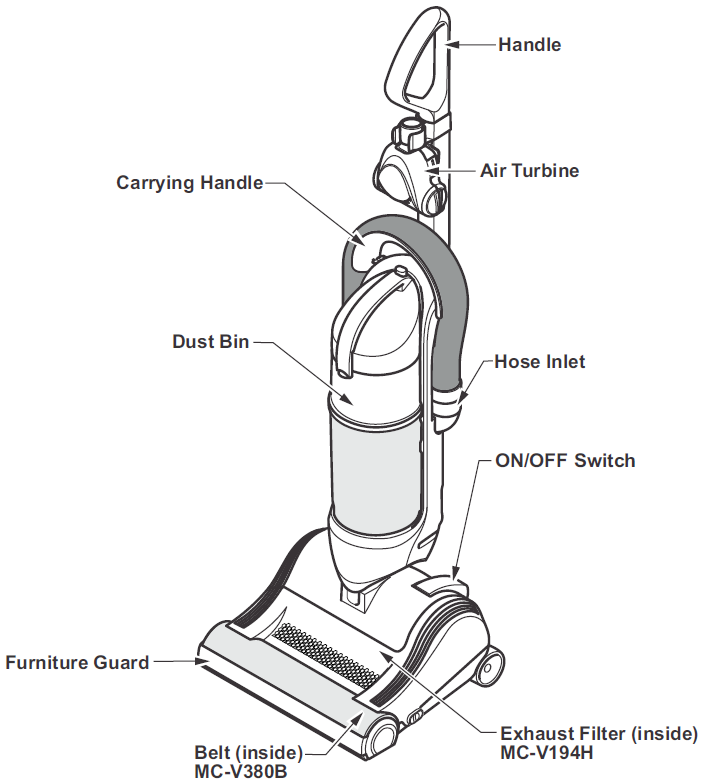
PARTS IDENTIFICATION
FEATURE CHART
- Power: 120V AC(60Hz)
- Thermal Protector: Yes
- Cord Length: 7.4 m (24 Ft.)
- Tools: Yes
Specifications
Below are the key specifications of the Panasonic MC-UL810:
- Bag Type: Bagless
- Filtration System: HEPA
- Power Input: 120V, 12 Amps
- Steering System: JetTurn Swivel Steering
- Cord Length: 24 feet with automatic rewind
- Weight: Approximately 15 pounds (varies slightly)
- Dimensions: 12 x 13 1/12 x 44 1/4 inches
- Cleaning Path: 13 inches
- On-Board Tools: Dusting Brush, Crevice Tool
- Warranty: 1 Year
IMPORTANT SAFETY INSTRUCTIONS
When using your vacuum cleaner, basic precautions should always be followed, including the following:
Read all instructions in this manual before assembling or using your vacuum cleaner.
WARNING: To reduce the risk of fire, electrical shock, and injury:
- Use your vacuum cleaner only as described in this manual. Use only with Panasonic recommended attachments.
- Disconnect the electrical supply before servicing or cleaning out the brush area.
- Do not leave the vacuum cleaner when plugged in. Unplug from the outlet when not in use and before servicing.
- To reduce the risk of electrical shock, do not use outdoors or on wet surfaces.
- Do not allow it to be used as a toy. Close attention is necessary when used by or near children.
- Do not use with a damaged cord or plug. If the vacuum cleaner is not working as it should, has been dropped, damaged, left outdoors, or dropped in water, return it to a Panasonic Service Center.
- Do not pull or carry by cord, use cord as a handle, close a door on cord, or pull cord around sharp edges or corners. Do not run a vacuum cleaner over the cord. Keep the cord away from heated surfaces.
- Do not unplug by pulling on the cord. To unplug, grasp the plug, not the cord.
- Do not handle the plug or the vacuum cleaner with wet hands.
- Do not put any objects into openings.
- Do not use with any opening blocked; keep free of dust, lint, hair, and anything that may reduce air flow.
- Keep hair, loose clothing, fingers, and all parts of the body away from openings and moving parts.
- Turn off all controls before unplugging.
- Use extra care when cleaning on stairs. Do not put on chairs, tables, etc. Keep on the floor.
- Do not use a vacuum cleaner to pick up flammable or combustible liquids (gasoline, cleaning fluid, perfumes, etc.), or use it in areas where they may be present. The fumes from these substances can create a fire hazard or explosion.
- Do not pick up anything that is burning or smoking, such as cigarettes, matches, or hot ashes.
- Do not use a vacuum cleaner without a dust bin and/or filters in place.
- Unplug before connecting the Air Turbine (if applicable).
- Hold the lug when rewinding onto the reel. DO NOT allow the plug to whip when rewinding.
- You are responsible for making sure that your vacuum cleaner is not used by anyone who is unable to operate it properly.
Power Cord
NOTE: To reduce the risk of electrical shock, this vacuum cleaner has a polarized plug; one blade is wider than the other. This plug will fit in a polarized outlet only one way. If the plug does not fit fully in the outlet, reverse the plug. If it still does not fit, contact a qualified electrician to install the proper outlet. DO NOT CHANGE THE PLUG IN ANY WAY. Only use outlets near the floor.
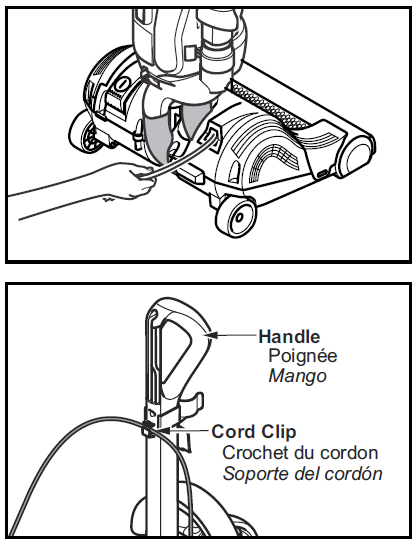
- Pull the power cord out of the vacuum cleaner to the desired length.
- Plug the polarized power cord into a 120 Volt outlet located near the floor.
- Make sure the power cord is placed into the cord clip as shown.
To Rewind:
- Turn off and unplug the vacuum cleaner.
- Hold the plug while rewinding to prevent damage or injury from the moving cord.
- A slight tug will release the locking pawls in the cord reel, allowing it to retract.
Using Tools
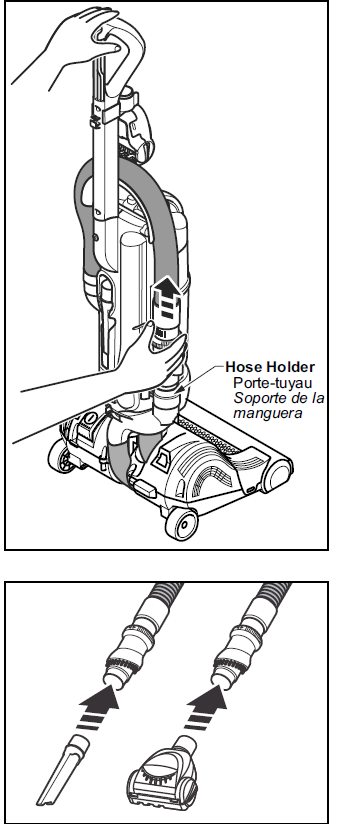
NOTE: Hold the handle to support the vacuum cleaner when using tools and disconnecting or attaching the hose.
- Disconnect the hose from the vacuum cleaner.
- Pull the hose gently in the direction of the arrow to disconnect.
- It may be necessary to slightly twist the hose handle to loosen it from the hose holder.
- Attach crevice tool or Air Turbine as needed.
Tools
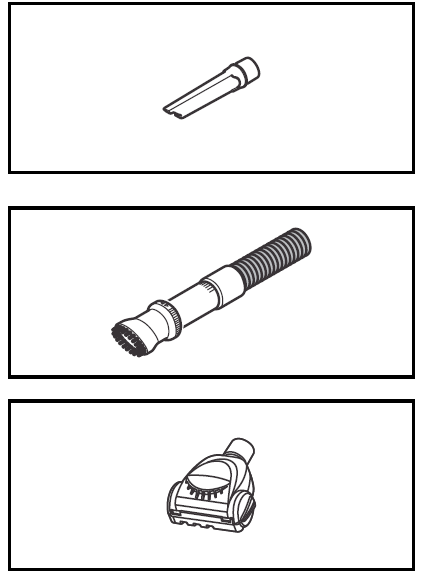
The Crevice Tool may be used on the following items:
- Furniture
- Cushions
- Drapes
- Stairs
- Walls
The Dusting Brush may be used on the following items:
- Furniture
- Drapes
- Stairs
- Walls
The Air Turbine may be used on the following items:
- Furniture
- Stairs
Operating instructions for the Air Turbine are included with the product.
Note: Always clean tools before using.
Thermal Protector
- This vacuum cleaner has a thermal protector that automatically trips to protect the vacuum cleaner from overheating.
- If a clog prevents the normal flow of air to the motor, the thermal protector turns the motor off automatically. This allows the motor to cool to prevent possible damage to the vacuum cleaner.
TO CORRECT PROBLEM:
- Turn the vacuum cleaner off and unplug the power cord from the outlet to allow the vacuum cleaner to cool and the thermal protector to reset.
- Check for and remove clogs, if necessary (See "Removing Clogs" p. 42). Also, check and replace any clogged filters and empty the dust bin, if necessary.
- Wait approximately fifty (50) minutes and then plug the vacuum cleaner in and turn it back on to see if the motor protector has reset.
ROUTINE CARE OF VACUUM CLEANER
Performing the tasks in the following sections will keep your new Panasonic vacuum cleaner operating at peak performance levels and will ensure these high levels for years to come. Check the BEFORE REQUESTING SERVICE section in this manual for recommendations on performing some of these tasks to help solve various problems that may occur.
WARNING: Electrical Shock or Personal Injury Hazard
Disconnect the electrical supply before servicing or cleaning the vacuum cleaner. Failure to do so could result in electrical shock or personal injury from a vacuum cleaner suddenly starting.
Cleaning Exterior and Tools
- Turn off and unplug the vacuum cleaner.
- Clean exterior using a clean, soft cloth that has been dipped in a solution of mild liquid detergent and water and wrung dry.
- DO NOT drip water on the vacuum cleaner and wipe dry after cleaning.
- DO NOT clean tools in the dishwasher or clothes washer.
- Crevice tool may be washed in warm soapy water, rinsed,d and air-dried.
- DO NOT use tools if they are wet.
LIMITED WARRANTY
(ONLY FOR U.S.A. AND PUERTO RICO)
Panasonic Vacuum Cleaner Limited Warranty
Limited Warranty Coverage (For USA and Puerto Rico Only)
If your product does not work properly because of a defect in materials or workmanship, Panasonic Consumer Marketing Company of North America (referred to as “the warrantor”) will, for the length of the period indicated on the chart below, which starts with the date of original purchase (“warranty period”), at its option either (a) repair your product with new or refurbished parts, (b) replace it with a new or a refurbished equivalent value product, or (c) refund your purchase price. The decision to repair, replace,, or refund will be made by the warrantor.
- Product or Part Name: Vacuum Cleaner
- Parts: 1 yr.
- Labor: 1 yr.
During the “Labor” warranty period,, there will be no charge for labor. During the “Parts” warranty period, there will be no charge for parts.
This Limited Warranty Excludes both Labor and Parts for the following items, which require normal replacement: Disposable Dust Bag, Filters, Belts, Light Bulbs, Agitator Brushes, and Batteries (if supplied).
This warranty only applies to products purchased and serviced in the United States or Puerto Rico. This warranty is extended only to the original purchaser of a new product which was not sold “as is”.
Carry-In or Mail-in Service:
To find a service center,, please visit http://www.panasonic.com/help or call 1-800-211-PANA (7262).
IF REPAIR IS NEEDED DURING THE WARRANTY PERIOD, THE PURCHASER WILL BE REQUIRED TO FURNISH A SALES RECEIPT/PROOF OF PURCHASE INDICATING DATE OF PURCHASE, AMOUNT PAID, ID, D AND PLACE OF PURCHASE. CUSTOMER WILL BE CHARGED FOR THE REPAIR OF ANY UNIT RECEIVED WITHOUT SUCH PROOF OF PURCHASE.
Limited Warranty Limits And Exclusions
This warranty ONLY COVERS failures due to defects in materials or workmanship, and DOES NOT COVER normal wear and tear or cosmetic damage. The warranty ALSO DOES NOT COVER damages which occurred in shipment, or failures which are caused by products not supplied by the warrantor, or failures which result from accidents, misuse, abuse, neglect, mishandling, misapplication, alteration, faulty installation, set-up adjustments, misadjustment of consumer controls, improper maintenance, power line surge, lightning damage, modification, introduction of sand, humidity or liquids, commercial use such as hotel, office, restaurant, or other business or rental use of the product, or service by anyone other than a Factory Service Center or other Authorized Servicer, or damage that is attributable to acts of God.
THERE ARE NO EXPRESS WARRANTIES EXCEPT AS LISTED UNDER “LIMITED WARRANTY COVERAGE”.
Customer Reviews
Users of the Panasonic MC-UL810 generally praise its lightweight design and ease of maneuverability. Many appreciate the powerful suction and the HEPA filter's effectiveness in reducing allergens. Some users have noted that the vacuum can be a bit heavy for prolonged use, but overall, it is well-regarded for its performance and value. Common praises include its ability to handle pet hair and embedded dirt effectively. However, some users have reported issues with the cord length and the need for more on-board storage for tools.
Faqs
How do I set up the panasonic VACUUM CLEANER MC-UL810 for first-time use?
What should I do if the panasonic VACUUM CLEANER MC-UL810 loses suction power?
Can the panasonic VACUUM CLEANER MC-UL810 be used on hardwood floors without causing damage?
How does the JetTurn swivel nozzle feature on the panasonic VACUUM CLEANER MC-UL810 improve cleaning?
What are the maintenance requirements to keep the panasonic VACUUM CLEANER MC-UL810 performing well?
Is the panasonic VACUUM CLEANER MC-UL810 compatible with additional cleaning attachments?
Why does the panasonic VACUUM CLEANER MC-UL810 have automatic cord rewind, and how does it benefit users?
What troubleshooting steps can I take if the panasonic VACUUM CLEANER MC-UL810 is not turning on?
More panasonic manuals
- Setup: Panasonic VACUUM CLEANER MC-UL675 Instruction Manual
- Setup: Panasonic Lumix Digital Camera DMC-FZ330 User Manual
- Usage: Panasonic VACUUM CLEANER MC-UL671 User Manual
- Panasonic High Definition Video Camera HC-V785 User Guide
- How to Use: Panasonic VACUUM CLEANER MC-UL555 User Manual
- Panasonic 65-inch OLED Smart TV TX-65JZ1000B User Guide
Leave a Comment