
Setup: Panasonic Home Monitoring Camera with Ambient Light KX-HNC855C User Manual
Content
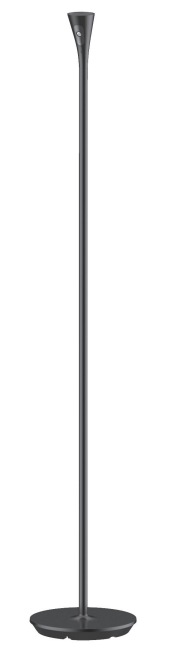
Panasonic Home Monitoring Camera with Ambient Light KX-HNC855C
Introduction
The Panasonic Home Monitoring Camera with Ambient Light KX-HNC855C is a state-of-the-art indoor security camera designed to provide comprehensive home surveillance with advanced features tailored for modern smart homes. Equipped with Full HD 1080p resolution, this camera ensures sharp, clear video recordings and live streaming, making it ideal for monitoring your living spaces, nurseries, or home offices. A standout feature is its integrated ambient light sensor, which automatically adjusts the camera’s sensitivity and visual output based on the lighting conditions, enhancing image quality during both day and night without manual intervention.
Perfect for homeowners, renters, and small businesses seeking reliable indoor security, the KX-HNC855C offers seamless connectivity through Bluetooth 5.0 and Wi-Fi, enabling real-time alerts and remote access via the HomeHawk app. It also supports person detection, motion alerts, and two-way audio communication, allowing users to interact remotely through the built-in microphone and speaker. With easy installation on shelves or windows, this camera fits discreetly into any environment.
The Panasonic Home Monitoring Camera KX-HNC855C is competitively priced in the mid-range segment, typically available between $120 to $160, depending on the retailer and promotions. It is widely available through authorized Panasonic dealers and popular e-commerce platforms. This product stands out for delivering advanced features such as color night vision, privacy modes, and microSD card support for local video storage, making it a compelling choice for users who value both security and intelligent automation.
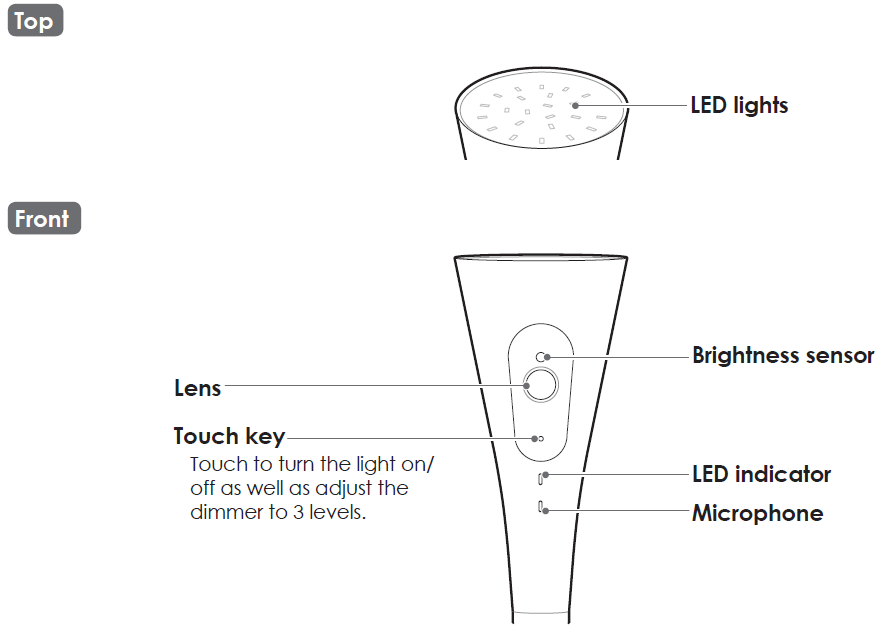
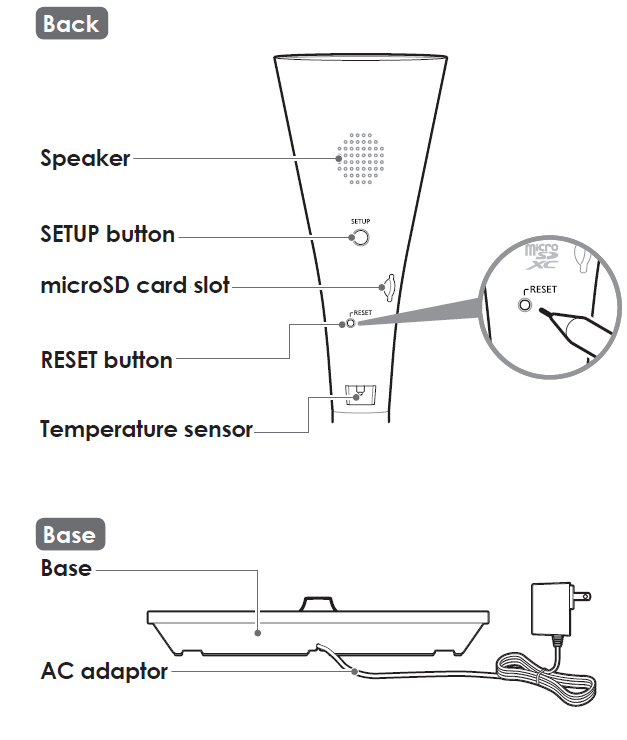
Part names and functions
Specifications
- Standards: IEEE 802.11a/b/g/n
- Frequency range: 2.412 GHz – 2.462 GHz (channels 1 – 11) / 5.180 GHz – 5.320 GHz (channels 36–64) / 5.500 GHz – 5.600 GHz (channels 100–116) / 5.650 GHz – 5.700 GHz (channels 132–140) / 5.745 GHz – 5.825 GHz (channels 149–165)
- RF transmission power: 100 mW (peak transmission power)
- Encryption: WPA2-PSK (TKIP/AES)‚ WPA-PSK (TKIP/AES)‚ WEP (128/64 bit)
- Power source: 120 V AC‚ 60 Hz
- Power consumption: Standby: 4.2 W / Maximum: 12.5 W
- Power back-up batteries (not supplied)1: AA (LR6) alkaline batteries x 8
- Power back-up battery life 2‚ 3: Daytime approx. 60 min./night time approx. 30 min.
- Operating conditions: 0 °C – 40 °C (32 °F – 104 °F) / 20 % – 80 % relative air humidity (dry)
- Resolution: 1920 × 1080 pixel (Full HD)‚ 1280 × 720 pixel (HD)‚ 640 × 480 pixel (VGA)
- Image sensor: 2.0 megapixel CMOS
- Maximum illumination 4: Approx. 600 lumens
- Minimum illuminance required5: 0 lx
- Focal length: Fixed (0.2 m (8 inches) – infinity)
- Camera field of view: Diagonal 140°
- microSD card:
- Type: microSDHC card (4 GB - 32 GB)‚ microSDXC card (64 GB - 256 GB)
- Speed: Class10‚ or UHS Speed Class 1 or higher
- Motion detection method: Visual sensor
- Dimensions (height × width × depth):
- 3 poles: Approx. 1‚800 mm × 306 mm × 306 mm (5 feet 10 7/8 inches × 12 1/32 inches × 12 1/32 inches)
- 2 poles: Approx. 1‚275 mm × 306 mm × 306 mm (4 feet 2 3/16 inches × 12 1/32 inches × 12 1/32 inches)
- 1 pole: Approx. 750 mm × 306 mm × 306 mm (2 feet 5 1/2 inches × 12 1/32 inches × 12 1/32 inches)
- Mass (weight):
- 3 poles: Approx. 4‚100 g (9.04 lb)
- 2 poles: Approx. 3‚650 g (8.05 lb) 1 pole: Approx. 3‚200 g (7.05 lb)
- During battery operations‚ LED brightness can only be set to the low setting.
- Note that battery life may be much shorter depending on the brand of batteries being used.
- There will be a notification when batteries are nearing the end of their life.
- The light dims according to your setting.
- The infrared LEDs that surround the camera lens will illuminate in low-light conditions.
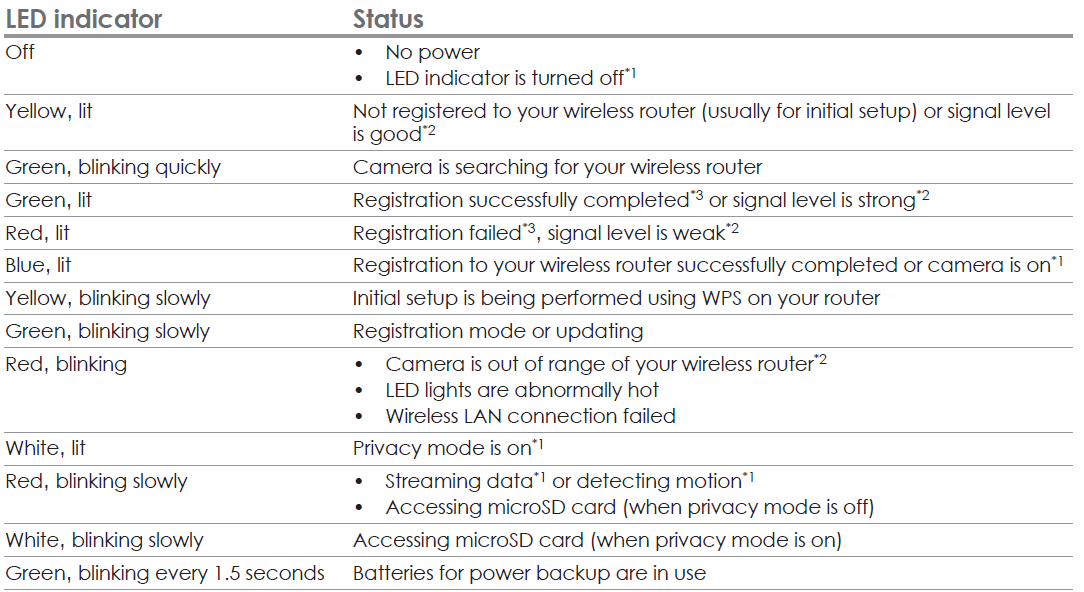
LED Indicator Status
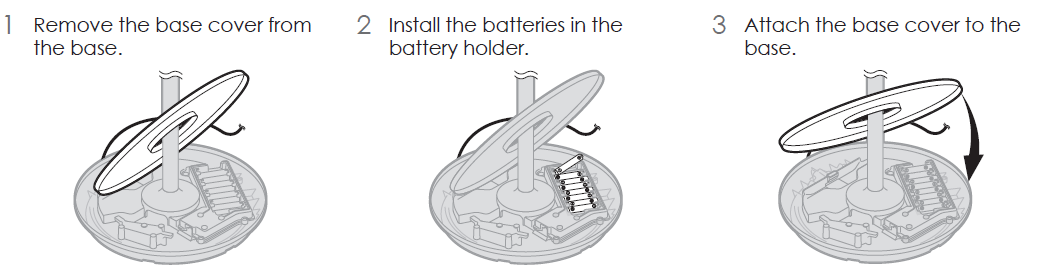
Battery installation (for power backup)
You can insert 8 AA (LR6) batteries (not supplied) into the base to temporarily power the camera in the event of a power failure.
Important:
- Use only alkaline batteries.
- Do NOT use manganese‚ Ni-Cd‚ Ni-MH‚ lithium‚ or lithium-ion batteries.
- Confirm correct polarities (+ ‚- ).
- Disconnect the AC adaptor when inserting or replacing batteries.
- Batteries are only intended for short-term use.
Installation
- Do not allow the power cord to be excessively pulled‚ bent, or placed under heavy objects.
- Do not place the product near wirelessly controlled devices such as automatic doors.
Installation and location
- Never install wiring during a lightning storm.
- The AC adaptor is used as the main disconnect device. Ensure that the AC outlet is installed near the product and is easily accessible.
- Place the product in a stable location where the base can be adequately supported when installing.
- Do not place the product on soft or unstable material. It may fall down‚ break, or cause injury.
Operating safeguards
- Do not look directly at the LED when it is lit. Doing so may cause damage to the eyes.
- Consider the installation environment carefully when installing the product. Pay particular attention to infants‚ children‚ and the elderly‚ as they may be more sensitive to bright lights.
- When you move the product‚ lift the product holding the poles or the bottom of the product base. There may be a risk of injury or damage to your property if the product is dropped.
- Do not put flammable objects such as cloth or paper on the product.
- Take adequate care when using the product in an area where there are small children or pets. If the product is bumped into‚ it may fall over and cause injury to small children or pets.
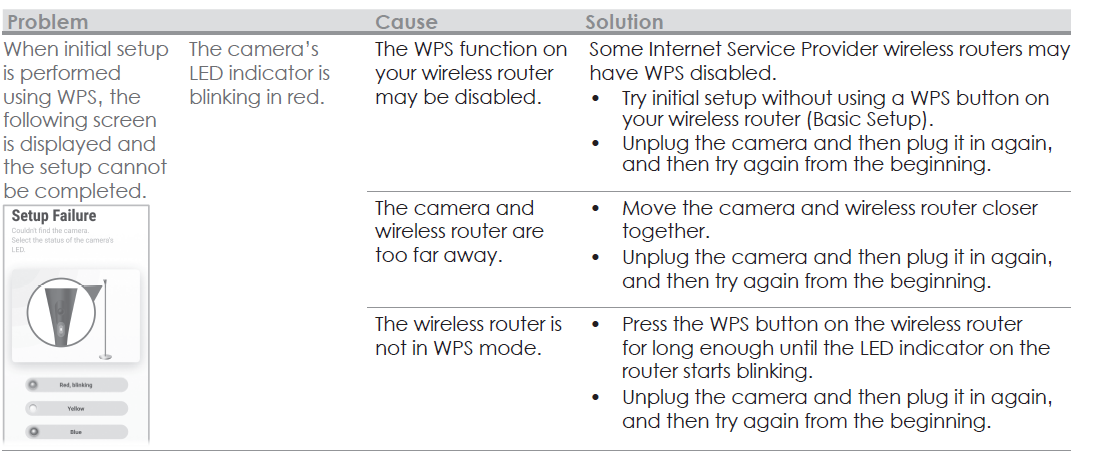
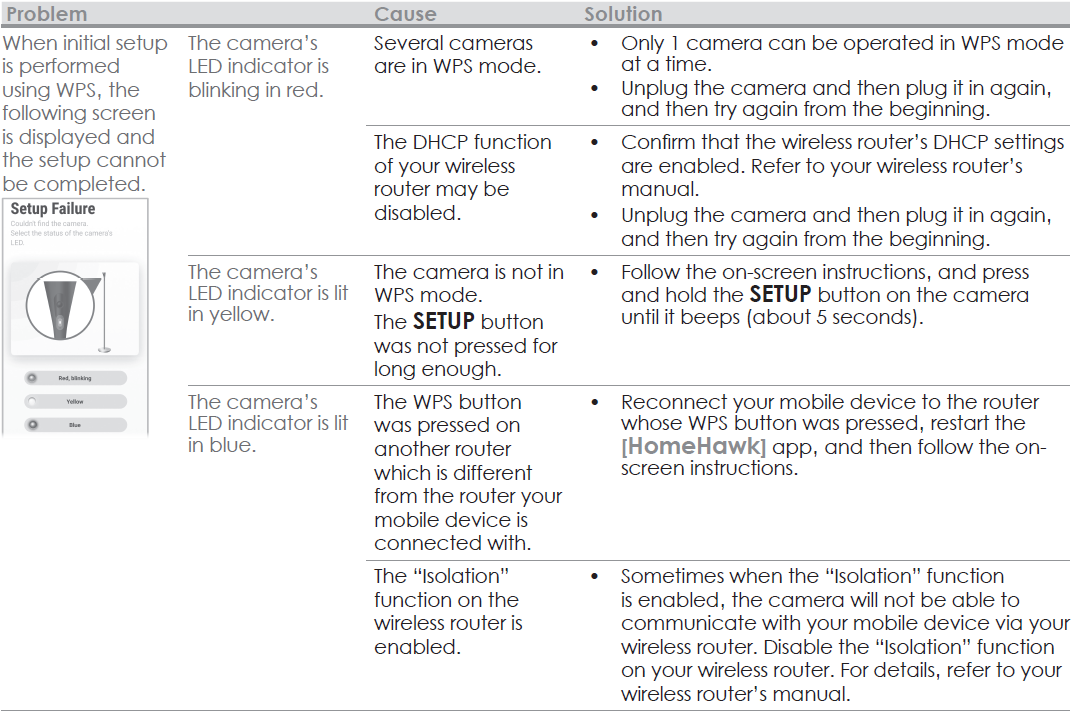
Troubleshooting (Initial setup by WPS)
What is WPS?
WPS is a function of wireless routers that is used to easily connect wireless devices to a wireless router.
A WPS button on a wireless router indicates that it has the WPS function. (Depending on the type of wireless router‚ the WPS function may be disabled on the wireless router even if there is a WPS button.)
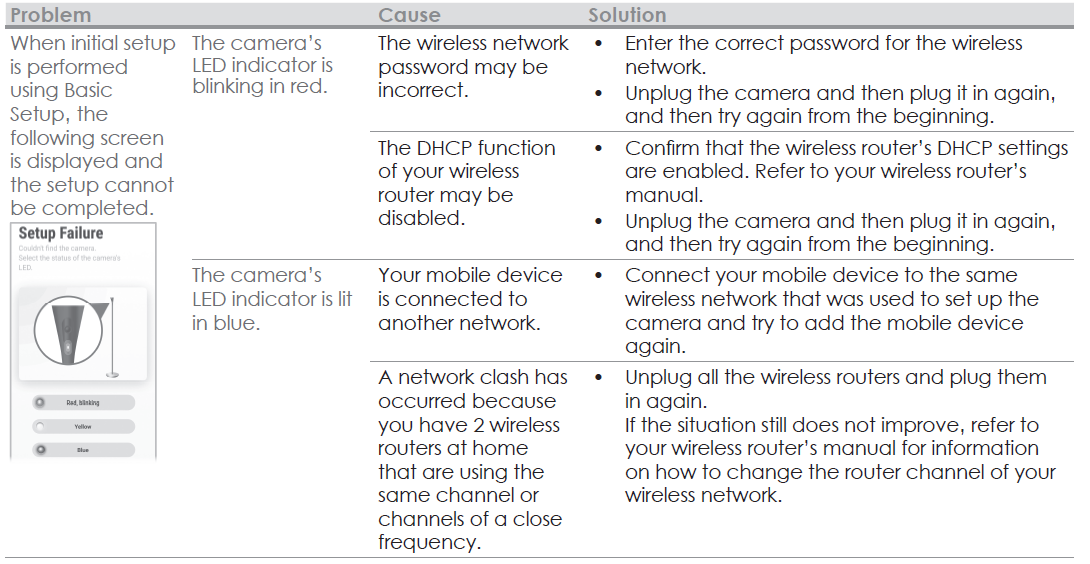
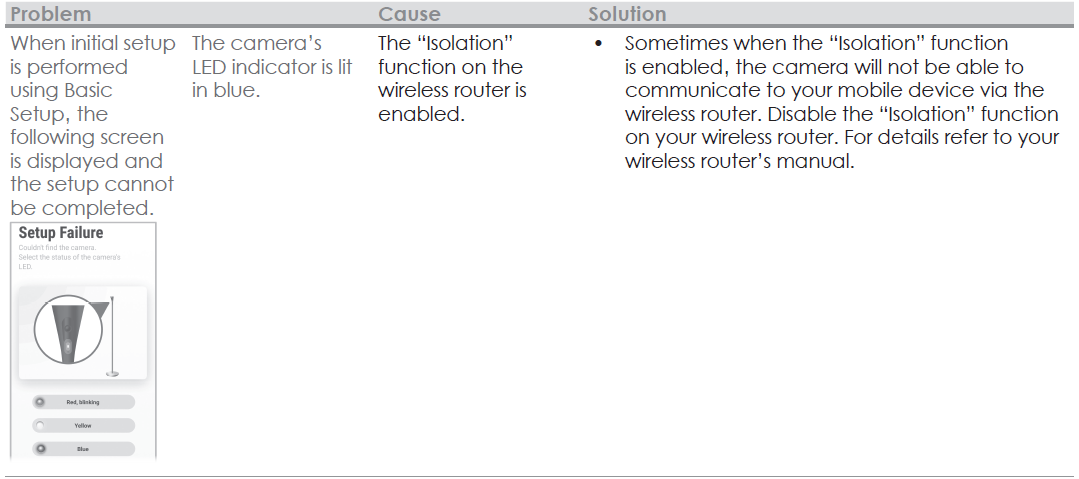
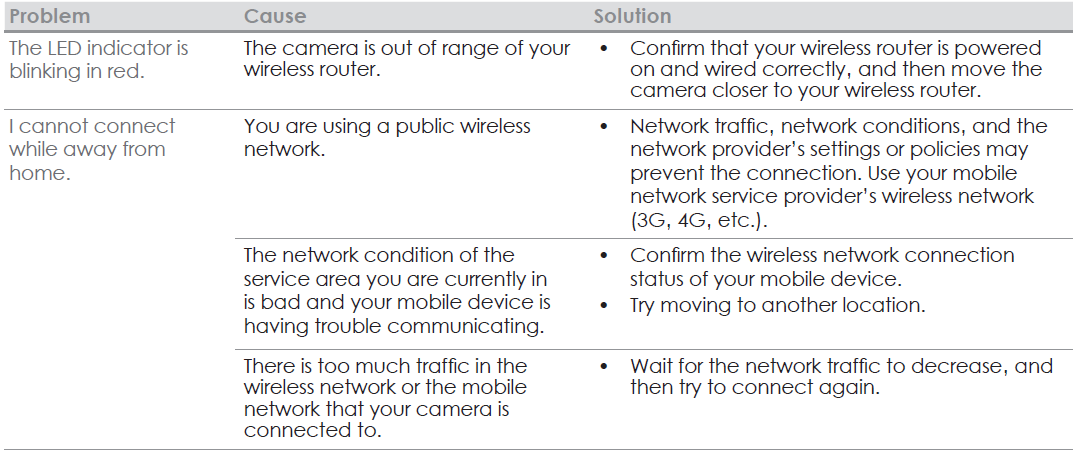
If you have trouble during the initial setup‚ check the following causes/solutions first and then turn off the camera and restart it.
Troubleshooting (Initial setup by Basic Setup)
Warranty
Panasonic Canada Inc.
5770 Ambler Drive‚ Mississauga‚ Ontario L4W 2T3
PANASONIC PRODUCT - LIMITED WARRANTY
EXCHANGE PROGRAM
Panasonic Canada Inc. warrants this product to be free from defects in material and workmanship under normal use and for a period as stated below from the date of original purchase agrees to‚ at its option either (a) repair your product with new or refurbished parts‚ (b) replace it with a new or a refurbished equivalent value product‚ or (c) refund your purchase price. The decision to repair‚ replace,, or refund will be made by Panasonic Canada Inc.
- Home Network System Products – One (1) year
- microSD card (Included model only) – One (1) year
This warranty is given only to the original purchaser‚ or the person for whom it was purchased as a gift‚ of a Panasonic brand product mentioned above sold by an authorized Panasonic dealer in Canada and purchased and used in Canada‚ which product was not sold “as is”‚ and which product was delivered to you in new condition in the original packaging. TO BE ELIGIBLE TO RECEIVE WARRANTY SERVICE HEREUNDER, A PURCHASE RECEIPT OR OTHER PROOF OF DATE OF ORIGINAL PURCHASE, SHOWING AMOUNT PAID AND PLACE OF PURCHASE,, IS REQUIRED
LIMITATIONS AND EXCLUSIONS
This warranty ONLY COVERS failures due to defects in materials or workmanship‚ and DOES NOT COVER normal wear and tear or cosmetic damage. The warranty ALSO DOES NOT COVER damages which occurred in shipment‚ or failures which are caused by products not supplied by Panasonic Canada Inc.‚ or failures which result from accidents‚ misuse‚ abuse‚ neglect‚ mishandling‚ misapplication‚ alteration‚ faulty installation‚ set-up adjustments‚ misadjustment of consumer controls‚ improper maintenance‚ improper batteries‚ power line surge‚ lightning damage‚ modification‚ introduction of sand‚ humidity or liquids‚ commercial use such as hotel‚ office‚ restaurant‚ or other business or rental use of the product‚ or service by anyone other than a Authorized Servicer‚ or damage that is attributable to acts of God.
Dry cell batteries are also excluded from coverage under this warranty. Rechargeable batteries are warranted for ninety (90) days from the date of original purchase.
THIS EXPRESS‚ LIMITED WARRANTY IS INSTEAD OF ALL OTHER WARRANTIES‚ EXPRESS OR IMPLIED‚ INCLUDING ANY IMPLIED WARRANTIES OF MERCHANTABILITY AND FITNESS FOR A PARTICULAR PURPOSE. IN NO EVENT WILL PANASONIC CANADA INC. BE LIABLE FOR ANY SPECIAL‚ INDIRECT,, OR CONSEQUENTIAL DAMAGES RESULTING FROM THE USE OF THIS PRODUCT OR ARISING OUT OF ANY BREACH OF ANY EXPRESS OR IMPLIED WARRANTY.
(As examples‚ this warranty excludes damages for lost time‚ travel to and from the Authorized Servicer‚ loss of or damage to media or images‚ data, or other memory or recorded content. This list of items is not exhaustive‚ but for illustration only.)
In certain instances‚ some jurisdictions do not allow the exclusion or limitation of incidental or consequential damages‚ or the exclusion of implied warranties‚ so the above limitations and exclusions may not be applicable. This warranty gives you specific legal rights, and you may have other rights which vary depending on your province or territory.
Pros & Cons of Panasonic Home Monitoring Camera with Ambient Light KX-HNC855C
- Pros:
- Full HD 1080p video quality ensures clear and detailed surveillance footage.
- Ambient light sensor optimizes video quality automatically across different lighting conditions, including effective color night vision.
- Supports two-way audio, enabling direct communication with people around the camera.
- Easy integration with the HomeHawk app for remote monitoring, live alerts, and device management.
- Local video storage via microSD card reduces dependency on cloud services and potential subscription fees.
- Person detection and customizable motion sensitivity enhance alert accuracy, reducing false alarms.
- Cons:
- Not equipped with 4K resolution, which some higher-end cameras offer for ultra-premium video clarity.
- Limited operating temperature range (0°C to 40°C) may restrict use in certain environments such as unheated garages or basements.
- Requires a stable Wi-Fi connection; performance may degrade in low signal areas.
- Google Home integration is limited to certain camera models and features, not fully supported on this one.
- Compared to some competitors, the app interface can be less intuitive for first-time users.
- Value for Money: The KX-HNC855C offers strong value with advanced features typically found in higher-priced models, particularly its ambient light adaptation and high-quality video recording capabilities. It competes well with alternatives like Arlo and Ring indoor camera,,s but stands out for local storage options and color night vision.
Customer Reviews for Panasonic Home Monitoring Camera with Ambient Light KX-HNC855C
Users generally rate the Panasonic Home Monitoring Camera with Ambient Light KX-HNC855C highly, with an average rating of around 4.8 to 4.9 out of 5 stars. Customers praise the crisp 1080p video clarity and the camera’s reliable motion detection system that triggers timely alerts. Many appreciate the built-in ambient light sensor,, which enhances night-time footage with color, a feature not commonly found in similar indoor cameras.
Common compliments include the ease of installation, the responsive HomeHawk mobile app, and the privacy shutter that allows users to disable the camera lens physically. However, some users report occasional connectivity issues, especially in areas with weak Wi-Fi signals. A few customers also mention that while the device excels indoors, it is not suitable for outdoor use due to environmental limitations.
Overall, the camera is recommended for home monitoring, baby monitoring, and small office security. Reviews highlight its excellent balance of features and affordability, making it a trusted choice for buyers seeking reliable indoor security without ongoing subscription costs.
Faqs
How do I set up the panasonic Home Monitoring Camera with Ambient Light KX-HNC855C for the first time?
What should I do if the panasonic Home Monitoring Camera with Ambient Light KX-HNC855C is not connecting to Wi-Fi?
Can I use the panasonic Home Monitoring Camera with Ambient Light KX-HNC855C with other Panasonic home network devices?
How do I optimize video performance for the panasonic Home Monitoring Camera with Ambient Light KX-HNC855C?
What are the key features of the panasonic Home Monitoring Camera with Ambient Light KX-HNC855C that improve home security?
How often should I clean and maintain the panasonic Home Monitoring Camera with Ambient Light KX-HNC855C?
What troubleshooting steps can I take if the panasonic Home Monitoring Camera with Ambient Light KX-HNC855C LED indicator does not light up?
Is the panasonic Home Monitoring Camera with Ambient Light KX-HNC855C compatible with Android and iOS devices?
More panasonic manuals
- Setup: Panasonic Home Monitoring Camera with Ambient Light Floor KX-HNC850 User Guide
- Setup: Panasonic Home Network System Digital Cordless Handset KX-HNH100 User Manual
- Usage: Panasonic Home Monitoring Camera KX-HNC815C User Guide
- How to Use: Panasonic Home Network System Access Keypad KX-HNK101 User Manual
- Usage & Setup: Panasonic Water Leak Sensor KX-HNS103 Instruction Guide
- How to Use: Panasonic Home Network System Keychain Remote KX-HNK102 User Manual
Leave a Comment