
Usage & Setup: Panasonic Motion Sensor KX-HNS102 Instruction Guide
Content
Panasonic Motion Sensor KX-HNS102

Introduction
The Panasonic Motion Sensor KX-HNS102 is a smart, wireless security accessory designed to enhance home monitoring and peace of mind. As a key component of Panasonic’s Home Network System, this motion detector is engineered for easy DIY installation and seamless integration with the KX-HNB600W hub, which is required for full functionality. The KX-HNS102 uses advanced infrared technology to detect movement within a range of approximately 5 meters (16.4 feet), with a 90° horizontal and 20° vertical detection angle, making it ideal for monitoring entryways, hallways, and interior rooms.
Homeowners can receive instant text alerts on their smartphone or tablet when motion is detected, allowing for a real-time response whether at home or away. The sensor also supports remote arming and disarming via the Panasonic Home Network app, offering convenience and flexibility. Additional features include adjustable sensitivity settings to minimize false alarms and an LED indicator for visual confirmation of detection.
The Panasonic Motion Sensor KX-HNS102 is perfect for families, renters, and small business owners seeking an affordable, user-friendly security solution. Typical use cases include monitoring children’s arrival, deterring intruders, and integrating with other smart home devices for a comprehensive security ecosystem. The estimated price range is mid-tier for smart home sensors, and availability varies by region, often through electronics retailers and online marketplaces. With its blend of reliability, ease of use, and smart connectivity, the KX-HNS102 stands out as a practical choice for modern home security.
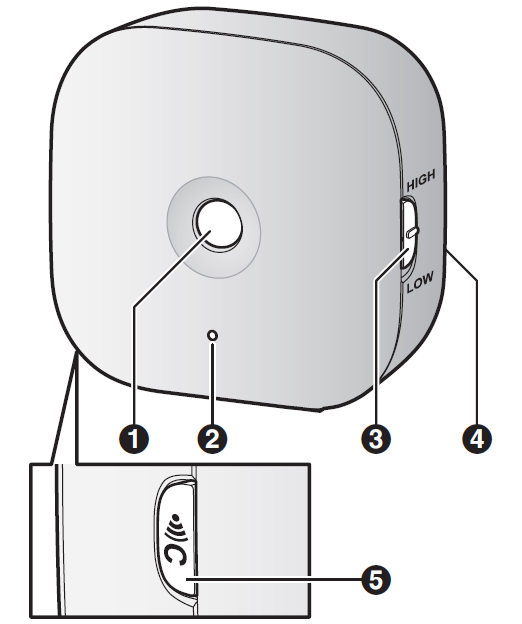
Part names and functions
- Infrared sensor
- LED indicator
- HIGH/LOW
Used to change the sensor sensitivity (page 14). - Rear cover

Used to confirm the status of the sensor or register the sensor to the hub.
Accessory information
Supplied accessories

- When replacing batteries, see “Power source” of “Specifications”, page 15 for battery information.
- The motion sensor can be wall-mounted with or without the wall mounting adaptor (page 12).

Specifications
- Frequency range
DECT: 1.92 GHz – 1.93 GHz - RF transmission power
DECT: 115 mW (max.) - Power source
AA (LR6) Alkaline battery (2 ´ 1.5 V) - Operating conditions
0 °C – 40 °C (32 °F – 104 °F) - Sensor detection method
Pyroelectric infrared sensor (heat sensor) - Heat sensor detection range
Horizontal: approx. ±45°
Vertical: approx. ±10°
Distance: approx. 5 m (16.4 feet) (when the surrounding temperature is approx. 25 °C (77 °F)) - Battery life
Approx. 1 year (when motion is detected 50 times a day and the surrounding temperature is approx. 25 °C (77 °F)) - Dimensions
With the rear cover attached:
Approx. 72 mm ´ 73 mm ´ 39 mm (2 27/32 inches ´2 7/8 inches ´1 17/32 inches)
With the wall mounting adaptor attached:
Approx. 72 mm ´ 73 mm ´ 61 mm (2 27/32 inches ´2 7/8 inches ´2 13/32 inches) - Mass (weight)
With the rear cover attached:
Approx. 70 g (0.15 lb), excluding the batteries
With the wall mounting adaptor attached:
Approx. 77 g (0.17 lb), excluding the batteries
Installation
- To prevent the risk of fire or electrical shock, do not expose the product to rain or any type of moisture.
- Do not place or use this product near automatically controlled devices such as automatic doors and fire alarms. Radio waves emitted from this product may cause such devices to malfunction, resulting in an accident.
- Keep small parts (screws, etc.) out of the reach of children. There is a risk of swallowing. In the event they are swallowed, seek medical advice immediately.
Important safety instructions
When using your product, basic safety precautions should always be followed to reduce the risk of fire, electric shock, and injury to persons, including the following:
- Do not use this product near water,r for example, near a bathtub, washbowl, kitchen sink, or laundry tub, in a wet basement,nt or near a swimming pool.
- Use only the batteries indicated in this document. Do not dispose of batteries in a fire. They may explode. Check with local codes for possible special disposal instructions.
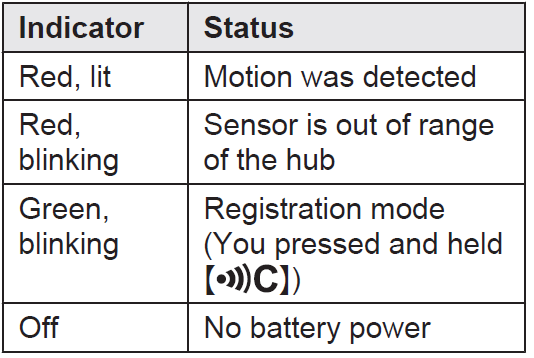
About the LED indicator
You can press and check the LED indicator to confirm the sensor’s status.

Note:
- The LED indicator does not indicate sensor status if the sensor has not been registered (page 8).
Setup overview
- Initial setup
Make sure you can access the system using your mobile device.
For details, refer to the System Setup Guide included with your hub. - Insert the batteries
The motion sensor is battery-powered. - Registration
Required only if the motion sensor was purchased separately (i.e., not as part of a bundle). - Confirm the installation area.
Read the information in this document to confirm that the desired installation area is suitable for proper operation. - Installation
Install the motion sensor in the desired location.
Setup
Inserting the batteries
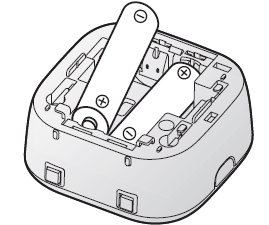
- USE ONLY Alkaline batteries AA (LR6) size.
- Do NOT use Manganese/Ni-Cd/ Ni-MH batteries.
- Confirm the polarities ( +, -).
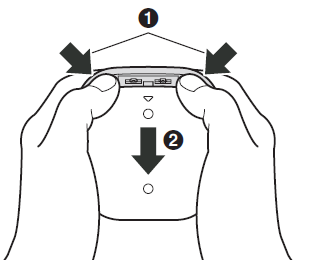
Remove the rear cover by pressing the upper sides of the cover (A) and sliding it down (B).
Insert the batteries.
Install the rear cover.
Place it with the “ ” mark facing upwards and slide it.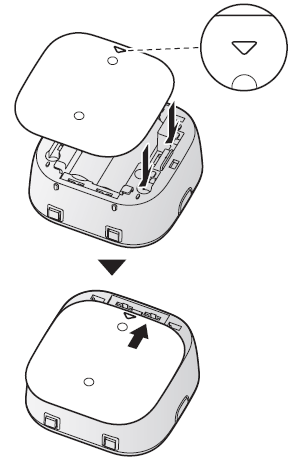
Warranty (For the United States and Puerto Rico)
Panasonic Home Network System Products Limited Warranty
Limited Warranty Coverage
If your product does not work properly because of a defect in materials or workmanship, Panasonic Corporation of North America (referred to as “the warrantor”) will, for the length of the period indicated on the chart below, which starts with the date of original purchase (“Limited Warranty period”), at its option either (a) repair your product with new or refurbished parts, or (b) replace it with a new or a refurbished equivalent value product, or (c) refund your purchase price. The decision to repair, replace, or refund will be made by the warrantor.
Home Network System Products microSD card (Included model only)
- Parts: One (1) Year 90 days
- Labor: One (1) Year N/A
During the “Labor” Limited Warranty period , there will be no charge for labor. During the “Parts” Limited Warranty period, there will be no charge for parts. You must mail in your product prepaid during the Limited Warranty period. This Limited Warranty excludes both parts and labor for batteries, antennas, and cosmetic parts (cabinet). This Limited Warranty only applies to products purchased and serviced in the United States or Puerto Rico. This Limited Warranty is extended only to the original purchaser and only covers products purchased as new.
Troubleshooting Common Issues with the Panasonic Motion Sensor KX-HNS102
Even the most reliable smart home devices can encounter occasional issues. Below are common problems, solutions, and preventive measures for the Panasonic Motion Sensor KX-HNS102.
Common Problems and Solutions
- No Motion Detection: Check the sensor’s placement—ensure it has a clear line of sight and is within 5 meters of the area to monitor. Test the sensor by moving in front of it; the LED should light red upon detection. Adjust sensitivity if needed using the MHIGHN/MLOWN switch.
- False Alarms: Reduce sensitivity if the sensor is triggered by pets or temperature fluctuations. Place the sensor away from heat sources and direct sunlight.
- No Notifications: Verify that the Home Network app is properly configured and your smartphone/tablet has a stable internet connection. Re-pair the sensor with the hub if necessary.
- Low Battery: Replace the battery promptly when the low battery indicator appears. Typical battery life is up to one year with standard use.
Error Codes and Fixes
While the KX-HNS102 does not display numeric error codes, status is communicated via the LED indicator. A solid or blinking LED can indicate pairing, detection, or low battery status. Consult the manual for specific LED patterns[2].
Preventive Measures
- Regularly test the sensor and check battery levels.
- Keep the sensor clean and free from obstructions.
- Ensure the hub is updated with the latest firmware.
Warranty and Support
Panasonic offers a standard warranty on the KX-HNS102; check your purchase documentation for details. For additional support, visit the Panasonic support website or contact their customer service line. Always retain your proof of purchase for warranty claims.
Pros and Cons of the Panasonic Motion Sensor KX-HNS102
Advantages
- Easy Installation: The KX-HNS102 features one-touch syncing and a simple DIY setup, making it accessible for non-technical users.
- Smart Alerts: Receive instant notifications on your mobile device when motion is detected, enhancing home security and convenience.
- Adjustable Sensitivity: Customize detection settings to reduce false alarms from pets or environmental changes.
- Long Battery Life: Operates for up to a year on a single battery under normal conditions.
- Integration: Works seamlessly with the Panasonic Home Network System and other compatible devices for a unified smart home experience.
Disadvantages
- Hub Required: The KX-HNS102 cannot function standalone; the KX-HNB600W hub must be purchased separately.
- Limited Range: Detection is effective up to 5 meters, which may not suffice for larger spaces.
- Basic Features: Lacks advanced capabilities like facial recognition or video recording found in some competitors’ products.
- No Rechargeable Battery: Uses standard batteries, which require periodic replacement.
Value for Money: The Panasonic Motion Sensor KX-HNS102 offers reliable performance and smart features at a competitive price, though the need for a separate hub adds to the total cost. Compared to alternatives, it excels in ease of use and integration with Panasonic’s ecosystem but may lack some premium features offered by other brands.
Customer Reviews and Testimonials
Users of the Panasonic Motion Sensor KX-HNS102 frequently praise its straightforward setup and reliable motion detection. Many highlight the convenience of receiving smartphone alerts and the ease of integrating the sensor into their existing Panasonic Home Network System. The long battery life and adjustable sensitivity are also commonly mentioned positives, with several users noting fewer false alarms compared to other sensors they’ve tried.
Common complaints include the necessity of purchasing a separate hub, which increases the overall investment, and the sensor’s limited range for larger homes. Some users have experienced occasional connectivity issues, though these are often resolved by re-pairing the device or checking battery levels.
Star ratings on retail platforms typically range from 4 to 4.5 out of 5, reflecting general satisfaction with the product’s performance and value. Testimonials often recommend the KX-HNS102 for users seeking an affordable, no-fuss addition to their smart home security, especially those already invested in the Panasonic ecosystem.
For those considering a purchase, the Panasonic Motion Sensor KX-HNS102 is best suited for small to medium-sized homes and users who value simplicity and reliability over advanced features. It is particularly recommended for families and renters looking to enhance their home monitoring without complex installation.
Faqs
How do I set up the Panasonic Motion Sensor KX-HNS102 for the first time?
What should I do if the Panasonic Motion Sensor KX-HNS102 is not working properly?
Can I use the Panasonic Motion Sensor KX-HNS102 with other smart devices?
How do I adjust the sensitivity of the Panasonic Motion Sensor KX-HNS102?
What are the key features that make the Panasonic Motion Sensor KX-HNS102 different?
How often should I maintain the Panasonic Motion Sensor KX-HNS102?
Can I use the Panasonic Motion Sensor KX-HNS102 with a different hub model?
What type of batteries should I use for the Panasonic Motion Sensor KX-HNS102?
More panasonic manuals
- Setup: Panasonic Window/Door Sensor KX-HNS101 Instruction Guide
- Usage & Setup: Panasonic Water Leak Sensor KX-HNS103 Instruction Guide
- Setup: Panasonic Home Network System Backup Battery Instruction Guide
- Usage: Panasonic Home Monitoring Camera KX-HNC815C User Guide
- Setup: Panasonic Home Monitoring Outdoor Camera KX-HNC710 Instruction Guide
- Setup: Panasonic Home Monitoring Camera with Ambient Light Floor KX-HNC850 User Guide
Leave a Comment