
Setup: Panasonic Window/Door Sensor KX-HNS101 Instruction Guide
Content
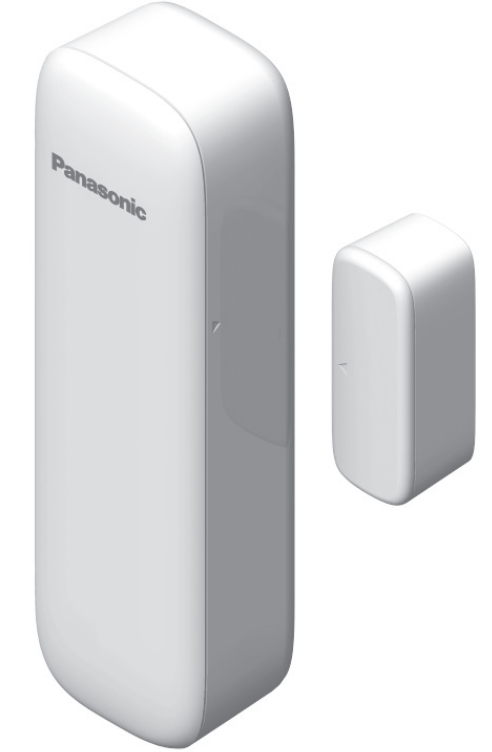
Panasonic Window/Door Sensor KX-HNS101
Introduction
The Panasonic Window/Door Sensor KX-HNS101 is a wireless security accessory designed to enhance your home monitoring system by detecting openings of windows and doors. Specifically engineered to work seamlessly with the Panasonic KX-HNB600 Hub unit, this sensor provides real-time alerts to your smartphone or tablet, ensuring you stay informed about your home’s security status even when you are away.
Key benefits of the KX-HNS101 include its easy DIY installation with one-touch pairing, a robust battery life lasting approximately two years under typical usage, and clear status indication through a red/green LED. The sensor emits a loud sound and flashes an LED as a deterrent when triggered, which can warn intruders effectively. This smart sensor is compatible with iOS and Android devices, enabling remote control and notifications, ideal for families, renters, and homeowners wanting added security for entry points.
Targeted at users who already own or plan to purchase Panasonic’s home monitoring kits (such as the KX-HN6000 series), the KX-HNS101 is perfect for securing entrances and alerting users to unauthorized access. It fits well in both residential and small office environments. The product is typically priced in the affordable range for home security accessories and is available through Panasonic’s authorized dealers and online retailers.
Part names and functions
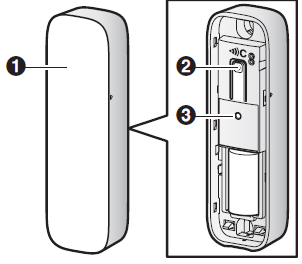
- Sensor unit cover

- Used to confirm the status of the sensor or register the sensor to the hub.
- LED indicator
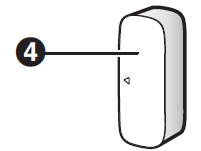
- Magnet unit cover
Sensor unit
Magnet unit
Specifications
- Frequency range
DECT: 1.92 GHz – 1.93 GHz - RF transmission power
DECT: 115 mW (max.) - Power source
Lithium battery CR2 (1 ´ 3.0 V,850 mAh) - Operating conditions
-10 °C – 40 °C (14 °F – 104 °F) - Battery life
Approx. 2 years (when the window/door is opened and closed 10 times a day, in an environment of 25 °C (77 °F)) - Dimensions
Sensor unit: Approx. 102 mm ´ 31 mm ´ 22 mm (4 inches ´ 1 7/32 inches ´ 7/8 inches)
Magnet unit: Approx. 37 mm ´14 mm ´ 14 mm (1 15/32 inches ´ 9/16 inches ´ 9/16 inches) - Mass (weight)
Sensor unit: Approx. 39 g (0.09 lb), excluding the battery
Magnet unit: Approx. 8 g (0.02 lb)
Accessory information
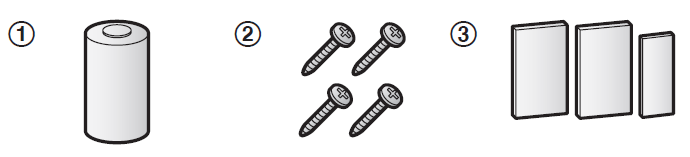
Supplied accessories

- When replacing the battery, see “Power source” of “Specifications”, page 18,, for battery information.
- 2 screws for the sensor unit and 2 screws for the magnet unit
- 2 pieces of tape for the sensor unit: PNHS1620Z
- 1 piece of tape for the magnet unit: PNHS1621Z
Important safety instructions
When using your product, basic safety precautions should always be followed to reduce the risk of fire, electric shock, and injury to persons, including the following:
- Do not use this product near water, for example, near a bathtub, washbowl, kitchen sink, or laundry tub, in a wet basement,, or near a swimming pool.
- Use only the batteries indicated in this document. Do not dispose of batteries in a fire. They may explode. Check with local codes for possible special disposal instructions.
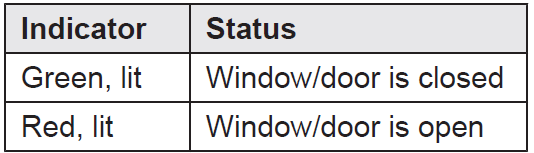
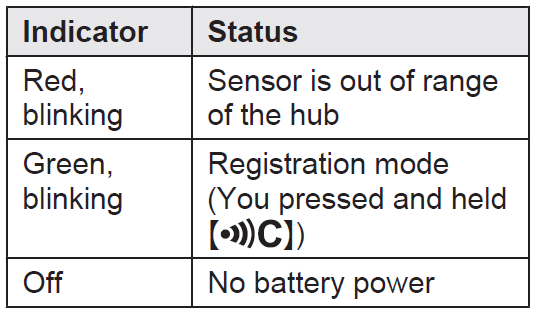
About the LED indicator
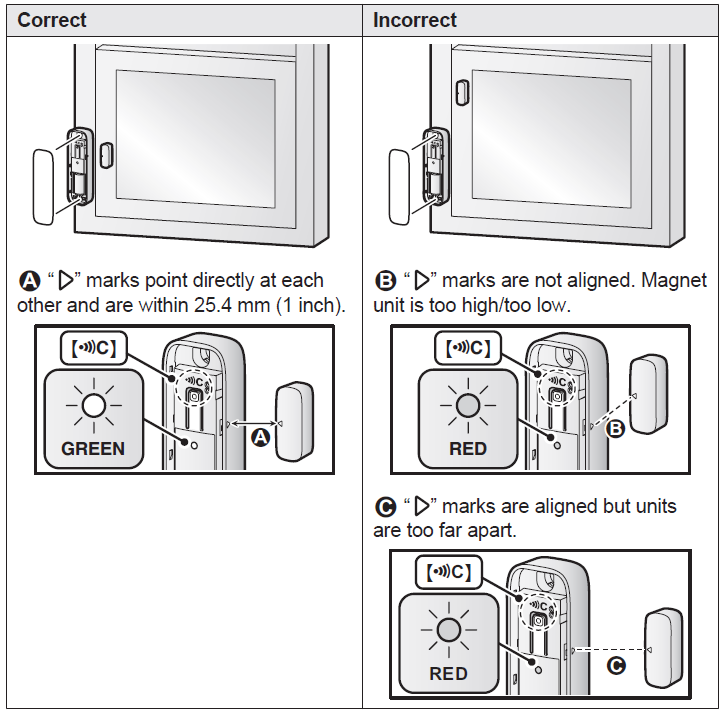
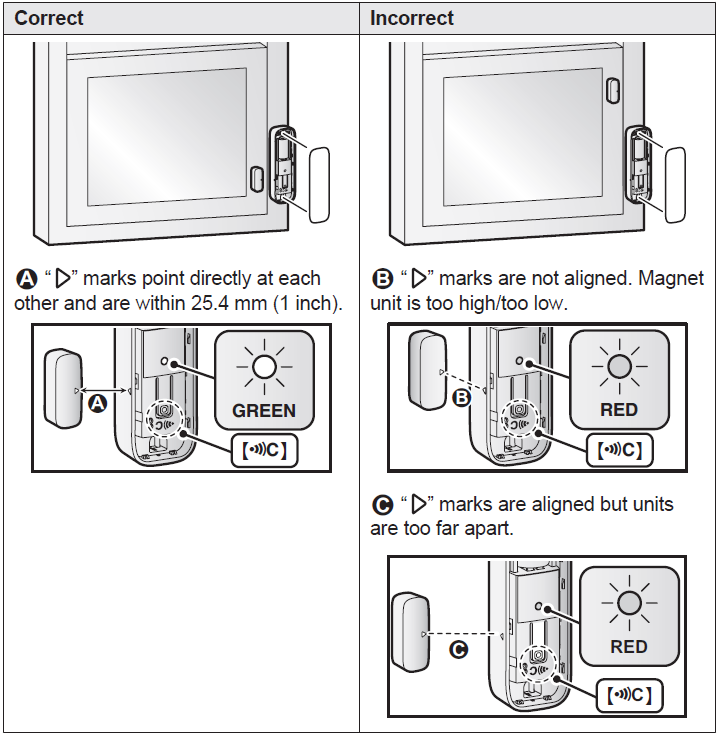
You can press and check the LED indicator to confirm the sensor’s status.
Setup overview
- Initial setup
Make sure you can access the system using your mobile device. For details, refer to the System Setup Guide included with your hub. - Insert the battery
The window/door sensor is battery-powered. - Registration
Required only if the window/door sensor was purchased separately (i.e., not as part of a bundle). - Confirm the installation area..
Read the information in this document to confirm that the desired installation area is suitable for proper operation. - Temporary placement
Temporarily place the window/ door sensor in the desired location and confirm that it operates properly (page 11). - Installation
Install the window/door sensor in the same position as where the proper one one..
Inserting the battery
- USE ONLY a CR2 Lithium battery.
- Confirm the polarities (+ , -).
Remove the sensor unit cover.
Lift from the indented area (A)and open the sensor unit cover (B).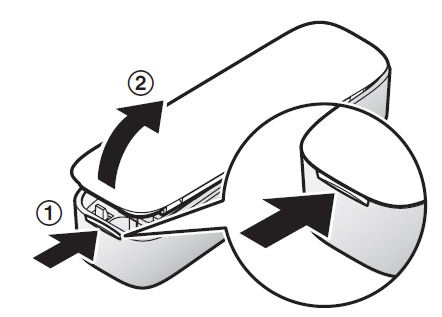
Insert the battery.
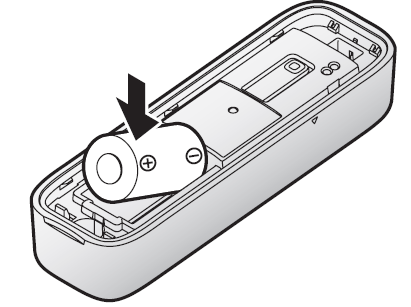
- Attach the sensor unit cover.
Setup
Example 1: Installed on the left of the window
Example 2: Installed on the right of the window
Features available when using the [Home Network] app
Some of the window/door sensor’s features that are available when using the [Home Network] app are listed below. For more information, refer to the User’s Guide (page 17).
- Security system
You can use the app to arm and disarm the security system, confirm the current status of the sensor, and view a log of previous security events. - Home control
You can configure the window/door sensor to trigger other system events, such as camera recording, turning on an electric device (such as a lamp), etc. (Appropriate device required.) - Telephone alert
You can configure the system to call a preprogrammed phone number when the window/door sensor is triggered.
Troubleshooting the Panasonic Window/Door Sensor KX-HNS101
Common issues with the Panasonic Window/Door Sensor KX-HNS101 include failure to receive notifications, sensor connectivity loss, and battery exhaustion. To resolve notification issues, ensure the sensor is within range of the KX-HNB600 Hub and properly paired via the one-push pairing button. If the LED indicator flashes red continuously, this may indicate misalignment of the sensor and magnet units or low battery status.
Error codes are generally communicated via the app; a low battery warning will prompt timely replacement using a CR2 lithium battery. The sensor operates optimally between -10°C and 40°C, so extreme temperatures may affect performance. Preventive measures include regular battery checks, keeping the sensor and magnet aligned within 25.4 mm (1 inch), and avoiding installation on surfaces that interfere with the LED status.
Panasonic offers a limited warranty on the KX-HNS101; customers can access technical support through Panasonic’s official website or customer service hotline for issues beyond basic troubleshooting.
Warranty (For the United States and Puerto Rico)
Panasonic Home Network System Products Limited Warranty
Limited Warranty Coverage
If your product does not work properly because of a defect in materials or workmanship, Panasonic Corporation of North America (referred to as “the warrantor”) will, for the length
of the period indicated on the chart below, which starts with the date of original purchase (“Limited Warranty period”), at its option either (a) repair your product with new or refurbished parts, or (b) replace it with a new or a refurbished equivalent value product, or (c) refund your purchase price. The decision to repair, replace,, or refund will be made by the warrantor.
Home Network System Products microSD card (Included model only)
- Parts: One (1) Year 90 days
- Labor: One (1) Year N/A
During the “Labor” Limited Warranty period, there will be no charge for labor. During the “Parts” Limited Warranty period, there will be no charge for parts. You must mail your product prepaid during the Limited Warranty period. This Limited Warranty excludes both parts and labor for batteries, antennas, and cosmetic parts (cabinet). This Limited Warranty only applies to products purchased and serviced in the United States or Puerto Rico. This Limited Warranty is extended only to the original purchaser and only covers products purchased as new.
Mail-In Service--Online
Pros & Cons of the Panasonic Window/Door Sensor KX-HNS101
Pros
- Long Battery Life: Up to 2 years of operation with typical daily use, reducing maintenance frequency.
- Easy Setup: One-touch pairing simplifies integration with the Panasonic Home Monitoring System.
- Effective Alerts: Provides immediate notifications to smartphones and tablets, enhancing security awareness.
- Deterrent Features: Loud sound and flashing LED alerts when triggered discourage intruders.
- Compact Design: Small sensor and magnet units allow discrete installation on various doors and windows.
Cons
- Requires Hub Unit: Must be used with the KX-HNB600 Hub, which is sold separately, adding to the overall cost.
- Limited Operating Temperature: Functionality can be affected outside the -10°C to 40°C range.
- Compatibility Limits: Primarily integrates only with Panasonic’s home monitoring kits, limiting use with other smart home brands.
Compared to alternatives, the KX-HNS101 offers reliable performance and integration within Panasonic’s ecosystem but may lack the cross-platform flexibility available in other brands.
Customer Reviews of the Panasonic Window/Door Sensor KX-HNS101
Users of the Panasonic Window/Door Sensor KX-HNS101 commonly praise its long-lasting battery life and easy installation process, often highlighting the convenience of smartphone alerts and the effective deterrent function. Many appreciate the sensor’s compact design and clear LED indicators, which simplify status monitoring.
On the downside, some customers note that the necessity of the separate hub unit (KX-HNB600) can raise the initial investment cost. A few reviews mention occasional connectivity issues when sensors are installed at the edge of the hub's wireless range, advising careful placement. Overall, the product averages a 4-star rating, with recommendations for those invested in Panasonic’s home security ecosystem.
Faqs
How do I set up the panasonic Window/Door Sensor KX-HNS101 for the first time?
What should I do if my panasonic Window/Door Sensor KX-HNS101 is not detecting door or window openings?
Can the panasonic Window/Door Sensor KX-HNS101 be used without the Panasonic Home Monitoring System hub?
How can I optimize the wireless range and performance of the panasonic Window/Door Sensor KX-HNS101?
What are the key features of the panasonic Window/Door Sensor KX-HNS101 that enhance home security?
How often should I perform maintenance on the panasonic Window/Door Sensor KX-HNS101 to ensure reliable operation?
What troubleshooting steps can I take if the panasonic Window/Door Sensor KX-HNS101 is not syncing with the hub?
Is the installation of the panasonic Window/Door Sensor KX-HNS101 suitable for all door and window types?
More panasonic manuals
- Setup: Panasonic Home Network System Backup Battery Instruction Guide
- Usage & Setup: Panasonic Motion Sensor KX-HNS102 Instruction Guide
- Setup: Panasonic Home Monitoring Outdoor Camera KX-HNC710 Instruction Guide
- Usage & Setup: Panasonic Water Leak Sensor KX-HNS103 Instruction Guide
- Usage: Panasonic Home Network System Outdoor Camera KX-HNC600 Instruction Guide
- Usage: Panasonic Home Monitoring Camera KX-HNC815C User Guide
Leave a Comment