
Usage: Panasonic Home Network System Outdoor Camera KX-HNC600 Instruction Guide
Content
Panasonic Home Network System Outdoor Camera KX-HNC600
Introduction
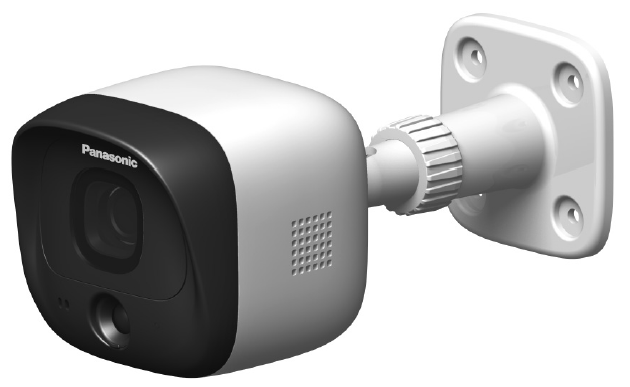
The Panasonic Home Network System Outdoor Camera KX-HNC600 is a robust and reliable surveillance solution designed specifically for outdoor home security. Built to withstand harsh weather conditions with an IP55 weatherproof rating, this camera offers dependable performance in monitoring entrances, patios, garages, gardens, and other exterior spaces. Its integration with the Panasonic KX-HNB600 Hub unit (sold separately) makes it part of a comprehensive home monitoring system, ideal for homeowners seeking peace of mind through real-time remote monitoring.
Key benefits include motion detection sensors that send instant alerts to your smartphone or tablet, two-way audio communication to interact with visitors or delivery personnel, and 24/7 monitoring capabilities even in low-light environments. The camera captures video at a resolution of 640 x 480 pixels with H.264 video compression, providing clear visuals suitable for daily security needs. With a 70° horizontal field of view, it efficiently covers significant outdoor areas.
This camera is well-suited for homeowners, renters, and small business owners who want to enhance their property’s security with DIY installation and easy synchronization with the system hub. The estimated price range for the Panasonic KX-HNC600 is around $199, making it a cost-effective option compared to other outdoor security cameras on the market. While availability might vary, it can be found through select online retailers and Panasonic’s authorized dealers.
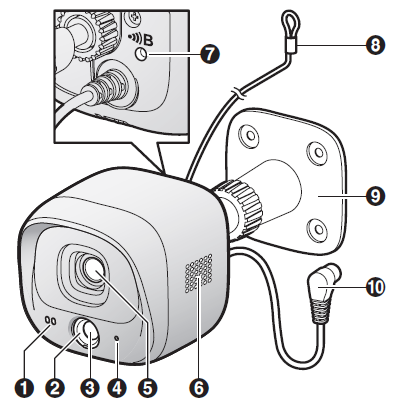
Part names and functions
- Microphone
- Sensor range cap (Standard)
- Infrared sensor
- LED indicator
- Lens unit
- Speaker
 Used when registering the camera to the hub.
- Safety wire
- Camera mounting stand
- DC cable
Specifications
- tandards
DECT 6.0 (Digital Enhanced Cordless Telecommunications 6.0) - Frequency range
DECT: 1.92 GHz – 1.93 GHz - RF transmission power
DECT: 115 mW (max.) - Power source
120 V AC, 60 Hz - Power consumption
Standby: 1.4 W
During operation:
1.5 W (when the LED lights are not lit)
2.3 W (when the LED lights are lit) - Operating conditions
-20 °C – 50 °C (-4 4°FF – 122°F) up to 90% relative humidity (non-condensing) - Transmitting range
Approx. 50 m (160 feet) indoors
Approx. 300 m (1,000 feet) outdoors - Image sensor
0.3 megapixel CMOS - Minimum illuminance required
0 lx*1 - Focal length
Fixed (0.4 m (1.3 feet) – infinity) - Angular field of view (camera angle)
Horizontal: approx. 70°
Vertical: approx. 50° - Motion detection method
Pyroelectric infrared sensor (PIR sensor) and visual sensor - PIR sensor detection range (when the surrounding temperature is approx. 25 °C (77 °F))
Horizontal: approx. 70°
Vertical: approx. 20°
Detection range: approx. 5 m - Visual sensor detection range
Horizontal: approx. 70°
Vertical: approx. 50° - IP rating
IP55*2 - Adjustable mounting angles
Horizontal: ±90°
Vertical: facing forward - facing downapprox. 60°(adjustable when mounting) - Dimensions
Approx. 75 mm ´ 75 mm ´ 173 mm (2 15/16 inches ´ 2 15/16 inches ´ 6 13/16 inches) - Mass (weight)
Approx. 305 g (0.67 lb)- The IR-LED will be lit in the low illuminance conditions.
- Water resistance is only assured if the camera is installed correctly according to the instructions in the Installation Guide, and appropriate water protection measures are taken. Do not install the camera in areas directly exposed to water or rain.
Accessory information
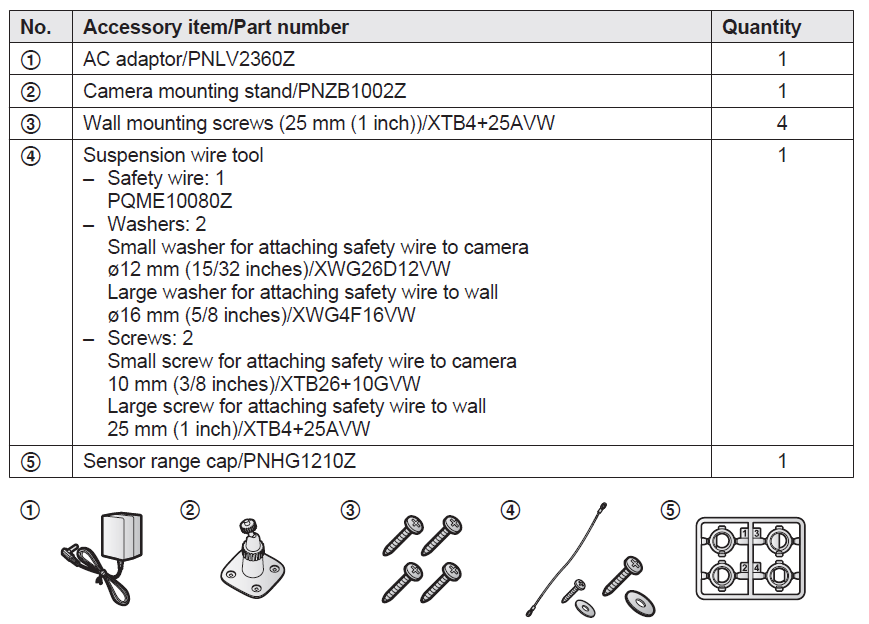
Supplied accessories
Information about sensor features
The camera has 2 sensor features that are used for motion detection: a visual sensor and an infrared sensor (i.e., heat sensor).
Please read the following information before deciding where to install the camera.
Note:
- The camera’s sensor features are not designed to be used in situations that require high reliability. We do not recommend the use of the sensor features in these situations.
- Panasonic takes no responsibility for any injury or damage caused by the use of the camera’s sensor features.
Installation
- To prevent the risk of fire or electrical shock, do not expose the product to rain or any type of moisture.
- Do not place or use this product near automatically controlled devices such as automatic doors and fire alarms. Radio waves emitted from this product may cause such devices to malfunction,, resulting in an accident.
- Do not allow the power cord to be excessively pulled, bent, or placed under heavy objects.
- Do not mount the bracket in an unstable location, in a location subject to frequent vibration, on a ceiling, or on a weak wall.
- (Do not mount on gypsum board, concrete blocks, wooden materials exposed to the outdoors, walls with very rough surfaces, or surfaces that are narrower than the width of the wall mount bracket.) There is a risk of injury if the product falls, or of fire or electric shock if water enters the product.
- Keep small parts (microSD cards, screws, washers, sensor range caps, etc.) out of the reach of children. There is a risk of swallowing. In the event they are swallowed, seek medical advice immediately.
Installation and location
- Never install wiring during a lightning storm. R Although this product conforms to the IPX5 code, do not intentionally expose it to water.
IPX5 indicates that the product is protected against water jets: water projected at all angles through a 6.3 mm nozzle flow rate of 12.5 liters/minute at a pressure of 30 kN/m2 for 3 minutes from a distance of 3 meters. - The AC adaptor is used as the main disconnect device. Ensure that the AC outlet is installed near the product and is easily accessible.
- If the wiring is underground, do not make any connections underground.
- If the wiring is underground, make sure the power cable and other wiring are properly waterproofed by running the cables through a conduit.
Do not install in these locations..
Installing in the following areas may cause deformation, discoloration, malfunction, or operational failure..
- In direct sunlight or directly under an outdoor light (even if the surroundings are within the operational temperature range, parts of the product may become hot.
- Areas subject to frequent vibration, shock, or impact, near fire, heating devices, magnetic fields (such as near magnets), or air conditioners (including outdoor equipment such as unit compressors)
- Areas exposed to grease or steam
- Near devices that emit strong radio waves, such as mobile phones
- Areas subject to extreme temperature changes (which can lead to condensation).. R Near coasts directly subjected to sea breezes, or near sulfuric hot springs (exposure to salt can shorten the life of the product)
- Near TVs, radios, automated office equipment such as computers, air conditioners, water heater panels (with intercom), or home security equipment (these may cause noise)
- Near satellite broadcasting receivers, such as tuners, TVs with built-in satellite tuners, and recordersbroadcasted images may be distorted.
- Areas where hydrogen sulfide, ammonia, dust, or toxic gases are present
Installation precautions
- Do not install the camera on a ceiling.
- Do not install the camera in areas directly exposed to water or rain.
- Holes must be made in the wall for cables and wires to pass through. Panasonic takes no responsibility for issues related to opening holes in walls.
- Make sure to waterproof the holes you make in the wall.
- Make sure you attach the safety wire to prevent the camera from falling.
- Do not use an impact driver. (This may lead to damaged screws or over-tightening.)
- Mount the camera in a a stable location where the unit can be adequately supported when installing.
- The AC adaptor should be connected to a vertically oriented or floor-mounted AC outlet. Do not connect the AC adaptor to a ceiling-mounted AC outlet, as the weight of the adaptor may cause it to become disconnected.
- Do not mount the camera on a soft material. It may fall down, break, or cause injury.
Detection method
Visual sensor
The camera detects changes in the images being displayed.
- The camera detects changes in the brightness levels of moving objects.
Infrared sensor
The camera detects temperature differences of objects in the images being displayed.
- The infrared sensor uses infrared rays to detect temperature differences within its range that are emitted naturally by people, animals, etc.
Direction of motion
It is easier to detect objects that move sideways in front of the camera, and more difficult to detect objects that move directly toward the front of the camera.
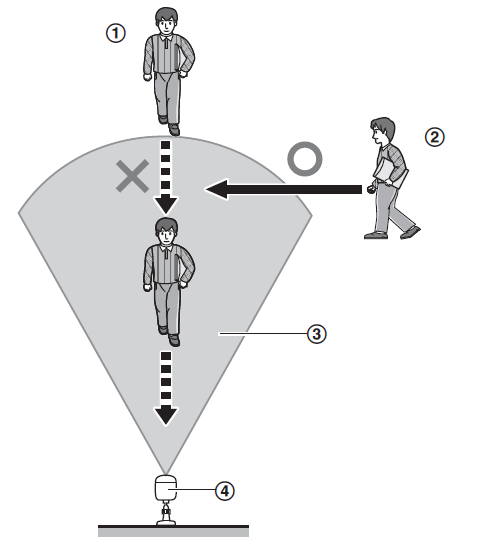
- It is difficult to detect movement directly towards the front of the camera.
- It is easy to detect movement sideways in front of the camera.
- Detection range
- Camera
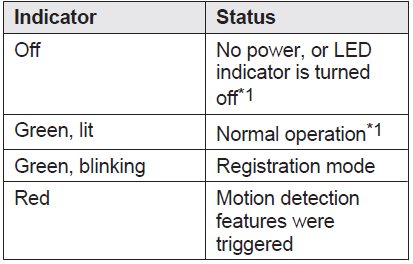
LED indicator
You can use the LED indicator to confirm the camera’s status.

Setup overview
- Initial setup
Make sure you can access the system using your mobile device. For details, refer to the System Setup Guide included with your hub. - Registration
Required only if the camera was purchased separately (i.e., not as part of a bundle - Confirm the installation area.
Read the information in this document to confirm that the desired installation area is suitable for proper operation. - Installation
Install the camera in the desired location and connect the camera to the power outlet. - Adjust the infrared sensor range.
Confirm the sensor range area and adjust it if necessary using the included sensor range adjustment caps.
Troubleshooting the Panasonic Home Network System Outdoor Camera KX-HNC600
Common issues users may encounter include connectivity interruptions, motion detection not triggering alerts, and audio communication malfunctions. If the camera’s LED indicator blinks quickly in red, it may signal a communication error with the hub, requiring a reset or checking wireless signal strength. In case of no video feed, ensure the camera is properly synced with the KX-HNB600 Hub and connected to power.
Error codes are generally displayed via the connected app, guiding users to specific fixes such as firmware updates or network troubleshooting. Preventive measures involve installing the camera within the recommended operating temperature range (-20 °C to +50 °C), avoiding physical obstructions that interfere with wireless signals, and regular app updates to maintain compatibility.
Panasonic offers a limited warranty with support options through its official website and customer service centers. For direct assistance, users can contact Panasonic support via their website or phone for troubleshooting guidance and repair services.
Panasonic Home Network System Products Limited Warranty
Limited Warranty Coverage
If your product does not work properly because of a defect in materials or workmanship, Panasonic Corporation of North America (referred to as “the warrantor”) will, for the length of the period indicated on the chart below, which starts with the date of original purchase (“Limited Warranty period”), at its option either (a) repair your product with new or refurbished parts, or (b) replace it with a new or a refurbished equivalent value product, or (c) refund your purchase price. The decision to repair, replace,,e or refund will be made by the warrantor.
Home Network System Products microSD card (Included model only)
- Parts: One (1) Year 90 days
- Labor: One (1) Year N/A
Pros & Cons of the Panasonic Home Network System Outdoor Camera KX-HNC600
- Pros:
- Weather-resistant design (IP55) suitable for various outdoor environments.
- Easy DIY installation with one-touch syncing to the KX-HNB600 Hub.
- Effective motion detection with instant smartphone alerts.
- Two-way talk feature for direct communication via mobile app.
- Competitive price point around $199, offering good value for a home monitoring system.
- Cons:
- Relatively low video resolution (0.3 megapixels, 640 x 480 pixels) compared to modern HD cameras.
- Limited field of view (70° horizontal), which may require multiple cameras for full coverage.
- Requires a separate hub unit (KX-HNB600) for operation, adding to overall system cost.
- No support for remote access via web browser, limited to Android and iOS app access only.
- Not confirmed compatibility with popular smart home systems like Google Home.
Compared to alternatives, the Panasonic KX-HNC600 excels in ease of use and weatherproofing but lacks higher resolution and advanced smart home integration found in newer models.
Customer Reviews of the Panasonic Home Network System Outdoor Camera KX-HNC600
Many users praise the Panasonic Home Network System Outdoor Camera KX-HNC600 for its reliable outdoor performance and straightforward installation process. Commonly highlighted positives include the prompt motion detection alerts and clear two-way audio, which users find particularly useful for communicating with delivery personnel or visitors when away from home.
Some customers note dissatisfaction with the video quality, describing it as adequate but not high definition. Additionally, a few reviews mention occasional connectivity issues requiring manual resets. Despite these concerns, the majority recommend the camera for homeowners seeking a budget-friendly and functional outdoor monitoring system.
Star ratings typically average around 4 out of 5 stars, reflecting overall user satisfaction balanced with minor limitations. Prospective buyers are advised to ensure compatibility with the required hub and consider their resolution needs before purchase.
Faqs
How do I choose the best installation location for my Panasonic Home Network System Outdoor Camera KX-HNC600 to ensure reliable performance?
What steps should I follow for secure outdoor wall mounting of the Panasonic Home Network System Outdoor Camera KX-HNC600?
Why is my Panasonic Home Network System Outdoor Camera KX-HNC600 not connecting to the hub, and how can I troubleshoot this issue?
Can I extend the power cable length for the Panasonic Home Network System Outdoor Camera KX-HNC600, and what are the safety considerations?
How do I adjust motion detection sensitivity and customize alert zones on the Panasonic Home Network System Outdoor Camera KX-HNC600?
What maintenance steps are recommended to keep my Panasonic Home Network System Outdoor Camera KX-HNC600 functioning properly over time?
Is the Panasonic Home Network System Outdoor Camera KX-HNC600 compatible with third-party smart home platforms, or does it only work with Panasonic’s ecosystem?
How can I receive smartphone alerts and view live footage from my Panasonic Home Network System Outdoor Camera KX-HNC600 when I’m away from home?
More panasonic manuals
- Usage: Panasonic Home Monitoring Window Camera KX-HNC505C Instruction Guide
- Setup: Panasonic Home Monitoring Outdoor Camera KX-HNC710 Instruction Guide
- Usage: Panasonic Home Monitoring Window Camera KX-HNC500 Instruction Guide
- Setup: Panasonic Home Network System Backup Battery Instruction Guide
- Usage: Panasonic Home Network System Indoor Camera KX-HNC210 Instruction Guide
- Setup: Panasonic Window/Door Sensor KX-HNS101 Instruction Guide
Leave a Comment