
Setup: Panasonic Home Network System Backup Battery Instruction Guide
Content
Panasonic Home Network System Backup Battery
Introduction
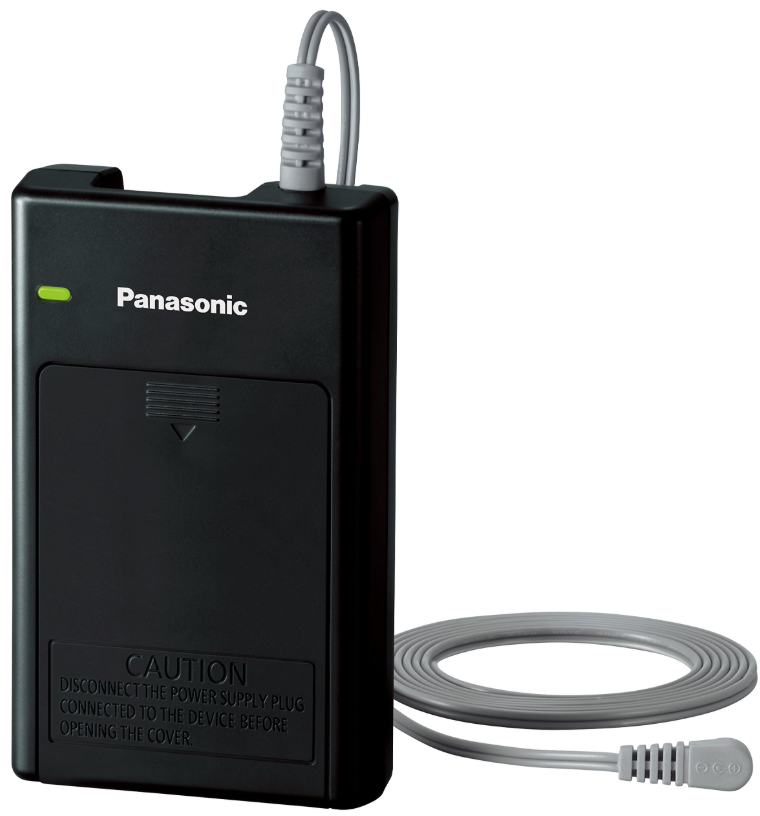
The Panasonic Home Network System Backup Battery (model KX-HNP100) is a reliable solution designed to keep your home security and automation devices running during unexpected power outages. Whether you use a hub, camera, siren, or other compatible devices within the Panasonic Home Network System, this backup battery ensures uninterrupted operation, providing peace of mind and enhanced home safety.
Key benefits include seamless power switching during outages, support for critical notifications (such as alarm triggers and mobile alerts), and the ability to maintain surveillance and security functions even when the main power supply is cut[3][4]. The Panasonic Home Network System Backup Battery is especially valuable for homeowners seeking to protect their property and loved ones, as well as for small businesses requiring dependable backup for security systems.
Unique selling points include easy installation, compatibility with a range of Panasonic devices, and the option to trigger automatic phone calls or mobile notifications in the event of a power failure. The backup battery is designed for users who prioritize home security, remote monitoring, and system reliability.
The estimated price range for the Panasonic Home Network System Backup Battery varies by region and retailer, but it is generally positioned as an affordable, essential accessory within the Panasonic Home Network System ecosystem. Availability may be limited as this product is part of an older product line and is considered discontinued in some markets.. However, it may still be found through specialized retailers or online marketplaces.
Accessory information
Supplied accessories
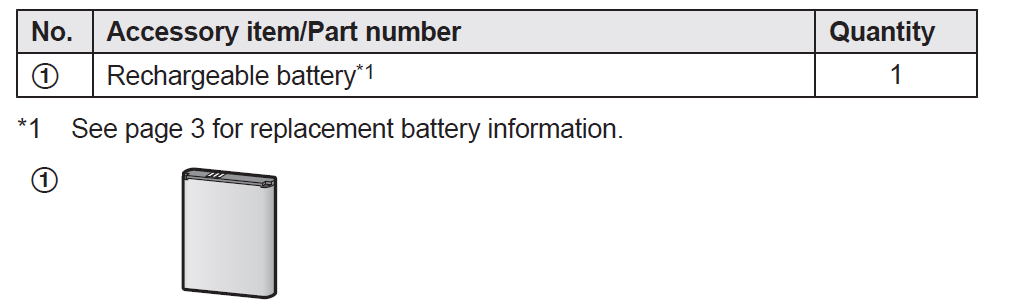
Additional/replacement accessories
Please contact your nearest Panasonic dealer for sales information (page 18).

Setup
Part names and functions
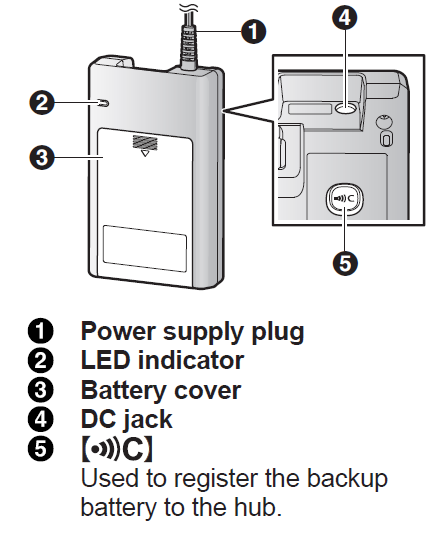
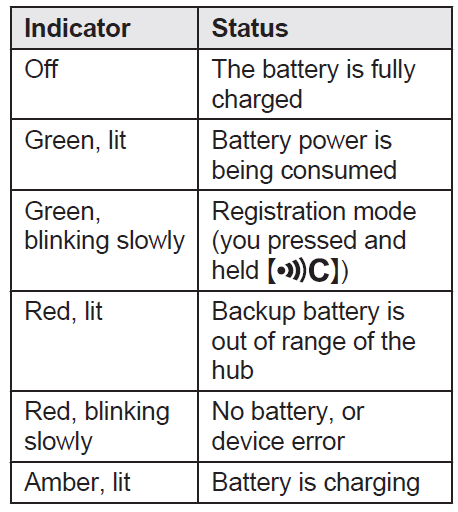
LED indicator
You can use the LED indicator to confirm the backup battery’s status.
Setup overview
- Initial setup
Make sure you can access the system using your mobile device. For details, refer to the System Setup Guide included with your hub. - Insert the battery
The battery will supply power to the connected device in the event of a power outage. - Connections
Connect the backup battery to the power outlet and to the device it will supply power to. - Registration
Register each of your backup batteries with the hub if you want to receive notifications in the event of a power outage. Note that this step is not required if the backup battery was purchased as part of a bundle.
Inserting the battery
- USE ONLY the specified battery. R Wipe the battery ends ( +,- ) with a dry cloth.
- Avoid touching the battery ends ( +, -) or the unit contacts.
- Press the notch (A) on the battery cover firmly.
- Slide it in the direction of the arrow
- Insert the battery (C).
- Close the battery cover (D).
Connections
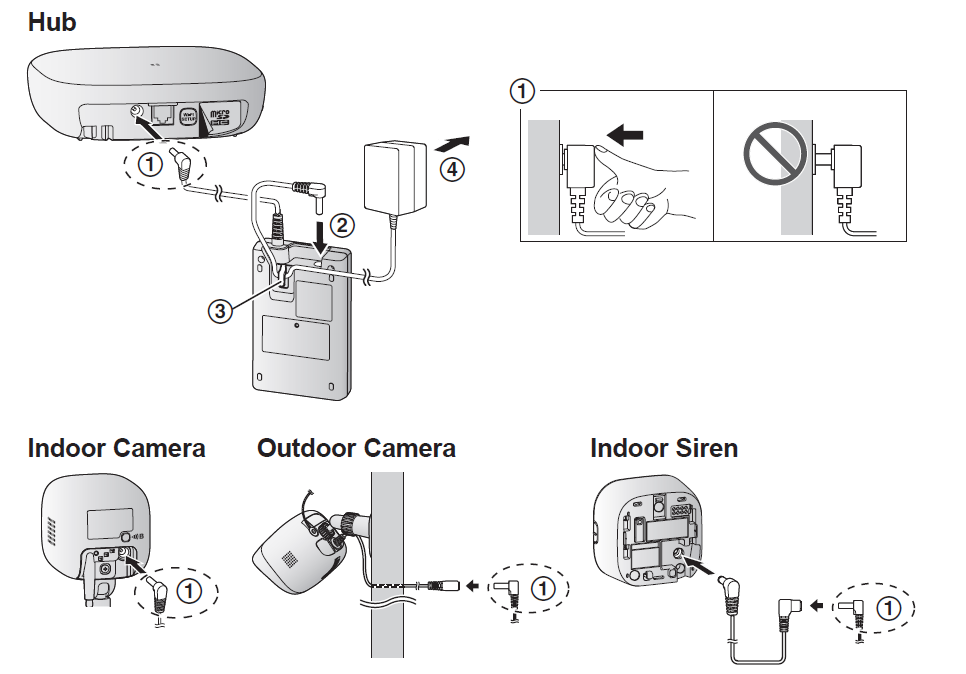
- Insert the backup battery’s DC plug firmly into the device’s DC jack, DC cable plug, or DC extension cord.
- Insert the DC plug completely. (This example illustration applies to the
- KX-HNB600 and KX-HNC200.)
- Connect the AC adaptor plug to the backup battery.
- Secure the AC adaptor cord by wrapping it around the hook.
- Connect the AC adaptor to the power outlet.
- Note:
- The AC adaptor described in these instructions is the AC adaptor that was supplied with your compatible device.
- It takes about 10 hours to fully charge the battery.
- The backup battery’s LED indicator lights in amber while the battery is charging.
When charging is complete, the LED indicator turns off (page 10). - Compatible devices shown here are current as of the time of printing. Additional compatible devices may become available at a later date.
Note about power connections
AC adaptor connection
- The AC adaptor must remain connected at all times. (It is normal for the adaptor to feel warm during use.)
- The AC adaptor should be connected to a vertically oriented or floor-mounted
AC outlet. Do not connect the AC adaptor to a ceiling-mounted AC outlet, as the weight of the adaptor may cause it to become disconnected.
Registering the backup battery
This procedure is not required for devices that were included as part of a bundle.
- Register each of your backup batteries with the hub if you want to receive notifications in the event of a power outage.
- You can register each device by using the registration buttons or the [Home Network] app.
Using registration buttons
Hub:
Press and hold  OTHER DEVICEN until the LED indicator blinks slowly in green.
Backup battery:
- Press and hold until the LED indicator blinks slowly in green (page 10).
- When registration is complete, the hub sounds one long beep.
Note:
- To cancel without registering the backup battery, press n the hub and on the backup battery again.
- If registration fails, the hub sounds several short beeps.
Using the app
When you register the backup battery by using the [Home Network] app, you can assign a name to the backup battery and turn its power outage notification feature on and off. For more information,, to the User’s Guide (page 15).
Specifications
- Standards
DECT (Digital Enhanced Cordless Telecommunications) - Frequency range
DECT: 1.92 GHz – 1.93 GHz - RF transmission power
DECT: 115 mW (max.) - Power source
120 V AC, 60 Hz
Lithium Ion (Li-Ion) type battery (1 ´ 3.7 V, 1,450 mAh) - Operating conditions
5 °C – 40 °C (41 °F – 104 °F) - Dimensions (height ´ width ´ depth) Approx. 115 mm ´ 71 mm ´ 25 mm (4 17/32 inches ´ 2 13/16 inches ´ 1 inch)
- Mass (weight)
Approx. 123 g (0.27 lb)
Limited Warranty (ONLY FOR U.S.A.)
Panasonic Products Limited Warranty
Limited Warranty Coverage (For USA Only)
- If your product does not work properly because of a defect in materials or workmanship, Panasonic Corporation of North America (referred to as “the warrantor”) will, for the length of the period indicated on the chart below, which starts with the date of original purchase (“warranty period”), at its option either (a) repair your product with new or refurbished parts,(b) replace it with a new or a refurbished equivalent value product, or (c) refund your purchase price. The decision to repair, replace, or refund will be made by the warrantor.
- During the “Labor” warranty period,,d there will be no charge for labor. During the “Parts” warranty period, there will be no charge for parts. This Limited Warranty excludes both parts and labor for non-rechargeable batteries, antennas, and cosmetic parts (cabinet). This warranty only applies to products purchased and serviced in the United States.
- This warranty is extended only to the original purchaser of a new product that is not sold “as is”.
- Mail-In Service--Online Repair Request
- Online Repair Request
- To submit a new repair request and for quick repair status,, visit our website at
When shipping the unit, carefully pack, include all supplied accessories listed in the Owner’s Manual, and send it prepaid, adequately insured ,,andwell-packedl in a carton box. When shipping Lithium Ion batteries, please visit our website,, as Panasonic is committed to providing the most up-to-date information. Include a letter detailing the complaint, a return address,, and provide a daytime phone number where you can be reached. A valid registered receipt is required under the Limited Warranty.
IF REPAIR IS NEEDED DURING THE WARRANTY PERIOD, THE PURCHASER WILL BE REQUIRED TO FURNISH A SALES RECEIPT/PROOF OF PURCHASE INDICATING DATE OF PURCHASE, AMOUNT PAID,, AND PLACE OF PURCHASE. CUSTOMER WILL BE CHARGED FOR THE REPAIR OF ANY UNIT RECEIVED WITHOUT SUCH PROOF OF PURCHASE.
Limited Warranty Limits and Exclusions
- This warranty ONLY COVERS failures due to defects in materials or workmanship, and DOES NOT COVER normal wear and tear or cosmetic damage. The warranty ALSO DOES NOT COVER damages which occurred in shipment, or failures which are caused by products not supplied by the warrantor, or failures which result from accidents, misuse, abuse, neglect, mishandling, misapplication, alteration, fault installation, set-up adjustments, misadjustment of consumer controls, improper maintenance, power line surge, lightning damage, modification, introduction of sand, humidity or liquids, commercial use such as hotel, office, restaurant, or other business or rental use of the product, or service by anyone other than a Factory Service Center r other Authorized Servicer, or damage that is attributable to acts of God.
- THERE ARE NO EXPRESS WARRANTIES EXCEPT AS LISTED UNDER “LIMITED WARRANTY COVERAGE”.
- THE WARRANTOR IS NOT LIABLE FOR INCIDENTAL OR CONSEQUENTIAL DAMAGES RESULTING FROM THE USE OF THIS PRODUCT, OR ARISING OUT OF ANY BREACH OF THIS WARRANTY.
(As examples, this excludes damages for lost time, travel to and from the servicer, loss of or damage to media or images, data o,,r other memory or recorded content. - The items listed are not exclusive, but for illustration only.)
- ALL EXPRESS AND IMPLIED WARRANTIES, INCLUDING THE WARRANTY OF MERCHANTABILITY, ARE LIMITED TO THE PERIOD OF THE LIMITED WARRANTY. Some states do not allow the exclusion or limitation of incidental or consequential damages, or limitations on how long an implied warranty lasts, so the exclusions may not apply to you. This warranty gives you specific legal rights,, and you may also have other rights which vary from state to state. If a problem with this product develops during or after the warranty period, you may contact your dealer or Service Center. If the problem is not handled to your satisfaction, then write to:
Troubleshooting
While the Panasonic Home Network System Backup Battery is designed for reliability, users may occasionally encounter issues. Below are common problems, solutions, and preventive measures.
Common Problems and Solutions
- Battery Not Charging: Ensure the backup battery is properly connected to both the device and a working power outlet. Check for loose connections or damaged cables.
- Short Battery Life: The typical operating time for a hub (e.g., KX-HNB600) is approximately 1.5 hours during a power outage IthIff If the runtime is significantly less, the rechargeable battery may need replacement.
- Device Not Powering On During Outage: Verify that the backup battery is correctly installed and that the connected device is compatible. Refer to the user manual for a list of supported devices.
- No Notification During Power Failure: Ensure the hub is registered with the backup battery and that notification settings are correctly configured in the system app
Error Codes and Fixes
No specific error codes are documented for the KX-HNP100 in the available manuals. Most issues can be resolved by checking connections, ensuring proper installation, and replacing the battery if necessary.
Preventive Measures
- Regularly test the backup battery by simulating a power outage.
- Keep the battery and contacts clean to prevent corrosion.
- Replace the rechargeable battery every 2–3 years or as needed for optimal performance.
Warranty and Support
The Panasonic Home Network System Backup Battery may be covered under the manufacturer’s standard warranty, depending on the region and purchase date. For discontinued products, support may be limited. For assistance, visit the official Panasonic support website or contact local customer service[2].
Contact Information
For technical support, visit the Panasonic support portal or refer to the contact details provided with your product documentation.
Pros & Cons
Advantages
- Reliable Backup: Ensures continuous operation of security and monitoring devices during power outages[3][6].
- Easy Installation: Simple setup with clear instructions; no technical expertise required[9].
- Smart Notifications: Integrates with the Panasonic Home Network System to send alerts and trigger calls during outages[3][4].
- Affordable: Priced competitively as an essential accessory for home security systems.
Disadvantages
- Limited Runtime: Provides only about 1.5 hours of backup for the hub, which may be insufficient for prolonged outages[2][9].
- Discontinued Product: May be difficult to find replacement batteries or receive official support in some regions[2].
- Device Compatibility: Only works with specific Panasonic Home Network System devices; not a universal solution[9].
Value for Money
The Panasonic Home Network System Backup Battery offers good value for users invested in the Panasonic ecosystem, providing critical backup during short outages. However, those needing longer runtime or broader compatibility may want to explore alternative universal UPS solutions.
Customer Reviews
User feedback for the Panasonic Home Network System Backup Battery highlights its reliability and ease of use. Many customers appreciate the peace of mind it provides, knowing their security system remains active during power failures. Common praises include simple installation and seamless integration with existing Panasonic devices.
Some users note the relatively short backup duration as a drawback, especially during extended outages. A few have mentioned challenges in finding replacement batteries or obtaining support for this older product line. Despite these issues, most reviews are positive, with many users recommending the backup battery as a worthwhile addition to their home security setup.
Star ratings typically range from 4 to 5 stars for functionality and reliability, with slightly lower scores for battery life and ongoing support. Purchase recommendations are strongest for existing Panasonic Home Network System users who prioritize system uptime during brief power interruptions.
SEO and Semantic Keywords
Throughout this manual, we’ve naturally integrated primary keywords such as Panasonic Home Network System Backup Battery, related terms like home security backup power, KX-HNP100, and power outage protection, as well as long-tail phrases such as how to install Panasonic backup battery and Panasonic home network battery troubleshooting. These keyword strategies are designed to improve search visibility, answer common user queries, and optimize for featured snippets and voice search.
Faqs
How do I set up the panasonic Home Network System Backup Battery for the first time?
What should I do if the panasonic Home Network System Backup Battery is not working properly?
Can I use the panasonic Home Network System Backup Battery with other Panasonic devices?
How often should I maintain the panasonic Home Network System Backup Battery?
What are the key features that make the panasonic Home Network System Backup Battery different?
Can I use the panasonic Home Network System Backup Battery with smart home systems?
How does the panasonic Home Network System Backup Battery optimize home security?
What is the operating time of the panasonic Home Network System Backup Battery when connected to a hub?
More panasonic manuals
- Setup: Panasonic Home Monitoring Outdoor Camera KX-HNC710 Instruction Guide
- Setup: Panasonic Window/Door Sensor KX-HNS101 Instruction Guide
- Usage: Panasonic Home Network System Outdoor Camera KX-HNC600 Instruction Guide
- Usage & Setup: Panasonic Motion Sensor KX-HNS102 Instruction Guide
- Usage: Panasonic Home Monitoring Window Camera KX-HNC505C Instruction Guide
- Usage & Setup: Panasonic Water Leak Sensor KX-HNS103 Instruction Guide
Leave a Comment