
Usage: Panasonic Home Monitoring Window Camera KX-HNC505C Instruction Guide
Content
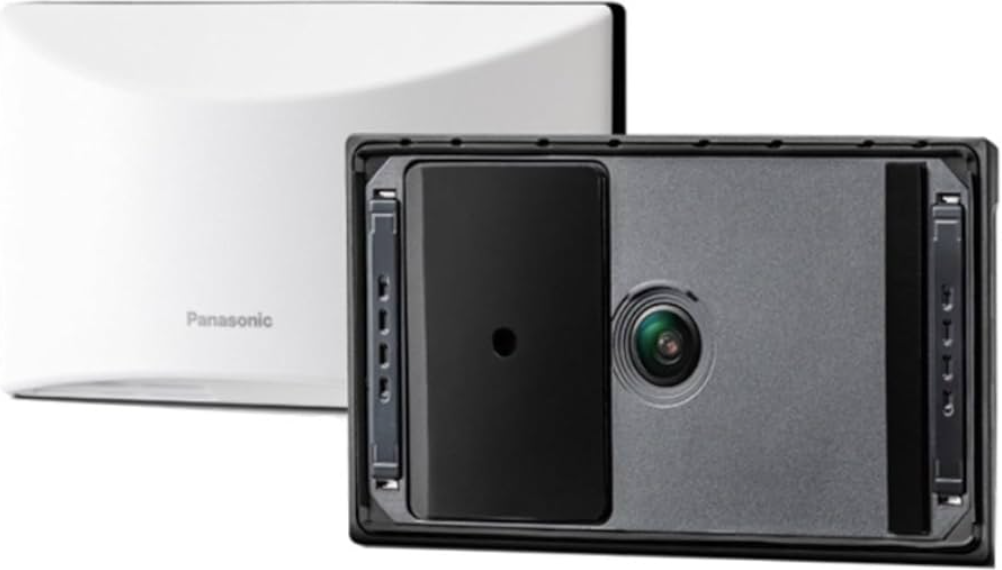
Panasonic Home Monitoring Window Camera KX-HNC505C
Introduction
The Panasonic Home Monitoring Window Camera KX-HNC505C is a state-of-the-art indoor security camera designed for seamless outdoor surveillance from within your home. This innovative device adheres securely to interior windows using a powerful suction cup or double-sided tape, allowing for effortless installation without drilling or complicated mounting. It delivers crystal-clear 1080p Full HD video with a wide 150° diagonal field of view, ensuring comprehensive coverage of your property’s exterior. The camera features bright color night vision capabilities, providing vivid, glare-free images even in low-light conditions.
Its compact and discreet design makes it ideal for homeowners seeking a theft-resistant and weather-protected monitoring solution. The KX-HNC505C is perfect for those who want continuous, reliable surveillance without the hassle of frequent battery charging since it plugs into a standard indoor outlet for uninterrupted power. It supports local recording to microSDXC cards (up to 1TB), eliminating monthly cloud subscription fees. Advanced person detection technology minimizes false alerts by differentiating people from cars or animals, and customizable detection zones further refine alert accuracy. Compatible with Alexa and Google Assistant, it integrates smoothly into smart home ecosystems.
This model targets security-conscious homeowners, renters, and small business owners who desire easy-to-install, high-quality video monitoring at an estimated price range of $200 to $250. Widely available through major retailers and Panasonic’s official outlets, the KX-HNC505C offers a blend of advanced features, ease of use, and value, positioning it as a compelling choice in the home security camera market.
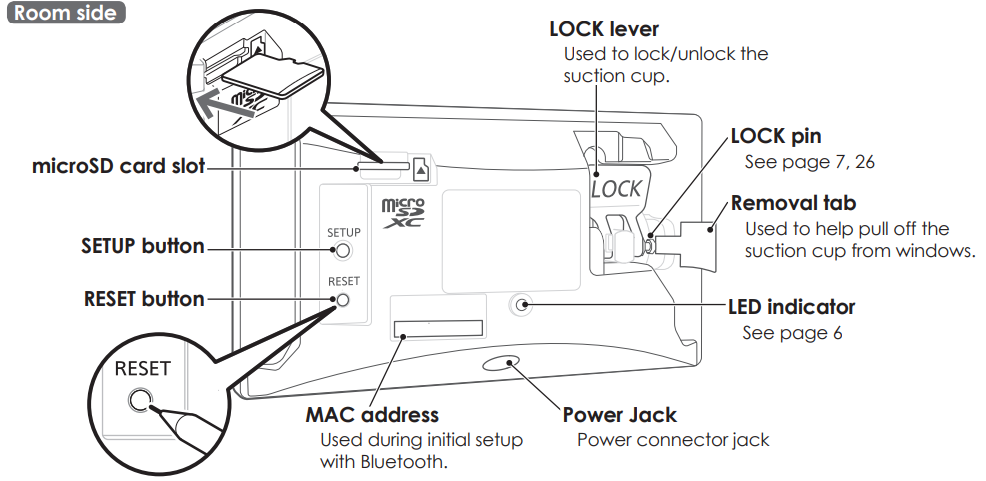
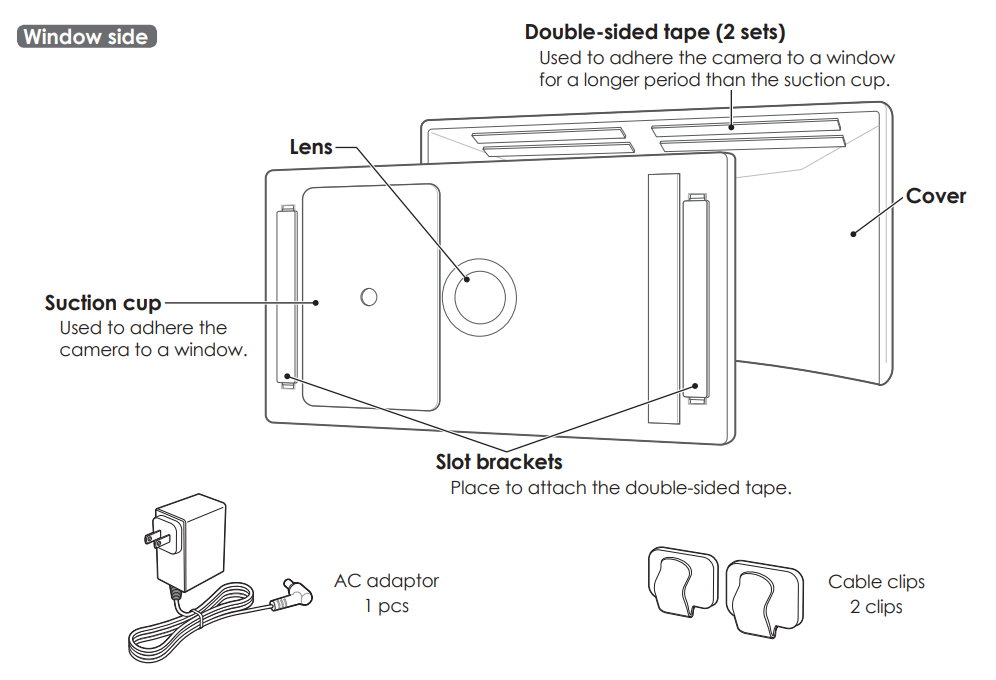
Part names and functions
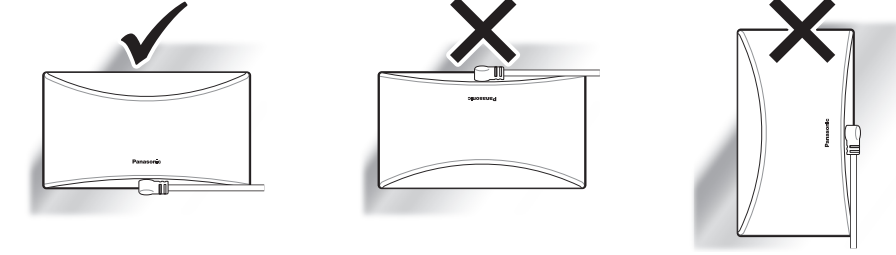
Installation alignment
Installation location cautions
- The camera may not be able to be installed in areas on the glass of windows that are uneven or have film, etc. attached.
- Depending on the installation location, the camera may hit against objects or people when the window is opened or closed.
About this system
- This system is not designed to provide complete protection from property loss. To the maximum extent permitted by applicable law‚ Panasonic will not be held responsible for any damage incurred as a result of property loss.
- The system’s wireless features are subject
to interference‚ therefore functionality in all situations cannot be guaranteed. Panasonic will not be held responsible for injury or damage to property that occurs in the event of wia wireless communication error or failure.
Privacy and rights of portrait
Please take into consideration the rights of others’ privacy. Generally said that “privacy” means the ability of an individual or group to stop information about themselves from becoming known to others. “Rights of portrait” means the right to be safe from having your own image taken and used indiscriminately without consent.
Security cautions
- Take appropriate measures to avoid the following security breaches when using this product.
- Leaks of private information
- Unauthorized use of this product
- Unauthorized interference or suspension of the use of this product
- Configure the wireless router that connects your mobile device to this product to use encryption for all wireless communication.
- Do not use the default password continuously. Change it to your own setting and set a new one periodically. Do not use passwords that could be easily guessed by a third party. If you keep a record of your passwords‚ protect that record.
- If you lose your mobile device‚ change the password used to access this product.
- If you enable the product’s auto login feature‚ enable the screen lock or similar security feature on your mobile device.
- Performing the reset will delete all information. To avoid losing your previous setting‚ we recommend writing down the information.
- To prevent disclosure of personal information‚ enable the screen lock or similar security feature on your mobile device.
- When submitting the product for repair‚ make a note of any important information stored in the product‚ as this information may be erased or changed as part of the repair process.
- Use only trusted repair services authorized by Panasonic.
- Before disposing of the product‚ perform a factory data reset to erase any data stored in the product. Remove and erase the microSD card.
- If your mobile device will no longer be used with the product‚ delete your mobile device’s registration from the product and delete the corresponding app from your mobile device.
This product may be used in ways that violate the privacy or publicity rights of others. You are responsible for how this product is used.
For your safety
To prevent severe injury and loss of life/property‚ read this section carefully before using the product to ensure proper and safe operation of your product.
WARNING
Power connection
- Use only the power source marked on the product.
- Do not overload power outlets and extension cords. This can result in the risk of fire or electric shock. Completely insert the AC adaptor/power plug into the power outlet. Failure to do so may cause electric shock and/or excessive he,, resulting in a fire.
- Regularly remove any dust‚ et,, etc., from the AC adaptor/power plug by pulling it from the power outlet‚ then wiping with a dry cloth. Accumulated dust may cause an insulation defect from moisture‚ etc., resulting in a fire.
- Unplug the product from power outlets if it emits smoke‚ an abnormal smell‚ or makes an unusual noise. These conditions can cause fire or electric shock. Confirm that smoke has stopped emitting and contact us by visiting our Support page..
- Unplug from power outlets and never touch the inside of the product if its casing has been broken open. The danger of electric shock exists.
- Never touch the plug with wet hands. The danger of electric shock exists.
- Do not connect non-specified devices. Operating safeguards
- Unplug the product from power outlets before cleaning. Do not use liquid or aerosol cleaners.
- Do not disassemble the product.
- Never put metal objects inside the product. If metal objects enter the product‚ turn off the circuit breaker and contact an authorized service centre.
- Keep small parts‚ such as microSD cards‚ out of the reach of children. There is a risk of swallowing.
- The applied nameplate is located at the bottom or rear of the product.
Medical
Consult the manufacturer of any personal medical devices‚ such as pacemakers or hearing aids‚ to determine if they are adequately shielded from external RF (radio frequency) energy. Wireless LAN features operate between the frequencies listed below‚ with a peak transmission power of 100mw:
- 2.412 GHz – 2.462 GHz
- 5.180 GHz – 5.320 GHz
- 5.500 GHz – 5.600 GHz
- 5.650 GHz – 5.700 GHz
- 5.745 GHz – 5.825 GHz
- Do not use the product in Healthcare facilities if any regulations posted in the area instruct you not to do so. Hospitals or Healthcare facilities may be using equipment that could be sensitive to external RF energy.
CAUTION
Installation and location
- Never install wiring during a lightning storm.
- The AC adaptor is used as the main disconnect device. Ensure that the AC outlet is installed near the product and is easily accessible.
- Mount the product in a stable location. Failure to do so may cause the product to fall,, resulting in damage to the product or injury.
- Do not mount the product on cracked or unstable windows. This may damage the windows.
- This product is a precision product and may be damaged if it falls.
- To prevent the product from being damaged, make sure to carefully read the Quick Start Guide and this document.
- When attaching the product using the suction cup, make sure to periodically reattach the product.
- Avoid using the suction cup and double-sided tape for long periods. Periodically replace them with new parts.
For best performance
Product location/avoiding noise
- This product uses radio waves to communicate with a wireless router.
- For maximum coverage and noise-free communications‚ place this product:
- A convenient‚ high‚ and central location with no obstructions between this product and the wireless router.
- Away from electronic appliances such as TVs‚ radios‚ personal computers‚ wireless devices‚ or other phones.
- Facing away from radio frequency transmitters‚ such as external antennas of mobile phone cell stations.
- Coverage and transmission quality depend on the local environmental conditions.
- If the transmission quality is not satisfactory‚ move this product to another location.
Environment
- Keep the product away from electrical noise-generating devices‚ such as fluorescent lamps and motors.
- The product should be kept free from excessive smoke‚ dust‚ high temperature‚ and vibration.
- Do not expose this product to direct sunlight or other forms of powerful light,, such as halogen light,, ts for long periods of time. (This may damage the image sensor.)
- Do not place heavy objects on top of the product.
- When you leave the product unused for a long period of time‚ unplug the product from the power outlet.
- The product should be kept away from heat sources such as heaters‚ kitchen stoves‚ etc.
- It should not be placed in rooms where the temperature is less than 0 °C (32 °F) or greater than 40 °C (104 °F). Damp basements should also be avoided.
- The maximum communication range may be shortened when the product is used in the following places: Near obstacles such as hills‚ tunnels‚ underground‚ near metal objects such as wire fences‚ etc.
- Operating the product near electrical appliances may cause interference. Move away from the electrical appliances.
Routine care
- Wipe the outer surface of the product with a wet wipe.
- Do not use benzine‚ thinner‚ or any abrasive powder.
Camera image quality
- Camera image and its quality may be affected on the mobile device based on surroundings such as lighting‚ brightness.
- Dirty windows and window screens affect the camera image quality.
- Regularly clean the windows and remove the window screens.
- Rain directly falling on a window may affect the camera image quality and human detection performance. We recommend installing the product a on a window that is not exposed to direct rain, such as a window with a sunshade.
Protecting your recordings
- Do not remove the microSD card or disconnect the product’s AC adaptor while reading or writing data to the microSD card. Data on the card could become corrupted.
- If a microSD card malfunctions or is exposed to electromagnetic waves or static electricity‚ data on the card could become corrupted or erased. Therefore, we recommend backing up important data to a computer or other device.
Notice for product disposal‚ transfer‚ or return
- This product can store your private/confidential information. To protect your privacy/confidentiality‚ we recommend that you erase information from the memory before you dispose of‚ transfer‚ or return the product.
Specifications
- Standards: IEEE 802.11a/b/g/n
- Wireless LAN:
Frequency range: 2.412 GHz – 2.462 GHz (channels 1 – 11) / 5.180 GHz – 5.320 GHz (channels 36–64) / 5.500 GHz – 5.600 GHz (channels 100–116) / 5.650 GHz – 5.700 GHz (channels 132–140) / 5.745 GHz – 5.825 GHz (channels 149–165) - RF transmission power: 100 mW (peak transmission power)
- Encryption: WPA2-PSK (TKIP/AES)‚ WPA-PSK (TKIP/AES)‚ WEP (128/64 bit)
- Wi-Fi device type: DFS client device
- Power source: 120 V AC‚ 60 Hz
- Bluetooth:
- Bluetooth system specification: Ver. 5.0
- Wireless equipment classification: Class 1.5 Frequency range: 2.402 GHz – 2.48 GHz
- RF transmission power: +10 dBm (max)
- Power consumption: Standby: 3.0 W / Maximum: 4.1 W
- Operating conditions: 0 °C – 40 °C *1 (32 °F – 104 °F) / 20 % – 80 % relative air humidity (dry)
- Resolution: 1920 x 108pixelssel (Full HD)‚ 1280 x 720 pixel (HD)‚ 640 x 480 pixel (VGA)
- Image sensor: 2.1 megapixel CMOS
- Minimum illuminance required: 0.20 lx *2
- Focal length: Fixed (1.5 m (4 feet 11 inches) – infinity)
- Camera field of view: Diagonal 150° microSD card *3, *4:
- Type: microSDHC card (4 GB – 32 GB)‚ microSDXC card (64 GB – 1 TB)
- Speed: Class10‚ or UHS Speed Class 1 or higher
- Motion detection method: Visual sensor
- Dimensions (height × width × depth): Approx. 73 mm × 130 mm × 32 mm (2 7/8 inches × 5 1/8 inches × 1 17/64 inches)
- Mass (weight): Approx. 135 g (0.29 lb)
- A fan operates when the camera becomes hot.
- The fan may be audible when it is operating.
- Illuminance to detect the form of people and people are within approximately. 4.8 m (16 feet) of the camer,,a and there is sufficient contrast with the background.
- We strongly recommend using a microSD card that is an “MLC flash memory” type or states its use for “video monitoring cameras” or “dash cam and home monitoring systems”.
- When recording images, images recorded in the following situations.
- When using 24/7 recording, images are not recorded for about 1 second between the minute recording intervals.
- When switching to HDR recording, images are not recorded for about the first 5 seconds.
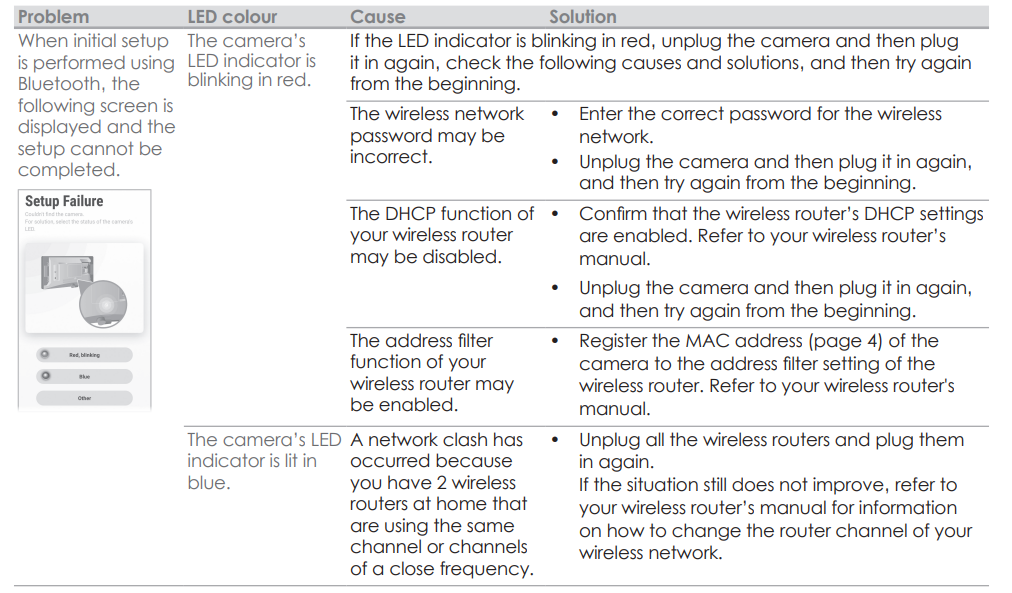
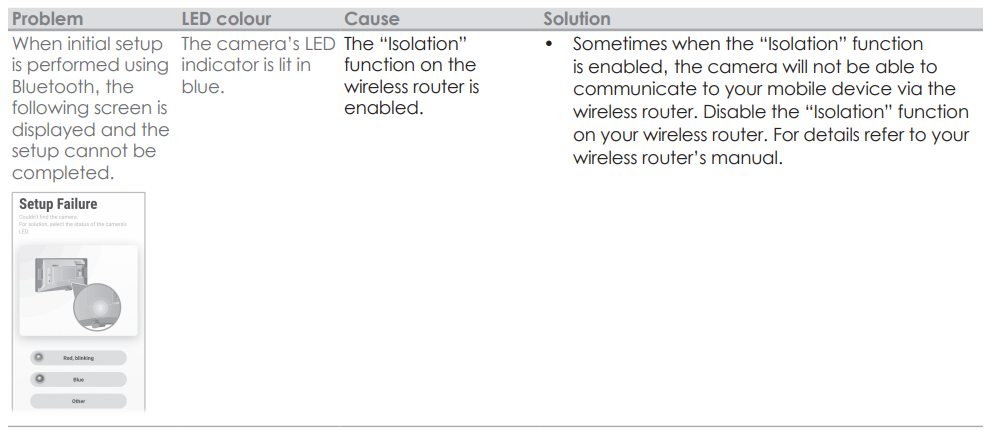
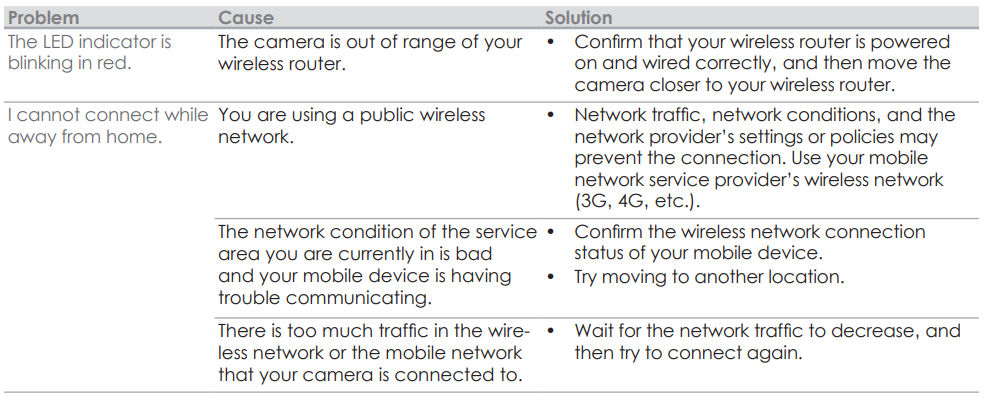
Troubleshooting (Initial setup by selecting “Bluetooth”)
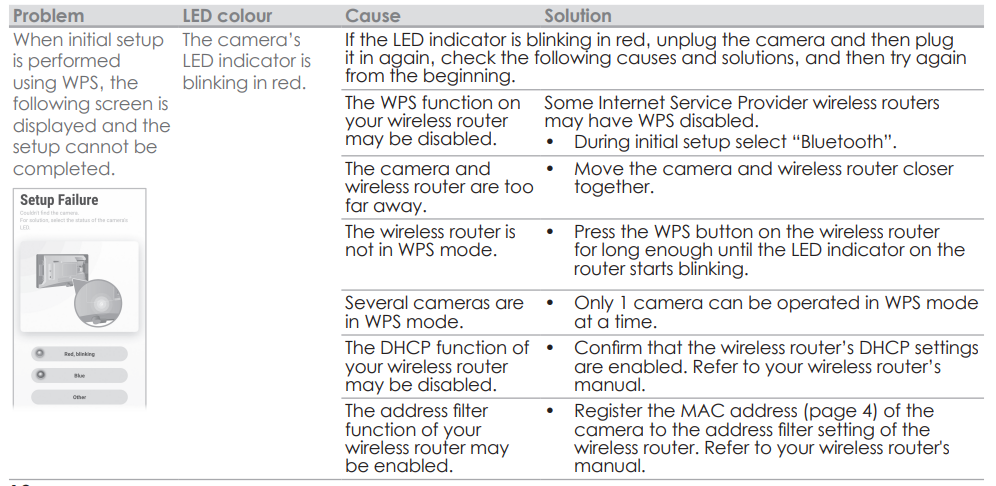
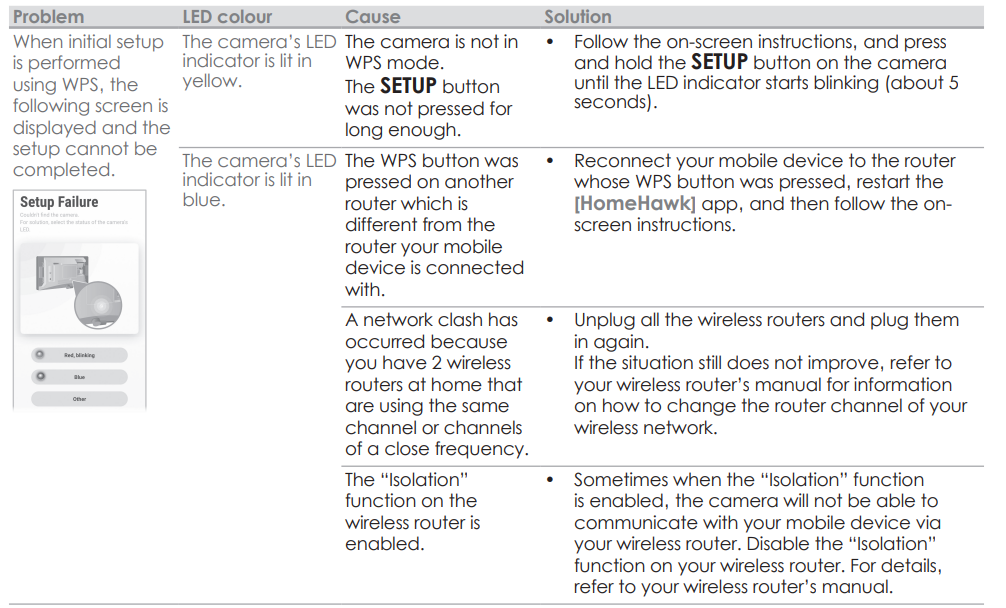
Troubleshooting (Initial setup by selecting “WPS”)
What is WPS?
WPS is a function of wireless routers that is used to easily connect wireless devices to a wireless router
A WPS button on a wireless router indicates that it has the WPS function. (Depending on the type of wireless router‚ the WPS function may be disabled on the wireless router even if there is a WPS button.)
If you have trouble during the initial setup‚ check the following causes/solutions first.
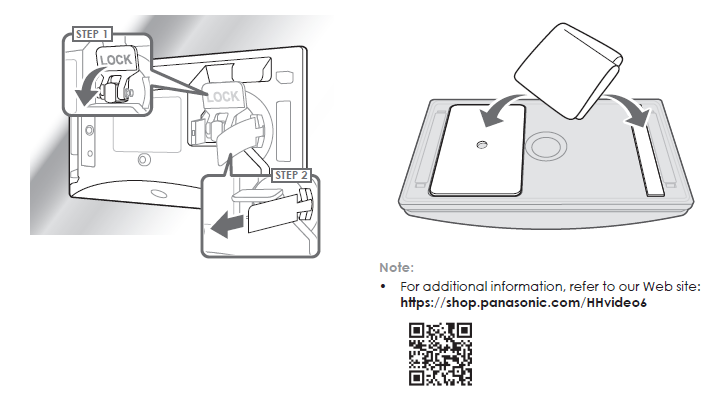
Cleaning the suction cup
- Remove the cover from the camera and then take the camera off the window.
- Wipe the suction cup with a wet wipe.
Warranty
- Panasonic Canada Inc.
- 5770 Ambler Drive‚ Mississauga‚ Ontario L4W 2T3
- PANASONIC PRODUCT - LIMITED WARRANTY
- EXCHANGE PROGRAM
- Panasonic Canada Inc. warrants this product to be free from defects in material and workmanship under normal use and for a period as stated below from the date of original purchase agrees to‚ at its option either (a) repair your product with new or refurbished parts‚ (b) replace it with a new or a refurbished equivalent value product‚ or (c) refund your purchase price. The decision to repair‚ replace,, or refund will be made by Panasonic Canada Inc.
- Home Network System Products – One (1) year
- microSD card (Included model only) – One (1) year
- This warranty is given only to the original purchaser‚ or the person for whom it was purchased as a gift‚ of a Panasonic brand product mentioned above sold by an authorized Panasonic dealer in Canada and purchased and used in Canada‚ which product was not sold “as is”‚ and which product was delivered to you in new condition in the original packaging. TORDER TO BE ELIGIBLE TO RECEIVE WARRANTY SERVICE HEREUNDER‚ A PURCHASE RECEIPT OR OTHER PROOF OF DATE OF ORIGINAL PURCHASE‚ SHOWING AMOUNT PAID AND PLACE OF PURCHASE,, IS REQUIRED
LIMITATIONS AND EXCLUSIONS - This warranty ONLY COVERS failures due to defects in materials or workmanship‚ and DOES NOT COVER normal wear and tear or cosmetic damage. The warranty ALSO DOES NOT COVER damages which occurred in shipment‚ or failures which are caused by products not supplied by Panasonic Canada Inc.‚ or failures which result from accidents‚ misuse‚ abuse‚ neglect‚ mishandling‚ misapplication‚ alteration‚ faulty installation‚ set-up adjustments‚ misadjustment of consumer controls‚ improper maintenance‚ improper batteries‚ power line surge‚ lightning damage‚ modification‚ introduction of sand‚ humidity or liquids‚ commercial use such as hotel‚ office‚ restaurant‚ or other business or rental use of the product‚ or service by anyone other than a Authorized Servicer‚ or damage that is attributable to acts of God.
- Dry cell batteries are also excluded from coverage under this warranty. Rechargeable batteries a warranted for ninety (90) days from the date of original purchase.
- THIS EXPRESS‚ LIMITED WARRANTY IS INSTEAD OF ALL OTHER WARRANTIES‚ EXPRESS OR IMPLIED‚ INCLUDING ANY IMPLIED WARRANTIES OF MERCHANTABILITY AND FITNESS FOR A PARTICULAR PURPOSE. IN NO EVENT WILL PANASONIC CANADA INC. BE LIABLE FOR ANY SPECIAL‚ INDIREC,,T OR CONSEQUENTIAL DAMAGES RESULTING FROM THE USE OF THIS PRODUCT OR ARISING OUT OF ANY BREACH OF ANY EXPRESS OR IMPLIED WARRANTY.
- (As examples‚ this warranty excludes damages for lost time‚ travel to and from the Authorized Servicer‚ loss of or damage to media or images‚ d,ata, or other memory or recorded content. This list of items is not exhaustive‚ but for illustration only.)
- In certain instances‚ some jurisdictions do not allow the exclusion or limitation of incidental or consequential damages‚ or the exclusion of implied warranties‚ so the above limitations and exclusions may not be applicable. This warranty gives you specific legal rights,, and you may have other rights which vary depending on your province or territory.
Pros & Cons of the Panasonic Home Monitoring Window Camera KX-HNC505C
Pros
- High-Quality Video: Captures 1080p Full HD footage with a broad 150° wide-angle lens for expansive coverage.
- Bright Color Night Vision: Provides clear night images with color, unlike many cameras that only offer monochrome night vision.
- Easy Installation: Mounts to interior windows using suction cups or tape, requiring no drilling or tools.
- Continuous Power Supply: Plugs into an indoor outlet, eliminating battery life concerns.
- Local Storage: Supports microSDXC cards up to 1TB, allowing lengthy 24/7 recording without recurring cloud fees.
- Advanced Person Detection: Filters out false alarms caused by cars or pets, with customizable detection zones.
- Smart Home Compatibility: Works with Alexa and Google Assistant for voice control and integration.
Cons
- Indoor Window Mount Only: Cannot be installed outdoors directly; requires a suitable window with a clear view.
- Limited Operating Temperature: Optimal performance between 0°C and 40°C (32°F to 104°F) which may restrict use in extreme climates.
- Dependent on Wi-Fi Quality: Requires stable 2.4 GHz or 5 GHz wireless connection for live monitoring and alerts.
- No Built-in Cloud Storage: Relies solely on local microSD storage; cloud options are not included.
- Price Point: Slightly higher than basic indoor cameras though justified by specialized features and build quality.
Compared to alternatives like traditional outdoor bullet cameras, the KX-HNC505C offers superior protection against theft and weather damage by being mounted indoors, but it requires a suitable window position. Its price reflects its advanced features and unique mounting method, providing excellent value for users prioritizing image quality and ease of installation.
Customer Reviews and Feedback for the Panasonic Home Monitoring Window Camera KX-HNC505C
The Panasonic Home Monitoring Window Camera KX-HNC505C has received generally positive reviews, averaging around 4 to 4.9 stars across various platforms. Users consistently praise its crystal-clear daytime and nighttime video quality with true color night vision enhancing security visibility. The wide-angle lens and person detection feature receive particular commendation for reducing false alarms and ensuring relevant alerts.
Many customers appreciate the ease of installation with no drilling required and the convenience of continuous power supply, eliminating battery worries. Users also value the local microSD storage option that avoids monthly cloud fees, citing peace of mind with reliable recordings stored locally.
On the downside, some buyers note occasional connectivity issues depending on Wi-Fi strength, and a few mention the camera's reliance on an indoor window placement can limit optimal positioning depending on their home layout. A minor number of customers wish for integrated cloud storage options and slightly more mobile app features.
Overall, customers recommend the Panasonic Home Monitoring Window Camera KX-HNC505C for those seeking a high-quality, easy-to-install home security solution with advanced detection capabilities and no ongoing fees.
Faqs
How do I set up the Panasonic Home Monitoring Window Camera KX-HNC505C for the first time?
What should I do if the Panasonic Home Monitoring Window Camera KX-HNC505C is not working properly?
Can I use the Panasonic Home Monitoring Window Camera KX-HNC505C with other smart home devices?
How often should I maintain the Panasonic Home Monitoring Window Camera KX-HNC505C?
What are the key features that make the Panasonic Home Monitoring Window Camera KX-HNC505C different?
How do I configure motion detection on the Panasonic Home Monitoring Window Camera KX-HNC505C?
Can I use the Panasonic Home Monitoring Window Camera KX-HNC505C with a battery power source?
How do I optimize the video quality of the Panasonic Home Monitoring Window Camera KX-HNC505C?
More panasonic manuals
- Usage: Panasonic Home Monitoring Window Camera KX-HNC500 Instruction Guide
- Usage: Panasonic Home Network System Outdoor Camera KX-HNC600 Instruction Guide
- Usage: Panasonic Home Network System Indoor Camera KX-HNC210 Instruction Guide
- Setup: Panasonic Home Monitoring Outdoor Camera KX-HNC710 Instruction Guide
- Usage: Panasonic Home Monitoring Indoor Camera Instruction Guide
- Setup: Panasonic Home Network System Backup Battery Instruction Guide
Leave a Comment