
Philips 4022 Series 22PFS4022 Television User Manual
Content
Philips 4022 Series 22PFS4022 Television: Compact Full HD TV for Everyday Viewing
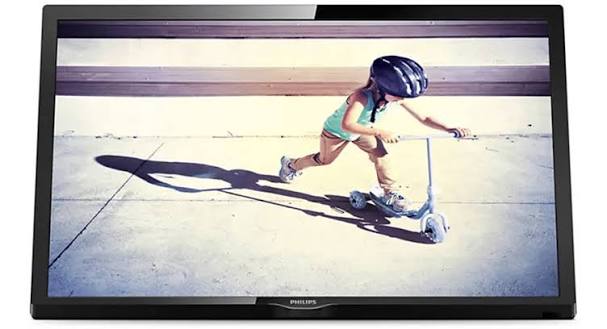
The Philips 4022 Series 22PFS4022 Television is a compact 22-inch Full HD LED TV designed for users who want sharp picture quality in a small footprint. With a 1920 x 1080 resolution, 250 cd/m² brightness, and Philips’ Digital Crystal Clear processing, this model delivers clean, detailed visuals for bedrooms, kitchens, dorm rooms, RVs, and second-screen setups. The slim design and lightweight build make it easy to place on a stand or mount in tight spaces, while the inclusion of two HDMI ports, one USB port, VGA, SCART, and digital audio output gives it broad compatibility with set-top boxes, laptops, gaming consoles, and older AV devices.
For shoppers searching for a budget-friendly small television, the Philips 4022 Series 22PFS4022 Television stands out as a practical option for basic entertainment, casual gaming, and everyday broadcast viewing. It supports common TV standards such as DVB-T2, DVB-C, and DVB-S2 in many versions, making it suitable for modern antenna, cable, and satellite use. The estimated price range for this model on the secondary market is generally around $80 to $180, depending on condition, seller, and region, since it is widely found as an older or discontinued model rather than a current retail release. Availability is typically strongest through online marketplaces, clearance listings, refurbished electronics sellers, and occasional remaining stock from resellers.
If the goal is a small, reliable Full HD TV with simple controls and flexible connectivity, this model offers solid value without unnecessary extras.
Pros and Cons of the Philips 4022 Series 22PFS4022 Television
Pros
- Full HD 1080p resolution on a compact 22-inch screen, which provides sharper text and better image clarity than many basic HD-ready small TVs.
- Multiple connections, including 2 HDMI ports, 1 USB port, VGA, and SCART, which makes it useful for both new and older devices.
- Compact, lightweight form factor that works well in bedrooms, kitchens, offices, and travel or RV environments.
- Low power consumption for a Full HD TV, making it efficient for everyday use.
- Good value for money if purchased at a discounted price, refurbished, or second-hand.
Cons
- Small screen size is not ideal for living rooms or long-distance viewing.
- Audio output is modest, so users who want stronger sound may need external speakers.
- As an older model, it lacks smart TV features, built-in streaming apps, and modern wireless conveniences.
- Brightness and contrast are adequate but not exceptional compared with newer midrange alternatives.
- For buyers wanting a more future-ready TV, newer budget smart TVs from TCL, Hisense, or Samsung may offer better app support and streaming integration.
Overall, the Philips 4022 Series 22PFS4022 Television is a strong choice for basic viewing and compatibility-focused setups, but it is less suitable for users who want a modern smart platform or larger cinematic display.
Customer Reviews for the Philips 4022 Series 22PFS4022 Television
Customer feedback for the Philips 4022 Series 22PFS4022 Television is generally positive, with many users giving it around 4.5 out of 5 stars for its sharp picture, compact size, and easy setup. One common praise is that the Full HD panel looks noticeably clearer than expected for a 22-inch TV, especially when used for news, streaming through an external device, or console gaming. Buyers also appreciate the wide range of inputs, calling it a practical replacement for older TVs in small spaces.
Common complaints focus on the limited built-in sound and the lack of smart TV functions. Some reviewers note that the menu system feels dated, while others mention that it is best used with an external speaker or soundbar for improved audio. A typical testimonial is: “Perfect for my bedroom and easy to connect to my laptop, but I added speakers for better sound.” For shoppers who want a compact, dependable small TV rather than an app-heavy smart model, this product is often recommended as a sensible purchase.
Frequently Asked Questions About the Philips 4022 Series 22PFS4022 Television
Is the Philips 4022 Series 22PFS4022 Television good for bedrooms?
Yes. Its 22-inch size, Full HD resolution, and slim design make it an excellent fit for bedrooms, dorm rooms, and small apartments.
Does it support gaming consoles and laptops?
Yes. The HDMI and VGA connections make it suitable for consoles, PCs, and media devices.
Is it a smart TV?
No. It is a traditional LED television, so streaming services require an external device such as a streaming stick, console, or set-top box.
Who should buy it?
It is best for users who want a compact Full HD TV for everyday viewing, secondary rooms, or simple device connectivity at a reasonable price.
Faqs
How do I set up philips 4022 Series 22PFS4022 Television for the first time?
What should I do if philips 4022 Series 22PFS4022 Television has no picture but the sound works?
How can I improve picture quality on philips 4022 Series 22PFS4022 Television?
Which devices are compatible with philips 4022 Series 22PFS4022 Television through HDMI and external ports?
Why is my philips 4022 Series 22PFS4022 Television not finding channels during setup?
How do I reset philips 4022 Series 22PFS4022 Television when apps or inputs stop responding?
How can I connect a soundbar or external speakers to philips 4022 Series 22PFS4022 Television?
What is the best way to clean and maintain philips 4022 Series 22PFS4022 Television safely?
More philips manuals
Leave a Comment