
Philips 5504 Series 65PFL5504 Television User Manual
Content
Philips 5504 Series 65PFL5504 Television Product Manual
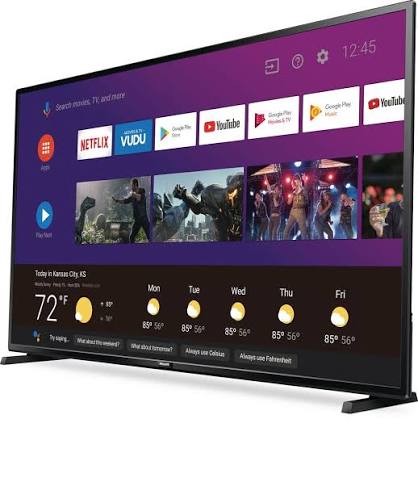
Introduction to the Philips 5504 Series 65PFL5504 Television
The Philips 5504 Series 65PFL5504 Television is a 65-inch 4K Ultra HD smart TV designed for viewers who want a large-screen home entertainment experience with solid everyday performance. Built around an LCD UltraHD display with LED backlighting, it delivers a 3840 x 2160 resolution, wide 178-degree viewing angles, and support for HDR10 over HDMI, making it well suited for movies, streaming, gaming, and live sports. The Android TV platform adds access to popular apps, voice-enabled browsing, and broad content compatibility, which makes the set especially appealing for users who want a straightforward smart TV without complicated setup.
This model is a practical choice for family rooms, media spaces, and users upgrading from older 1080p televisions. It offers three HDMI inputs, USB connectivity, Ethernet, Wi-Fi support, and a headphone output, giving it enough flexibility for modern entertainment systems. The Philips 5504 Series 65PFL5504 Television is also attractive for buyers looking for a balance between screen size, 4K resolution, and value. Depending on condition, retailer, and region, the estimated price range typically falls around entry-level to mid-range 65-inch 4K TV pricing, with refurbished or older inventory often available at a lower cost than comparable current models.
Availability may vary because this is an earlier-generation model, so it is most commonly found through remaining retail stock, third-party sellers, refurbished listings, or support channels for existing owners.
Specifications for Philips 5504 Series 65PFL5504 Television
- Display size: 65 inches diagonal, approximately 64.5 inches visible screen size
- Resolution: 3840 x 2160 pixels, 4K Ultra HD
- Panel type: LCD UltraHD display with LED backlight
- Aspect ratio: 16:9 widescreen
- Viewing angle: 178° horizontal and 178° vertical
- Response time: 16 ms typical
- Contrast ratio: 1000:1 typical
- Refresh and video support: 480i/p, 720p, 1080i/p, and 2160p at 24/30/60Hz
- HDR support: HDR10 via HDMI
- Audio output: 10W x 2 speakers, 20W total RMS
- Connectivity: 3 HDMI inputs, USB 2.0, Ethernet RJ45, optical audio out, analog audio out, AV component input, cable/antenna input, and wireless LAN 802.11ac MIMO
- Tuner: ATSC digital and NTSC analog
- Power: 120V / 60Hz, up to 230W maximum power consumption
Compared with similar 65-inch 4K smart TVs, the Philips 5504 Series 65PFL5504 Television stands out for its large screen, basic HDR support, and reliable connectivity, while newer alternatives may offer higher brightness, more advanced local dimming, and faster smart interfaces.
Troubleshooting Common Problems on the Philips 5504 Series 65PFL5504 Television
If the TV will not power on, confirm that the AC cord is firmly connected, the outlet works, and the remote batteries are installed correctly. A simple reset often helps: unplug the television for about one minute, then reconnect it and try again. If there is no picture or no sound, verify that the correct input source is selected and that the HDMI or antenna cable is secure. Many display issues are caused by an incorrect source setting rather than a hardware fault.
For signal problems such as a blank screen, weak channels, or unstable playback, check the antenna or cable box connection and confirm that the external device matches the selected HDMI mode and resolution. If the television shows error messages related to input or source detection, switch inputs and test another HDMI cable or port. Common error-like symptoms on smart TVs often disappear after restarting the set and the connected device.
To reduce future issues, keep the firmware updated, avoid blocking ventilation openings, use a surge protector, and power-cycle the TV after electrical interruptions. Warranty coverage and support depend on seller and region, but Philips support channels, product manuals, and service portals are the best starting points for repairs, replacement guidance, and setup help. For assistance, use the official Philips support page, the product model search, or the customer service number listed on your region’s Philips support website.
Pros and Cons of the Philips 5504 Series 65PFL5504 Television
- Pros: Large 65-inch 4K screen delivers strong value for movie nights, sports, and streaming
- Pros: Wide 178-degree viewing angles make it suitable for family rooms and shared spaces
- Pros: Android TV support gives access to popular apps and flexible smart features
- Pros: HDR10 compatibility improves contrast in supported content
- Pros: Multiple HDMI ports and wired/wireless networking make setup easier for consoles, soundbars, and media players
- Cons: Basic 1000:1 contrast ratio is modest compared with premium modern TVs
- Cons: 16 ms response time is acceptable for casual viewing but not ideal for competitive gaming
- Cons: 20W total audio output may sound limited in large rooms without a soundbar
- Cons: As an older model, app performance and long-term availability may trail newer 4K televisions
- Cons: Best suited to budget-conscious buyers rather than those wanting advanced OLED-like picture quality
For value for money, the Philips 5504 Series 65PFL5504 Television is a sensible purchase if the goal is a big-screen 4K experience at a lower price. Compared with newer alternatives, it offers fewer premium display enhancements, but it still covers the essentials well for everyday use.
Customer Reviews and User Feedback for Philips 5504 Series 65PFL5504 Television
Customer feedback for the Philips 5504 Series 65PFL5504 Television is generally positive, especially among buyers who wanted a large screen without paying premium pricing. Typical ratings fall around 4 out of 5 stars for value, setup ease, and overall picture size. Many users praise the sharp 4K image, wide viewing angles, and simple app access through Android TV.
Common complaints include average built-in sound, occasional smart TV lag, and picture quality that is good but not exceptional in bright rooms. A frequent testimonial theme is that the TV works best with a soundbar and a stable internet connection. Buyers often recommend it for streaming, casual gaming, and general family use, especially when purchased at a discounted price or in refurbished condition.
Frequently Asked Questions About the Philips 5504 Series 65PFL5504 Television
Is the Philips 5504 Series 65PFL5504 Television good for streaming? Yes, it is a solid streaming TV with Android TV support and wireless connectivity.
Does it support 4K gaming? Yes, it supports 4K input up to 2160p at 60Hz, making it suitable for casual console gaming.
Is a soundbar recommended? Yes, the built-in 20W speakers are fine for regular viewing, but a soundbar improves clarity and impact.
Faqs
How do I set up the philips 5504 Series 65PFL5504 Television for the first time?
What should I do if the philips 5504 Series 65PFL5504 Television will not turn on?
Which devices are compatible with the philips 5504 Series 65PFL5504 Television through HDMI and USB?
How do I improve picture quality on the philips 5504 Series 65PFL5504 Television?
Why is the philips 5504 Series 65PFL5504 Television not connecting to Wi‑Fi?
How do I fix sound problems on the philips 5504 Series 65PFL5504 Television?
What picture and audio settings work best for gaming on the philips 5504 Series 65PFL5504 Television?
How should I clean and maintain the philips 5504 Series 65PFL5504 Television safely?
More philips manuals
Leave a Comment