
Pioneer VSX-534 AV Receiver User Manual
Content
pioneer VSX-534 AV Receiver: A Complete Manual for Home Theater and 4K Entertainment
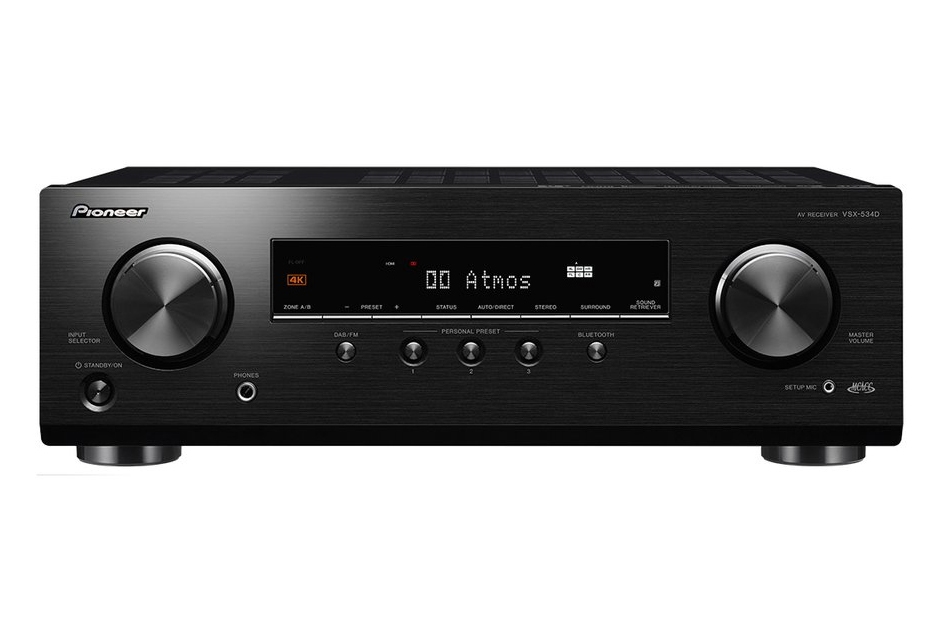
The pioneer VSX-534 AV Receiver is a compact 5.2-channel home theater receiver designed for movie lovers, gamers, and TV streamers who want immersive surround sound without spending flagship-level money. It delivers a practical mix of modern connectivity, Dolby Atmos and DTS:X support, Bluetooth wireless audio, and 4K HDR passthrough, making it a strong fit for entry-level and midrange home cinema setups. For users upgrading from a soundbar or an older stereo receiver, this model provides a noticeable leap in clarity, channel separation, and overall room-filling performance.
One of its biggest selling points is value. The pioneer VSX-534 AV Receiver typically sits in the budget-to-midrange price range, with street pricing often falling around the low-to-mid $200s to mid-$300s depending on retailer and stock availability. It is widely available through major electronics sellers and home audio retailers, though pricing can vary by region and promotions. The receiver is especially appealing for buyers who want easy setup, HDMI switching for multiple devices, and support for modern formats like HDR10 and Dolby Vision.
This model is best suited to compact and medium-sized living rooms, starter theater rooms, and users building a 5.1 or 5.2 speaker system. It is also a smart pick for anyone wanting a straightforward AV receiver for TV audio, console gaming, Blu-ray playback, and everyday streaming through Bluetooth. In short, the pioneer VSX-534 AV Receiver balances essential features, dependable performance, and approachable pricing in a clean, beginner-friendly package.
Key Specifications of the pioneer VSX-534 AV Receiver
- Channel configuration: 5.2-channel AV receiver with support for dual subwoofers
- Power output: 80 W per channel at 8 ohms, 20 Hz–20 kHz, 2 channels driven; 150 W per channel at 6 ohms, 1 kHz, 1 channel driven
- HDMI connectivity: 4 HDMI inputs and 1 HDMI output
- Video support: 4K UHD passthrough, HDR10, Dolby Vision, and HDCP 2.2/2.3 compatibility depending on region and version
- Audio formats: Dolby Atmos, Dolby TrueHD, Dolby Digital Plus, DTS:X, DTS-HD Master Audio, DTS Virtual:X, and DTS Neural:X
- Wireless audio: Bluetooth built in for quick phone and tablet streaming
- Legacy inputs: Optical, coaxial, RCA stereo inputs, USB port, FM/AM tuner, and headphone output
- Speaker setup: Designed for simple 5.1 or 5.2 home theater layouts
- Performance benchmark: Signal-to-noise ratio listed around 109 dB on retailer specifications
Compared with similar entry-level AV receivers, the pioneer VSX-534 AV Receiver stands out for including Dolby Atmos and DTS:X support at a lower price point, though it does not include advanced networking features found on more expensive models such as built-in Wi-Fi, multi-room streaming ecosystems, or extensive app-based control.
Pros and Cons of the pioneer VSX-534 AV Receiver
Pros
- Affordable home theater upgrade with strong value for money
- Supports Dolby Atmos and DTS:X for more immersive movie sound
- Compact, straightforward design that is easy to set up
- Good HDMI flexibility for TV, game consoles, and Blu-ray players
- Bluetooth makes casual music streaming quick and convenient
- Works well for first-time AV receiver buyers and smaller rooms
Cons
- No built-in Wi-Fi or advanced streaming platform on many versions
- 5.2-channel layout limits expansion compared with 7.2- or 9.2-channel receivers
- Power output is solid for most rooms but not ideal for very demanding speakers
- On-screen features and smart functions are basic versus premium competitors
- Setup may feel technical for users moving from soundbars
For shoppers comparing alternatives, this receiver is a better fit than many ultra-basic budget models because it adds real immersive audio support. However, users wanting Wi-Fi streaming, voice control, or room calibration depth may prefer a higher-tier Pioneer or Yamaha AV receiver.
Customer Reviews and Real-World Feedback on the pioneer VSX-534 AV Receiver
Customer feedback for the pioneer VSX-534 AV Receiver is generally positive, with many buyers praising its easy setup, clean sound, and strong performance for the price. A common rating pattern from users is around 4 out of 5 stars, especially among home theater beginners who want a dependable first receiver. One frequent comment is that it “sounds great for movies and TV” and offers “excellent value for the money.”
Common complaints usually focus on the lack of built-in Wi-Fi, limited smart features, and the fact that it is not the best match for very large rooms or power-hungry speakers. Some users also mention that the menu system can feel dated compared with newer network receivers. Even so, most owners recommend it to buyers who want a budget-friendly AV receiver for a 5.1 or 5.2 setup.
If you want a simple, reliable home theater hub with Dolby Atmos and HDMI 4K support, this model is a strong buy. If you need streaming apps, multi-room audio, or more advanced calibration tools, consider stepping up to a more modern networked receiver.
Faqs
How do I set up the pioneer VSX-534 AV Receiver for the first time with a TV and speakers?
What speaker setup works best with the pioneer VSX-534 AV Receiver for home theater use?
Why is there no sound from my pioneer VSX-534 AV Receiver even though everything is powered on?
Which devices are compatible with the pioneer VSX-534 AV Receiver through HDMI and wireless playback options?
How do I improve sound quality on the pioneer VSX-534 AV Receiver for movies and music?
What should I check if my pioneer VSX-534 AV Receiver is overheating or shutting down?
How do I connect a TV to the pioneer VSX-534 AV Receiver using HDMI ARC correctly?
What regular maintenance does the pioneer VSX-534 AV Receiver need to stay reliable?
More pioneer manuals
Leave a Comment