
Usage & Setup: Samsung Galaxy Note20 5G User Manual
Content
Samsung Galaxy Note20 5G
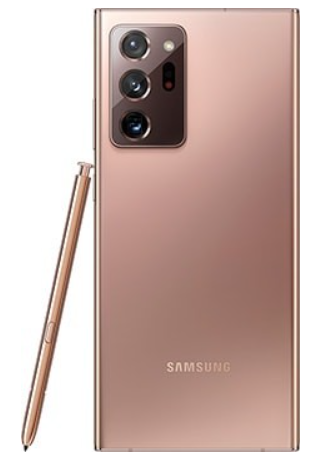
Introduction
The Samsung Galaxy Note20 5G is a premium Android smartphone designed for professionals, creatives, and tech enthusiasts who demand top-tier performance and productivity. Featuring a large 6.7-inch Super AMOLED Plus display, powerful Exynos 990 chipset, and advanced S Pen integration, the Galaxy Note20 5G delivers a seamless multitasking experience. Its 5G connectivity ensures lightning-fast downloads and streaming, while the pro-grade camera system captures stunning photos and 8K video. The device is ideal for business users, content creators, and mobile gamers seeking a reliable, feature-rich device.
Key benefits include a long-lasting 4300 mAh battery, expandable storage, and Samsung’s signature S Pen for note-taking and drawing. The Galaxy Note20 5G stands out with its sleek design, robust security features, and seamless integration with Samsung’s ecosystem. Available in select markets, the phone typically retails between $999 and $1,199, depending on storage configuration and region. Whether you’re working remotely, editing videos, or gaming on the go, the Samsung Galaxy Note20 5G is built to elevate your mobile experience.
Detailed Specifications of the Samsung Galaxy Note20 5G
- Display: 6.7-inch Super AMOLED Plus, 2400 x 1080 resolution, 393 ppi, 60 Hz refresh rate
- Processor: Exynos 990 (Octa-core), Adreno 650 GPU
- RAM: 8 GB
- Storage: 128 GB or 256 GB (expandable up to 1 TB via microSD)
- Battery: 4300 mAh, non-removable, supports 25W wired charging and Qi wireless charging
- Cameras: Triple rear (12 MP wide, 64 MP telephoto, 12 MP ultrawide), 10 MP front
- Connectivity: 5G, Wi-Fi 6, Bluetooth 5.0, NFC, eSIM, Ultra-wideband
- Operating System: Android 10 (upgradable)
- Design: Gorilla Glass 5 front, polycarbonate back, IP68 water resistance
- Additional Features: S Pen (26ms latency), Samsung PowerShare, no audio jack
Compared to rivals like the iPhone 12 Pro and Google Pixel 5, the Samsung Galaxy Note20 5G offers superior multitasking, expandable storage, and a more versatile S Pen.
Getting started
Galaxy Note20 5G
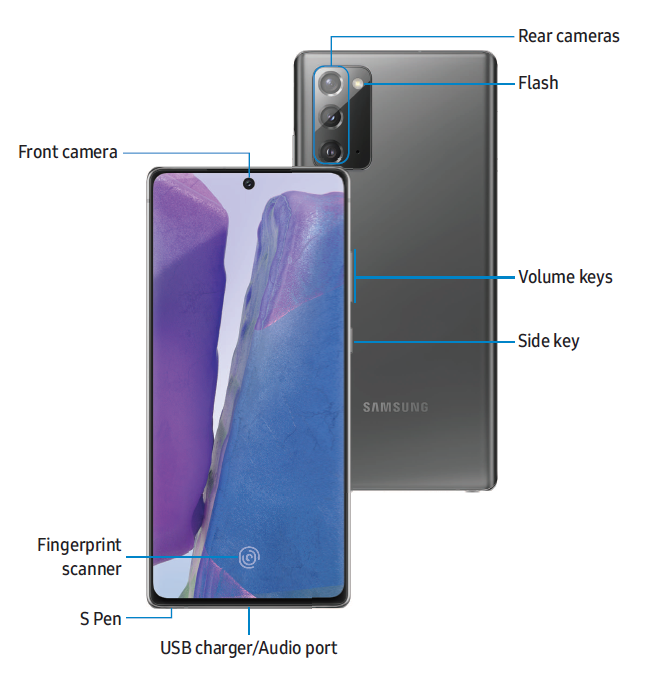
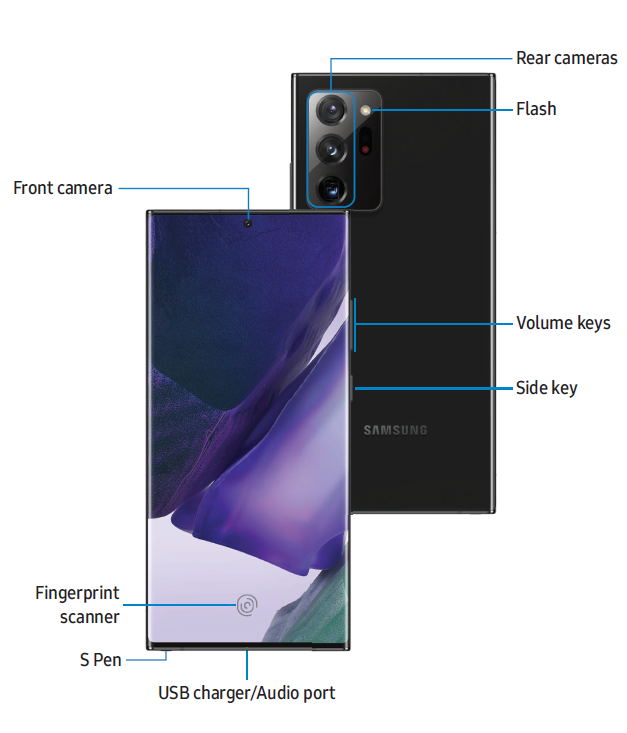
Set up your device
Charge the battery | Wireless PowerShare
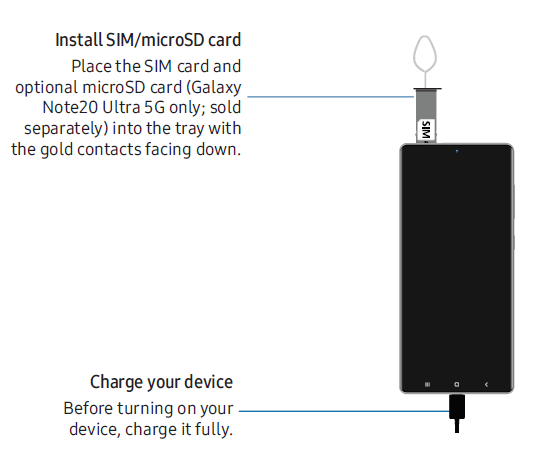
Your device uses a nano-SIM card. A SIM card may be preinstalled, or you may be able to use your previous SIM card. Contact your carrier for more details.
- NOTE: The use of mobile devices on an aircraft or a ship may be subject to federal and local guidelines and restrictions. Check with appropriate authorities and always follow crew instructions regarding when and how you may use your device.
- NOTE: Use only charging devices and batteries (if applicable) that are approved by Samsung. Samsung charging devices and batteries are designed for your device to maximize battery life. Using other charging devices and batteries may void your warranty and may cause damage.
- NOTE: Your device is IP68 rated for dust and water resistance. To maintain the water-resistant and dust-resistant features of your device, make sure that the SIM card/Memory card tray openings are maintained free of dust and water, and the tray is securely inserted prior to any exposure to liquids. For more information, see Maintaining water and dust resistance.
Charge the battery
Your device is powered by a rechargeable battery. A charger (charging head and USB Type-C cable) is included with the device for charging the battery from a power outlet.
TIP: While charging, the device and the charger may become hot and stop charging. This usually does not affect the device’s lifespan or performance and is in the device’s normal range of operation. Disconnect the charger from the device and wait for the device to cool down.
Wireless PowerShare
Wirelessly charge your compatible Samsung devices using your phone. Some features are not available while sharing power.
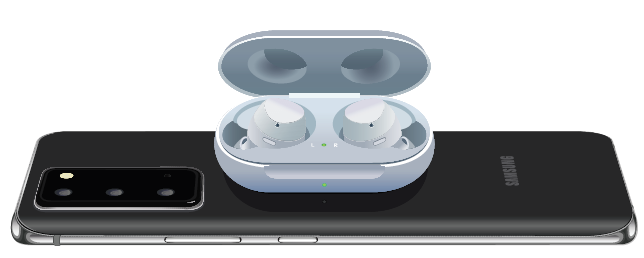
- From Quick settings, tap Wireless PowerShare to enable this feature.
- With the phone face down, place the compatible device on the back of the phone to charge. A notification sound or vibration occurs when charging begins.
NOTE Wireless PowerShare works with most Qi-Certified devices. Requires a minimum of 30% battery to share. The speed and power efficiency of charging vary by device. May not work with some accessories, covers, or other manufacturers’ devices. If you have trouble connecting or if charging is slow, remove any covers from each device.
For best results when using Wireless PowerShare, please note:
- Remove any accessories or covers before using the feature. Depending on the type of accessory or cover, Wireless PowerShare may not work properly.
- The location of the wireless charging coil may vary by device, so you may need to adjust the placement to make a connection. When charging starts, a notification or vibration will occur, so the notification will help you know you've made a connection.
- Call reception or data services may be affected, depending on your network environment.
- Charging speed or efficiency can vary depending on device condition or the surrounding environment.
- Do not use headphones while charging with Wireless PowerShare.
Maintaining water and dust resistance
CAUTION : To avoid electric shock and damage to your device, do not charge the device while it is wet or in an area where it could get wet. Do not handle the device, charger, or cords with wet hands while charging.
The device is not impervious to dust and water damage in any situation. All compartments must be closed tightly.
Follow these tips carefully to prevent damage to the device and maintain dust and water resistance performance:
- Water resistant based on IP68 rating, which tests submersion in fresh water deeper than 1.5 meters or keeping it submerged for more than 30 minutes. If the device is exposed to fresh water, dry it thoroughly with a clean, soft cloth; if exposed to liquid other than fresh water, rinse with fresh water and dry as directed.
- Any device that uses accessible compartments or ports that can be opened should have these sealed or closed tightly to prevent liquid from entering the system.
- If the device has been immersed in water or the microphone or speaker is wet, sound may not be heard clearly during a call. After wiping the device with a dry cloth, dry it thoroughly before using it.
- Do not expose the device to water at high pressure.
- If the device is dropped or receives an impact, the water and dust resistant features of the device may be damaged.
NOTE : Liquid other than fresh water may enter the device faster. Failure to rinse the device in fresh water and dry it as instructed may cause the device to suffer from operability or cosmetic issues.
Troubleshooting Common Issues with the Samsung Galaxy Note 20 5G
- Slow Performance: Clear cache, close unused apps, or restart the device.
- Battery Drains Quickly: Disable background apps, reduce screen brightness, or check for rogue apps.
- 5G Not Working: Ensure 5G is enabled in settings,s and you’re in a supported area.
- S Pen Not Responding: Re-pair the S Pen or replace the battery if needed.
- Camera Errors: Update the camera app or reset camera settings.
- Wi-Fi/Bluetooth Issues: Toggle airplane mode or reset network settings.
Prevent issues by keeping the device updated and using genuine accessories. The Galaxy Note20 5G comes with a 1-year limited warranty. For support, contact Samsung Customer Care at 1-800-SAMSUNG
Pros and Cons of the Samsung Galaxy Note20 5G
Pros
- Excellent display and build quality
- Powerful performance for multitasking
- Advanced S Pen for productivity
- Expandable storage and 5G support
- Pro-grade camera and video features
Cons
- No audio jack
- 60 Hz refresh rate (lower than competitors)
- Expensive compared to mid-range phones
- Some features are limited to the Ultra model
The Samsung Galaxy Note20 5G offers great value for professionals and creatives, though casual users may find it overkill.
Customer Reviews of the Samsung Galaxy Note20 5G
Users praise the Galaxy Note20 5G for its smooth performance, excellent camera, and S Pen functionality. Many highlight the long battery life and 5G speeds. Common complaints include the lack of a 120 Hz display and the absence of an audio jack. The phone averages 4.5 out of 5 stars on major retail sites. Testimonials often mention its reliability for work and creative tasks. Most buyers recommend it for those who need a powerful, versatile smartphone, especially if they value the S Pen and 5G connectivity.
Faqs
Why does my samsung Galaxy Note20 5G have a green tint or lines on the display, and how can I fix it?
Why is my samsung Galaxy Note20 5G overheating, and what can I do to prevent it?
How can I troubleshoot mobile data connectivity issues on my samsung Galaxy Note20 5G?
How do I optimize battery life on my samsung Galaxy Note20 5G for longer daily use?
What should I do if the touchscreen on my samsung Galaxy Note20 5G becomes unresponsive or laggy?
Can I use the samsung Galaxy Note20 5G with Android Auto, and what do I do if it doesn’t connect?
Why does my samsung Galaxy Note20 5G randomly reboot or shut down, and how can I fix it?
How do I maintain and care for my samsung Galaxy Note20 5G to ensure long-term performance?
More samsung manuals
- Usage: Samsung Galaxy Tab S7|S7+ User Manual
- Setup: Samsung Galaxy S23 Ultra User Manual
- Pairing & Setup: Samsung SM-R170 Galaxy Buds User Manual
- Setup: Samsung Galaxy Tab S7 5G | S7+ 5G User Manual
- Setup: Samsung Galaxy Book Series NP750TDA User Manual
- Setup: Samsung SSD Data Migration V.4.0 User Manual
Leave a Comment