
Setup: Samsung Galaxy S23 Ultra User Manual
Content
Samsung Galaxy S23 Ultra
Introduction
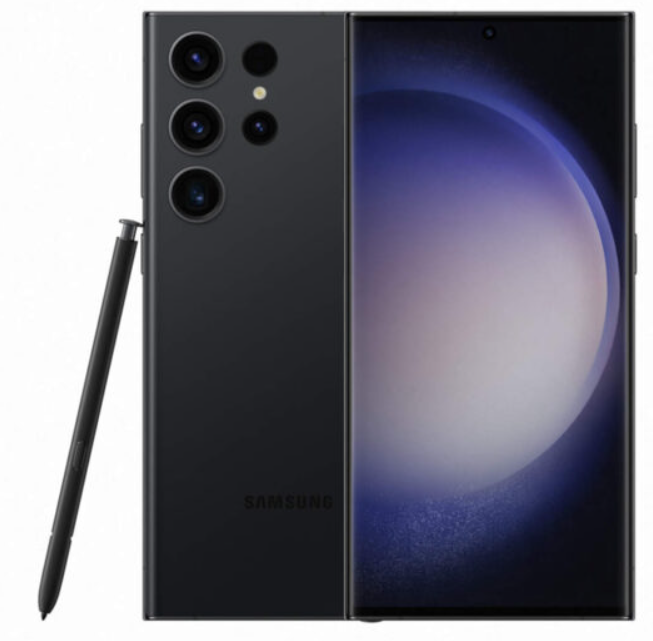
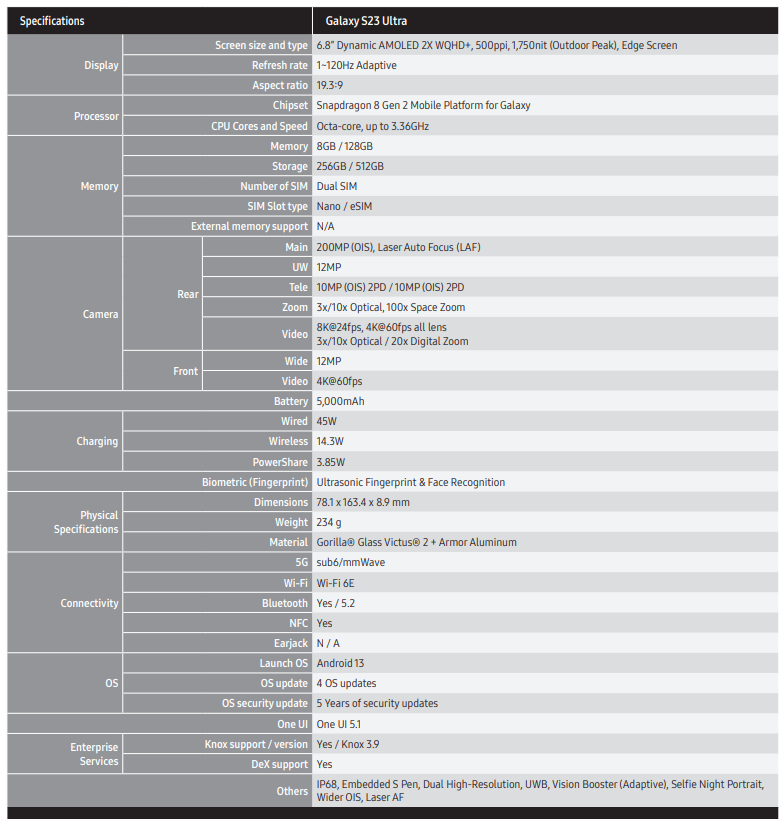
The Samsung Galaxy S23 Ultra stands as Samsung's pinnacle of smartphone innovation, combining cutting-edge technology with a premium design. Featuring a stunning 6.8-inch QHD+ Dynamic AMOLED 2X display with a super-smooth adaptive 120Hz refresh rate, it delivers breathtaking visuals and fluid interactions for gaming, multimedia, and productivity. The device is powered by the Snapdragon 8 Gen 2 chipset tailored for Galaxy, ensuring blazing-fast performance and energy efficiency.
Key benefits include its industry-leading 200MP rear camera system—a quad setup with ultrawide, 3x, and 10x telephoto lenses—allowing ultra-high-resolution photos and versatile shooting options, including impressive low-light Nightography. The built-in S Pen enhances creativity and multitasking, appealing to professionals and tech enthusiasts alike. With up to 12GB RAM and storage options up to 1TB, the S23 Ultra meets the demands of power users and content creators.
Targeted at users seeking premium smartphone experiences—ranging from mobile photography experts, gamers, to productivity-focused professionals—the Galaxy S23 Ultra supports fast 45W wired and 10W wireless charging backed by a robust 5,000 mAh battery. Its IP68 rating guarantees water and dust resistance, making it durable for everyday use.
Retailing around $999 to $1,19,9, depending on configuration, the Samsung Galaxy S23 Ultra is widely available globally through carriers, retail outlets, and Samsung’s official channels, making it a top contender in the flagship smartphone market of 2025.
Specifications
Device Layout
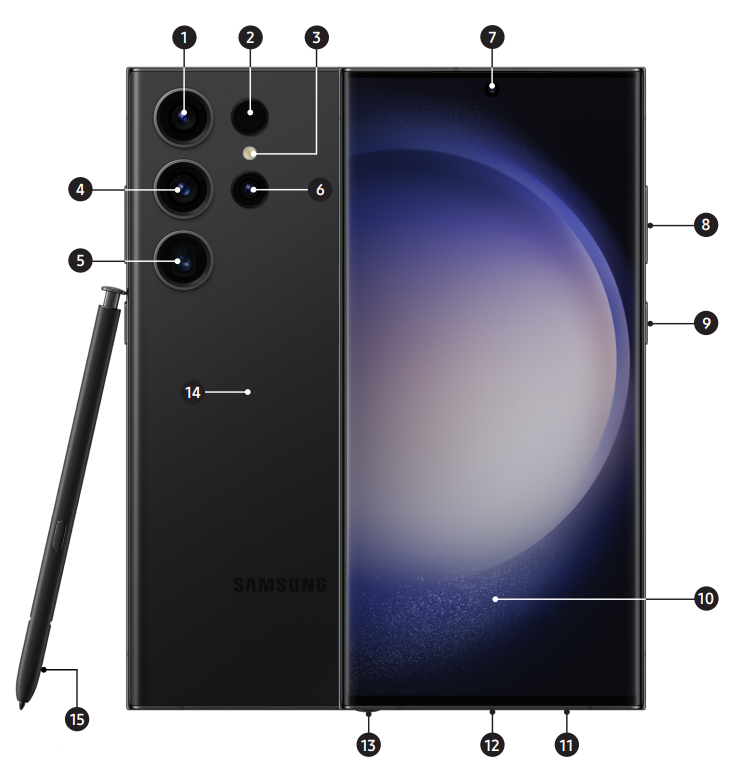
- Ultra-Wide Camera
- Laser Auto Focus
- LED Flash
- Wide-Angle Camera
- Super Telephoto Camera (10x)
- Telephoto 3X Camera
- Front Camera
- Volume Keys
- Power Button (Customizable)
- Ultrasonic Fingerprint
- SIM Tray
- USB-C
- S Pen Slot
- Wireless PowerShare
- S Pen
Troubleshooting Common Issues with Samsung Galaxy S23 Ultra
Despite its advanced technology, users may encounter some common issues, which can be resolved with straightforward solutions:
- Battery Drain: Optimize battery usage via Settings > Battery and check for apps consuming excess power. Use e adaptive refresh rate to save energy.
- Camera App Freezing: Clear cache/data of the Camera app from Settings > Apps. Restart the device if the issue persists.
- Connectivity Problems: For Wi-Fi or Bluetooth drops, toggle airplane mode or reset network settings via Settings > General management.
- Error Code 901: Indicates an update failure; retry software update over stable Wi-Fi or use Samsung’s Smart Switch on PC.
Preventive measures include regularly updating One UI 5.1 and Android 13 software, avoiding unauthorized apps, and using official Samsung accessories. The Galaxy S23 Ultra comes with a standard one-year manufacturer's warranty covering hardware defects. Samsung offers comprehensive customer support via their website, live chat, and dedicated service centers worldwide.
For assistance, contact Samsung Support at 1-800-SAMSUNG or visit your nearest authorized service center.
Pros & Cons of the Samsung Galaxy S23 Ultra
Pros
- Exceptional Camera Quality: 200MP main sensor delivers sharp, detailed photos with versatile telephoto options enabling up to 10x optical zoom.
- Vivid Display: Large 6.8-inch QHD+ AMOLED screen with 120Hz adaptive refresh rate offers vibrant colors and smooth scrolling.
- Powerful Performance: Snapdragon 8 Gen 2 chipset combined with up to 12GB RAM ensures seamless multitasking and gaming.
- S Pen Integration: Built-in stylus enhances productivity and creativity, unique among flagship smartphones.
- Durability: IP68 water and dust resistance adds reliability for everyday use.
Cons
- Price: Premium pricing may be a barrier for budget-conscious buyers.
- Size & Weight: At 233 grams and 6.8 inches, it may feel bulky for some users.
- Charging Speed: Though 45W wired charging is fast, competitors offer higher wattage options.
Compared to alternatives such as the Google Pixel 8 Pro or Apple iPhone 15 Pro Max, the Galaxy S23 Ultra excels in display quality and camera versatility but comes at a higher price point. Overall, it offers strong value in the flagship segment for users prioritizing photography, display, and stylus functionality.
Customer Reviews and Feedback on Samsung Galaxy S23 Ultra
Users praise the Samsung Galaxy S23 Ultra for its remarkable camera capabilities, particularly the 200MP sensor’s detail and low-light performance. The large, bright display and smooth One UI 5.1 interface receive frequent compliments for an enhanced user experience. Many highlight the S Pen features as a productivity boost.
Common complaints include the device’s hefty size and occasional battery drain under heavy use. Some users mention minor software bugs, which are typically resolved with timely updates. The charging speed is seen as adequate but not class-leading.
Overall, the Galaxy S23 Ultra holds an average rating of around 4.5 stars out of 5 on major retail platforms, with strong recommendations for photography enthusiasts and power users. Buyers seeking a premium Android device with advanced camera tech and stylus support often find it an excellent purchase.
Faqs
How do I set up my samsung Galaxy S23 Ultra for first-time use?
What should I do if my samsung Galaxy S23 Ultra won't turn on?
How can I fix touchscreen sensitivity problems on my samsung Galaxy S23 Ultra?
Why does my samsung Galaxy S23 Ultra's S Pen keep disconnecting and how can I fix it?
How do I resolve Wi-Fi connectivity issues on my samsung Galaxy S23 Ultra?
What steps can I take to optimize performance and reduce lag on my samsung Galaxy S23 Ultra?
How can I prolong battery life and fix slow charging issues on the samsung Galaxy S23 Ultra?
What is the best way to maintain and care for my samsung Galaxy S23 Ultra to ensure longevity?
More samsung manuals
Leave a Comment