
Tcl 20 Pro 5G Smartphone User Manual
Content
Introduction to the TCL 20 Pro 5G Smartphone
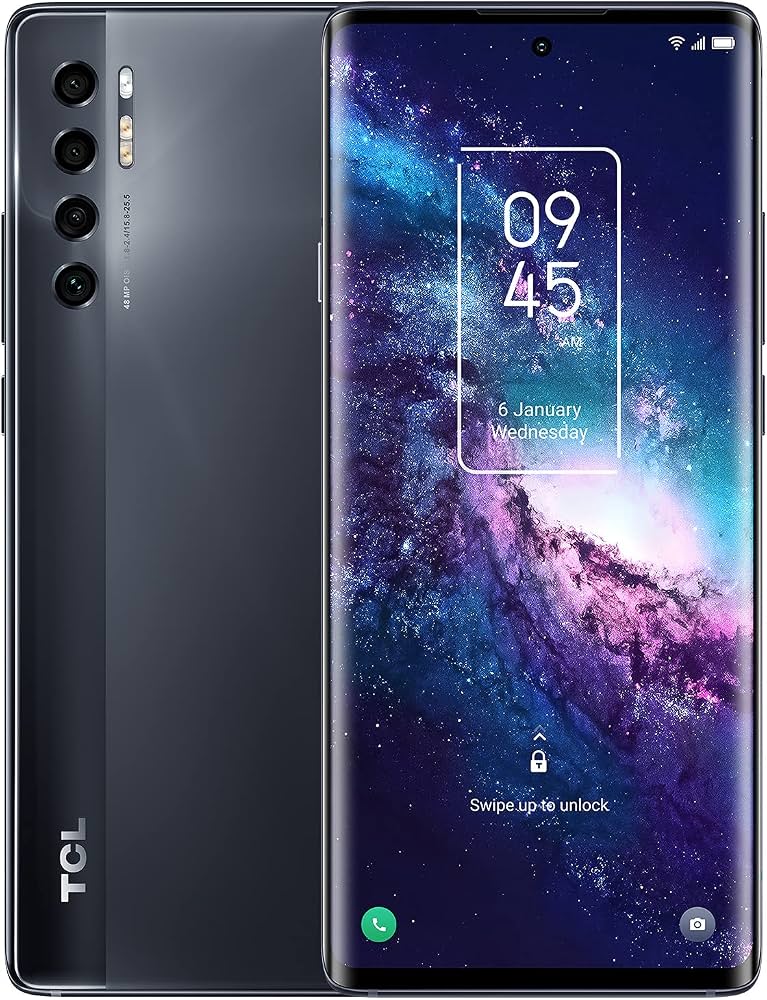
The TCL 20 Pro 5G Smartphone is a premium mid-range device built for users who want a large AMOLED display, capable 5G performance, and versatile cameras without paying flagship prices. It stands out for its curved 6.67-inch FHD+ NXTVISION AMOLED screen, Snapdragon 750G processor, and 256GB of storage, making it a strong choice for streaming, gaming, photography, and everyday productivity. The design also feels more upscale than many phones in its class, with a slim body, glass-like finish, and IP52 dust and splash resistance.
This model is a good fit for mobile content consumers, remote workers, social media creators, and users upgrading from older 4G smartphones. Its 48MP main camera with OIS, 32MP selfie camera, and 15W wireless charging add real value for the price segment. In current market terms, the TCL 20 Pro 5G Smartphone typically falls in the mid-range category, with estimated pricing often around the sub-$500 level depending on retailer, region, and stock availability. Availability may vary because this is an older model, so it is often found through online marketplaces, refurbished sellers, or remaining retail inventory rather than standard carrier shelves. For buyers seeking a balanced Android phone with a strong display and generous storage, it remains a practical and attractive option.
Specifications for TCL 20 Pro 5G Smartphone
- Display: 6.67-inch FHD+ AMOLED, 2400 x 1080 resolution, curved design
- Processor: Qualcomm Snapdragon 750G 5G with Kryo 570 CPU cores
- RAM: 6GB
- Storage: 256GB internal storage with microSD expansion
- Rear Cameras: 48MP main camera with OIS, 16MP ultra-wide, 5MP macro, 2MP depth sensor
- Front Camera: 32MP selfie camera
- Battery: 4500mAh with 18W wired charging and 15W wireless charging
- Operating System: Android 11 with TCL UI
- Connectivity: 5G, LTE, Wi-Fi, Bluetooth 5.1, NFC, USB-C
- Protection: IP52 splash and dust resistance
- Dimensions: Approximately 164.2 x 73 x 8.8 mm
- Weight: About 190 g
In performance terms, the Snapdragon 750G places the device near other upper-midrange phones such as the Samsung Galaxy A52 5G and Motorola One 5G Ace, though the TCL model often feels more premium in display quality. It is best suited for multitasking, media playback, and moderate gaming rather than heavy flagship-level workloads.
Detailed Description of the TCL 20 Pro 5G Smartphone
The TCL 20 Pro 5G Smartphone combines a polished design with practical features that make daily use comfortable and efficient. Its curved AMOLED panel delivers vivid colors, strong contrast, and smooth viewing for video streaming, reading, and browsing. The phone’s build quality feels refined, with a slim frame and premium finish that helps it compete with more expensive devices in appearance and hand feel.
Under the hood, the Snapdragon 750G provides reliable 5G connectivity and enough power for common tasks such as social media, web browsing, video calls, navigation, and photo editing. The camera system is especially useful in real-world situations: the main sensor handles daylight shots well, the ultra-wide lens captures landscapes and group photos, and the macro lens is suited for close-up detail work. The 32MP front camera also makes it a solid choice for video conferencing and selfies. The combination of a 4500mAh battery, wireless charging, and large internal storage makes this device practical for users who want convenience and long-term usability. Overall, the TCL 20 Pro 5G Smartphone delivers a strong user experience for entertainment-focused buyers and everyday smartphone users.
Setup Guide for TCL 20 Pro 5G Smartphone
Setting up the TCL 20 Pro 5G Smartphone is straightforward. Begin by inserting a compatible Nano-SIM card and, if needed, a microSD card for extra storage. Power on the device, select your language, connect to Wi-Fi, and sign in with a Google account to restore apps, contacts, and settings. During setup, you can choose whether to transfer data from an old phone, enable location services, and configure screen lock options such as PIN, pattern, fingerprint, or face unlock.
For connectivity, open the settings menu to pair Bluetooth headphones, smartwatches, or speakers. If wireless charging is available, place the phone on a Qi-compatible pad and ensure it is centered correctly. For best results, update the system software before heavy use so security patches and performance improvements are installed. If setup stalls, restart the phone, check Wi-Fi stability, or use mobile data as a backup. Avoid using damaged charging cables or third-party accessories that do not meet safety standards. Keep the device away from excessive heat and moisture during the initial setup period and throughout regular use.
Troubleshooting TCL 20 Pro 5G Smartphone Common Problems
If the phone will not power on, charge it for at least 20 to 30 minutes using the original charger or a certified replacement before trying again. If the screen freezes, hold the power button and volume key combination to restart the device. For slow performance, clear unused apps, delete cached files, and ensure enough storage space remains available. If 5G or Wi-Fi connectivity is weak, toggle airplane mode, reset network settings, and confirm that your carrier supports the required bands.
Common camera issues often improve after a software update or by cleaning the lens gently with a soft microfiber cloth. If wireless charging does not start, remove thick cases and confirm the charging pad supports the phone’s charging standard. There are no widely used public error codes specific to this model, so most fixes rely on standard Android troubleshooting steps. Preventive care includes keeping the battery between 20% and 80% when possible, avoiding overheating, and using approved accessories. For warranty service, support requests, or hardware repair, contact TCL customer support through the official regional support center, your retailer, or the carrier where the phone was purchased.
Pros and Cons of the TCL 20 Pro 5G Smartphone
Pros
- Large 6.67-inch AMOLED display with vibrant colors and strong contrast
- 256GB of storage provides excellent room for apps, photos, and videos
- Versatile quad-camera system with OIS on the main lens
- 15W wireless charging is uncommon in this price range
- Premium curved design makes it feel more expensive than many alternatives
- Good value for users who prioritize media consumption and storage capacity
Cons
- Snapdragon 750G is capable but not a top-tier performer for demanding gaming
- 18W wired charging is slower than many newer mid-range phones
- Android 11 is dated compared with newer software versions
- IP52 protection is basic rather than full waterproofing
- Availability can be limited because the model is no longer widely stocked
Compared with newer alternatives, the TCL 20 Pro 5G Smartphone remains appealing for display quality and storage, but newer phones may offer faster charging, updated software, and better long-term support. It is still a smart buy when found at a discounted price.
Customer Reviews of the TCL 20 Pro 5G Smartphone
User feedback for the TCL 20 Pro 5G Smartphone is generally positive, especially for its display, design, and generous storage. Many owners give it around 4 out of 5 stars, praising the AMOLED screen, smooth everyday performance, and premium feel. A common positive comment is that it looks and feels like a more expensive phone than it actually is.
Frequent complaints include slower charging than expected, average gaming performance, and software that feels less current than on newer devices. Some users also mention that camera quality is strong in daylight but less impressive in low light. Overall, the phone is often recommended for buyers who want a stylish mid-range Android phone with excellent screen quality, dependable 5G, and strong multimedia features. It is a solid choice for budget-conscious shoppers who value display and storage over flagship-level speed.
Faqs
How do I set up the TCL 20 Pro 5G Smartphone for the first time?
Why is my TCL 20 Pro 5G Smartphone not connecting to 5G or mobile data?
What should I do if the TCL 20 Pro 5G Smartphone battery drains too fast?
How can I improve the performance of my TCL 20 Pro 5G Smartphone?
Is the TCL 20 Pro 5G Smartphone compatible with microSD cards and dual SIM use?
How do I use the TCL 20 Pro 5G Smartphone camera for better low-light photos?
How do I fix fingerprint sensor problems on the TCL 20 Pro 5G Smartphone?
How should I clean and protect the TCL 20 Pro 5G Smartphone from everyday damage?
More tcl manuals
Leave a Comment