
Tcl One Touch 4041 Mobile Phone User Manual
Content
tcl One Touch 4041 Mobile Phone Review and Product Manual
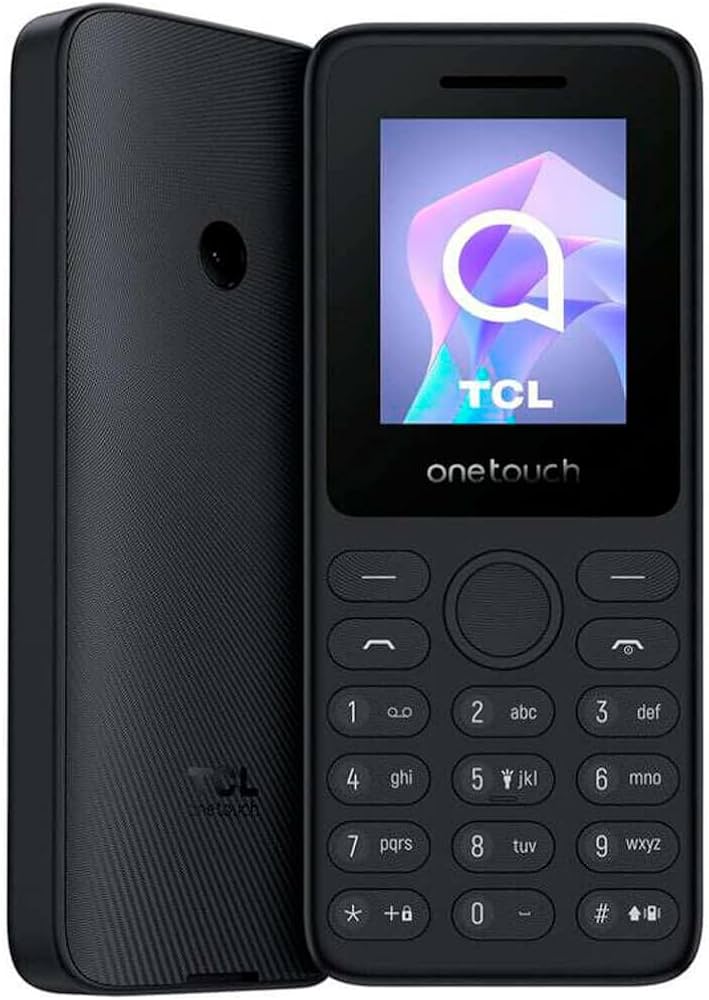
The tcl One Touch 4041 Mobile Phone is a compact feature phone built for users who want simple calling, long standby time, and modern 4G connectivity in a classic keypad design. With a 1.8-inch TFT display, physical buttons, dual SIM support, and a lightweight body, it is designed for everyday essentials rather than smartphone-style multitasking. This makes it a practical choice for seniors, first-time mobile users, work phones, backup devices, and anyone who prefers a dependable basic phone with fewer distractions.
One of the biggest advantages of the tcl One Touch 4041 Mobile Phone is its balance of simplicity and connectivity. It supports 4G LTE, which helps future-proof basic voice use in markets where older networks are being phased out. The removable 1030 mAh battery is another highlight, offering efficient power use for calls, texts, and standby. Its compact size also makes it easy to carry in a pocket, bag, or toolbox, and the physical keypad provides a familiar typing experience for users who dislike touchscreens. Depending on the region and seller, the estimated price range is usually budget-friendly, often around the low-cost feature phone segment, with availability through online retailers, mobile carriers, and electronics stores.
For buyers searching for a straightforward basic mobile phone with dual SIM convenience, the tcl One Touch 4041 Mobile Phone stands out as a practical and affordable option. It is best suited to users who want a reliable secondary phone, a travel handset, or a simple communication device without the complexity of apps and large screens.
Pros and Cons of the tcl One Touch 4041 Mobile Phone
Pros
- Compact and lightweight design that is easy to carry and use one-handed.
- Physical keypad makes dialing and texting simple for seniors and basic users.
- 4G LTE support offers better network compatibility than older 2G-only feature phones.
- Dual SIM capability is useful for separating personal and work numbers.
- Removable battery supports easy replacement and practical everyday use.
- Good value for money for users who only need calling, SMS, and essential features.
Cons
- Small 1.8-inch screen limits comfort for reading messages or viewing menus.
- Basic camera and limited multimedia features are not ideal for modern content use.
- Low internal memory means it is not suited for apps, media storage, or heavy file use.
- Not a smartphone alternative for users who expect internet browsing and social apps.
- Compared with simple smartphones, the interface may feel old-fashioned to some buyers.
For value-focused shoppers, the tcl One Touch 4041 Mobile Phone delivers strong basics at a low price, especially when compared with larger Android phones that cost more but are often unnecessary for simple communication. If the goal is dependable calling rather than app use, this model is a sensible buy.
Customer Reviews: What Users Say About the tcl One Touch 4041 Mobile Phone
User feedback is generally positive, especially from buyers looking for a no-fuss basic phone. Many customers rate it around 4 out of 5 stars for its compact design, easy keypad, and dual SIM support. A common praise is that it feels simple and reliable for calls and text messages, while another frequent highlight is the battery efficiency for light daily use.
Common complaints focus on the small display, limited storage, and the fact that it is not designed for app-heavy use. Some users also mention that the feature set is intentionally minimal, which may be a drawback for those expecting smartphone functions. Typical comments include: “Perfect as a backup phone,” “Easy for my parents to use,” and “Good battery life for basic communication.”
Overall, the tcl One Touch 4041 Mobile Phone is recommended for seniors, travelers, and anyone who needs a simple dual SIM feature phone. Buyers who want music streaming, advanced cameras, or social media should look at a low-cost smartphone instead.
Frequently Asked Questions About the tcl One Touch 4041 Mobile Phone
Is the tcl One Touch 4041 Mobile Phone good for seniors?
Yes. Its physical keypad, simple menu layout, and compact design make it a practical option for older users who want an easy-to-use phone.
Does the tcl One Touch 4041 Mobile Phone support 4G?
Yes. It is built with 4G LTE support, which makes it a better long-term basic phone choice than older network-only models.
Is it worth buying as a backup phone?
Yes. It is especially useful as a backup handset, travel phone, or work-only device because it keeps communication simple and affordable.
Final Verdict
The tcl One Touch 4041 Mobile Phone is a straightforward feature phone that focuses on the essentials: calling, texting, dual SIM convenience, and compact portability. It is not meant to compete with smartphones, but within its category it offers solid everyday practicality and strong value. For users who want a dependable basic mobile phone with modern network support, it is an easy recommendation.
Faqs
How do I set up the TCL One Touch 4041 Mobile Phone for the first time?
What should I do if my TCL One Touch 4041 Mobile Phone is not connecting to 4G or making calls?
Does the TCL One Touch 4041 Mobile Phone support dual SIM, and how should I manage two numbers?
Can I expand storage on the TCL One Touch 4041 Mobile Phone with a memory card?
How long does the TCL One Touch 4041 Mobile Phone battery last in daily use?
Why is the screen on my TCL One Touch 4041 Mobile Phone hard to read?
How do I fix sound problems on the TCL One Touch 4041 Mobile Phone?
How should I clean and maintain the TCL One Touch 4041 Mobile Phone for longer life?
More tcl manuals
Leave a Comment