
Setup: Tozo Acufit Lite Smart Watch User Manual
Content
Tozo Acufit Lite Smart Watch
Introduction
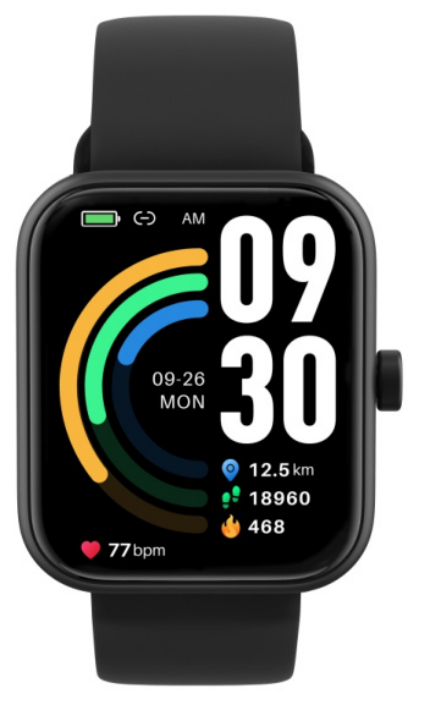
The tozo Acufit Lite Smart Watch is an advanced, feature-rich wearable designed to empower fitness enthusiasts, health-conscious users, and tech-savvy individuals alike. Offering a vibrant AMOLED touchscreen display and a wide range of health monitoring tools, this smartwatch seamlessly integrates fitness tracking with everyday convenience. Its lightweight design and customizable watch faces cater to users seeking both style and functionality in a compact device.
Key benefits include continuous heart rate monitoring, SpO2 blood oxygen measurement, sleep tracking, and the ability to choose from over 100 sports modes, ensuring precise data for various workouts such as running, cycling, yoga, and more. The watch also supports Bluetooth calling and message notifications, allowing users to stay connected without reaching for their phones. With an estimated price range of around $50-$70, the Tozo Acufit Lite offers excellent value for money and is widely available through online retailers and official brand stores.
This smartwatch suits a broad audience from fitness beginners aiming to improve their health to active users requiring detailed exercise analytics. Its versatility makes it ideal for everyday wear, outdoor activities, and even light professional use, balancing affordability with robust features.
Note:
- For the first use, please charge with the cable to activate/turn on the watch.
- You can set the screen-on time (5-20S): setting-screen timeout.
- Open the package and check the product.
- Package contents: {1)TOZO Acuflt Ute Smart watch {with built-in lithium battery); (2) User guide; (3)Charging cable.
- Connect the contact points of the magnetic charging cable to the contact points of the watch to charge and activate the device, and to turn it on.
- Search for "TOZO Health' In your mobile app store and download. Or scan the QR code (on the Right) to install the app.
- Open the app.. Tap the" More" icon in the upper right corner, select "Add Device", select the device category, and select the device you wish to li..nk In the corresponding search 11th. You may also link the device directly by scanning the device's QR code using the scan function.

Health
App
- Start "TOZO Health", enable the Bluetooth feature. And grant the GPS positioning permission.
- Unlock the bracelet screen and bring it close to your phone.
- Click "Bind Deviee" on the App, and select the bracelet model in the search results to bind.
- Confirm the binding request on the bracelet.
- Fill in your Information and set your step goal on the App to complete the binding.
Watch
- Record your data, measure your heart rate, Blood oxygen monitor(Sp02) and stress test. Monitor your heart rate and steepness..
- Start an exercise.
- Start the sports App on the bracelett click the Icon of sports type and the the goal to exercise.
Basic Operations
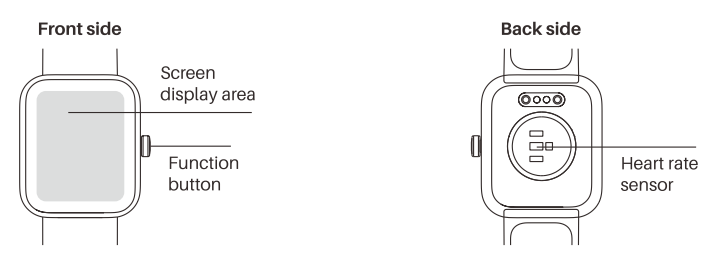
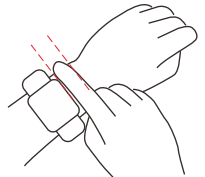
- wear it correctly: make sure that the bonom sensor is properly attached to the skin. And the strap shall be one finger away from the wrist
- Touch operation: TOZO AcuFlt Lite supports full-screen touch operations.
- Button: TOZO AcuFII Ute has a physical button. Short press: Return°' close a notification.
Specifications of the Tozo Acufit Lite Smart Watch
- Display: 1.78-inch AMOLED touchscreen with HD resolution (~368 x 448 pixels)
- Sensors: Heart rate monitor, SpO2 blood oxygen sensor, accelerometer, sleep tracker
- Sports Modes: Over 100 exercise types,, including outdoor/indoor running, cycling, hiking, yoga, dance, and stepper
- Battery Life: Up to 7-10 days on a single charge with a 300mAh battery capacity
- Connectivity: Bluetooth 5.0 for seamless pairing with iOS (11.0+) and Android (9.0+) devices
- Additional Features: Bluetooth calling, message and call notifications, weather updates, customizable watch faces, music control
- Water Resistance: Suitable for daily splash resistance and sweat; avoid submersion
Compared to other TOZO models like the S4 and S6, the Acufit Lite offers a slightly smaller display and fewer premium sensors but compensates with a lighter design and user-friendly app integration, making it an excellent choice for budget-conscious users focused on core fitness features.
Troubleshooting the tozo Acufit Lite Smart Watch
- Issue: Watch not syncing with smartphone.
Solution: Ensure Bluetooth is enabled on both devices, restart the watch and phone, and try pairing again via the “TOZO Health” app. Update the app and device firmware if available. - Issue: Heart rate or step count inaccuracies.
Solution: Wear the watch snugly on the wrist, and calibrate personal data (age, height, weight) in the app. For outdoor cycling, enable exercise mode in the app for better tracking. - Error Codes: No specific codes reported; a general restart or reset can resolve minor glitches.
- Preventive Measures: Keep the watch firmware updated, avoid extreme temperatures (-10°C to 50°C for use), and charge regularly to maintain battery health.
The product includes a standard warranty (usually 12 months) covering manufacturing defects. For support, contact TOZO customer service via their official website or through the “TOZO Health” app support section.
Pros & Cons of the Tozo Acufit Lite Smart Watch
- Pros:
- Affordable price with robust health and fitness tracking features
- Vivid AMOLED display with customizable watch faces
- Wide variety of 100+ sports modes for comprehensive workout tracking
- Bluetooth calling and notifications improve hands-free convenience
- Long battery life (7-10 days) reduces charging frequency
- Cons:
- Lacks advanced sensors found in higher-end models (e.g., ECG or GPS)
- Bluetooth calling speaker volume may be low in noisy environments
- Water resistance suitable only for daily splashes; not for swimming or diving
- Some users report minor syncing delays or inaccuracies during irregular arm movements
Compared to alternatives like the TOZO S4 or S6, the Acufit Lite is more budget-friendly but with slightly fewer premium features, making it best suited for users prioritizing fitness tracking and basic smart functions over advanced health diagnostics.
Customer Reviews of the tozo Acufit Lite Smart Watch
Users generally praise the tozo Acufit Lite Smart Watch for its clear AMOLED display, extensive sports mode options, and reliable heart rate monitoring. Many highlight its comfort and long battery life as major advantages. The Bluetooth calling feature receives positive feedback for convenience, though some users note the speaker volume may be inadequate in loud environments.
Common complaints include occasional syncing issues, minor inaccuracies in step counting when arm movements are limited, and limited water resistance. Nonetheless, the majority of reviews rate the product 4 out of 5 stars, recommending it as a value-packed smartwatch for everyday fitness and casual use.
Overall, customers recommend the Tozo Acufit Lite for those seeking an affordable, easy-to-use smartwatch with a solid feature set and dependable performance for daily health monitoring and activity tracking.
Faqs
How do I set up my tozo Acufit Lite Smart Watch for the first time?
What should I do if my tozo Acufit Lite Smart Watch is not syncing with my phone?
What health tracking features does the tozo Acufit Lite Smart Watch offer?
Is the tozo Acufit Lite Smart Watch compatible with all smartphones?
How long does the battery of the tozo Acufit Lite Smart Watch last on a single charge?
How can I optimize the performance of my tozo Acufit Lite Smart Watch?
What should I do if the touchscreen on my tozo Acufit Lite Smart Watch is unresponsive?
How do I maintain and care for my tozo Acufit Lite Smart Watch to ensure longevity?
More tozo manuals
- How to Use: Tozo W10 Wireless Charger User Manual
- Pairing & Setup: Tozo E1 True Wireless Stereo Earbuds User Guide
- Setup: Tozo W6 Wireless Charger User Guide
- How to Pair: Tozo Crystal Pods Wireless Earbuds User Guide
- How To Pair: Tozo PE-1 Portable Wireless Sports Speaker Instruction Guide
- Pairing: Tozo E2 Stereo Earbuds Setup Guide
Leave a Comment