
Pairing & Setup: Tozo E1 True Wireless Stereo Earbuds User Guide
Content
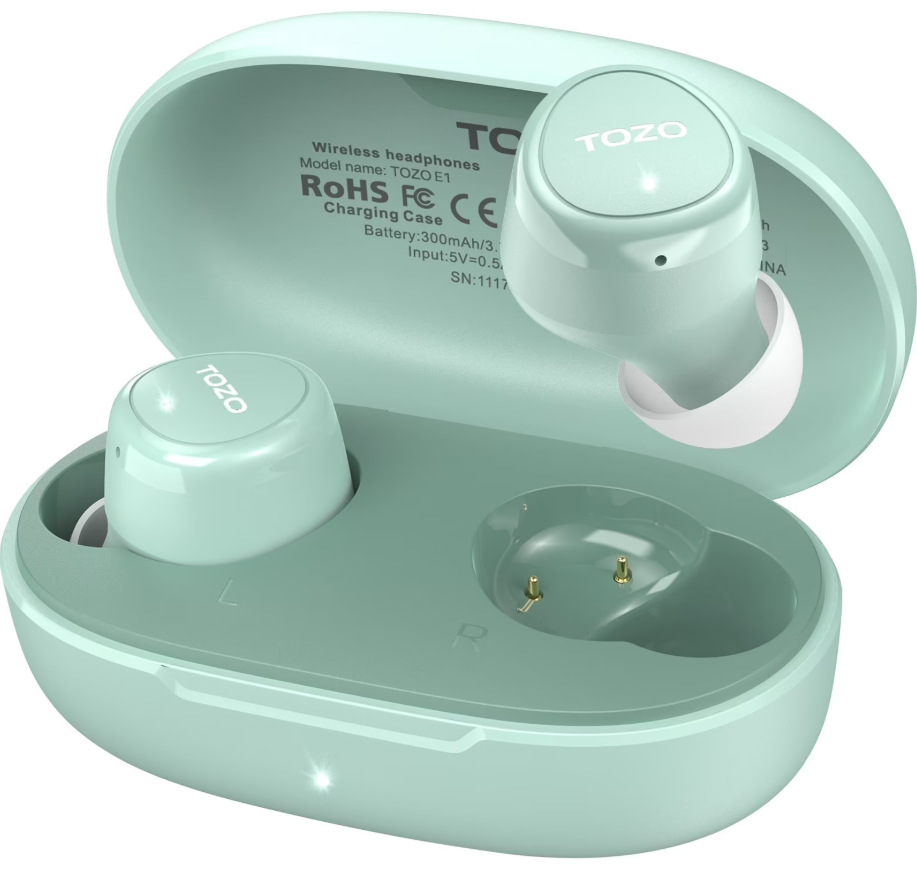
Tozo E1 True Wireless Stereo Earbuds
Introduction
The tozo E1 True Wireless Stereo Earbuds offer a premium audio experience packed into a sleek, lightweight design. Engineered with advanced Bluetooth 5.3 technology, these earbuds deliver fast and stable pairing, ensuring a seamless connection for music, calls, and more. Designed for users seeking comfort and durability, the tozo E1 earbuds provide up to 8.5 hours of playback on a single charge, extending to 30 hours with the compact charging case. Their ergonomic fit and IPX6 waterproof rating make them ideal for active lifestyles, workouts, commuting, and everyday use.
Key benefits include crystal-clear call quality with built-in noise cancellation microphones, customizable sound profiles via the TOZO app with 32 EQ settings, and intuitive touch controls for effortless operation. The earbuds’ 6mm drivers deliver rich bass and immersive sound, pleasing audiophiles and casual listeners alike. The tozo E1 earbuds target a broad audience — from fitness enthusiasts and remote workers to anyone seeking an affordable yet high-performance wireless audio solution.
Available globally through official online retailers and authorized resellers, the tozo E1 earbuds typically range between $30 to $40, offering exceptional value in the competitive true wireless market. Their combination of extended battery life, water resistance, and personalized sound customization positions them as a strong contender among budget-friendly wireless earbuds.
Product diagrammatic sketch
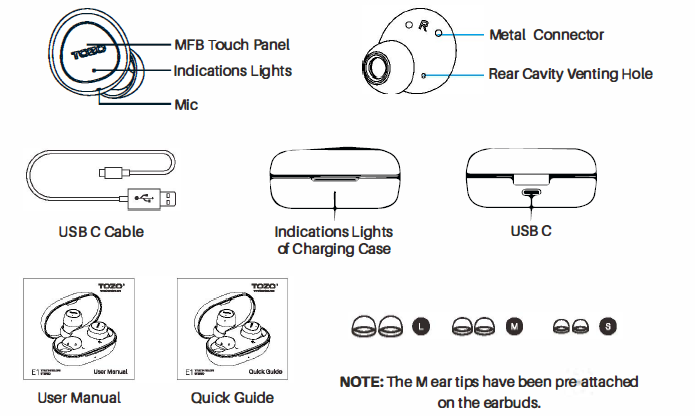
Technical Specifications and Features of tozo E1 True Wireless Stereo Earbuds
- Bluetooth Version: 5.3 for fast pairing and stable connectivity
- Driver Unit: 6mm dynamic drivers delivering balanced sound and deep bass
- Battery Life: Up to 8.5 hours per single charge; total 30 hours with charging case
- Charging Case Capacity: 400 mAh, charging time approximately 1.5 hours via USB-C
- Weight: 3.9g per earbud, 34.1g for charging case, providing lightweight comfort
- Water Resistance: IPX6 rating, protecting against heavy sweat and water splashes
- Frequency Response: 20Hz - 20,000Hz, supporting full spectrum audio
- Sensitivity: 112 dB; Impedance: 16 Ohm
- Control Type: Touch control with support for the TOZO app for 32 EQ presets
- Noise Cancellation: Built-in mic with call noise cancellation for clear conversations
Compared to similar earbuds in this price range, the tozo E1 earbuds stand out with their advanced Bluetooth 5.3, long battery life, and extensive sound customization options. Many competitors offer basic Bluetooth 5.0 and fewer EQ settings, making the Tozo E1 a compelling choice for users wanting both convenience and audio personalization.
Wearing steps
- Step 1: Ensure the earbud tip is facing downwards, then place the earbuds into your ear.
- Step 2: Rotate the earbuds back to the auricle side to fit snugly.
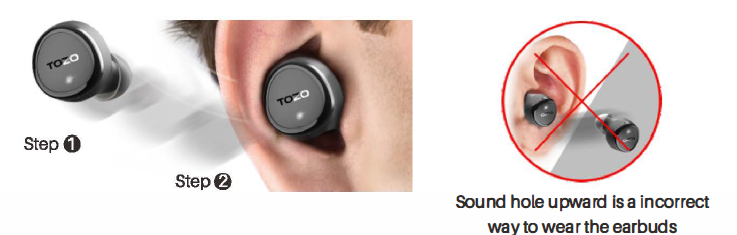
Operation of earbuds
How to pair
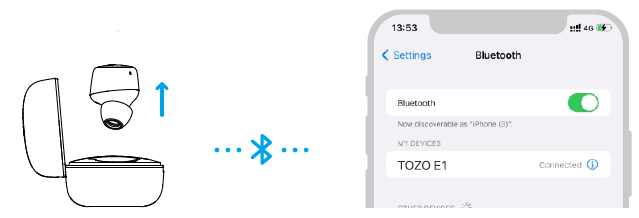
- Pick up two earbuds from the charging case, and the white indicator will blink slowly. (pairing mode)
- Search for the name [TOZO E1] and select on your mobile.
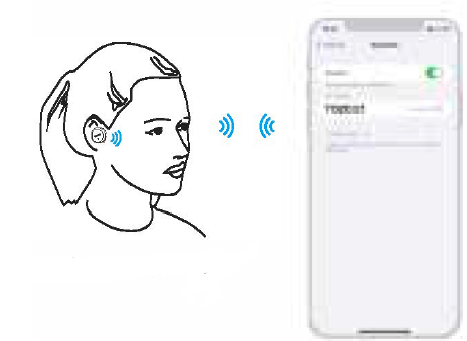
Another method of turning on & turning off
Turn on:
Take out the earbuds from the charging case, or press the Control button and hold for 3 seconds.
Turn off:
- Put the earbuds back into the charging case, and the earbuds will turn off.
- Pressing the control button for 5 seconds will turn off when they are in a a non-playing state.
- The earbuds will automatically turn off if they remain disconnected for more than 5 minutes.
Reset
If you accidentally get only one earbud work. Or fall to the pal reach the other, please reset it..
- Delete all [TOZO E1] Bluetooth records on your phone, then turn off Bluetooth.
- Place both earbuds in the case and hold the Control button for 6s, or remove both earbuds from the case and quickly double-tap each one. Reset is complete when the white lights sync and flash slowly on both.
Note: If the reset doesn't work. Please repeat the steps above.
Button operation
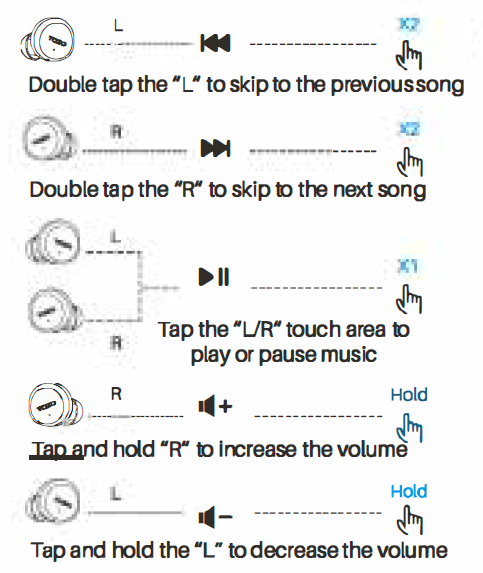
Music Operation
(Operation: In wearing of double earbuds)
Calling Control
- Tap the "UR" touch area to answer the call
- Hold #UR" 2 seconds,, the sensing er to hang up the call
- Hold "UR" for 2 seconds in the sensing area to reject the call
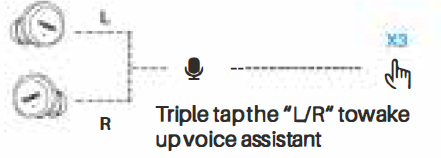
Voice Assistant
Charging box LED Indicator

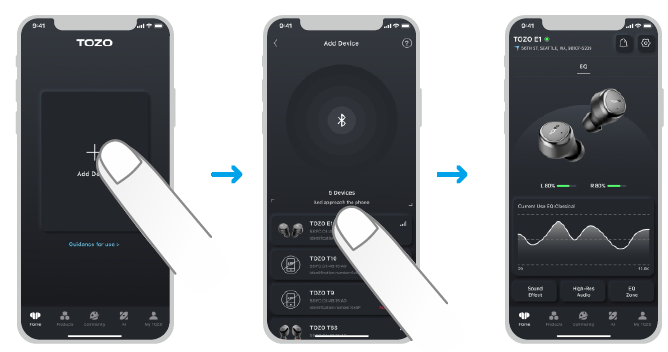
TOZOAPP
Download the TOZO App for UI customization, EQ settings, and more.
- UI customization: Most of the controls can be customized in the App.
- EQ settings: There are lots of EQ settings you can choose in the App to optimize your experience while enjoying different music genres.
- Earbuds firmware update: The earbuds' firmware can be updated in the App. You will be informed once the new version of firmware is detected when you connect the earbuds to the App .
TOZOAPP pairing
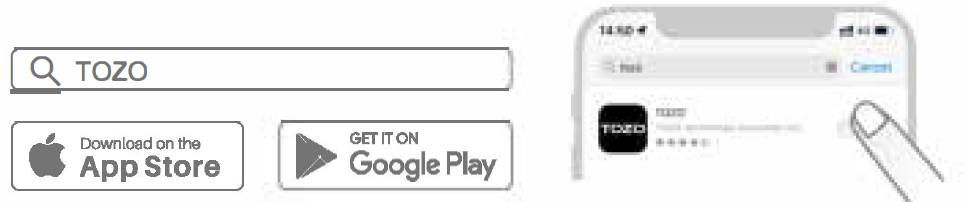
Step 1:
Download the TOZO App on your phone.
Step 2:
Bluetooth pairing with your earbuds.
Step 3:
TOZO App pairing with your earbuds.
Troubleshooting Common Issues with tozo E1 True Wireless Stereo Earbuds
- Issue: Earbuds not connecting via Bluetooth
Solution: Ensure earbuds are charged, reset the earbuds by placing them back in the case and removing them again, and delete the previous pairing on the device before re-pairing. - Issue: Audio cutting out or lagging
Solution: Check for interference from other Bluetooth devices, move closer to the audio source, and ensure the firmware is updated via the TOZO app if available. - Issue: One earbud not producing sound
SolutiClear the earbudsacts and rethem the earbuds; re-pair to the device to ensure proper stereo function. - Issue: Touch controls not responsive
Solution: Clean the touch surface, avoid moisture, and restart the earbuds by placing them in the charging case. - Preventive Measures: Keep earbuds and the charging case dry and clean, use original charging cables, and avoid exposing them to extreme temperatures.
The TOZO E1 earbuds come with a manufacturer's warranty; customers can visit the official TOZO website for product registration, warranty claims, and technical support. Official contact and support resources are available at www.tozostore.com.
Pros and Cons of Tozo E1 True Wireless Stereo Earbuds
- Pros:
- Exceptional battery life with 30 hours total playback, including charging case
- Bluetooth 5.3 ensures fast, stable connections and low latency
- IPX6 waterproof rating supports workout and outdoor use
- Customizable sound profiles with 32 EQ presets via the TOZO app
- Lightweight and ergonomic design offers all-day comfort
- Clear call quality with noise-cancelling microphones
- Affordable price point, excellent value for money
- Cons:
- No active noise cancellation (ANC) for ambient noise reduction
- The charging case lacks a detailed battery level display beyond a three-color indicator
- Sound quality, while balanced, may not satisfy audiophiles seeking premium bass intensity
- Touch controls can be sensitive, requiring a learning curve
Customer Reviews and Feedback on tozo E1 True Wireless Stereo Earbuds
Users generally praise the tozo E1 earbuds for their impressive battery life, comfortable fit, and reliable Bluetooth 5.3 connectivity. Many highlight the value offered at the affordable price, noting the earbuds perform well for casual listening, workouts, and calls. The customizable EQ settings receive positive feedback for allowing personalized audio experiences.
Common complaints include the absence of active noise cancellation and the simplicity of the charging case's battery indicator. Some users also mention the touch controls can be overly sensitive or occasionally unresponsive. Overall, the product holds a strong average rating of around 4.5 stars out of 5 across major retailers, with testimonials recommending the Tozo E1 for budget-conscious buyers seeking dependable true wireless earbuds.
Purchase recommendations emphasize the earbuds’ suitability for users prioritizing battery longevity, water resistance, and sound customization over high-end audiophile features.
Faqs
How do I set up my tozo E1 True Wireless Stereo Earbuds for the first time?
What should I do if my tozo E1 True Wireless Stereo Earbuds are not pairing with my phone?
Can I use the tozo E1 True Wireless Stereo Earbuds with any Bluetooth-enabled device?
How do I optimize the sound quality on my tozo E1 True Wireless Stereo Earbuds?
What is the battery life of the tozo E1 True Wireless Stereo Earbuds and how do I check the battery status?
How do I clean and maintain my tozo E1 True Wireless Stereo Earbuds to ensure long-lasting performance?
What features help the tozo E1 True Wireless Stereo Earbuds provide clear calls?
How do I use the touch controls on the tozo E1 True Wireless Stereo Earbuds?
More tozo manuals
Leave a Comment