
Pairing & Usage: Tozo A1 Stereo Earbuds Instruction Guide
Content
TOZO A1 Stereo Earbuds
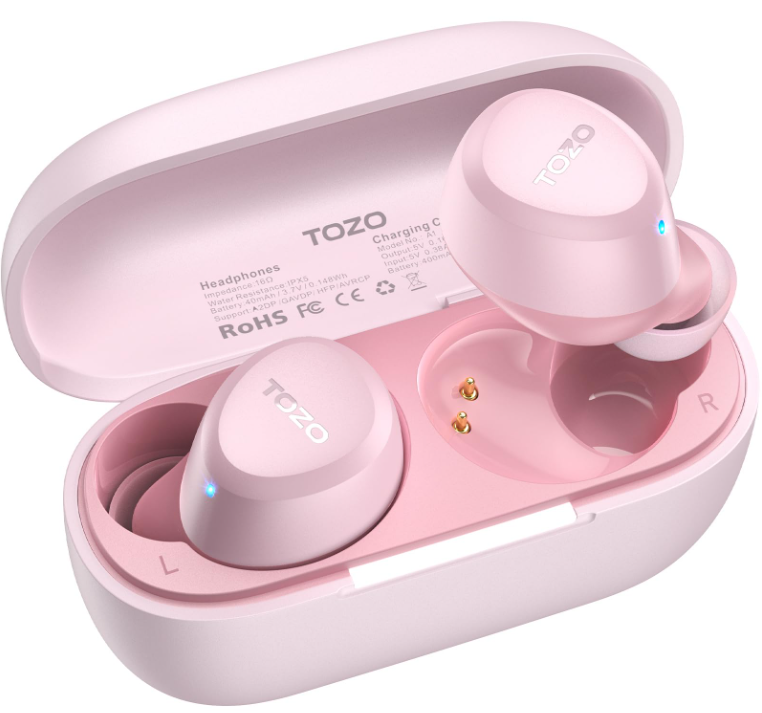
Introduction
Discover the TOZO A1 Stereo Earbuds—a wireless audio solution designed for music lovers, commuters, and professionals seeking a seamless listening experience. With their ultra-lightweight build (each earbud weighs just 3.7g), these in-ear true wireless earbuds are engineered for all-day comfort and a secure, ergonomic fit The TOZO A1 Stereo Earbuds deliver crisp, balanced sound thanks to 6mm dynamic drivers and advanced Bluetooth 5.3 technology, ensuring stable connections and low-latency audio for music, calls, and videos.
Key benefits of the TOZO A1 Stereo Earbuds include up to 7 hours of playtime on a single charge, extendable to 32 hours with the compact charging case—ideal for travel and long workdays. IPX5 water resistance offers protection against sweat and rain, making these earbuds a smart choice for workouts and outdoor activities. The intuitive touch controls and customizable EQ modes (via the TOZO App) let users tailor their audio experience, while dual microphones with ENC (Environmental Noise Cancellation) ensure clear calls even in noisy environments
Designed for a wide range of users—from students and office workers to fitness enthusiasts—the TOZO A1 Stereo Earbuds are priced competitively, typically ranging from $25 to $40, depending on retailer and color options. Available in multiple stylish colors, they are widely accessible online through major retailers and the official TOZO store, ensuring easy purchase and global availability Whether you need reliable wireless earbuds for commuting, exercising, or enjoying your favorite content, the TOZO A1 Stereo Earbuds offer an affordable, feature-rich solution.
Product Description
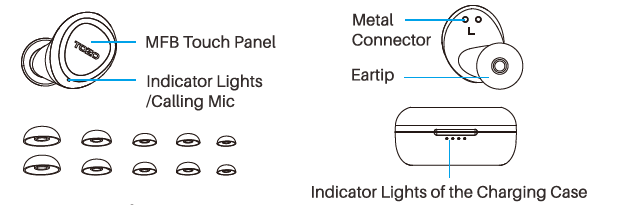
Operation of Earbuds
How to pair
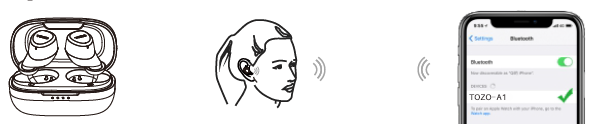
- Take out the 2 earbuds from the charging case, they will power on and connect to each other automatically within 10 seconds.
- One of the earbud flashes red and blue alternately. ( Pairing Mode )
- Search for pairing name (TOZO-A1).
Poweron/off
Power on:
- Take out the 2 earbuds from the charging case, they will power on automatically.
- Press & hold both earbuds' MFB Touch Panel for over 3 seconds.
Power off:
- Place the earbuds back into the case, and the earbuds will power off automatically.
- When earbuds are not playing music, press & hold MFB Touch Panel for 5 seconds to turn it off.
- The earbuds will power off automatically after it disconnects for more than 5 minutes.
Reset
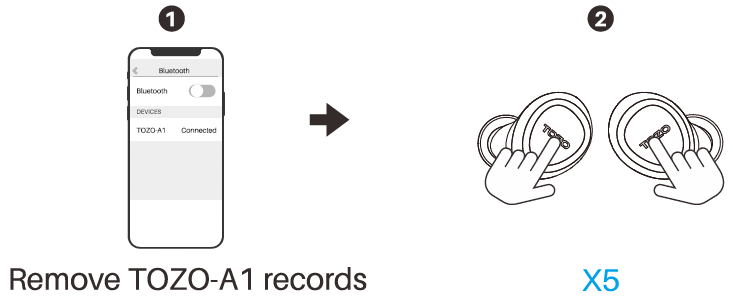
- Turn off Bluetooth and remove/forget (TOZO-A 1] records on your device.
- Take out both earbuds from the case, and quickly tap them 5 times. Reset is completed when the red lights flash for a second.
- Put the earbuds back into case first and take out to reconnect.
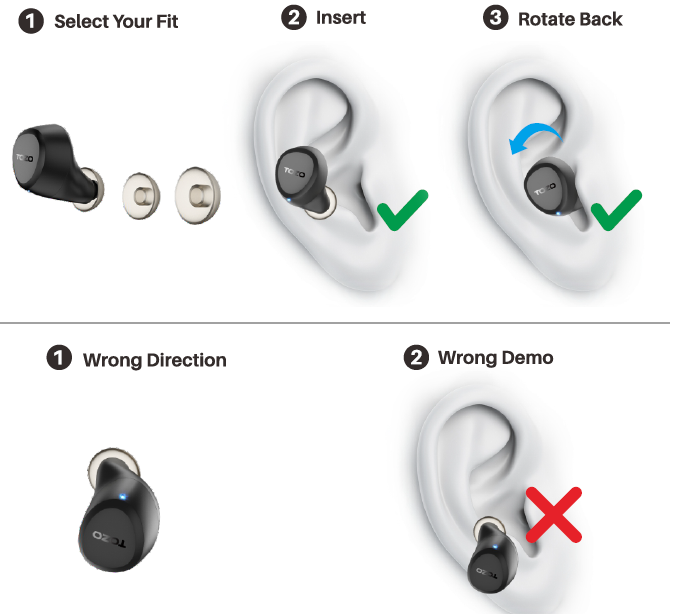
Wearing Steps
TOZO APP pairing
Step 1:
Download the TOZO App on your phone.
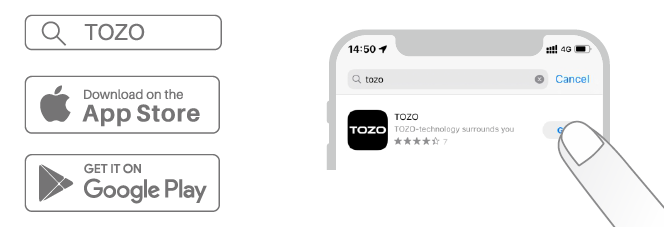
Step 2:
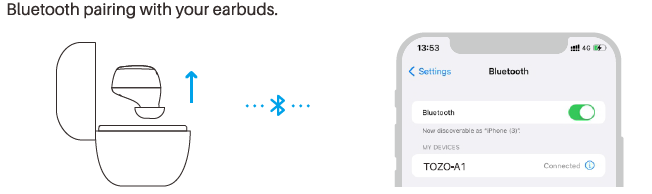
Step 3:
TOZO App pairing with your earbuds.
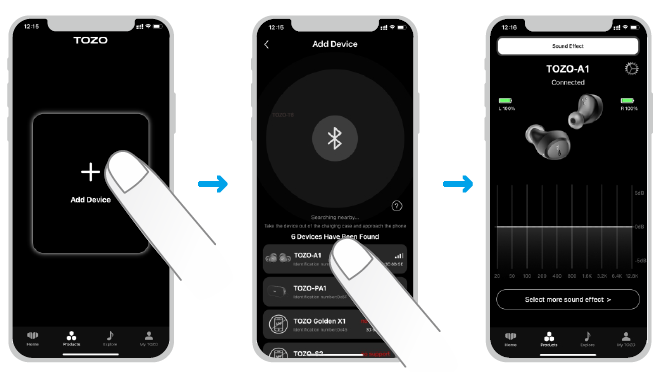
TOZO A1 Stereo Earbuds: Technical Specifications
- Model: TOZO A1 / A1 Mini
- Type: In-ear True Wireless Stereo (TWS)
- Bluetooth Version: 5.3 (supports HSP, HFP, A2DP, AVRCP)
- Effective Range: 10–12 meters (33–39 feet)
- Audio Codecs: AAC, SBC
- Driver Size: 6mm dynamic driver
- Frequency Response: 20Hz – 20kHz
- Battery Life: Up to 7 hours (earbuds), up to 32 hours (with charging case)
- Charging Case Capacity: 400mAh
- Charging Port: USB Type-C
- Charging Time: 2 hours (earbuds and case)
- Water Resistance: IPX5 (earbuds only)
- Weight: 3.7g per earbud
- Controls: Smart touch controls, volume control, app support (32 EQ modes)
- Included Accessories: Charging case, multiple eartip sizes, USB-C cable, user manual
Compared to similar budget wireless earbuds, the TOZO A1 Stereo Earbuds stand out with their Bluetooth 5.3 connectivity, extended battery life, and IPX5 water resistance—features often found in more expensive models. The inclusion of customizable EQ modes via the TOZO App and dual ENC microphones for clear calls further enhance their value proposition
Troubleshooting TOZO A1 Stereo Earbuds
Encountering issues with your TOZO A1 Stereo Earbuds? Most common problems have simple solutions:
- Earbuds not pairing/connecting: Ensure Bluetooth is enabled on your device, place earbuds back in the case, close, then reopen to re-enter pairing mode. If problems persist, forget “TOZO-A1” from your device’s Bluetooth list and re-pair
- Only one earbud working: Place both earbuds in the charging case, close the lid for 5 seconds, then open again. This often re-syncs them
- No sound or low volume: Check device and earbud volume. Ensure earbuds are properly seated and clean any debris from the speaker mesh.
- Charging issues: Make sure the cable is securely connected and clean the charging contacts. Try a different USB port or power adapter
- Touch controls unresponsive: Restart the earbuds by placing them in the case and taking them out. Use clean, dry fingers for touch commands
Preventive measures include keeping the earbuds and case clean, avoiding exposure to liquids despite the IPX5 rating, and storing them in the case when not in use. For persistent issues, contact TOZO customer support via their official website. Most TOZO A1 Stereo Earbuds come with a standard one-year warranty—check your purchase documentation for details
Pros and Cons of TOZO A1 Stereo Earbuds
Pros
- Lightweight and Comfortable: At just 3.7g per earbud, they’re ideal for extended wear without discomfort
- Long Battery Life: Up to 7 hours of playtime and 32 hours with the case—excellent for travel and daily use
- Bluetooth 5.3: Stable, low-latency connection with a range of up to 12 meters
- IPX5 Water Resistance: Suitable for workouts and outdoor activities
- Customizable Sound: 32 EQ modes via the TOZO App for personalized audio
- Value for Money: Affordable price with features usually found in higher-priced models
Cons
- No Active Noise Cancellation: Lacks ANC, which may be a drawback in very noisy environments.
- Average Microphone Quality: While ENC helps, microphone clarity is acceptable but not exceptional.
- Plastic Build: Durable but less premium feel compared to metal or glass-finish competitors.
- Limited High-End Audio: Good for the price, but audiophiles may prefer higher-end codecs like aptX.
Compared to alternatives, the TOZO A1 Stereo Earbuds offer a compelling mix of comfort, battery life, and features at a budget-friendly price, though they may not match premium models in sound isolation or build materials.
Customer Reviews and Recommendations
User feedback for the TOZO A1 Stereo Earbuds is generally positive, with many praising their comfort, battery life, and sound quality for the price. Common praises include the lightweight design, easy pairing, and reliable Bluetooth connection The IPX5 rating and touch controls are also frequently mentioned as standout features.
Some users note that the earbuds fit securely during workouts, and the charging case is compact and convenient. However, a few customers mention that the bass could be stronger and that the microphone performance is adequate but not outstanding. Most reviews award the TOZO A1 Stereo Earbuds 4 to 4.5 out of 5 stars, highlighting their value and reliability for everyday use.
Frequently mentioned issues include occasional connectivity drops in crowded areas and the lack of wireless charging. Despite these minor drawbacks, the TOZO A1 Stereo Earbuds are recommended for budget-conscious buyers seeking reliable, feature-rich wireless earbuds for music, calls, and casual listening. For those prioritizing premium sound or advanced noise cancellation, considering higher-end models may be worthwhile.
Faqs
How do I set up my tozo A1 Stereo Earbuds for the first time?
What can I do if only one tozo A1 Stereo Earbud is working?
How do I use the touch controls on tozo A1 Stereo Earbuds?
Are tozo A1 Stereo Earbuds compatible with all Bluetooth devices?
How long does the battery last on tozo A1 Stereo Earbuds and how do I charge them?
What should I do if my tozo A1 Stereo Earbuds are not connecting or pairing properly?
How do I clean and maintain my tozo A1 Stereo Earbuds to ensure optimal performance?
What unique features do the tozo A1 Stereo Earbuds offer to enhance sound and user experience?
More tozo manuals
- Pairing: Tozo E2 Stereo Earbuds Setup Guide
- How to Pair: Tozo A3 True Wireless Stereo Earbuds User Manual
- How to Pair: Tozo Crystal Pods Wireless Earbuds User Guide
- How to Pair: Tozo A2 True Wireless Stereo Earbuds User Guide
- Pairing & Setup: Tozo E1 True Wireless Stereo Earbuds User Guide
- How to Pair: Tozo Crystal Pods Earbuds User Guide
Leave a Comment