
How to Pair: Tozo Crystal Pods Earbuds User Guide
Content
tozo Crystal Pods Earbuds
Introduction
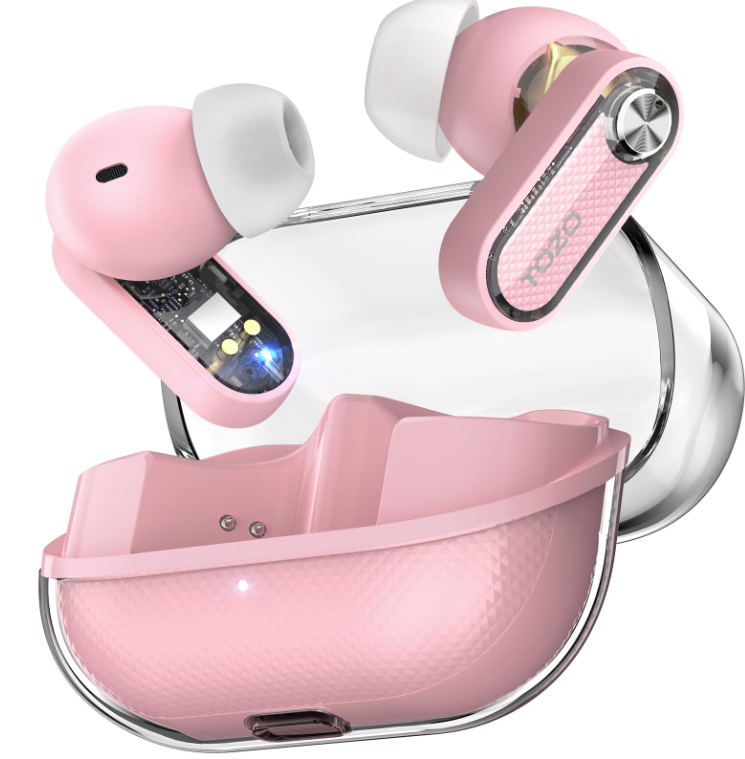
The tozo Crystal Pods Earbuds represent a fusion of cutting-edge audio technology and striking transparent design, crafted to elevate your listening experience. These true wireless earbuds come equipped with advanced Hybrid Active Noise Cancelling (ANC) technology, reducing ambient sound by up to 38dB, allowing users to immerse themselves fully in music, podcasts, or calls without distractions. Their sleek, transparent casing sets them apart aesthetically, making them a stylish accessory for on-the-go lifestyles.
Designed for music lovers, commuters, remote workers, and fitness enthusiasts, the tozo Crystal Pods cater to versatile use cases—from intense workout sessions to quiet focus moments or casual calls. Featuring AI-enhanced 4-mic call noise cancellation, they ensure crystal-clear voice communication even in noisy environments. With Bluetooth 5.4 connectivity, IPX5 water resistance, and customizable sound profiles through the TOZO app, these earbuds blend durability, convenience, and personal audio customisation.
Users can expect an impressive battery life of up to 7 hours per charge without ANC and up to 6 hours with ANC active, extendable to over 30 hours combined with the charging case. Fast charging delivers 2+ hours of playback with just 10 minutes of charge. The tozo Crystal Pods are competitively priced in the mid-range wireless earbuds market, generally available between $40 to $60, making them an attractive option for quality-conscious buyers seeking premium features without a premium price tag.
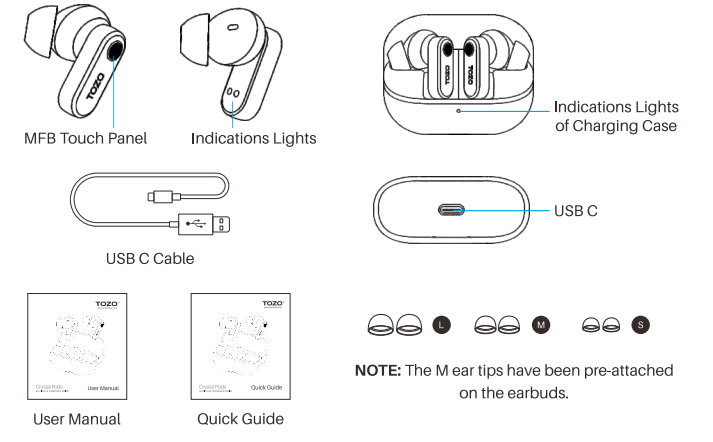
Product diagrammatic sketch
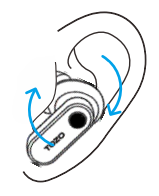
Wearing steps
- Step 1: Ensure the earbud tip is facing downwards, then place the earbuds into your ear.
- Step 2: Rotate the earbuds back to the auricle side to fit snugly.
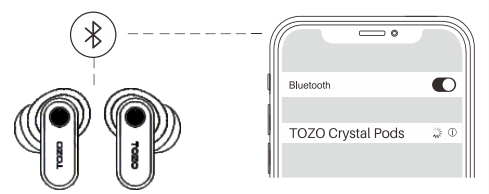
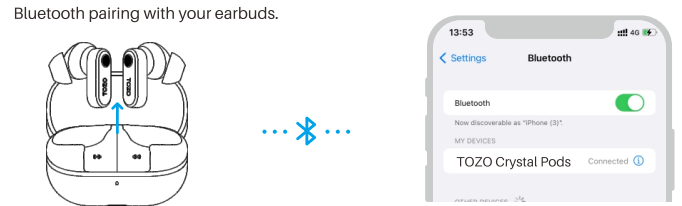
Pairing and Connectivity
- Open the charging case and take out the earbuds. Blesse
The red and white lights will alternately flash. - On your phone, enable Bluetooth and search for the device (TOZO Crystal Pods). Tap to connect.
- After a successful connection, the white light will remain on for 2 seconds and then turn off.
- If you find that the left and right earbuds are not paired, ensure both earbuds are powered on and disconnected from any Bluetooth device. Double-tap both the left and right earbuds to re-pair them.
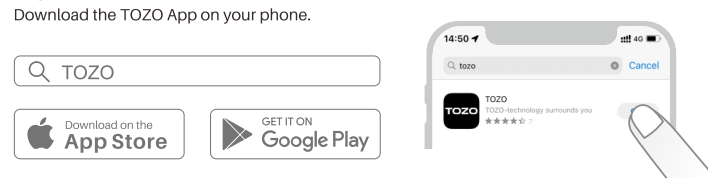
TOZO APP pairing
Step 1:
Step 2:
Step 3:
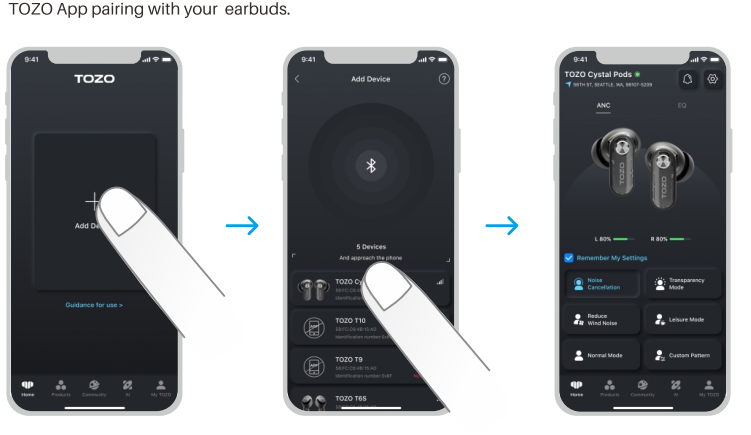
Troubleshooting and reminders
- Charging case not charging:
Check if the power adapter is working, or try using a different charging cable. - Earphones not connecting to Bluetooth or Bluetooth signal not found:
Open your phone's settings, delete the Bluetooth pairing records, and then search for the earbuds' Bluetooth signal to reconnect. - Earphones won't power on:
Ensure the charging case has power and try charging the earphones for a while before attempting to power them on.
Detailed Specifications and Features of tozo Crystal Pods Earbuds
- Driver Size: 10mm dynamic drivers delivering rich, immersive stereo sound with enhanced bass and clear mids and highs.
- Active Noise Cancelling (ANC): Hybrid ANC technology reduces noise by up to 38dB, plus Transparency Mode to hear surroundings when needed.
- Microphones: Four built-in microphones with AI-powered noise cancellation for clear, crisp voice calls.
- Connectivity: Bluetooth 5.4 protocol for fast, stable wireless connection with smartphones, tablets, and PCs.
- Battery Life: 7 hours of playback per charge (ANC off), 6 hours with ANC on; total up to 35 and 30 hours respectively with the charging case.
- Charging: USB-C fast charging; 10 minutes of charging delivers over 2 hours of playtime; full charge in ~1.5 hours.
- Water Resistance: IPX5 rating for protection against sweat, rain, and water splashes—ideal for workouts and outdoor use.
- Customisation: The TOZO app provides 32 EQ presets, custom equaliser settings, and over 100 white noise options.
- Design: Transparent earbuds and charging case with ergonomic fit and multiple ear tip sizes (S/M/L) included for comfort.
- Supported Codecs: AAC and SBC audio codecs for good sound quality across iOS and Android devices.
Compared to similar earbuds in the $50 range like the Anker Soundcore Life P3 or the EarFun Air, the tozo Crystal Pods stand out with their unique transparent design, slightly longer battery life, and app-driven sound customisation options, while delivering competitive ANC performance.
Pros & Cons of tozo Crystal Pods Earbuds
- Pros:
- Impressive ANC: Hybrid noise cancelling effectively reduces background noise up to 38dB, suitable for urban commuting and office use.
- Clear Calls: AI-enhanced 4-mic setup delivers excellent voice clarity even in noisy environments.
- Strong Battery Life: Up to 7 hours per charge without ANC, with fast charging support for quick boosts.
- Customisation: Extensive EQ presets and app features allow personalised sound tuning unmatched by many competitors.
- Water Resistance: IPX5 rating adds durability for active users and outdoor conditions.
- Unique Design: Transparent housing offers a modern, stylish look distinct from typical earbuds.
- Cons:
- ANC Limitations: While effective, ANC is not as deep or dynamic as premium models like the Sony WF-1000XM5.
- Fit Variability: Some users report that the earbuds can feel slightly bulky or less secure compared to in-ear competitors.
- Touch Controls Sensitivity: Customizable but may require an adjustment period to avoid accidental taps.
- Sound Profile: Bass is boosted, which may not appeal to users preferring a more neutral audio signature.
- App Dependency: Full feature set requires using the TOZO app, which may not be preferred by all users.
Overall, the tozo Crystal Pods Earbuds provide excellent value for money, delivering premium features at a competitive price point, making them a strong contender in the budget ANC earbuds segment.
Customer Reviews and Feedback on tozo Crystal Pods Earbuds
Customers consistently praise the tozo Crystal Pods for their stylish transparent design and reliable active noise-cancelling capabilities. Users frequently mention the earbuds’ comfort and secure fit, especially with the included multiple ear tip sizes. The AI-powered call noise reduction is highlighted as a major advantage, with many reviews noting clear, noise-free phone conversations even in busy environments.
Typical complaints include occasional challenges with touch control sensitivity and the desire for stronger ANC comparable to high-end models. Some users also note the sound profile leans bass-heavy, which may not suit all listeners. Battery life and fast charging receive positive remarks, as do the TOZO app’s customization options, though a few users find the app interface somewhat complex.
Ratings average around 4 to 4.5 stars out of 5, with purchase recommendations especially strong among budget-conscious buyers seeking good ANC earbuds with customizable sound and a fashion-forward look. Frequent users recommend the tozo Crystal Pods for daily use, workouts, and commuting.
Faqs
How do I set up tozo Crystal Pods Earbuds for the first time?
What should I do if my tozo Crystal Pods Earbuds won’t enter pairing mode?
How can I use and customize touch controls on tozo Crystal Pods Earbuds?
Are tozo Crystal Pods Earbuds compatible with all Bluetooth devices?
How does the Active Noise Cancelling feature work on tozo Crystal Pods Earbuds?
What are common troubleshooting steps if sound quality or connectivity is poor on tozo Crystal Pods Earbuds?
How do I maintain and clean my tozo Crystal Pods Earbuds to ensure longevity?
Can I customize the sound profile on tozo Crystal Pods Earbuds for different music genres?
More tozo manuals
- How to Pair: Tozo A2 True Wireless Stereo Earbuds User Guide
- Pairing & Usage: Tozo A1 True Wireless Stereo Earbuds User Manual
- How to Pair: Tozo A3 True Wireless Stereo Earbuds User Manual
- How to Pair: Tozo NC7 Crystal Buds User Guide
- Pairing & Usage: Tozo A1 Stereo Earbuds Instruction Guide
- Operating: Tozo NC9 Active Noise Cancellation User Manual
Leave a Comment