
How to Pair: Tozo NC7 Crystal Buds User Guide
Content
Tozo NC7 Crystal Buds
Introduction
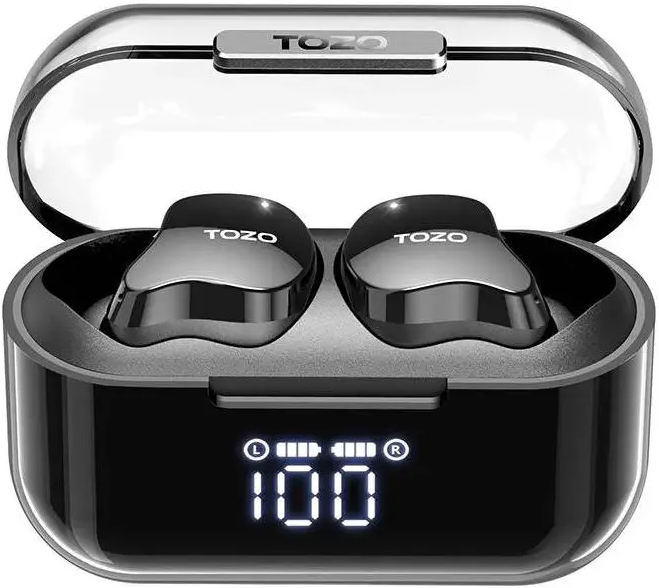
The Tozo NC7 Crystal Buds are advanced true wireless earbuds designed to deliver an immersive audio experience with cutting-edge features that cater to music lovers, commuters, and fitness enthusiasts alike. Equipped with hybrid active noise cancellation (ANC) technology, these earbuds effectively reduce ambient noise, allowing users to enjoy crystal-clear sound whether at home, work, or on the go. Featuring the latest Bluetooth 5.3 connectivity, they ensure a stable and seamless wireless connection with devices.
Key benefits include a long battery life of up to 18 hours on a single charge and an impressive total playtime of 72 hours with the charging case, supporting both USB-C fast charging and wireless charging. The earbuds have an IPX6 waterproof rating, making them resilient against sweat and rain—ideal for workouts and outdoor use. Their bright and punchy sound signature enhances vocals and bass, supported by ORIGX 2.0 audio technology for superior fidelity.
Targeted at users seeking a budget-friendly yet feature-rich audio solution, the Tozo NC7 Crystal Buds are perfect for daily commuters, casual listeners, and active users who value convenience and sound quality. With a competitive price point of around $40, they offer great value in the affordable wireless earbuds market. These buds are widely available through online retailers and authorized distributors, making them easily accessible to the global audience.
Specifications
- Earbuds: 50mAhx2
- Charging case battery capacity: 470mAh
- Charging time of earbuds: 1.5H
- Impedance: 16+15%
- Charging time of charging case: 1.8H( + 20%)
- Frequency range: 20Hz~20,000Hz
- Musikspielzeit: 8H
- Anrufzeit: 5H
- Aufladestation: Typ-C
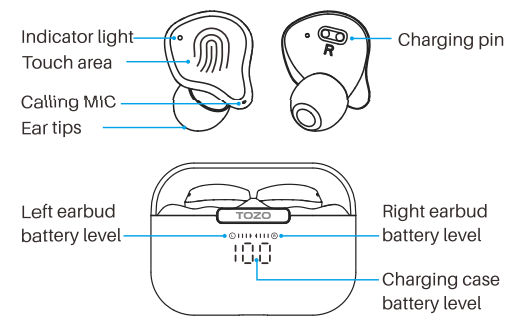
Earbuds function diagram
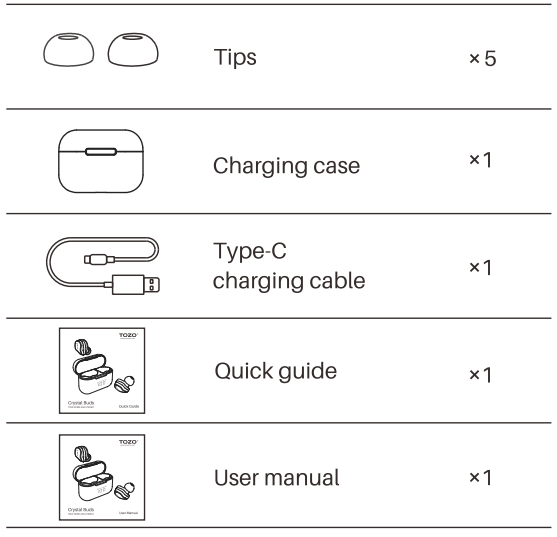
The package contains Crystal Buds earbuds, a charging case, 5 sizes of ear tips(the M size ear tips are pre-installed on the earbuds), a Type-C charging cable, a user manual, and a quick guide.
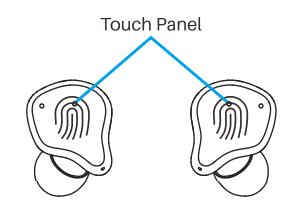
Touch control diagram
The touch area (MFB Touch Panel) is located in the center of the earbuds' handle.
Auto power on/off
- Auto power on
The earbuds will turn on automatically when the charging case is opened. - Auto power off
The earbuds will turn off automatically when the charging case is closed. - Another way to turn on
Press and hold the touch area for 3 seconds to turn on the earbuds whenre turned off. - Another way to turn off
Press and hold the touch area for 5 seconds to turn off when no music is playing.
How to pair
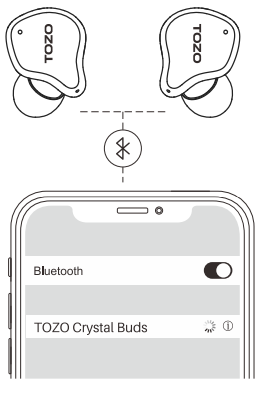
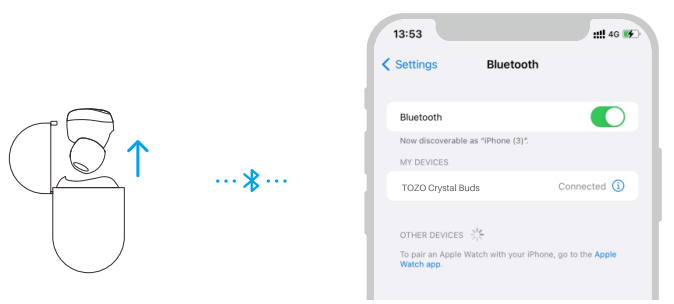
- Open the charging case. The earbuds will automatically power on and connect to each other within 10 seconds.
- Search for pairing name [TOZO Crystal Buds) and click on it.
Bluetooth tips
- The earbuds will automatically pair and connect to the most recently paired device when removed from the charging case, if the device is available.
- A single earbud (Left or Right) can also be used. If you want to use both earbuds, simply take out the other earbud, and the earbuds will automatically pair.
- The earbuds will automatically turn off when being unpaired for 5 minutes.
- If the earbuds fail to connect to a previously used device, please unpair the earbuds from the device and try again.
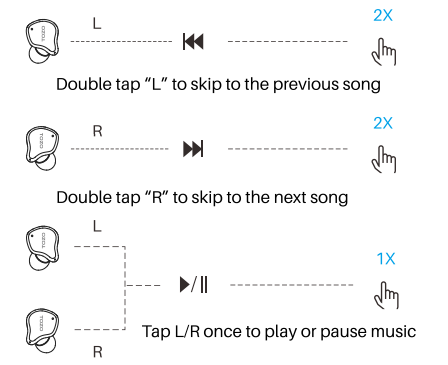
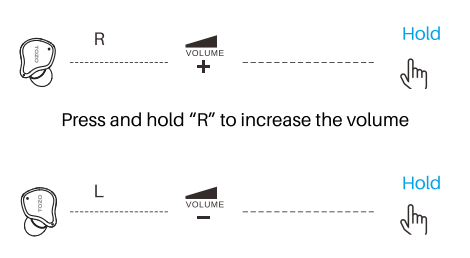
Music operation
(Operation in wearing of both earbuds)
Calling control
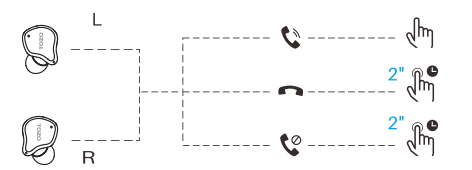
- Press " L" or "R" once to answer the call.
- Press and hold " L" or "R" for 2 seconds to hang up the call.
- Press and hold " L" or "R" for 2 seconds to reject the call.
Voice assistant
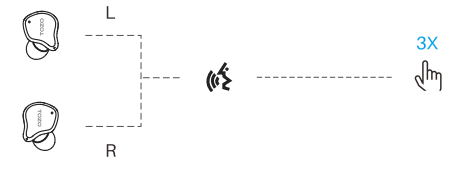
Triple-tap "L" or "R" to activate the voice assistant when using single or both earbuds.
Charging
- Place earbuds in the charging case to charge automatically.
- Ensure that earbuds are always completely dry before charging.
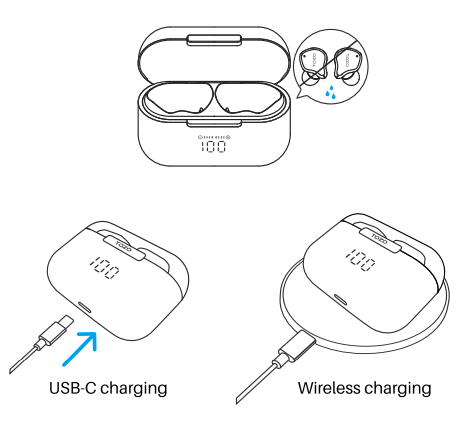
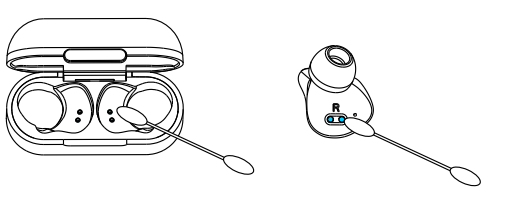
- Clean metal contacts with a dry cotton swab/dry cloth frequently to prevent charging issues.
Reset
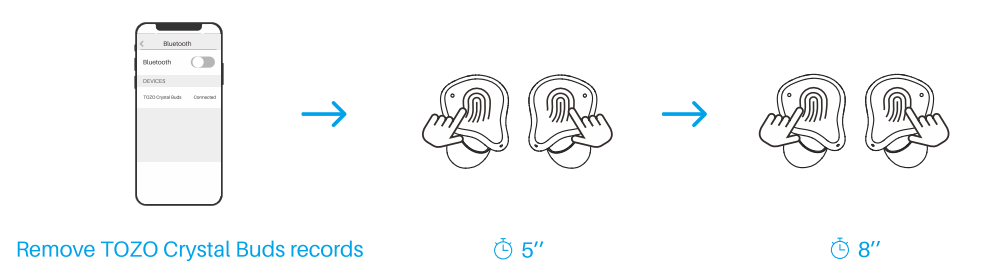
If one or both earbuds fail to play audio or pair to the device, follow these instructions to reset the earbuds:
- Turn off the Bluetooth on the mobile phone and delete/forget all (TOZO Crystal Buds) Bluetooth records.
Take the earbuds out of the charging case, press the touch panel for 5 seconds to turn the earbuds off. - Press and hold both earbuds at the same time for 8 seconds, release them after the white light flashes quickly, and the earbuds automatically complete the pairing.
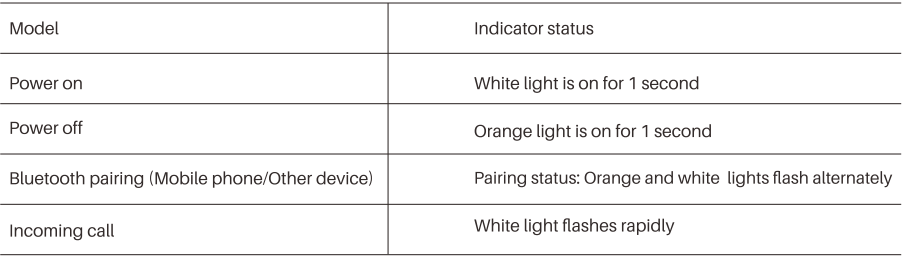
Observation indicators
TOZO APP
Download the TOZO App for Ul customization, EQ settings, and more.
- Ul customization: Most of the controls can be customized in the App.
- EQ settings: There are lots of EQ settings you can choose in the App to optimize your experience while enjoying different music genres.
- Earbuds firmware update: Earbuds firmware can be updated in the App. You will be informed once the new version of firmware is detected when you connect the earbuds to the App.
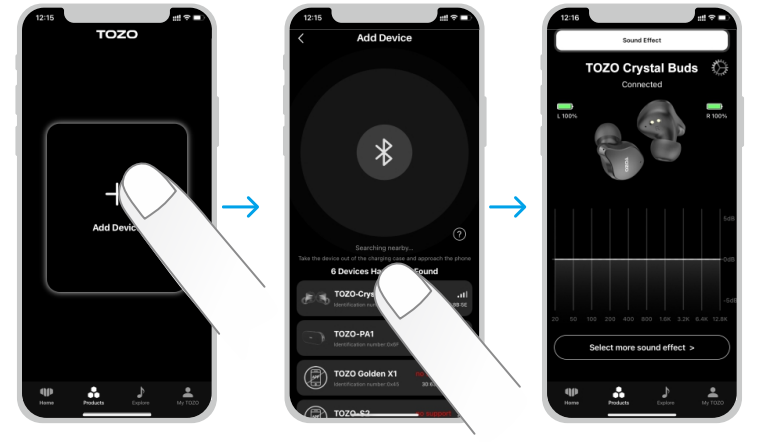
TOZO APP pairing
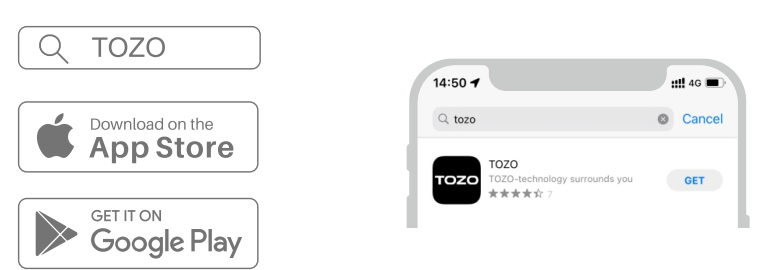
Step 1:
Download the TOZO App on your phone.
Step 2:
Please take out both earbuds and connect them to the phone's Bluetooth list.
Step 3:
TOZO App pairing with your earbuds.
Troubleshooting Tozo NC7 Crystal Buds
Users may occasionally encounter issues such as connectivity drops, touch control sensitivity, or audio latency, especially during gaming. Common problems and solutions include:
- Connection Issues: Ensure Bluetooth 5.3-compatible device is within 10 meters, reset earbuds by placing them in the case and holding the touch sensors for 10 seconds.
- Touch Controls Not Responding: Clean the touch-sensitive areas and avoid accidental touches by adjusting finger placement; disable gestures if needed through app customization.
- Audio Latency During Gaming: This is a known drawback; reduce latency by minimizing the distance between the device and the earbuds or using wired headphones for gaming.
- Battery Not Charging Properly: Use the supplied USB-C cable or a compatible wireless charger; ensure charging contacts are clean and dry.
Preventive measures include keeping earbuds and the case dry, regularly updating firmware via the official Tozo app (if available), and using the protective case for safe storage. The Tozo NC7 Crystal Buds come with a standard one-year warranty covering manufacturing defects. For support, users can contact Tozo customer service through their official website or authorized retailers.
Pros & Cons of Tozo NC7 Crystal Buds
Pros
- Advanced Hybrid ANC: Customizable noise cancellation effectively reduces environmental noise for clear listening in busy settings.
- Long Battery Life: Up to 18 hours per charge with 54 additional hours from the charging case, totaling 72 hours of playback.
- Waterproof IPX6 Rating: Resistant to sweat and rain, suitable for workouts and outdoor activities.
- Bluetooth 5.3 Connectivity: Ensures stable, low-latency wireless connection and broad device compatibility.
- Rich Sound Quality: Bright, punchy sound with enhanced bass and clear vocals thanks to ORIGX 2.0 technology.
- Touch Controls & App Support: Customizable touch gestures for music and call management via a companion app.
Cons
- Latency in Gaming: Noticeable audio delay makes them less suitable for competitive gaming.
- Touch Sensitivity: Can lead to accidental triggers during physical activities.
- Deep Fit Design: May cause discomfort for some users during extended wear.
- Limited Sound Customization: No equalizer or advanced sound tuning beyond preset modes.
Compared to alternatives like the Tozo NC9, the NC7 offers slightly brighter sound and better ANC but lacks some higher-end sound customization features. Their price makes them an excellent value for users seeking premium ANC at a budget-friendly cost.
Customer Reviews of Tozo NC7 Crystal Buds
Users generally praise the Tozo NC7 Crystal Buds for their impressive noise cancellation and strong battery performance. Many highlight the bright, clear audio quality and stable Bluetooth connection as standout features. A common praise is the IPX6 waterproof rating, which users find reliable for workouts and outdoor use.
However, some customers mention occasional issues with touch control sensitivity causing unintended inputs, and a few note discomfort from the earbuds’ deep in-ear fit over extended periods. Gaming users report latency that affects synchronization, but agree that the sound quality and ANC make them excellent for casual listening. Overall, the earbuds receive an average rating of around 4 out of 5 stars, with many recommending them as a cost-effective choice for everyday wireless earbuds with ANC.
Tags
More tozo manuals
- Pairing & Usage: Tozo A1 True Wireless Stereo Earbuds User Manual
- Operating: Tozo NC9 Active Noise Cancellation User Manual
- How to Pair: Tozo Crystal Pods Earbuds User Guide
- Tozo NC2 Active Noise Cancellation Earbuds | Specs & Features
- How to Pair: Tozo A2 True Wireless Stereo Earbuds User Guide
- How to Pair: Tozo A3 True Wireless Stereo Earbuds User Manual
Leave a Comment