
How to Pair: Tozo A2 True Wireless Stereo Earbuds User Guide
Content
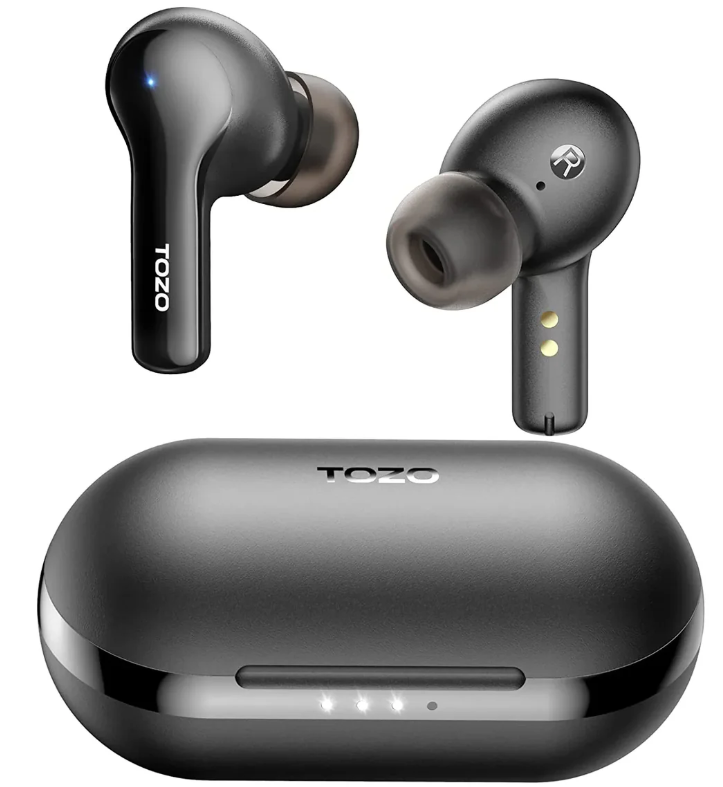
TOZO A2 True Wireless Stereo Earbuds
Introduction
The TOZO A2 True Wireless Stereo Earbuds are designed to provide a seamless listening experience with their feather-light design and crystal-clear sound. Equipped with Bluetooth 5.3 technology, these earbuds offer stable connectivity and low latency, ensuring a smooth audio experience during calls, music, or gaming. The φ6mm dynamic drivers deliver a comprehensive frequency response range of 20Hz to 20kHz, supported by AAC/SBC audio codecs. With a built-in microphone and IPX5 water resistance, these earbuds are ideal for everyday use, sports, and travel. The TOZO A2 earbuds are available in black and white colors, making them a stylish accessory for any user. The estimated price range is around $14.99 to $19.99, depending on the retailer and availability.
Targeted at users seeking lightweight, premium sound quality without the hassle of wires, the TOZO A2 earbuds are perfect for those who value convenience and audio clarity. Whether you're a gamer, a music enthusiast, or someone who enjoys immersive sound while working out, these earbuds meet your needs with their Ultra-Lightweight Design and Premium Sound Quality.
Speclffcatlon
- Name: A2
- Transmission distance: 10M
- Rated power: 3mW
- Earbuds battery capacity: 3.85V/30mAh
- Charging box battery capacity: 3.7V/315mAh
- Playing Time: 4.5 hours
- Charging time of the charging case: 2 hours
- Charging port: Type-C
- Size of the earbud: 32.2 22.8 23.6 mm
- Size of the charging box: 704931 mm
Product description
Wearing steps
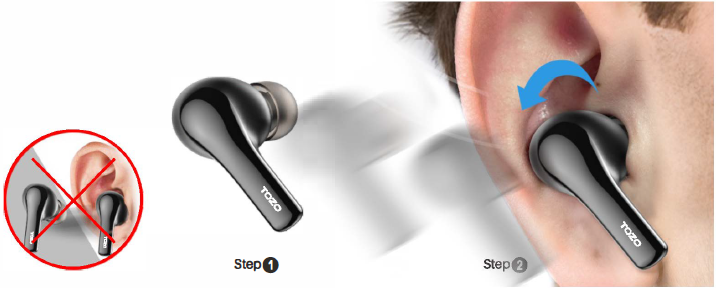
- Step 1: Ensure the eartip is facing downwards, then place the earbuds into your ears.
- Step 2: Rotate the earbuds back to the auricle side to fit snugly.
Operation of earbuds
Howtopalr
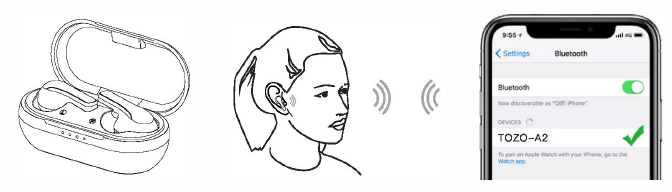
- In first use, take the earbuds out of the charging box, and the earbuds will power on and automatically connect to each other. Open the Bluetooth device, search [TOZO -A2], and select the connection. (voice prompt : connected}
- Non-first used, the earbuds will auto-connect back to the last pairing device when turned on.
Power on/off
Power on:
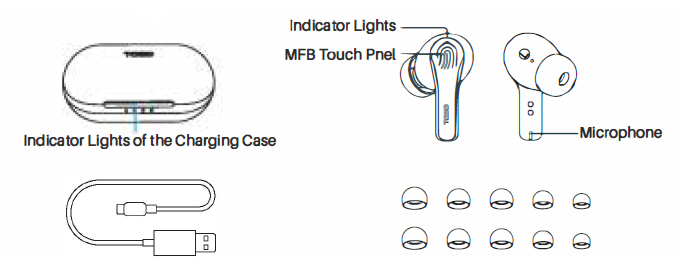
- Tap and hold the Touch Control Pen of both earbuds for more than 3 seconds.
- Take the arbuds out of the case to power on automatically.
Power off:
- Touch the control Buttons for 5 seconds to turn them off while the earbuds are not playing.
- The earbuds will turn off automatically after being disconnected for more than 5 minutes.
- Place earbuds back rn the case to power off automatically.
Reset
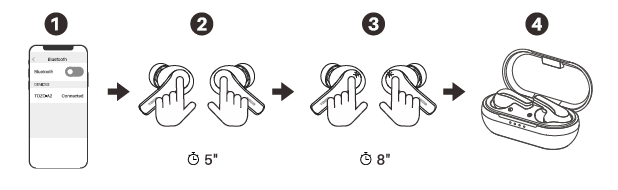
If your earbuds accidentally only get one earbud to work, or fail to pair. Please reset it
- Delete Bluetooth records
Delete all [TOZO-A2] Bluetooth records on your phone, then turn off the Bluetooth. - Press and hold the earbuds for about 5s
Pick up two earbuds from the charging case and wear them, then press and hold both earbuds , then release fingers after hearing Power Off. - Press and hold the both earbuds again for 8s
Press and hold the both earbuds again, release fingers after hearing 'PTP pairing', reset completed. - Put the earbuds back into the case and take them out again. Two earbuds will flash red and blue alternately. Turn on the Bluetooth to connect again.
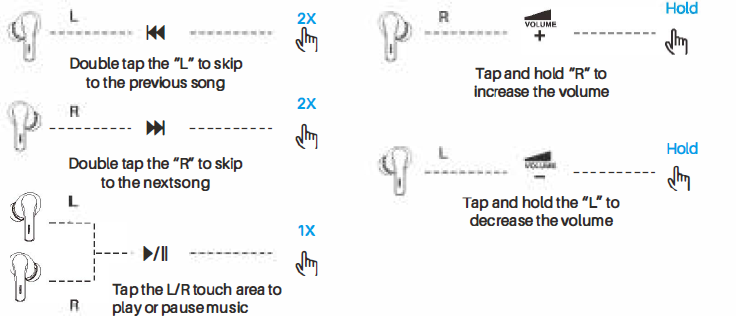
Music Operation
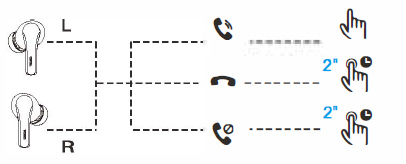
Call control
- Tap Lor R touch area to answer the call, or it will answer the call automatically.
- Hold Lor R 2s thesenslng area to hang up the call
- Hold Lor R 2s the sensing area to reject the call
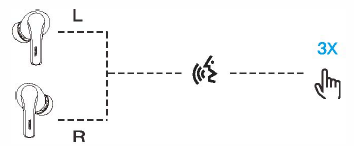
Voice assistant
- When using single or both earbuds, triple-tap the Lor Rearbud to wake up the Voice assistant with a 'Beep' sound.
Charging
Charging the earbuds
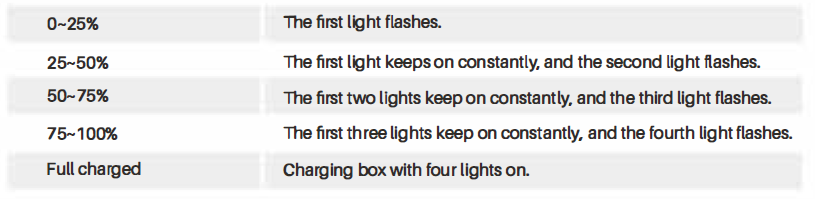
- When the power of the charging case is Insufficient, put the earbuds into the charging case, the first light on the charging boxwlllflashfor4sand then go out.
- Plug in the charging box and charge with the USB Interface charger; four white lights are on when fully charged.

Troubleshooting Common Issues
Here are some common problems and their solutions for the TOZO A2 earbuds:
- Failed Charging: Ensure the charging cable is properly connected. Clean the metal connectors on the earbuds and charging case with a soft cloth or paper towel.
- Sound Issues: Check if both earbuds are turned on. Increase the volume on both the earbuds and the connected device. Ensure the earbuds are close to the device for better signal reception.
- Connection Problems: Delete the earbuds from your Bluetooth list and reconnect them. If issues persist, reset the earbuds by pressing and holding both earbuds until the red/blue lights flash.
For further assistance, contact TOZO support via info@tozostore.com. TOZO offers a warranty and dedicated customer support for all its products.
Pros and Cons of TOZO A2 Earbuds
Pros:
- Lightweight Design: Weighs only 3.8g per earbud, making them comfortable for extended use.
- Clear Sound Quality: Offers a wide frequency response range for immersive audio.
- Low Latency: Ensures a smooth listening experience with Bluetooth 5.3 technology.
- Value for Money: Priced affordably compared to similar products in the market.
Cons:
- Short Battery Life: Provides up to 5 hours of playback on a single charge.
- Limited Noise Cancellation: Does not feature active noise cancellation.
Customer Reviews and Feedback
Customers have praised the TOZO A2 earbuds for their comfortable fit and impressive sound quality. Users enjoy the lightweight design and easy pairing process. However, some have noted that the battery life could be longer. Overall, these earbuds receive a rating of around 3.8 out of 5 stars. Users recommend them for their value for money and portability.
If you're looking for a budget-friendly option with good sound quality and ease of use, the TOZO A2 True Wireless Stereo Earbuds are a solid choice. They are available for purchase at retailers like Walmart and Best Buy.
More tozo manuals
- How to Pair: Tozo A3 True Wireless Stereo Earbuds User Manual
- How to Pair: Tozo Crystal Pods Earbuds User Guide
- Pairing & Usage: Tozo A1 Stereo Earbuds Instruction Guide
- Pairing & Usage: Tozo A1 True Wireless Stereo Earbuds User Manual
- Pairing: Tozo E2 Stereo Earbuds Setup Guide
- How to Pair: Tozo NC7 Crystal Buds User Guide
Leave a Comment