
Pairing: Tozo E2 Stereo Earbuds Setup Guide
Content
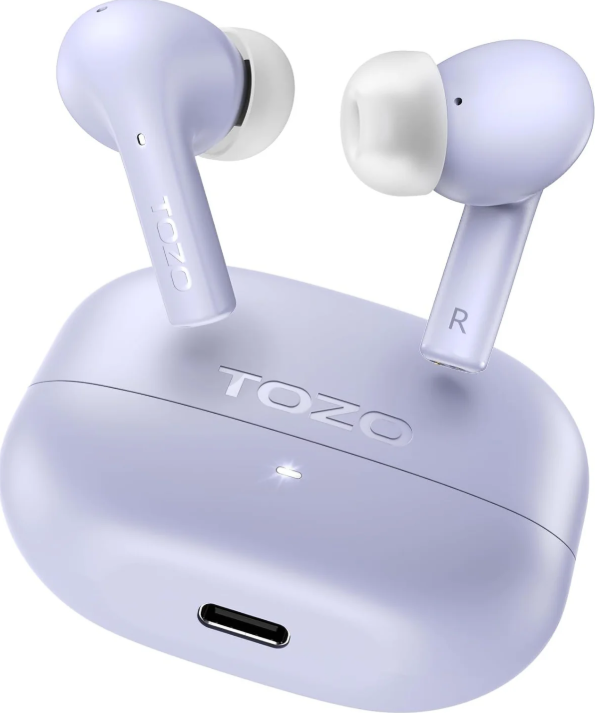
TOZO E2 Stereo Earbuds
Introduction
Experience the best in audio with the TOZO E2 Stereo Earbuds, designed to deliver powerful bass, clear treble, and customizable sound through their 10mm dynamic drivers. These earbuds are perfect for music lovers and gamers alike, offering up to 30 hours of playtime and advanced noise-canceling technology for clear calls. With the TOZO app, users can personalize their listening experience with 32 EQ presets. The TOZO E2 earbuds are ideal for those seeking a balance of sound quality and affordability, priced around $14-$20 and available at major retailers.
Whether you're a gamer looking for low-latency performance or an audiophile seeking rich sound, the TOZO E2 earbuds are a versatile choice. Their sleek design and waterproof build ensure durability, while Bluetooth 5.3 technology provides stable connections. The target audience includes budget-conscious consumers and entry-level users seeking high-quality earbuds without breaking the bank.
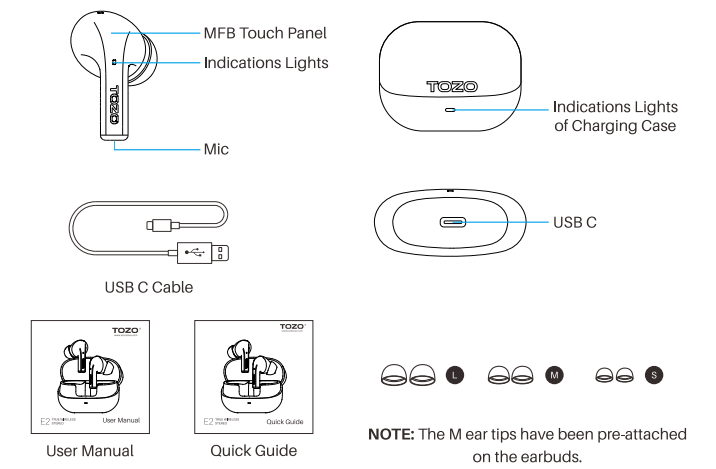
Product diagrammatic sketch
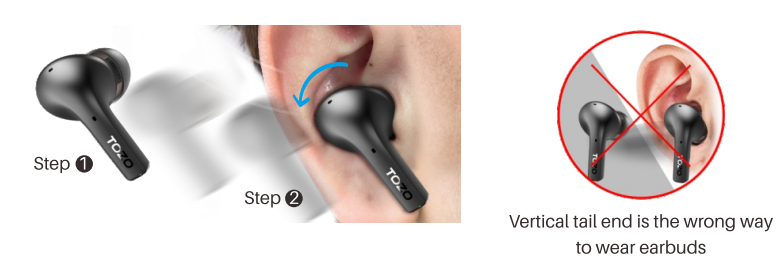
Wearing steps
- Step 1: Ensure the earbud tip facing downwards, then place earbuds into ear.
- Step 2: Rotate earbuds back to auricle side to fit snugly.
Operation of earbuds
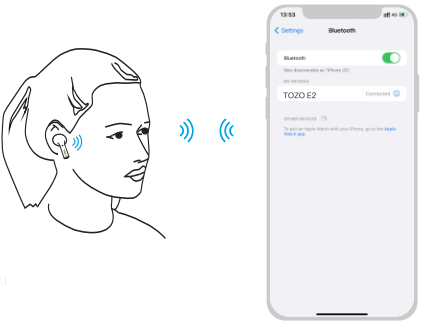
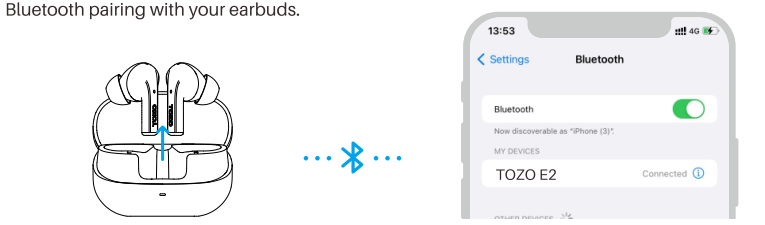
How to pair
- Pick up two earbuds from charging case, the white indicator will blink slowly. (pairing mode)
- Search for pairing name (TOZO E2) and select it in your mobile.
Another method of turning on & Turning off
Turn on:
Take out the earbuds from the charging case; or press the Control button and hold 3 seconds.
Turn off:
- Put the earbuds back into the charging case, and the earbuds will turn off.
- Pressing the control button for 5 seconds will turn off when they are in non-playing state.
- The earbuds will automatically turn off if they remain disconnected for more than 5 minutes.
Reset
If you accidentally get only one earbud work, or fail to pair each other, please reset it:
- Delete all [TOZO E2) Bluetooth records on your phone, then turn off Bluetooth.
- Delete all (TOZO E2) Bluetooth records on your phone, then turn off Bluetooth.
- Place both earbuds in the case and hold the Control button for 6s, or remove both earbuds from the case and quickly double-tap each one. Reset is complete when white lights sync and flash slowly on both.
Note: If the reset doesn't work, please repeat the steps above.
TOZO APP pairing
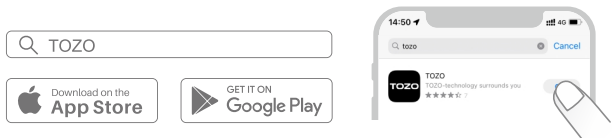
Step 1:
Download the TOZO App on your phone.
Step 2:
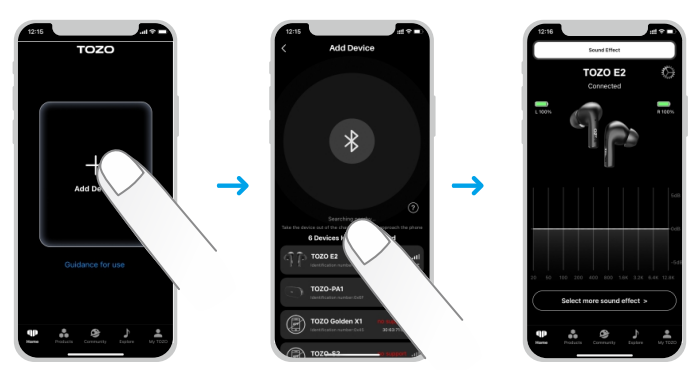
Step 3:
TOZO App pairing with your earbuds.
Specifications of TOZO E2 Stereo Earbuds
Here are the key specifications of the TOZO E2 Stereo Earbuds:
- Model Name: TOZO E2 (T11152)
- Connectivity Technology: Wireless (Bluetooth 5.3)
- Audio Driver Size: 10mm Dynamic Drivers
- Playtime (Single Charge): Up to 8.5 hours
- Total Playtime (with Charging Case): Up to 30 hours
- Charging Time: 1.5 Hours (Earbuds & Case)
- Noise Control: Sound Isolation, AI Call Noise Cancellation (ENC)
- Bluetooth Range: 12 Meters
- Audio Latency: 60 Milliseconds (Low-latency Mode)
- Water Resistance Level: Waterproof
- Control Type: Touch Control / APP
- Material: Polycarbonate (PC), Acrylonitrile Butadiene Styrene (ABS)
- Item Weight: 32.9 Grams
Compared to similar products in the market, the TOZO E2 earbuds stand out with their customizable EQs and advanced noise-canceling features, making them a top choice for those seeking a premium audio experience at an affordable price.
Troubleshooting for TOZO E2 Stereo Earbuds
Common issues and their solutions:
- Connection Issues: Ensure Bluetooth is enabled on your device and that the earbuds are properly paired.
- Sound Quality Problems: Adjust EQ settings through the TOZO app for better sound.
- Charging Issues: Check the charging port for debris and ensure the case is properly aligned.
- Warranty and Support: TOZO offers a standard manufacturer's warranty. For assistance, visit the official TOZO website or contact customer support.
To prevent issues, regularly clean the earbuds and keep them away from moisture.
Pros & Cons of TOZO E2 Stereo Earbuds
Here's a balanced assessment of the TOZO E2 earbuds:
Pros
- Powerful Bass and Clear Sound: Delivers rich audio with 10mm dynamic drivers.
- Customizable EQs: Offers 32 EQ presets for personalized sound.
- Long Battery Life: Up to 30 hours with the charging case.
- Affordable Price: Priced around $14-$20.
Cons
- Latency: While low-latency mode is available, some users may experience slight delays.
- Build Quality: Some users have noted that the build could be more premium.
Overall, the TOZO E2 earbuds offer excellent value for their price, making them a great choice for entry-level users seeking quality audio without breaking the bank.
Customer Reviews of TOZO E2 Stereo Earbuds
Users have praised the TOZO E2 earbuds for their sound quality, affordability, and customization options. Some common complaints include minor latency issues and a desire for a more premium build. Overall, the TOZO E2 earbuds are highly recommended for those seeking a budget-friendly yet feature-rich audio experience.
Star Rating: 4.5/5
Testimonial: "These earbuds are a great value for the price. The sound quality is impressive, and the EQ customization is a nice touch."
Purchase Recommendation: For anyone looking for affordable, high-quality earbuds with advanced features, the TOZO E2 is an excellent choice.
Faqs
How do I connect tozo E2 Stereo Earbuds to my smartphone for the first time?
Why does only one earbud of my tozo E2 Stereo Earbuds work at a time?
How do I customize the sound profile on my tozo E2 Stereo Earbuds?
How can I improve call clarity on my tozo E2 Stereo Earbuds in noisy environments?
What devices are compatible with tozo E2 Stereo Earbuds?
How do I activate low-latency gaming mode on my tozo E2 Stereo Earbuds?
How should I clean and maintain my tozo E2 Stereo Earbuds for long-term use?
What should I do if my tozo E2 Stereo Earbuds won’t charge or hold a charge?
More tozo manuals
- How to Pair: Tozo Crystal Pods Wireless Earbuds User Guide
- Pairing & Usage: Tozo A1 Stereo Earbuds Instruction Guide
- Pairing & Setup: Tozo E1 True Wireless Stereo Earbuds User Guide
- How to Pair: Tozo A3 True Wireless Stereo Earbuds User Manual
- Setup: Tozo Acufit Lite Smart Watch User Manual
- How to Pair: Tozo A2 True Wireless Stereo Earbuds User Guide
Leave a Comment