
How to Pair: Tozo Crystal Pods Wireless Earbuds User Guide
Content
tozo Crystal Pods Wireless Earbuds
Introduction
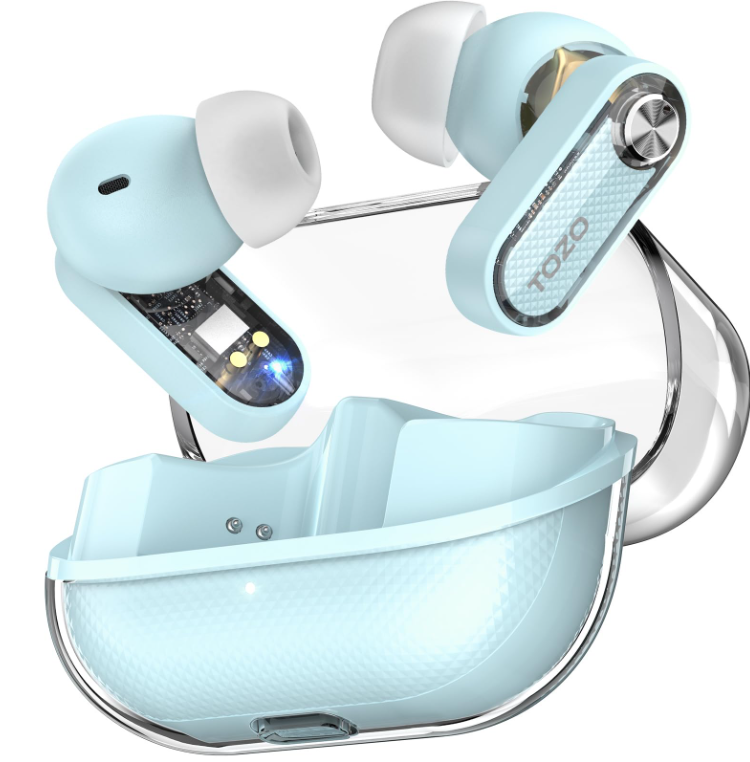
The tozo Crystal Pods Wireless Earbuds offer a sleek, transparent design combined with advanced audio technology to deliver an immersive listening experience. These earbuds feature Hybrid Active Noise Cancelling (ANC) with up to 38dB noise reduction, enabling users to block out ambient distractions effectively. Powered by 10mm dynamic drivers and TOZO's OrigX Acoustic 2.0 technology, they provide rich, balanced sound with powerful bass, clear mids, and crisp highs. Enhanced with AI-driven 4-microphone call noise cancellation, Crystal Pods ensure crystal-clear voice calls even in noisy environments.
Designed for music enthusiasts, commuters, remote workers, and fitness lovers alike, these earbuds provide up to 7 hours of playback on a single charge, extendable to 35 hours with the compact charging case. Quick charging capabilities deliver over 2 hours of playtime from just 10 minutes of charging. With Bluetooth 5.4 connectivity and an IPX5 waterproof rating, the Crystal Pods are ideal for on-the-go use, workouts, and outdoor activities. The accompanying TOZO app offers full customization with 32 EQ presets and personalized sound settings, appealing to audiophiles seeking tailored audio experiences.
Currently, the tozo Crystal Pods Wireless Earbuds are available worldwide through official retailers and online marketplaces, with an estimated price range of around $50-$70, positioning them competitively in the budget ANC earbuds segment. Their combination of style, performance, and affordability makes them a compelling choice for users seeking high-quality wireless earbuds with active noise cancellation.
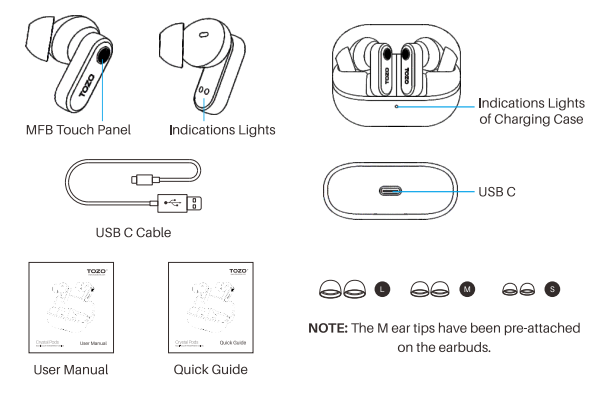
Product diagrammatic sketch
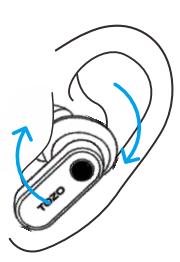
Wearing steps
- Step 1: Ensure the earbud tip is facing downwards, then place the earbuds into your ear.
- Step 2: Rotate the earbuds back to the auricle side to fit snugly.
Pairing and Connectivity
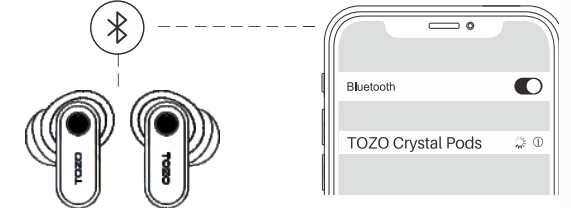
- Open the charging case and take out the earbuds.
The red and white lights will alternately flash. - On your phone, enable Bluetooth and search for the device (TOZO Crystal Pods). Tap to connect.
After a successful connection, the white light will remain on for 2 seconds and then turn off.
If you find that the left and right earbuds are not paired, ensure both earbuds are powered on and disconnected from any Bluetooth device. Double-tap both the left and right earbuds to re-pair them.
Power On/Power Off
Power On
- To turn on the earbuds, open the charging case and take out the earbuds. The white light will remain on for 2 seconds, and the earbuds will automatically power on.
- If the earbuds are outside the charging case, tap and hold the left and right earbuds for 3 seconds to power them on. (Both earbuds need to be operated separately.)
Power Off
- Place the earbuds in the charging case and close it; they will automatically power off.
- If the earbuds are outside the charging case and not playing music, tap and hold the earbuds for 5 seconds to power them off. (Both earbuds need to be operated separately.)
TOZO APP pairing
Step 1:
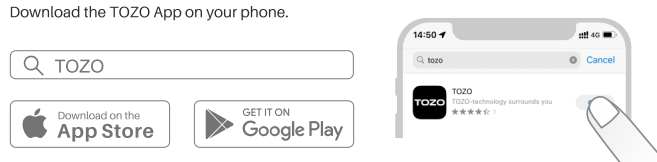
Step 2:
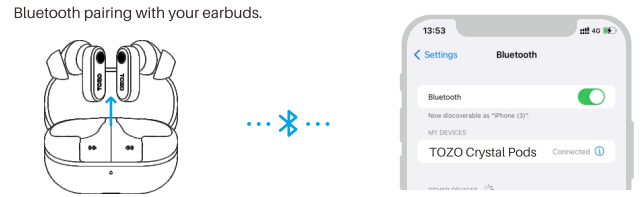
Step 3:
TOZO App pairing with your earbuds.
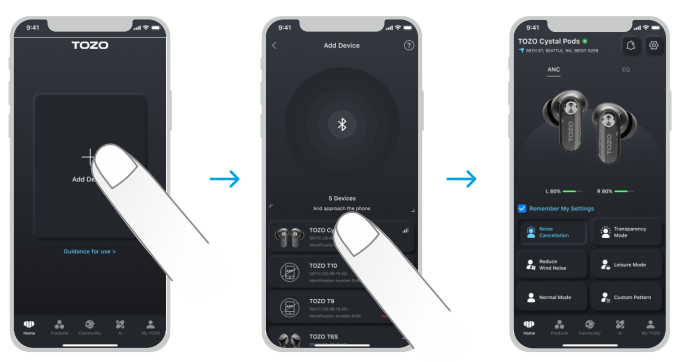
Troubleshooting for tozo Crystal Pods Wireless Earbuds
- Charging case not charging:
Check if the power adapter is working, or try using a different charging cable. - Earphones not connecting to Bluetooth or Bluetooth signal not found:
Open your phone's settings, delete the Bluetooth pairing records, and then search for the earbuds' Bluetooth signal to reconnect. - Earphones won't power on:
Ensure the charging case has power and try charging the earphones for a while before attempting to power them on.
Common issues with the tozo Crystal Pods include connectivity drops, one earbud not pairing, and ANC mode not activating properly. To resolve pairing issues, ensure both earbuds are fully charged and reset by placing them in the case and holding the touch sensors for 10 seconds. For sound imbalance or no audio from one side, clean the earbuds and ensure firmware is updated via the TOZO app. If noise cancellation or transparency mode malfunctions, toggle ANC off and on again or restart the earbuds.
Error codes are not typically displayed, but persistent problems may require a factory reset through the TOZO app. Preventive measures include keeping the earbuds and charging case clean and dry, avoiding extreme temperatures, and regularly updating firmware.
The tozo Crystal Pods come with a limited 12-month warranty covering manufacturing defects. For technical support or warranty claims, contact TOZO customer service via their official website or authorized sellers. Most users find help through the dedicated support channels and comprehensive user manual provided with the purchase.
Pros & Cons of tozo Crystal Pods Wireless Earbuds
- Pros:
- Effective Hybrid ANC with up to 38dB noise reduction for immersive listening.
- Sleek transparent design stands out aesthetically.
- Long battery life: up to 7 hours per charge, 35 hours with case.
- Fast charging delivers 2+ hours of playback from 10 10-minute charge.
- AI-powered 4-mic noise cancellation ensures clear call quality.
- Customizable sound profiles with 32 EQ presets via the TOZO app.
- IPX5 waterproof rating suitable for workouts and outdoor use.
- Bluetooth 5.4 offers stable connectivity and low latency.
- Cons:
- ANC performance is good but less refined compared to premium models like the Sony WF-1000XM5.
- EQ adjustments in leisure and custom modes have a limited perceptible effect.
- Fit may require ear tip adjustments for some users despite the included sizes.
- No active error code display may complicate troubleshooting for some.
- Sound signature is bass-forward, which may not suit all preferences.
Compared with alternatives in the budget ANC category, the tozo Crystal Pods offer a compelling balance of features, style, and price, making them a strong contender for users prioritizing noise cancellation and sound customization without breaking the bank.
Customer Reviews of tozo Crystal Pods Wireless Earbuds
Users generally praise the tozo Crystal Pods Wireless Earbuds for their stylish transparent look and effective noise-cancelling capabilities. Many highlight the clear call quality enabled by AI-enhanced microphones, finding them reliable for calls in busy environments. Battery life and quick charge features are frequently commended, with users appreciating the convenience during daily use.
Common complaints mention that ANC modes can feel similar with slight differences, and the bass-heavy sound may not suit all tastes. Some users report minor fit issues that require trying different ear tip sizes. Star ratings typically range between 4 to 4.5 out of 5, with recommendations centered on value for money and feature set at the price point.
Overall, the tozo Crystal Pods receive positive feedback for delivering advanced features like Hybrid ANC and customizable EQ settings in an affordable wireless earbud package, making them a recommended purchase for budget-conscious audiophiles.
Faqs
How do I set up my tozo Crystal Pods Wireless Earbuds for the first time?
What should I do if my tozo Crystal Pods Wireless Earbuds are not connecting to Bluetooth?
Can the tozo Crystal Pods Wireless Earbuds be used with both Android and iOS devices?
How does the Hybrid Active Noise Cancelling feature work on tozo Crystal Pods Wireless Earbuds?
How can I maximize the battery life of my tozo Crystal Pods Wireless Earbuds?
What are the best practices for cleaning and maintaining tozo Crystal Pods Wireless Earbuds?
How do I customize sound and controls on the tozo Crystal Pods Wireless Earbuds?
What should I do if calls on my tozo Crystal Pods Wireless Earbuds sound unclear or have background noise?
More tozo manuals
- Pairing & Setup: Tozo E1 True Wireless Stereo Earbuds User Guide
- Pairing: Tozo E2 Stereo Earbuds Setup Guide
- Setup: Tozo Acufit Lite Smart Watch User Manual
- Pairing & Usage: Tozo A1 Stereo Earbuds Instruction Guide
- How to Use: Tozo W10 Wireless Charger User Manual
- How to Pair: Tozo A3 True Wireless Stereo Earbuds User Manual
Leave a Comment