
How to Pair: Tozo A3 True Wireless Stereo Earbuds User Manual
Content
tozo A3 True Wireless Stereo Earbuds
Introduction
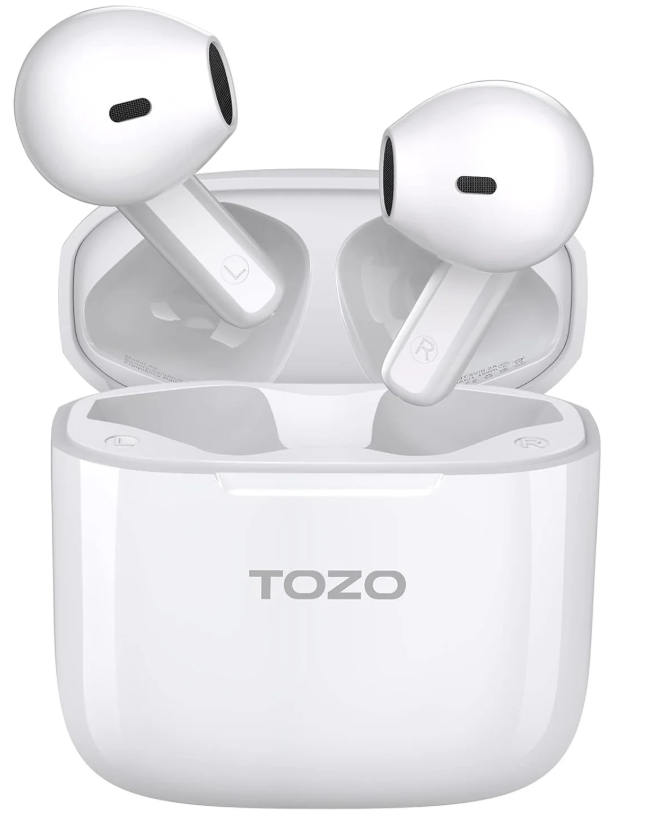
The tozo A3 True Wireless Stereo Earbuds offer an exceptional blend of high-quality sound, ergonomic design, and advanced Bluetooth technology, making them a standout choice for both casual listeners and active users. Equipped with a 14.2mm dynamic driver, these earbuds deliver rich, clear audio with enhanced bass, supporting AAC and SBC audio codecs to ensure crisp music playback across a wide frequency range of 20Hz to 20kHz. The semi-in-ear design provides a comfortable and secure fit suitable for extended wear and various activities, from commuting to workouts.
Featuring Bluetooth 5.3, the tozo A3 earbuds ensure fast and stable wireless connectivity within a 10-meter range, reducing latency and improving call quality with DSP noise cancellation technology. The earbuds provide up to 5 hours of continuous playtime on a single charge, with an additional 17 hours supplied by the compact, lightweight charging case, totaling 22 hours for on-the-go use. The USB Type-C charging port supports quick recharging in approximately 1.5 hours.
Designed for audiophiles and everyday users alike, the Tozo A3 earbuds are ideal for streaming music, taking calls, or enjoying podcasts with hands-free convenience. Their IPX4 waterproof rating offers protection against sweat and light rain, catering well to fitness enthusiasts. Available at an estimated price range of $40 to $60, these earbuds represent excellent value with premium features commonly found in higher-end models. The tozo A3 True Wireless Stereo Earbuds are widely available through official online stores, major retailers, and e-commerce platforms.
Product description
Earbuds wearing
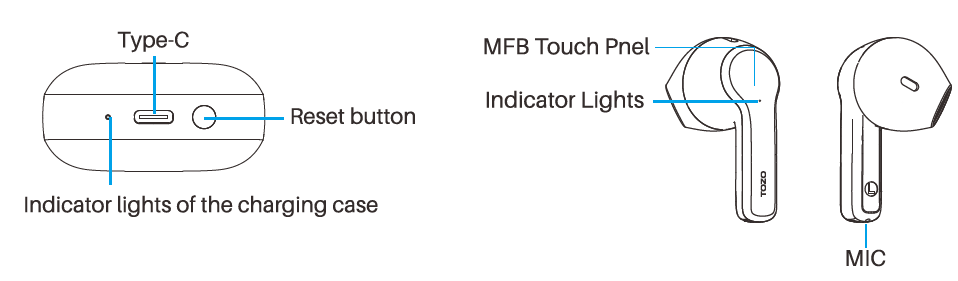
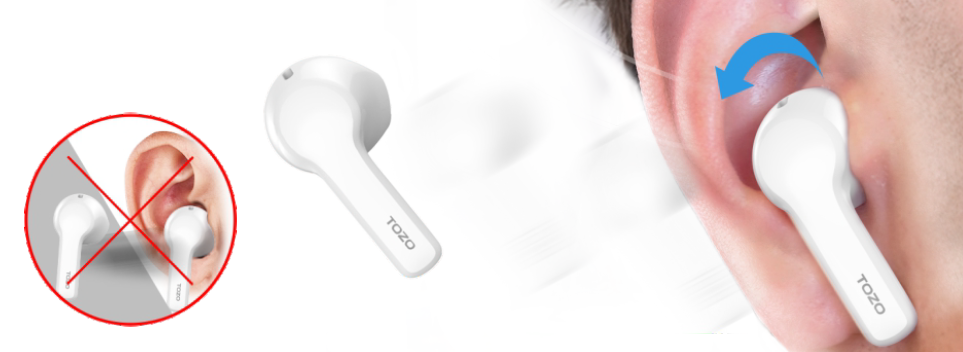
- Gently insert the earpiece into the cochlea obliquely and adjust it to an appropriate angle.
- When making a call, turn the earbud microphone towards your mouth to make the call clearer.
Operation of earbuds
Power on/off
Power on:
- Open the cover of the charging case, and the earbuds will power on automatically.
- Tap and hold the earbuds for over 3 seconds.
Power off:
- Place the earbuds back into the charging case and close the cover.
- Tap and hold the earbuds for over 5 seconds when not playing media.
- The earbuds will turn off automatically after being disconnected for over 5 minutes.
Bluetooth pairing and connection
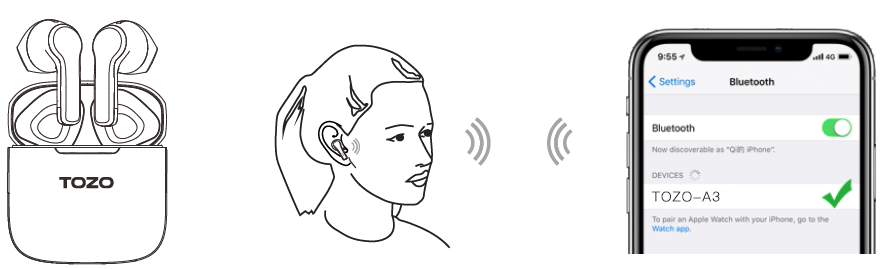
- In first use, take the earbuds out of the charging case,, and the earbuds will power on and automatically pair with each other. Open the Bluetooth device, search [TOZO-A3],, and select the connection.
- Non-first used, the earbuds will auto-connect back to the last pairing device when turned on.
- If auto-connect back fails, please select [TOZO-A3] again on the "DEVICES" list. If you need to connect to another device, please forget/unpair [TOZO-A3] from the current device and repeat step 1 to connect to the new one.
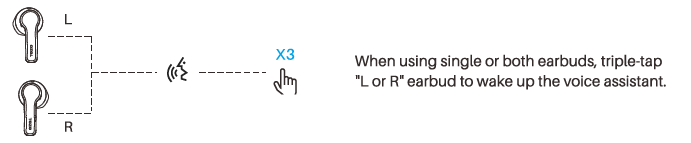
Voice assistant
Specification
- Name
- TOZO-A3
- Transmission distance
- 10M
- Rated power
- 3mW
- Earbuds battery capacity
- 3.7V/35mAh
- Charging box battery capacity
- 3.7V/400mAh
- Playing Time
- >5.5 hours
- Charging time of the charging case
- 1.5 hours
- Charging port
- Type-C
- Size of the earbud
- 32.2 * 22.8*23.6 mm
- Size of the charging box
- 70.29*36.1*32.1 mm
Troubleshooting Common Issues with tozo A3 True Wireless Stereo Earbuds
Users of the tozo A3 True Wireless Stereo Earbuds may occasionally encounter common issues such as pairing difficulties, sound interruptions, or charging problems. Below are solutions to frequent problems:
- Pairing Issues: Ensure Bluetooth 5.3 is enabled on your device. Remove previously paired devices named "TOZO-A3" and re-initiate pairing by taking both earbuds out of the charging case, which automatically turns them on and connects them. Then select "TOZO-A3" in your device’s Bluetooth menu.
- No Sound or Audio Delay: Check the volume on your source device and confirm the earbuds are fully charged. Restart the earbuds by placing them back in the charging case for a few seconds, then reconnect.
- Charging Problems: Clean the charging contacts on both earbuds and the case with a dry cloth to ensure proper connectivity. Use only the supplied USB Type-C cable and avoid charging in extreme temperatures.
- Error Codes: While the tozo A3 earbuds do not display explicit error codes, unresponsive earbuds can be reset by holding the touch control buttons for 10 seconds or placing them back in the charging case and closing the lid for 30 seconds.
To prevent issues, keep the earbuds and charging case clean and dry, avoid exposure to water beyond the IPX4 rating, and update your device's Bluetooth drivers if needed. The TOZO A3 earbuds come with a standard warranty (check the retailer for exact terms), and customer support is accessible through the official TOZO website and authorized sellers.
For assistance, contact TOZO customer service via their official store or support email provided with your purchase documentation.
Pros & Cons of tozo A3 True Wireless Stereo Earbuds
Pros
- High-Quality Sound: The 14.2mm dynamic driver delivers rich bass and clear mids and highs, enhancing music and call experiences.
- Bluetooth 5.3 Connectivity: Provides a stable, low-latency connection with a 10-meter effective range.
- Long Battery Life: Up to 5 hours per charge with an additional 17 hours from the compact charging case, offering a total of 22 hours.
- Ergonomic Semi-In-Ear Design: Lightweight (3.3g per earbud) and comfortable for prolonged use, suitable for sports and daily activities.
- Water Resistance: IPX4 rating protects against sweat and light rain, ideal for workouts and outdoor use.
- Affordable Price: Competitively priced between $40-$60, offering great value versus more expensive alternatives.
Cons
- Limited Noise Isolation: The semi-in-ear design may not block ambient noise as effectively as in-ear silicone tips.
- Basic Touch Controls: Some users report sensitivity issues or accidental touches during use.
- No Advanced Features: Lacks active noise cancellation (ANC) and customizable EQ settings found in premium models.
- Charging Case Size: While lightweight, the case is slightly larger compared to ultra-compact models.
Customer Reviews of tozo A3 True Wireless Stereo Earbuds
Many users praise the tozo A3 True Wireless Stereo Earbuds for their impressive sound quality and reliable Bluetooth 5.3 connectivity. Positive feedback often highlights the comfortable fit and long battery life, making these earbuds suitable for both casual listening and exercise.
Common praises include the enhanced bass performance and clear call quality due to DSP noise cancellation. Customers also appreciate the quick pairing process and lightweight design.
On the downside, some users mention occasional touch control sensitivity issues and note that the semi-in-ear design offers less noise isolation than in-ear models. A few reviews suggest that the charging case could be more compact.
Overall, the tozo A3 earbuds receive average ratings around 4 to 4.5 stars out of 5, with many recommending them as a budget-friendly alternative to premium true wireless earbuds. Purchase recommendations frequently emphasize their value for money and suitability for users seeking wireless convenience without sacrificing audio quality.
Faqs
How do I set up tozo A3 True Wireless Stereo Earbuds for the first time?
What should I do if my tozo A3 True Wireless Stereo Earbuds are not connecting or pairing properly?
Can I use tozo A3 True Wireless Stereo Earbuds with all Bluetooth devices, including Android and iOS?
How do I maximize the battery life of my tozo A3 True Wireless Stereo Earbuds?
What are the main touch control features on the tozo A3 True Wireless Stereo Earbuds?
How do I clean and maintain my tozo A3 True Wireless Stereo Earbuds safely?
Why is the sound quality on my tozo A3 True Wireless Stereo Earbuds sometimes distorted or low?
Does the tozo A3 True Wireless Stereo Earbuds support noise cancellation for calls?
More tozo manuals
- Pairing & Usage: Tozo A1 Stereo Earbuds Instruction Guide
- How to Pair: Tozo A2 True Wireless Stereo Earbuds User Guide
- Pairing: Tozo E2 Stereo Earbuds Setup Guide
- How to Pair: Tozo Crystal Pods Earbuds User Guide
- How to Pair: Tozo Crystal Pods Wireless Earbuds User Guide
- Pairing & Usage: Tozo A1 True Wireless Stereo Earbuds User Manual
Leave a Comment