
Pairing & Usage: Tozo A1 True Wireless Stereo Earbuds User Manual
Content
Tozo A1 True Wireless Stereo Earbuds
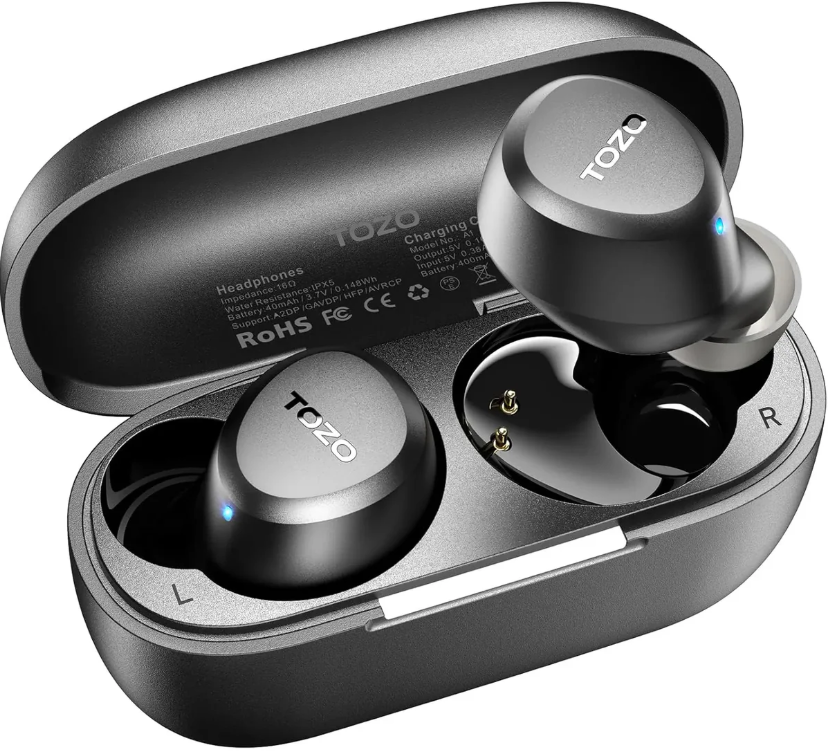
Introduction
The tozo A1 True Wireless Stereo Earbuds offer a sleek, ultra-lightweight audio solution for users seeking high-quality sound with complete wireless freedom. Designed for active lifestyles and everyday use, these earbuds combine advanced Bluetooth 5.3 technology and IPX5 water resistance to deliver stable connectivity and reliable performance even during workouts and outdoor activities. With a compact design and multiple color options, they fit comfortably for extended wear while ensuring rich, clear stereo sound powered by 6mm dynamic drivers.
Key benefits include up to 7 hours of continuous playback on a single charge, boosted to a total of 32 hours using the compact USB Type-C charging case. The earbuds support AAC and SBC audio codecs for versatile device compatibility, along with environmental noise cancellation (ENC) microphones to improve call clarity. Their intuitive smart touch controls allow users to manage music, calls, and voice assistants effortlessly.
Ideal for commuters, fitness enthusiasts, and casual listeners, the tozo A1 earbuds balance affordability with premium features. Available in multiple colors such as black, blue, and khaki, they retail within a competitive price range, typically around $30-$50. The product is widely accessible through online retailers and official outlets, making it a practical choice for anyone upgrading to true wireless audio.
Specifications and Features of tozo A1 True Wireless Stereo Earbuds
- Bluetooth Version: 5.3, offering faster connection and low latency up to 10-12 meters
- Driver Size: 6mm dynamic drivers delivering balanced stereo sound
- Audio Codecs: AAC and SBC for high-quality audio streaming
- Battery Life: 7 hours per single charge, extending to 32 hours with the charging case
- Charging: USB Type-C port; earbuds and case fully charge in approximately 2 hours
- Water Resistance: IPX5 rating, resistant to sweat and light rain
- Weight: Ultra-light at 3.7 grams per earbud for comfortable all-day wear
- Controls: Smart touch interface for music playback, calls, and voice assistant activation
- Additional Features: Environmental Noise Cancellation microphones, 32 EQ modes for personalized sound
Compared to similar true wireless models in the same price bracket, the tozo A1 earbuds stand out with their advanced Bluetooth 5.3 connectivity and extended 32-hour total playback time, which surpasses many competitors offering only 20-24 hours. Their IPX5 waterproof rating also provides better durability against moisture than some rivals, limited to IPX4.
ProductDescrlption
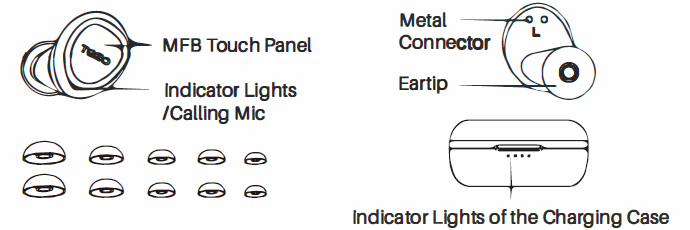
Operation of Earbuds
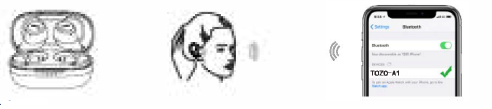
How to pair
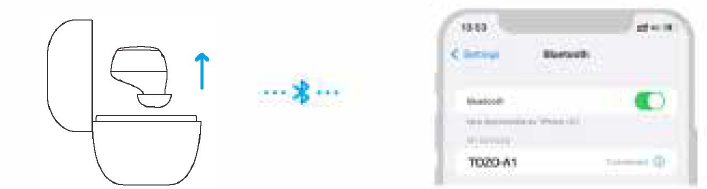
- Take out the 2 earbuds from the charging case, they will power on and connect to each other automatically within 10 seconds.
- One of the earbuds flashes red and blue alternately. ( Pairing Mocle)
- Search for pairing name [TOZO-A 1].
Poweronloff
Power on:
- Take out the 2 earbuds from the charging case, and they will power on automatically.
- Press & hold both earbuds' MFB Touch Panel for over 3 seconds.
Power off:
- Place the earbuds back into the case, and the earbuds will power off automatically.
- When earbuds are not playing music, press & hold the FB Touch Panel for 5 seconds to turn it off.
- The earbuds will power off automatically after they disconnect for more than 5 minutes.
Reset
- Turn off Bluetooth and remove/forget [TOZO-A 11 records on your device.
- Take out both earbuds from the case, and quickly tap them 5 times. The reset is completed when the red lights flash for a second.
- Put the earbuds back into the case first and take them out to reconnect.
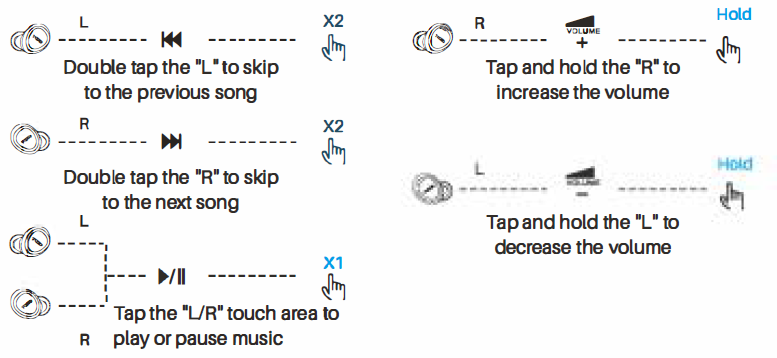
Music Operation
- X1: Press once
- X2: Press twice
- X3: Press three times
- Hold: Press and hold for 2 seconds
Call Control
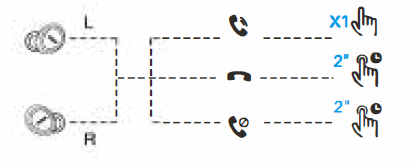
- Tap 'UR' touch area to answer the call, or it will answer the call automatically.
- Hold "UR' 2S the sensing area to hang up the cal.l Hold "UR' 2S the sensing area to reject the call.
Voice Assistant
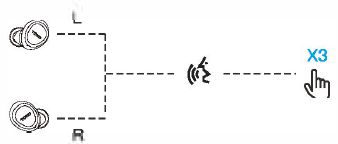
When using single or both earbuds, triple-tap the 'VR' earbud to wake up the Voice assistant with a "Beep' sound.
Special Reminder
Wipe the hardware contacts of the earbuds and charging box when the earbuds are not charging.
Wearing Steps
TOZOAPP
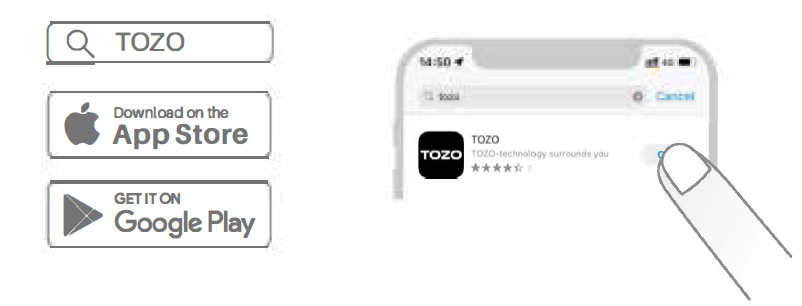
Download the TOZO App for UI customization, EQ settings, and more.
- UI customization: Most of the controls can be customized in the App.
- EQ settings: There are lots of EQ settings you can choose in the App to optimize your experience while enjoying different music genres.
- Earbuds firmware update: The earbuds' firmware can be updated in the App.
- You will be informed once the new version of firmware is detected when you connect the earbud to the App.
TOZO APP pairing
Step 1:
Download the TOZO App on your phone.
Step 2:
Bluetooth pairing with your earbuds.
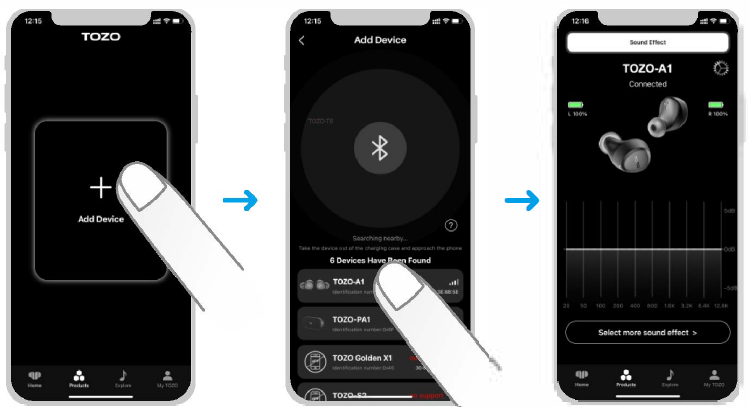
Step 3:
TOZO App pairing with your earbuds.
Troubleshooting Guide for tozo A1 True Wireless Stereo Earbuds
- Earbuds Not Pairing: Ensure Bluetooth is enabled on your device. Place the earbuds back in the charging case, close and reopen the lid to reset pairing mode. Remove “TOZO-A1” from your device’s Bluetooth list and try pairing again.
- Only One Earbud Works: Confirm both earbuds are charged. Place both earbuds in the case for a few seconds to re-sync them, then reconnect.
- No Sound or Low Volume: Check your device’s volume settings and earbud placement. Clean any debris from the earbud speakers if necessary.
- Charging Issues: Verify the charging cable connection and clean the charging contacts on the earbuds and case. Try alternative USB power sources if charging fails.
- Touch Controls Unresponsive: Ensure your fingers are clean and dry. Restart earbuds by placing them in the case and removing them again.
Preventive measures include keeping the earbuds clean, avoiding exposure to extreme conditions despite the IPX5 rating, and regularly updating pairing settings. The TOZO A1 earbuds come with a standard warranty, and customer support can be reached via the official TOZO website for assistance or replacement options.
Pros & Cons of tozo A1 True Wireless Stereo Earbuds
- Pros:
- Lightweight design (3.7g each) ensures comfortable wear over long periods.
- Excellent battery life with 7 hours per charge and 32 hours total via charging case.
- Bluetooth 5.3 provides s stable connection and low latency for video and gaming.
- IPX5 water resistance suits active users and outdoor environments.
- Equipped with ENC microphones for clear voice calls.
- Affordable price point offering premium features usually found in higher-end models.
- Cons:
- Audio quality is good but not audiophile-grade; bass may feel less pronounced compared to flagship earbuds.
- Touch controls can be sensitive and sometimes trigger unintended actions.
- No wireless charging support, unlike some competitors.
- Limited advanced app support for sound customization outside preset EQ modes.
While the tozo A1 True Wireless Stereo Earbuds offer outstanding value for money, users seeking studio-level sound fidelity or extensive customization may consider higher-tier alternatives. However, for daily use, workouts, and calls, the earbuds deliver a reliable and enjoyable experience.
Customer Reviews and Feedback on tozo A1 True Wireless Stereo Earbuds
Users frequently praise the tozo A1 True Wireless Stereo Earbuds for their comfort, lightweight design, and long battery life. Positive reviews highlight clear call quality with noise reduction and stable Bluetooth connectivity even in crowded environments. Many recommend the earbuds for jogging, commuting, and casual listening.
Common complaints include occasional touch control misfires and the desire for stronger bass performance. Some users experience brief syncing delays between earbuds but find that resetting resolves the issue. Overall, the product receives an average rating of 4.3 out of 5 stars across major retail platforms.
Given the combination of affordable pricing, feature set, and ease of use, the tozo A1 earbuds are highly recommended for users looking to upgrade from wired headphones or entry-level wireless models.
Faqs
How do I set up my tozo A1 True Wireless Stereo Earbuds for the first time?
What should I do if my tozo A1 True Wireless Stereo Earbuds won't pair with my phone?
Can the tozo A1 True Wireless Stereo Earbuds be used for making phone calls?
How can I optimize battery life on my tozo A1 True Wireless Stereo Earbuds?
Are the tozo A1 True Wireless Stereo Earbuds compatible with all Bluetooth devices?
What do I do if only one earbud of my tozo A1 True Wireless Stereo Earbuds is working?
How do I clean and maintain my tozo A1 True Wireless Stereo Earbuds to ensure longevity?
What are the touch control features on the tozo A1 True Wireless Stereo Earbuds and how do I use them?
More tozo manuals
- How to Pair: Tozo Crystal Pods Earbuds User Guide
- How to Pair: Tozo NC7 Crystal Buds User Guide
- How to Pair: Tozo A2 True Wireless Stereo Earbuds User Guide
- Operating: Tozo NC9 Active Noise Cancellation User Manual
- How to Pair: Tozo A3 True Wireless Stereo Earbuds User Manual
- Tozo NC2 Active Noise Cancellation Earbuds | Specs & Features
Leave a Comment