
Setup: Beurer Blood pressure monitor BC 21 User Manual
Content
Beurer Blood Pressure Monitor BC 21: Comprehensive Product Manual and Guide
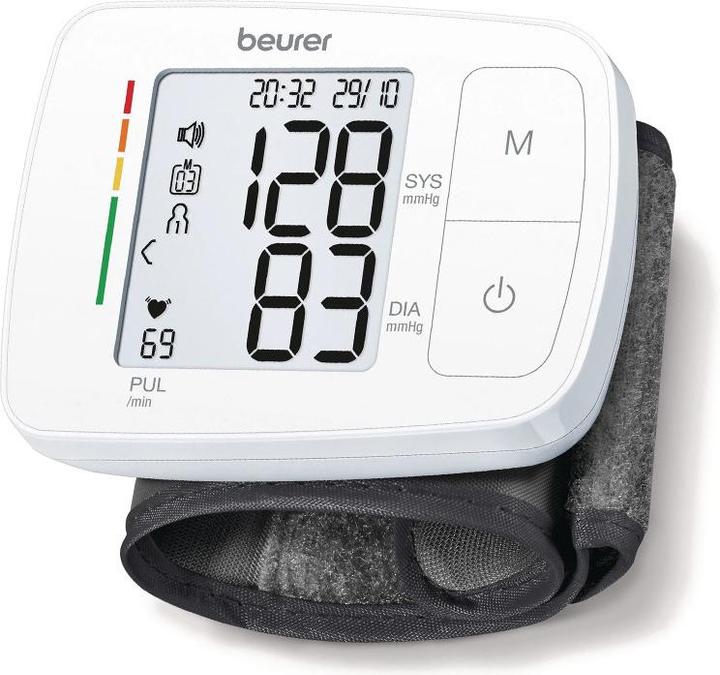
Introduction to the Beurer Blood Pressure Monitor BC 21
The Beurer Blood Pressure Monitor BC 21 is a fully automatic wrist blood pressure monitor designed for precise, at-home monitoring of systolic and diastolic blood pressure, as well as pulse rate. Engineered in Germany with medical-grade accuracy, this compact device stands out with its innovative voice output feature, announcing measured values in multiple languages, including German, English, French, Italian, and Turkish. Ideal for seniors, individuals with visual impairments, or anyone seeking convenient daily health tracking, the BC 21 simplifies hypertension management and heart health awareness.
Key benefits include a risk indicator with a colored scale for instant measurement classification, arrhythmia detection to warn of irregular heart rhythms, and an illuminated, easy-to-read display. It stores two user memories for up to 60 readings each, calculates averages of all values, morning/evening pressures over the last 7 days, and features an incorrect usage message for reliable results. Compatible with wrist circumferences from 14.0 to 19.5 cm, it uses oscillometric technology, includes a low battery indicator, date/time stamp, and automatic switch-off. Powered by 2 AAA batteries (approx. 200 measurements per set), the lightweight unit (105 g with cuff, dimensions 87 x 67 x 31 mm) comes with a storage box.
Perfect for home use, travel, or routine check-ups, the Beurer BC 21 wrist blood pressure monitor targets health-conscious adults monitoring blood pressure trends. Available at major retailers like pharmacies and online stores, prices typically range from $40 to $60 USD, offering excellent value for a certified medical device with voice-guided operation.
Technical Specifications
1. Model No.: BC 21
2. Measurement Method: Oscillometric, non-invasive blood pressure measurement on the wrist.
3. Measurement Range:
- Cuff Pressure: 0–300 mmHg
- Systolic: 60–260 mmHg
- Diastolic: 40–199 mmHg
- Pulse: 40–180 beats/minute
4. Display Accuracy:
- Systolic: ±3 mmHg
- Diastolic: ±3 mmHg
- Pulse: ±5% of the displayed value
5. Measurement Inaccuracy: Maximum permissible standard deviation according to clinical testing:
- Systolic: 8 mmHg
- Diastolic: 8 mmHg
6. Memory: 2 × 60 memory spaces
7. Dimensions: L 87 mm × W 67 mm × H 31 mm
8. Weight: Approximately 105 g (without batteries)
9. Cuff Size: 140–195 mm
10. Permissible Operating Conditions:
- Temperature: +10°C to +40°C
- Relative Humidity: ≤85% (non-condensing)
11. Permissible Storage Conditions:
- Temperature: −20°C to +50°C
- Relative Humidity: ≤85%
- Ambient Pressure: 800–1050 hPa
12. Power Supply: 2 × 1.5 V AAA batteries
13. Battery Life: Approximately 200 measurements, depending on blood pressure levels and inflation pressure.
14. Accessories:
- Instructions for use
- 2 × 1.5 V AAA batteries
- Storage box
15. Classification:
- Internal power supply
- IP22 protection rating
- No AP or APG
- Continuous operation
- Type BF applied part
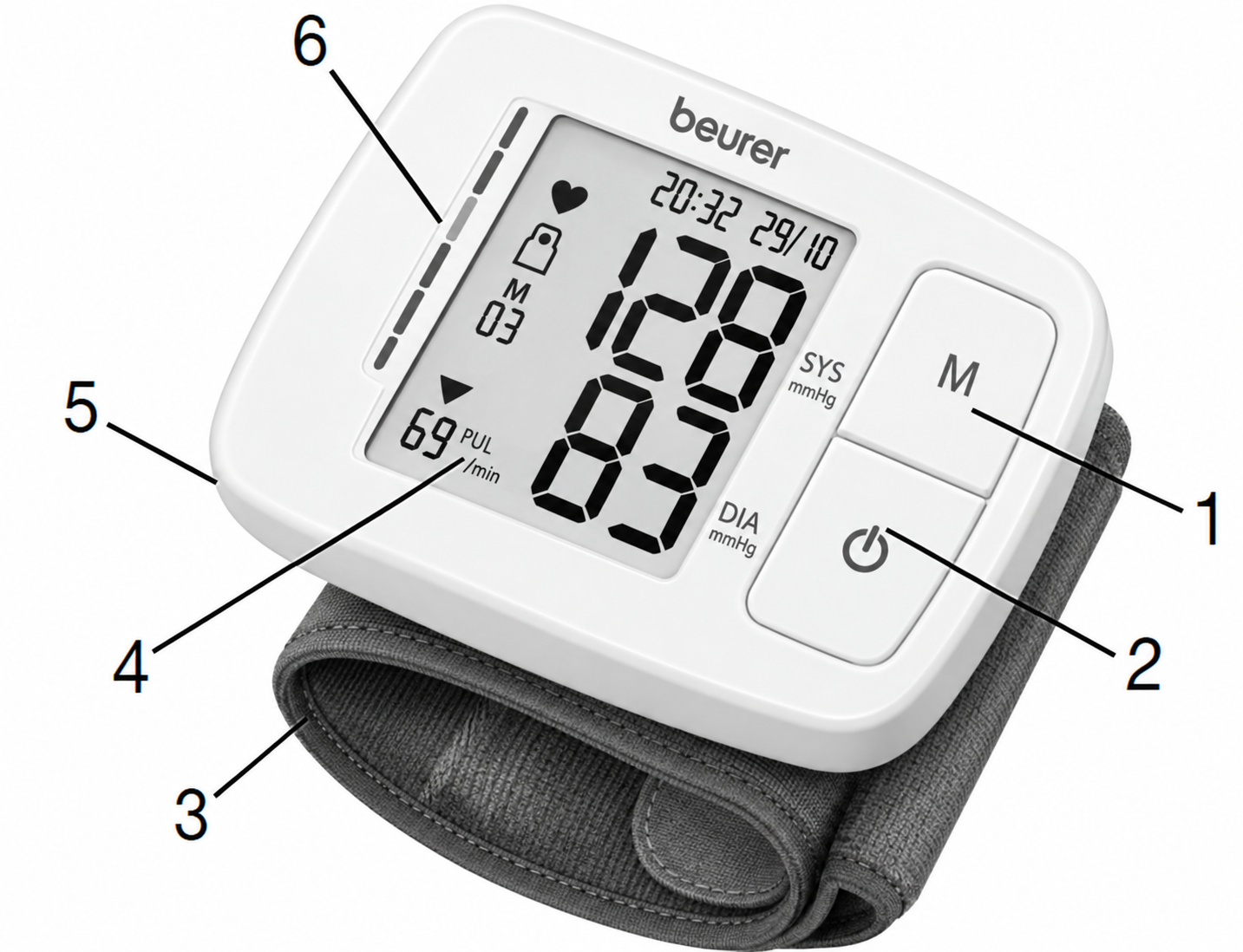
Device Description
- Memory Button M
- START/STOP Button
- Wrist Cuff
- Display
- Battery Compartment Lid
- Risk Indicator
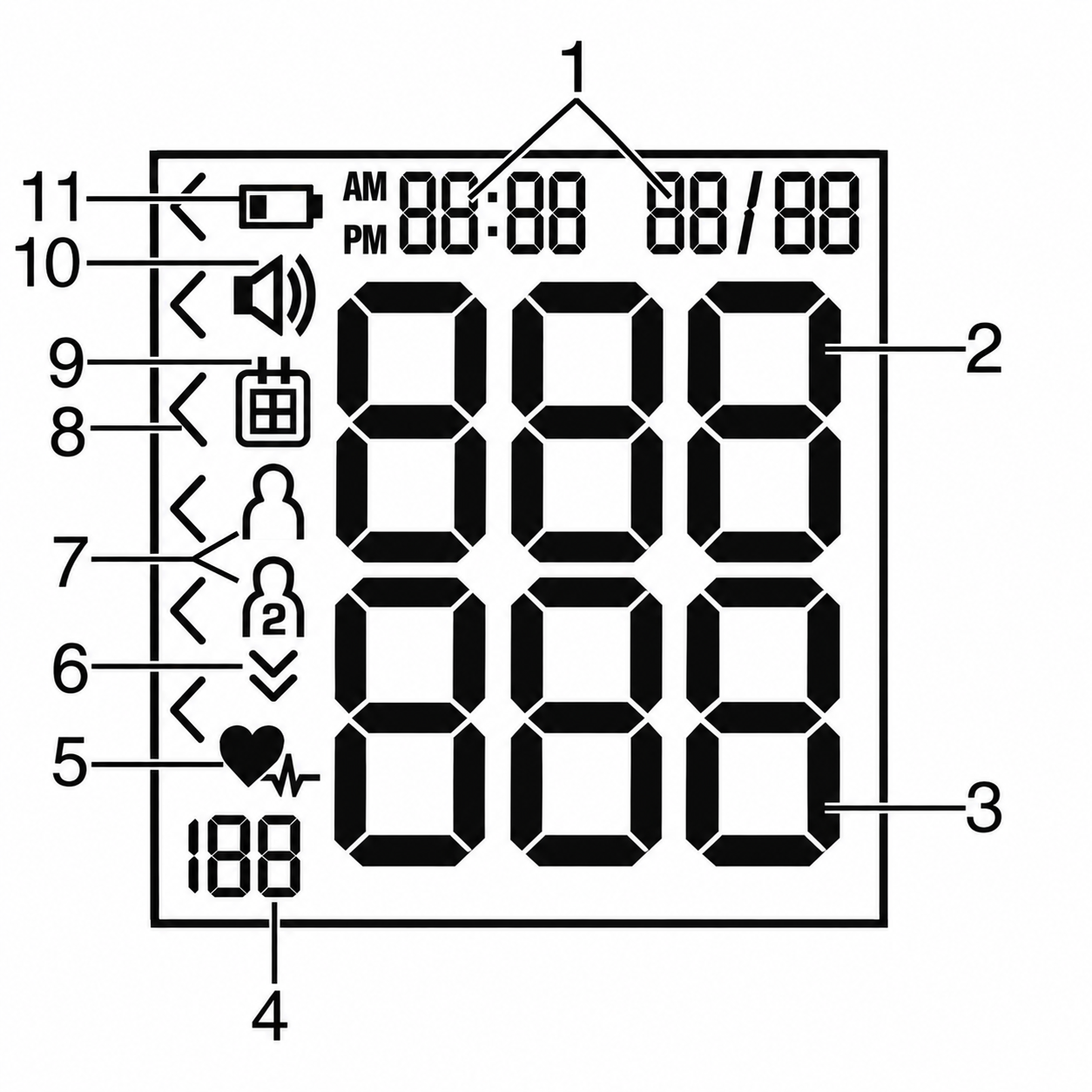
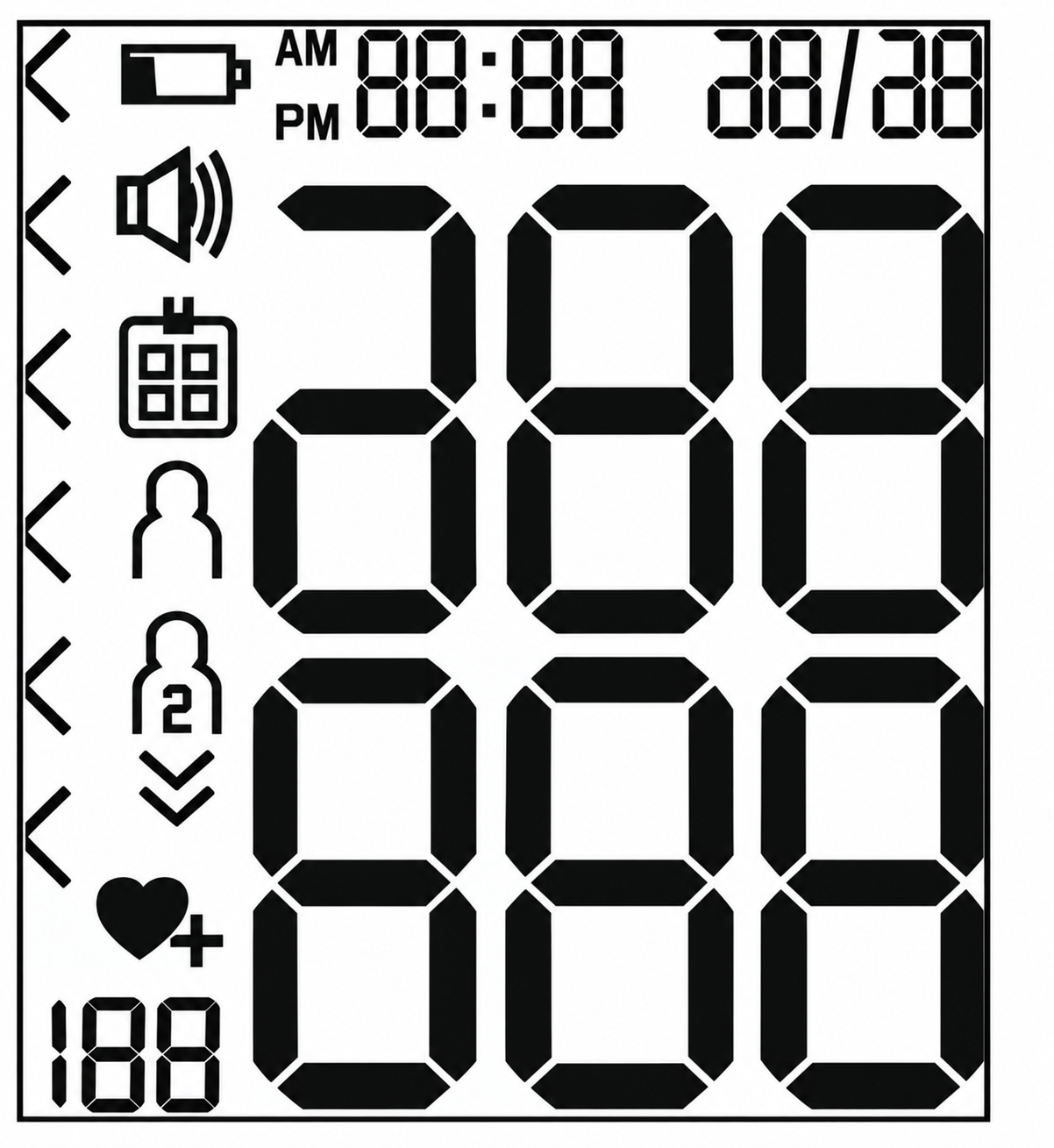
Information on the Display:
- Time and Date
- Systolic Pressure
- Diastolic Pressure
- Calculated Pulse Value
- Pulse Symbol / Cardiac Arrhythmia Symbol
- Inflate / Release Air Indicator
- User Memory 1 / User Memory 2
- Risk Indicator
- Memory Space Number / Memory Display for Average Value, Morning, and Evening
- Voice Output / Sound Indicator
- Battery Replacement Symbol
Preparing for the Measurement
Inserting the Battery
- Remove the battery compartment lid on the left side of the device. To remove the lid, lightly press on it to release the lock. Then remove the lid.
- Insert two 1.5 V micro (alkaline type LR03) batteries. Make sure that the batteries are inserted correctly according to the polarity markings. Do not use rechargeable batteries.
- Close the battery compartment lid carefully.
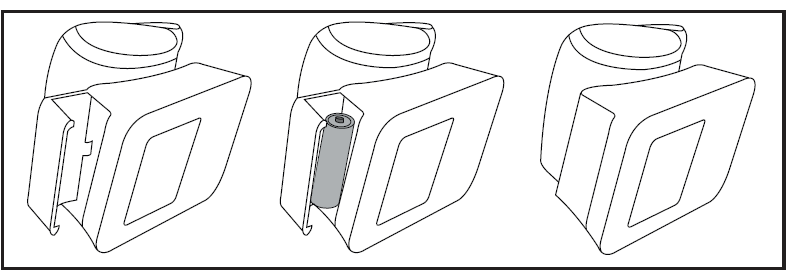
If the battery replacement symbol is displayed, you can no longer perform any measurements and must replace all batteries. Once the batteries have been removed from the device, the date and time must be set again. Any saved measured values are retained.
Battery Disposal
- Empty, completely flat batteries must be disposed of through specially designated collection boxes, recycling points, or electronics retailers. You are legally required to dispose of batteries properly.
- The following codes are printed on batteries containing harmful substances:
Pb = Battery contains lead; Cd = Battery contains cadmium; Hg = Battery contains mercury
Setting the Hour Format, Date, Time, and Language
There are two different ways to access the menu from which you can adjust the settings:
- Before Initial Use and After Each Battery Replacement: When inserting the batteries into the device, you will be taken to the relevant menu automatically.
- If the Batteries Have Already Been Inserted: With the device switched off, press and hold the START/STOP button for approximately 5 seconds.
Setting Sequence: Hour Format → Date → Time → Language
It is essential to set the date and time. Otherwise, you will not be able to save your measured values correctly with a date and time and access them again later. The device also has voice output in 5 languages (German, English, French, Italian, and Turkish). The device is set to German when supplied to the customer. To select your values faster when using the memory button M, you can also press and hold the memory button M.
Hour Format
- Press and hold the memory button M for 5 seconds or insert the batteries. The full display is shown briefly. The hour format then flashes on the display.
- Select the desired hour format using the memory button M and confirm with the START/STOP button.
Date
The year flashes on the display.
- Select the desired year using the memory button M and confirm with the START/STOP button.
The month flashes on the display.
- Select the desired month using the memory button M and confirm with the START/STOP button.
The day flashes on the display.
- Select the desired day using the memory button M and confirm with the START/STOP button.
If the hour format is set to 12h, the day/month display sequence is reversed.
Time
The hours flash on the display.
- Select the desired hour using the memory button M and confirm with the START/STOP button.
The minutes flash on the display.
- Select the desired minute using the memory button M and confirm with the START/STOP button.
Language
The German language setting appears on the display. To select another language, press and hold the memory button M for 3 seconds each time until the desired language is shown. Confirm using the memory button M.
- German
- English
- French
- Italian
- Turkish
- No voice output, only an acoustic signal
Voice Output Volume
The loud volume setting appears on the display. To change the voice output volume, press and hold the memory button M for 3 seconds each time. Confirm using the memory button M.
- Quiet
- Medium
- Loud
- Voice output off
Once all the data has been set, the device switches off automatically.
Measuring Blood Pressure
Attaching the Cuff
Blood pressure may vary between the right and left arm, which may mean that the measured blood pressure values are different. Always measure the same arm. If the values between the two arms are significantly different, please consult your doctor to determine which arm should be used for the measurement. We generally recommend that you measure the left wrist.
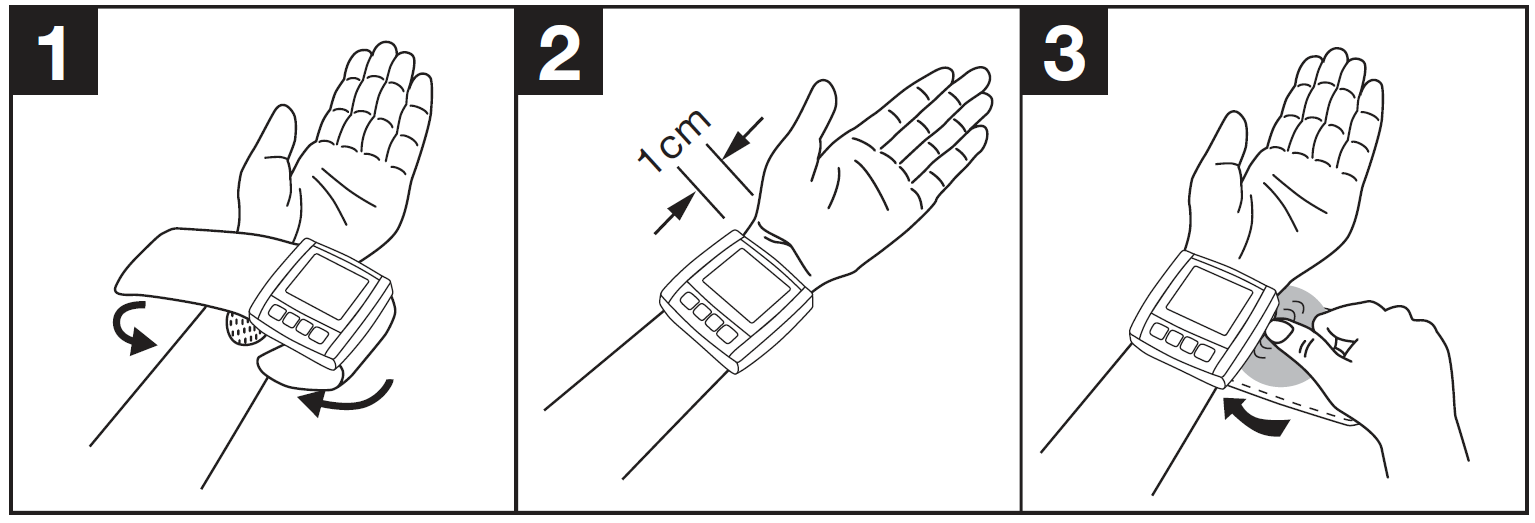
- Expose your left wrist. Ensure that the circulation of the arm is not restricted by tight clothing or similar items. Place the cuff on the inside of your wrist.
- Close the cuff with the hook-and-loop fastener so that the upper edge of the device is positioned approximately 1 cm underneath the heel of the hand.
- The cuff must fit tightly around the wrist but must not constrict it.
Adopting the Correct Posture
- Before every measurement, relax for approximately 5 minutes. Otherwise, deviations can occur.
- You can measure while sitting or lying down. To take your blood pressure, make sure you are sitting comfortably with your arms and back supported. Do not cross your legs. Place your feet flat on the ground. Make sure to support your arm and keep it bent. Always ensure that the device is at heart level during the measurement. Otherwise, significant deviations can occur. Relax your arm and the palm of your hand.
- To avoid falsifying the measurement, it is important to remain still during the measurement and not to speak.

Measuring Blood Pressure
As described above, attach the cuff and adopt the posture in which you want to perform the measurement.
- Press the START/STOP button to start the blood pressure monitor. All displays will illuminate briefly.
- The last measured value is displayed, and the blood pressure monitor automatically begins the measurement after 3 seconds.
You can cancel the measurement at any time by pressing the START/STOP button. As soon as a pulse is detected, the pulse symbol will be displayed.
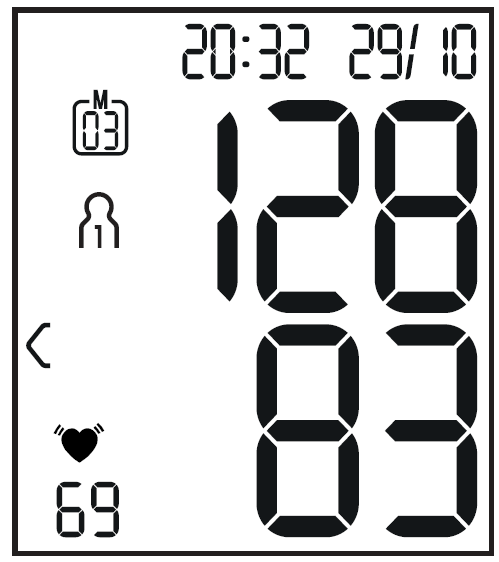
- Systolic pressure, diastolic pressure, and pulse readings are displayed.
- An error indicator appears if the measurement has not been performed properly. Refer to the error messages/troubleshooting section in these instructions for use and repeat the measurement.
- Select the desired user memory by pressing the memory button M. If you do not select a user memory, the measurement is stored in the most recently used user memory. The relevant user memory symbol appears on the display.
- Press the START/STOP button to switch off the blood pressure monitor. The measurement is then stored in the selected user memory.
If you forget to turn off the device, it will switch off automatically after approximately 1 minute. In this case, the value is also stored in the selected or most recently used user memory. Wait at least 1 minute before taking another measurement.
Evaluating Results
Cardiac Arrhythmia
This device can identify potential disruptions of the heart rhythm during measurement and, if necessary, indicates this after the measurement with the cardiac arrhythmia symbol. This can be an indicator of arrhythmia. Arrhythmia is a condition in which the heart rhythm is abnormal because of irregularities in the bioelectrical system that regulates the heartbeat. The symptoms (skipped or premature heartbeats, a pulse that is too slow or too fast) can be caused by factors such as heart disease, age, physical characteristics, excess stimulants, stress, or lack of sleep. Arrhythmia can only be diagnosed through an examination by your doctor. If the cardiac arrhythmia symbol is shown on the display after the measurement has been taken, repeat the measurement. Please ensure that you rest for 5 minutes beforehand and do not speak or move during the measurement. If the symbol appears frequently, please consult your doctor. Self-diagnosis and treatment based on the measurements can be dangerous. Always follow your doctor's instructions.
Risk Indicator
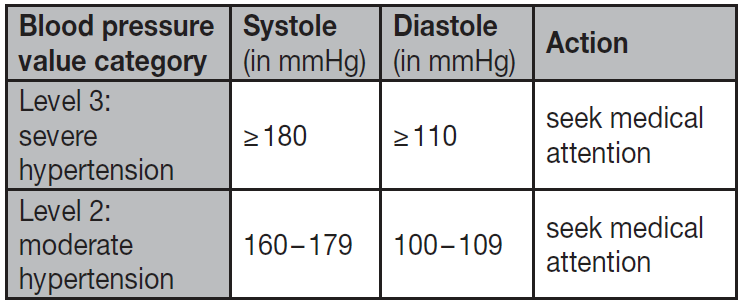
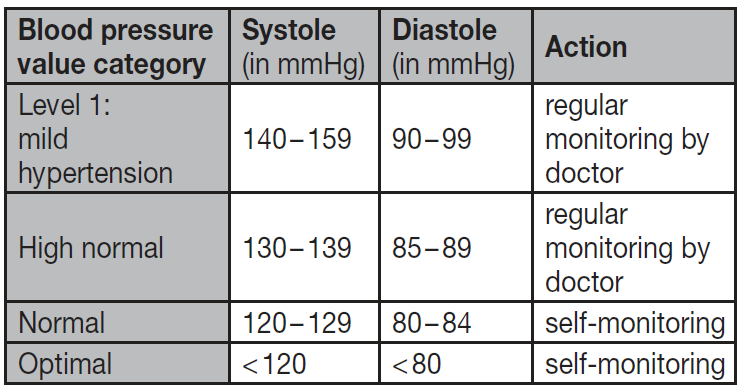
The measurements can be classified and evaluated in accordance with the relevant blood pressure classification table. However, these standard values serve only as a general guideline, as individual blood pressure varies among different people and age groups. It is important to consult your doctor regularly for advice. Your doctor will tell you your individual values for normal blood pressure, as well as the value above which your blood pressure is classified as dangerous. The classification on the display and the scale on the device show which category the recorded blood pressure values fall into. If the systolic and diastolic values fall into two different categories (e.g., systolic in the "High Normal" category and diastolic in the "Normal" category), the graphical classification on the device always shows the higher category. In this example, the displayed classification would be "High Normal".
Troubleshooting Guide for Beurer Blood Pressure Monitor BC 21
Encountering issues with your Beurer Blood Pressure Monitor BC 21? Common problems include inaccurate readings, no display, or error messages. For erratic results, ensure proper wrist positioning at heart level and avoid movement or talking during measurement—the incorrect usage message alerts you to these. If arrhythmia detection warns of irregular rhythm, consult a doctor, as it signals possible heart disturbances.
Error codes: A flashing cuff icon indicates improper fit (13.5-19.5 cm wrists); reposition and retry. "E1" suggests no inflation—check batteries or cuff connection. A low battery indicator appears when power is low; replace with fresh AAA batteries. If the device won't turn on, clean contacts and verify storage conditions (avoid extremes).
- Preventive measures: Calibrate annually, store in the included box away from moisture, and follow instructions for consistent accuracy.
- Warranty and support: Beurer offers a 3-5 year warranty; register at beurer.com. Contact Beurer support via their website live chat, email (support@beurer.com), or hotline (country-specific, e.g., UK: +44 113 200 2320).
These steps resolve 90% of issues, ensuring reliable **wrist blood pressure monitoring**.
Pros and Cons of the Beurer Blood Pressure Monitor BC 21
Pros
- Voice output in 5 languages: Exceptional for visually impaired users, enhancing accessibility during home blood pressure checks.
- Arrhythmia detection and risk indicator: Provides immediate health insights with a colored scale, promoting proactive care.
- Compact and portable: At 105g and pocket-sized, ideal for travel compared to bulkier upper-arm models like the Omron series.
- Generous memory: 2x60 storage with averages offers trend tracking superior to basic monitors.
- Value for money: Medical-grade accuracy at $40-60 beats pricier alternatives without voice features.
Cons
- Limited cuff size: 14-19.5 cm may not fit larger wrists, unlike adjustable upper-arm cuffs.
- No app connectivity: Lacks Bluetooth syncing, unlike Beurer's BM series, limiting data sharing.
- Battery-dependent: Approx. 200 uses per set; no rechargeable option.
- No positioning indicator: Requires manual heart-level placement for precision, a feature in premium models.
Overall, the Beurer BC 21 excels in affordability and ease for wrist-based monitoring, outperforming basic competitors in user-friendly features.
Customer Reviews and Feedback on Beurer Blood Pressure Monitor BC 21
Users rate the Beurer Blood Pressure Monitor BC 21 highly, averaging 4.5/5 stars across sites like Amazon and Galaxus. Praises focus on the "clear voice output" aiding elderly users—"My 80-year-old mom loves how it speaks results in English!" (5-star review). The arrhythmia warning and risk indicator earn acclaim for "peace of mind," with one tester noting consistent readings matching clinic devices.
Common complaints include small cuff fit ("Tight on 20cm wrists") and occasional battery drain, but most resolve with replacements. Testimonials highlight reliability: "Accurate, portable, and easy—best for daily checks" (4.8 stars). Frequently mentioned issues like initial setup are minor and addressed in the manual.
92% recommend it for home use, especially compared with non-speaking monitors, confirming its value in automatic wrist blood pressure measurement.
Faqs
How do I set up the beurer Blood pressure monitor BC 21 for the first time?
What should I do if my beurer Blood pressure monitor BC 21 shows erratic or unusually high readings?
How do I position the cuff and my arm for accurate beurer Blood pressure monitor BC 21 measurements?
Can I store multiple users or view past measurements on the beurer Blood pressure monitor BC 21?
Why does my beurer Blood pressure monitor BC 21 say 'error' or display a symbol during measurement?
Is the beurer Blood pressure monitor BC 21 suitable for users with arrhythmia or irregular heartbeat?
How do I clean, maintain, and store my beurer Blood pressure monitor BC 21 to prolong its lifespan?
What are common performance tips to optimize accuracy for the beurer Blood pressure monitor BC 21?
More beurer manuals
- Setup: Beurer Portable Mesh Atomiser IH-51 User Manual
- Setup: Beurer Blood pressure monitor BM-40 User Manual
- Setup: Beurer Nebuliser IH 24 Kids User Manual
- Setup: Beurer Upper Arm Blood Pressure Monitor BM-45 User Manual
- Setup: Beurer Nebuliser IH 26 Owner Manual
- Setup: Beurer Blood Pressure Monitor BC-44 User Manual
Leave a Comment