
Setup: Beurer Blood Pressure Monitor BC-27 User Manual
Content
Introduction — beurer Blood Pressure Monitor BC-27
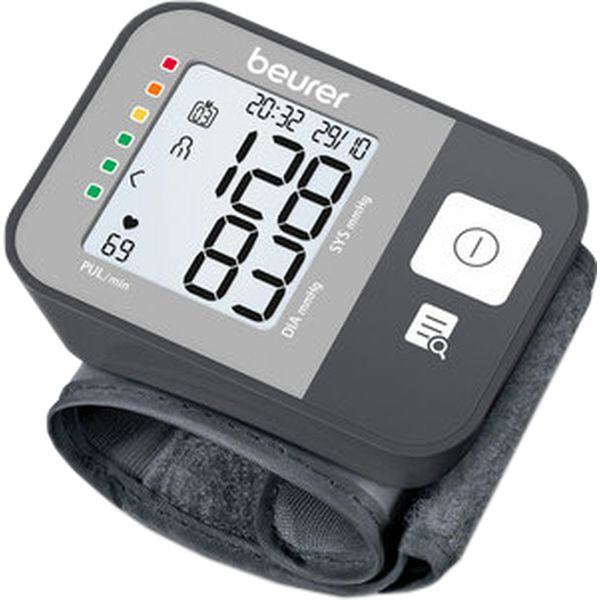
The beurer Blood Pressure Monitor BC 27 is a compact, wrist-based automatic sphygmomanometer designed for convenient home use and on-the-go blood pressure monitoring. It combines a color-coded risk indicator, one-button operation, and arrhythmia detection to help users quickly interpret results and track cardiovascular signals without complex setup. Key benefits include fast, cuff-based wrist measurement, a seven‑day average function for trend tracking, and a clear display geared toward users who prefer simplicity and portability as primary selling points. The monitor targets adults who need routine self-checks — for example, people with hypertension, those following a treatment plan, or health-conscious users who want regular blood pressure snapshots.
Typical use cases include daily morning/evening checks, travel monitoring, and quick spot-checks between clinical visits. The device is widely available through electronics and health retailers and typically falls in the budget-friendly wrist monitor price segment; estimated retail range is approximately €25–€50 depending on region and retailer. For accuracy considerations and clinical validation, refer to product documentation and independent assessments before using for medical decision-making.
Specifications — Technical details for beurer Blood Pressure Monitor BC 27
- Measurement type: Automatic wrist blood pressure and pulse measurement (oscillometric) as a single-measurement device.
- Display & indicators: Digital LCD with color-coded risk indicator scale (WHO-style) for easy classification of readings.
- Functions: Arrhythmia detection, 7‑day average calculation, memory for multiple measurements (manufacturer documentation lists memory and averaging functions).
- Cuff size: Wrist cuff for wrist circumference range (typical range ~140–195 mm cuff length as listed by retailers; check packaging for exact fit recommendations). [Conrad product listing details cuff lengths].
- Power: 2 × AAA batteries (included with many retail packages). [Conrad product listing].
- Dimensions & weight: Compact wrist unit (approx. 84 × 60 × 29 mm per product listings) and lightweight for travel use.[Training-Fit listing]
- Intended use: Self-measurement at home and on the wrist; single measurements only (not continuous ambulatory monitoring). [Medaval and Beurer product pages].
- Manufacturer: Beurer GmbH, Germany (official product page lists global product number 65904). [Beurer official page].
- Performance notes: Provides pulse detection and arrhythmia alerts; offers 7‑day averaging for trend interpretation rather than clinical diagnostics.[Beurer page]
Comparison with similar products:
- Compared with upper‑arm monitors, the BC 27 is more portable but wrist measurement can be more angle- and position-sensitive, which may affect accuracy versus validated upper-arm devices.
- Against other wrist models, the BC 27 stands out for its color-coded risk indicator and 7‑day averaging; however, independent clinical validation for this model is limited according to device-assessment portals, so users seeking clinically validated accuracy may prefer upper-arm monitors with published validation studies.[Medaval assessment]
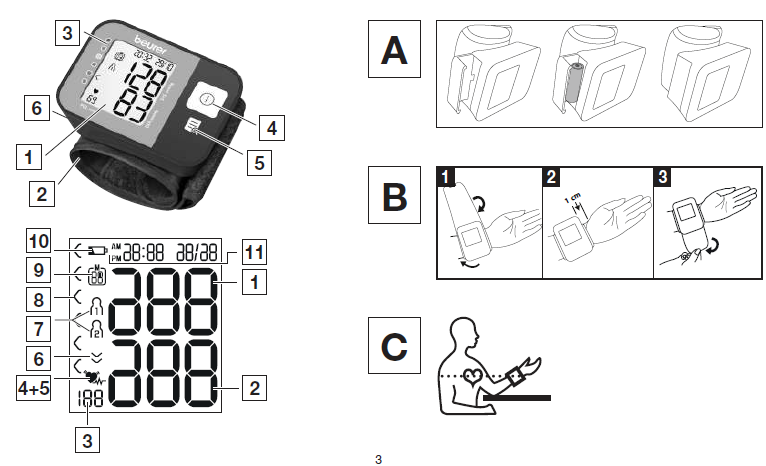
DEVICE DESCRIPTION
The corresponding drawings are shown on page 3.
- Display
- Wrist cuff
- Risk indicator
- START/STOP button
- Memory button
- Battery compartment lid
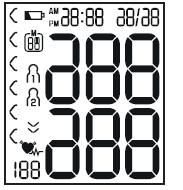
Information on the Display:
The corresponding drawings are shown on page 3.
- Systolic pressure
- Diastolic pressure
- Calculated pulse rate
- Cardiac arrhythmia symbol
- Pulse symbol
- Release air
- User memory
- Risk indicator
- Memory space number / Memory display for average value (A), morning (AM), evening (PM)
- Battery replacement symbol
Time and date
INTENDED USE
Purpose
The blood pressure monitor is intended for the fully automatic, non-invasive measurement of arterial blood pressure and pulse values on a wrist with a wrist circumference of 14 cm to 19.5 cm. It is intended for indoor use by adults only.
Target Group
The device is designed for self-measurement by adults in the home environment and is suitable for users whose wrist circumference is within the range printed on the cuff.
Indication/Clinical Benefits
The user can record their blood pressure and pulse values quickly and easily using the device. The recorded values are classified according to internationally applicable guidelines and evaluated graphically. The device saves the recorded measurements and can also display average values of previous measurements.
WARNINGS AND SAFETY NOTES
Contraindications
- Do not use the blood pressure monitor on newborns, children or pets.
- People with restricted physical, sensory or mental abilities should be supervised by a person responsible for their safety and receive instructions from this person on how to use the device.
- If you have any of the following conditions, it is essential to consult your doctor before using the device: irregular heartbeat, circulatory problems, diabetes, pregnancy, pre-eclampsia, hypotension, chills or shaking.
- People with pacemakers or other electrical implants should consult their doctor before using the device.
- The blood pressure monitor must not be used in connection with a high-frequency surgical unit.
- Do not use the cuff on people who have undergone a mastectomy without first consulting a healthcare professional.
- Do not place the cuff over wounds, as this may cause further injury.
- Make sure that the cuff is not placed on a wrist in which the arteries or veins are undergoing medical treatment, such as intravascular access, intravascular therapy or an arteriovenous (AV) shunt.
General Warnings
- The measurements taken by you are for your information only and are no substitute for a medical examination. Discuss the measured values with your doctor and never make your own medical decisions based on them, such as changing medication dosages.
- The device is intended only for the purpose described in these instructions for use. The manufacturer is not liable for damage resulting from improper or incorrect use.
- Using the blood pressure monitor outside your home environment or while moving, such as travelling in a car, ambulance or helicopter, or during physical activities such as sports, can affect measurement accuracy and cause incorrect readings.
- Cardiovascular diseases may lead to incorrect measurements or negatively affect measurement accuracy.
- Do not use the device at the same time as other medical electrical equipment (ME equipment). This could cause the measuring device to malfunction or produce inaccurate measurements.
General Precautions
- The blood pressure monitor contains precision and electronic components. The accuracy of the measurements and the service life of the device depend on careful handling.
- Protect the device from impacts, moisture, dirt, significant temperature fluctuations and direct sunlight.
- Ensure that the device is at room temperature before measuring. If the measuring device has been stored near the maximum or minimum storage and transport temperatures and is then placed in an environment with a temperature of 20°C, it is recommended to wait approximately 2 hours before using it.
- Do not drop the device.
- Do not use the device near strong electromagnetic fields. Keep it away from radio systems and mobile telephones.
- Remove the batteries if the device will not be used for a prolonged period.
Measures for Handling Batteries
- If your skin or eyes come into contact with battery fluid, rinse the affected areas with water and seek medical assistance.
- Choking hazard: Small children may swallow batteries and choke. Store batteries out of the reach of small children.
- Risk of explosion: Do not throw batteries into a fire.
- If a battery has leaked, put on protective gloves and clean the battery compartment with a dry cloth.
- Do not disassemble, open or crush the batteries.
Notes on Electromagnetic Compatibility
- The device is suitable for use in all environments listed in these instructions for use, including domestic environments.
- The operation of the device may be affected by electromagnetic disturbances. This could result in error messages or failure of the display or device.
- Avoid using this device directly next to other devices or stacked on top of other devices, as this could lead to faulty operation. If such use is necessary, monitor this device and the other equipment to ensure that they are functioning correctly.
INITIAL USE
Inserting the Batteries
- Remove the battery compartment lid on the left side of the device.
- Insert two 1.5 V AAA micro (alkaline type LR03) batteries. Ensure that the batteries are inserted with the correct polarity according to the markings inside the battery compartment. Do not use rechargeable batteries.
- Carefully close the battery compartment lid.
If the battery replacement symbol appears on the display, measurements can no longer be performed. Replace all batteries before using the device again.
Adjusting the Settings
Ensure that the device settings are correct before use to access all available functions. Correct settings allow measurements to be saved with the associated date and time and retrieved later. There are two ways to access the settings menu:
- Before Initial Use and After Battery Replacement: When batteries are inserted into the device, the settings menu opens automatically.
- If the Batteries Are Already Inserted: With the device switched off, press and hold the START/STOP button for approximately 5 seconds to access the settings menu.
The following settings can be adjusted in sequence:

Hour Format
The hour format flashes on the display.
- Select the desired hour format using the memory button and confirm by pressing the START/STOP button.
Date
The year flashes on the display.
- Select the desired year using the memory button and confirm by pressing the START/STOP button.
The month flashes on the display.
- Select the desired month using the memory button and confirm by pressing the START/STOP button.
The day flashes on the display.
- Select the desired day using the memory button and confirm by pressing the START/STOP button.
If the hour format is set to 12-hour mode, the day and month display sequence is reversed.
Time
The hours flash on the display.
- Select the desired hour using the memory button and confirm by pressing the START/STOP button.
The minutes flash on the display.
- Select the desired minute using the memory button and confirm by pressing the START/STOP button.
Once all settings have been configured, the device switches off automatically.
USAGE
Attaching the Cuff
- Blood pressure can generally be measured on either wrist. Certain differences between blood pressure measurements taken on the right and left wrists are caused by normal physiological variations. Always perform measurements on the wrist with the higher blood pressure values. Consult your doctor before beginning self-measurement to determine the appropriate wrist. Thereafter, always take measurements on the same wrist. The device must only be operated with the cuff supplied with it. Before using the device, check that the cuff fits correctly and that your wrist circumference is within the range printed on the cuff.
- Uncover your wrist. Ensure that blood circulation is not restricted by tight clothing or similar items.
- Place the cuff on your wrist so that your palm and the device display are facing upwards.
- Position the cuff approximately 1.0 to 1.5 cm away from the heel of your hand.
- Fasten the cuff securely around your wrist using the hook-and-loop fastener. Ensure that it fits snugly without being excessively tight or cutting into your wrist.
Adopting the Correct Posture
- Sit upright in a comfortable position. Lean back so that your back is properly supported.
- Rest your arm on a stable surface.
- Place both feet flat on the floor next to each other.
- Keep the cuff at the same level as your heart.
- Remain as still as possible during the measurement and do not speak.
Performing the Blood Pressure Measurement
Measurement
Press the START/STOP button to activate the blood pressure monitor. All display elements appear briefly.
- Press the START/STOP button to switch on the blood pressure monitor. All display elements illuminate briefly.
- The last measured value appears on the display, and the blood pressure monitor automatically begins a new measurement after approximately 3 seconds.
You can cancel the measurement at any time by pressing the START/STOP button. As soon as a pulse is detected, the pulse symbol appears on the display.
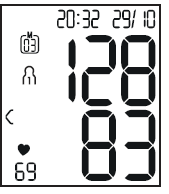
- The measured systolic pressure, diastolic pressure and pulse rate are displayed.
- If an error occurs or the measurement is not performed correctly, refer to the error messages and troubleshooting section of the instructions for use, then repeat the measurement.
- Select the desired user memory by pressing the memory button. If no user memory is selected, the measurement is stored in the most recently used user memory. The corresponding user memory symbol appears on the display.
- Press the START/STOP button to switch off the blood pressure monitor. The measurement is then saved in the selected user memory.
If you forget to switch off the device, it automatically switches off after approximately 1 minute. In this case, the measured value is also stored in the selected or most recently used user memory. Wait at least 1 minute before taking another measurement.
Evaluating the Results
General Information About Blood Pressure
Blood pressure is the force exerted by circulating blood against the walls of the arteries. Arterial blood pressure changes continuously throughout the cardiac cycle.
Risk Indicator
The World Health Organization (WHO) has established internationally recognized classifications for evaluating measured blood pressure values. These classifications help users understand their readings by categorizing blood pressure levels. The device uses a risk indicator to classify measured blood pressure values according to its reference ranges. These classifications provide general guidance and should not replace professional medical evaluation.
Irregular Heartbeat
The device can detect irregularities in the heartbeat by analyzing the recorded pulse signal during a blood pressure measurement. If irregularities are detected, the device displays the irregular heartbeat symbol after the measurement. This may indicate an irregular heartbeat. If the irregular heartbeat symbol appears after a measurement, repeat the measurement because the accuracy of the recorded value may be affected. When evaluating your blood pressure, use measurements recorded without corresponding pulse irregularities. If the irregular heartbeat symbol appears frequently, consult your doctor. Only a qualified healthcare professional can determine whether an arrhythmia is present through appropriate medical examinations and diagnostic procedures.
CLEANING AND MAINTENANCE
- Clean the device and cuff carefully using only a slightly damp cloth.
- Do not use cleaning agents or solvents.
- Never immerse the device or cuff in water or hold them under running water, as liquid may enter and damage the components.
- When storing the device and cuff, do not place heavy objects on them. Remove the batteries before prolonged storage.
Troubleshooting — Fixes, error codes and support for beurer Blood Pressure Monitor BC 27
- No power / blank display: Replace the 2 × AAA batteries with fresh, correctly oriented batteries; ensure battery contacts are clean and free from corrosion.[Conrad product listing]
- Err or error message on display: Common wrist monitor errors typically indicate incorrect cuff placement or movement during measurement—remove and reapply the cuff snugly at heart level, remain still, and retry the measurement. If an error persists, remove batteries for 1 minute and reinsert to reset the device.[Device manual guidance]
- Inconsistent or unusually high/low readings: Ensure the wrist is held at heart level, sit quietly for 5 minutes before measuring, avoid caffeine/exercise/smoking 30 minutes prior, and take repeated measurements after a short rest; average results using the device’s 7‑day average feature for trends rather than single values.[Beurer product guidance]
- Arrhythmia alert shown: The device flags irregular pulse rhythms; if arrhythmia messages recur or are accompanied by symptoms (dizziness, chest pain), seek medical advice immediately. The monitor is not a diagnostic ECG device but can prompt medical follow-up.[Beurer product page]
- Preventive measures: Keep the device dry and store in a protective case, avoid harsh impacts, and use fresh batteries. Calibrate/replace device per manufacturer recommendations if available.
- Warranty & support: Warranty coverage varies by country and retailer—refer to the included warranty card and Beurer customer support for specifics. For product documentation, downloads, and local support, consult Beurer’s official product page for item 65904.[Beurer official page]
- Contact for help: Use Beurer customer service channels listed in the manual or on the official Beurer website; retail seller support (where purchased) can assist with returns or warranty claims.[Beurer page]
Pros & Cons — beurer Blood Pressure Monitor BC 27 evaluation
Pros
- Portable and compact: Small wrist form factor ideal for travel and quick spot checks.
- Easy to read: Color-coded risk indicator simplifies interpretation for non‑medical users.[Beurer product description]
- Arrhythmia detection: Alerts users to irregular pulses that may warrant clinical follow-up.[Beurer product description]
- 7‑day averaging: Helps observe short-term trends rather than relying on isolated readings.[Beurer product description]
- Budget-friendly: Typically priced lower than many upper-arm validated models, offering value for casual monitoring.
Cons
- Wrist accuracy limitations: Wrist measurements are more position-sensitive and can be less reliable than validated upper-arm monitors; independent clinical validation for the BC 27 is limited according to assessment databases.[Medaval assessment]
- Single-measurement focus: Not intended for continuous monitoring—only single, manual measurements per use.
- Limited clinical validation available: Some device-assessment resources note no published peer‑reviewed clinical validation for this specific model, which may concern users needing medically certified accuracy.[Medaval assessment]
- Feature set vs. advanced models: Lacks connectivity (Bluetooth/APP) found in higher-end monitors for automatic logging and clinician sharing.
- Value for money caveat: Good for casual monitoring and portability, but users requiring clinically validated measurements may be better served by validated upper-arm devices.
Customer Reviews — real-world feedback for beurer Blood Pressure Monitor BC 27
Users commonly praise the beurer Blood Pressure Monitor BC 27 for its compact size, simple one-button operation, and the helpful color-coded risk indicator that makes results easy to understand for non‑professionals. Many reviews highlight portability and battery-powered convenience as strong positives.[Retail product listings]
Frequent complaints include sensitivity to wrist position leading to variable readings and occasional error messages when the cuff is not aligned at heart level; some customers note they prefer an upper-arm monitor for higher confidence in accuracy. Typical star ratings on retail pages range from mixed to positive, with users recommending the BC 27 for travel or casual monitoring but advising caution if clinical-grade accuracy is required.
SEO & Keywords
This manual includes the primary phrase beurer Blood Pressure Monitor BC 27 and related terms such as wrist blood pressure monitor, arrhythmia detection, 7-day average, portable blood pressure monitor, and long-tail queries like “best wrist blood pressure monitor for travel” to support search visibility and featured snippet potential.
Faqs
How do I set up the beurer Blood Pressure Monitor BC 27 for the first time?
What is the correct wrist position and cuff placement when using beurer Blood Pressure Monitor BC 27?
Why does my beurer Blood Pressure Monitor BC 27 show an error or ‘—’ and how can I fix it?
How do I use the memory and user profiles on the beurer Blood Pressure Monitor BC 27?
Can I connect the beurer Blood Pressure Monitor BC 27 to apps or export readings to my doctor?
My beurer Blood Pressure Monitor BC 27 detects arrhythmia—what should I do?
How often should I maintain and check the beurer Blood Pressure Monitor BC 27 for accuracy?
What troubleshooting steps improve measurement performance and reduce inconsistent readings on the beurer Blood Pressure Monitor BC 27?
More beurer manuals
- Setup: Beurer Upper Arm Blood Pressure Monitor BM-48 User Manual
- Setup: Beurer Upper Arm Blood Pressure Monitor BM-54 User Manual
- Setup: Beurer Upper Arm Blood Pressure Monitor BM 28 User Manual
- Setup: Beurer Upper Arm Blood Pressure Monitor BM-23 User Manual
- Setup: Beurer Speaking Upper Arm Blood Pressure Monitor BM-49 User Manual
- Setup: Beurer Blood Pressure Monitor BM-51 easyClip User Manual
Leave a Comment