
How to Use: Bowers and Wilkins Pi8 In-Ear True Wireless Earbuds User Manual
Content
Bowers and Wilkins Pi8 In-Ear True Wireless Earbuds: Complete Product Manual and Buying Guide
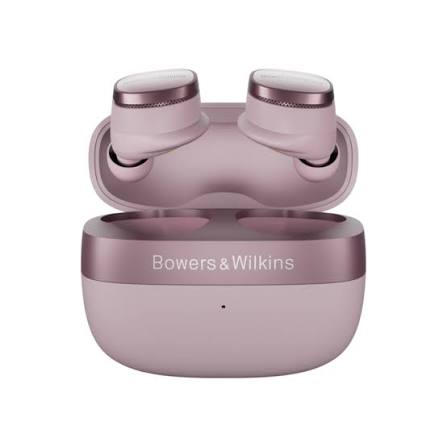
The Bowers and Wilkins Pi8 In-Ear True Wireless Earbuds are positioned as premium flagship earbuds for listeners who want high-end sound quality, strong noise cancellation, and a refined everyday design. Built around 12mm carbon cone drivers, advanced DSP, and Bluetooth 5.4 with aptX Lossless support, the Pi8 aims to deliver a more detailed, spacious, and powerful listening experience than typical true wireless earbuds. They are designed for audiophiles, commuters, remote workers, frequent travelers, and anyone who wants top-tier wireless audio with a luxury feel.
Key benefits include adaptive active noise cancellation, multipoint connectivity, wireless charging, fast charging, and a smart charging case that can retransmit audio from external sources. The earbuds also offer IP54 protection, making them suitable for daily use, light sweat, and incidental splashes. Battery life is rated at up to 6.5 hours per charge with ANC on, with the case extending total playback to around 20 hours. In real-world use, battery performance can vary depending on volume, codec, and ANC settings.
The Bowers and Wilkins Pi8 In-Ear True Wireless Earbuds sit in the premium category, with an estimated price range of about $399 to $499 depending on retailer, region, and current promotions. They are widely available through major electronics retailers, audio specialty stores, and the official Bowers & Wilkins channel. If you want a best-in-class sound signature, elegant build quality, and strong feature depth in a compact form factor, the Pi8 is one of the most compelling premium wireless earbud choices available today.
Detailed Specifications for Bowers and Wilkins Pi8 In-Ear True Wireless Earbuds
- Driver size: 12mm carbon cone dynamic drivers for detailed mids, energetic bass, and clean treble.
- Connectivity: Bluetooth 5.4 with AAC, SBC, aptX, aptX Adaptive, and aptX Lossless support.
- Noise cancellation: Adaptive active noise cancellation with transparency mode.
- Battery life: Up to 6.5 hours on the earbuds and roughly 20 hours total with the charging case.
- Fast charging: About 15 minutes of charging can provide around 2 hours of playback.
- Charging: USB-C wired charging and wireless charging supported.
- Water resistance: IP54 rating for dust, sweat, and splash resistance.
- Weight: About 7g per earbud, with the case around 46g to 47g depending on the reference measurement.
- Controls and features: Touch controls, multipoint pairing, customizable EQ, and TrueSound mode.
- Special function: Audio retransmission through the charging case for wired or analog sources.
Compared with similar premium earbuds such as Sony, Apple, and Technics models, the Pi8 stands out for its carbon cone driver design, audiophile-leaning tuning, and case audio retransmission feature. It competes more on sound quality and craftsmanship than on budget value.
Setup Guide: How to Pair and Configure Bowers and Wilkins Pi8 Earbuds
Start by fully charging both earbuds and the case before first use. Open the case, remove the earbuds, and place them in your ears using the included ear tips for the best seal and sound isolation. Download the companion app if available in your region, since it helps with firmware updates, EQ adjustments, and feature configuration.
To pair the earbuds, enable Bluetooth on your phone, tablet, or laptop, then select the Pi8 from the available device list. If you want to connect two devices, activate multipoint pairing and follow the prompts in the app or device Bluetooth settings. For the best sound quality, use a compatible device that supports aptX Adaptive or aptX Lossless.
Configure ANC, transparency mode, touch controls, and EQ settings inside the app. If pairing fails, reset the earbuds by placing them in the case, closing the lid, waiting a few seconds, and repeating the setup process. Keep the charging contacts clean and avoid exposing the earbuds to excessive moisture. Do not use the earbuds while charging, and avoid forcing the ear tips or charging connectors, since that can damage the hardware.
Troubleshooting Bowers and Wilkins Pi8 True Wireless Earbuds
- Problem: Earbuds will not pair. Reset Bluetooth on the source device, place the earbuds back in the case, and try pairing again from scratch.
- Problem: Only one earbud plays audio. Re-seat both earbuds in the case, clean the charging contacts, and reconnect the device.
- Problem: Weak battery life. Reduce ANC use, lower volume, and confirm the earbuds are fully charging in the case.
- Problem: Poor sound quality or dropouts. Move closer to the source device, reduce wireless interference, and update firmware if available.
- Problem: Touch controls are unresponsive. Dry the earbud surfaces and check whether control settings were disabled in the app.
For preventive care, store the earbuds in the case when not in use, avoid dust buildup on the charging pins, and keep them away from heavy rain or immersion. The Pi8 typically does not rely on visible error codes; most issues are solved through reset, firmware updates, or device re-pairing. Warranty coverage and after-sales support are usually handled through Bowers & Wilkins authorized service channels, official support pages, and the retailer where the product was purchased. If you need help, contact the official Bowers & Wilkins customer support team or the authorized seller directly with your serial number and proof of purchase.
Pros and Cons of the Bowers and Wilkins Pi8 In-Ear True Wireless Earbuds
Pros
- Excellent sound quality with a premium, detailed tuning that favors music lovers.
- 12mm carbon cone drivers deliver strong bass control and clear vocal presentation.
- Adaptive ANC and transparency mode make the earbuds useful for commuting and office use.
- Multipoint support is convenient for switching between phone and laptop.
- Wireless charging, fast charging, and case retransmission add real-world flexibility.
- Premium build quality and attractive finish options enhance the ownership experience.
Cons
- High price makes them less accessible than mainstream alternatives.
- Battery life is good, but not class-leading for the premium segment.
- ANC performance is strong, though some rivals may block noise more aggressively.
- Best sound quality depends on using compatible codecs and a capable source device.
- Value for money is strongest for users who prioritize audio performance over cost.
For buyers comparing premium earbuds, the Pi8 competes closely with flagship models from Sony, Apple, and Technics. It is a stronger choice for pure sound enthusiasts than for shoppers focused on the lowest price or the longest battery life.
Customer Reviews of Bowers and Wilkins Pi8 Earbuds
Customer feedback for the Bowers and Wilkins Pi8 In-Ear True Wireless Earbuds is generally very positive, especially from listeners who care most about sound quality. Many users praise the rich bass, smooth treble, strong detail retrieval, and luxurious design. Typical star ratings from reviewer communities and buyers often land around 4 to 4.5 out of 5 stars, with sound quality being the most common reason for high scores.
Common complaints usually focus on the premium price, which can feel steep compared with mainstream earbuds. Some users also note that battery life is solid but not exceptional, and a few mention that ANC is excellent rather than absolute best-in-class. Positive testimonials often highlight the earbuds’ comfort, stylish case, and the convenience of multipoint pairing and wireless charging.
Purchase recommendation: choose the Pi8 if you want a high-end listening experience and are willing to pay for premium audio. If your top priority is maximum value, longer battery life, or the strongest possible noise cancellation, a less expensive alternative may be a better fit.
Faqs
How do I set up Bowers and Wilkins Pi8 In-Ear True Wireless Earbuds for the first time?
Why are my Bowers and Wilkins Pi8 In-Ear True Wireless Earbuds not pairing with my phone?
How do I improve sound quality on Bowers and Wilkins Pi8 In-Ear True Wireless Earbuds?
What should I do if one Bowers and Wilkins Pi8 earbud has low volume or no sound?
Are Bowers and Wilkins Pi8 In-Ear True Wireless Earbuds compatible with iPhone, Android, and laptops?
How do I use noise cancellation and transparency mode on Bowers and Wilkins Pi8 earbuds?
How long does the battery last on Bowers and Wilkins Pi8 In-Ear True Wireless Earbuds, and how can I extend it?
How should I clean and maintain Bowers and Wilkins Pi8 In-Ear True Wireless Earbuds safely?
More bowers and wilkins manuals
- Bowers and Wilkins 800 Series Center-Channel Loudspeaker User Manual
- Bowers and Wilkins CWM Cinema 6 In-Wall Speaker User Manual
- Bowers and Wilkins Standmount & Bookshelf Loudspeaker 606 User Manual
- Bowers and Wilkins 800 Series Center Channel Speaker HTM1-D3 User Manual
- Bowers and Wilkins Pi7-S2 True Wireless Earbuds User Manual
- Bowers and Wilkins CC6 Center Channel Speaker User Manual
Leave a Comment