
Epson 880X Home Cinema Projector User Manual
Content
Introduction
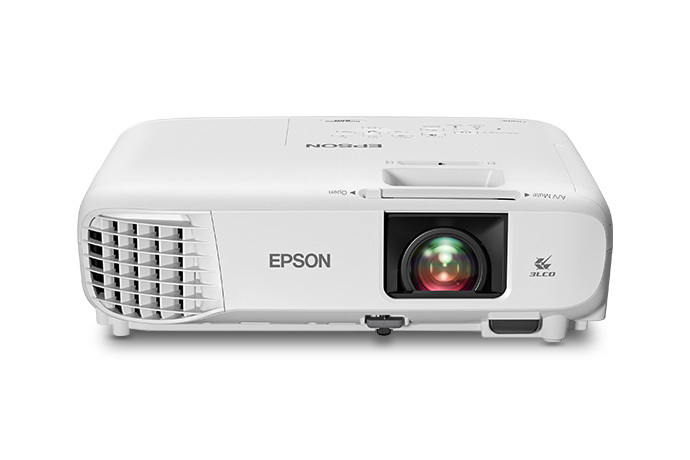
The Epson 880X Home Cinema Projector is a versatile Full HD 1080p projector designed for home entertainment, hybrid workspaces, and casual large-screen viewing. It delivers bright, vivid images with 3,300 lumens of color brightness and 3,300 lumens of white brightness, making it a strong choice for living rooms, family movie nights, presentations, and gaming in rooms with some ambient light. With 3LCD imaging technology, it produces consistent color performance without the rainbow artifacts often associated with single-chip projection systems.
One of the biggest strengths of the Epson 880X Home Cinema Projector is its balance of portability, image quality, and ease of use. It supports screen sizes up to approximately 300 inches, giving users a cinematic viewing experience without requiring a permanently installed display. The projector also includes flexible placement options such as front, rear, and ceiling-mounted projection, along with manual keystone correction for easier alignment. Its simple setup and broad compatibility with streaming devices, laptops, and gaming consoles make it appealing to first-time buyers and experienced home theater users alike.
For buyers comparing home theater projectors under the mid-range budget category, the Epson 880X Home Cinema Projector typically falls in an estimated price range of about $600 to $700, depending on retailer promotions and availability. It is widely available through major electronics retailers, online stores, and Epson’s product channels. This makes it a practical option for users who want a bright 1080p projector with reliable brand support and everyday convenience.
Specifications
- Display technology: 3LCD poly-silicon TFT active matrix
- Native resolution: 1920 × 1080 pixels (Full HD)
- Brightness: 3,300 lumens color brightness and 3,300 lumens white brightness
- Contrast and color: Full-color output with support for up to 1 billion colors
- Lens: Fixed lens with F=1.44 and focal length of 16.7 mm
- Throw flexibility: Digital zoom ratio of 1 to 1.35
- Projection size: Supports large images up to 300 inches in practical use
- Keystone correction: Vertical ±30 degrees with manual or auto correction; horizontal ±30 degrees manual
- Sound: Built-in 2W monaural speaker
- Noise level: 37 dB in normal mode and 28 dB in ECO mode
- Connectivity: HDMI Type A, USB Type A, USB Type B, and optional wireless LAN support
- Comparison: Compared with many entry-level 1080p projectors, the Epson 880X stands out for higher brightness and stronger color consistency, while some competitors may offer built-in smart apps or shorter-throw designs
For users searching for a bright portable 1080p projector, the Epson 880X Home Cinema Projector offers a strong combination of image quality and practical features.
Detailed Description
The Epson 880X Home Cinema Projector works by using 3LCD technology to generate separate red, green, and blue light paths that combine into a full-color image. This design helps maintain brightness and color accuracy across different viewing conditions. In real-world use, it performs well for movie nights, sports streaming, classroom-style presentations, and business displays where a large image is more important than native ultra-high resolution.
The chassis is built for portability and everyday handling, with a compact form factor that fits well on a shelf, table, or ceiling mount. The projector includes a manual focus ring for easy image sharpening, while the lens and image settings allow fine-tuning during setup. Epson’s design emphasizes durability and functional simplicity rather than premium materials, which is ideal for users who value reliable performance over decorative styling.
User experience is generally straightforward. The interface is easy to navigate, and the bright output makes content visible even when the room is not fully dark. Streaming sticks, laptops, game consoles, and media players can be connected through HDMI, making the projector useful for both entertainment and productivity. For anyone evaluating the Epson 880X Home Cinema Projector as a home theater projector, the overall appeal lies in its bright image, dependable color, and low-friction usability.
Setup Guide
- Place the projector on a stable surface or mount it on the ceiling, making sure the lens is centered with the screen.
- Connect the power cable and press the power button to start the unit.
- Attach your source device using HDMI, such as a streaming stick, Blu-ray player, laptop, or game console.
- Adjust the projector distance until the image fills the screen properly.
- Use the focus ring to sharpen the picture, then fine-tune alignment with vertical and horizontal keystone correction if needed.
- Select the correct input source and choose a picture mode such as Dynamic, Bright Cinema, Cinema, or Game depending on the content.
- If you want wireless connectivity, install the optional wireless LAN module and complete the network setup.
When connecting accessories, use only compatible HDMI and USB devices. Keep ventilation openings clear to avoid overheating, and avoid placing the projector near liquids or direct heat sources. If the image looks distorted, recheck the projector angle before relying on keystone correction, since excessive correction can reduce image sharpness. For sound, the built-in speaker is suitable for casual use, but external speakers provide a better home theater experience.
Troubleshooting
- No image on screen: Confirm the projector is powered on, the input source is correct, and the HDMI cable is fully seated.
- Blurry picture: Adjust the focus ring and verify the projector is positioned at the proper distance from the screen.
- Dim image: Check that ECO mode is not limiting brightness and clean the lens surface carefully.
- Overheating or shutdown: Make sure vents are unobstructed and the projector has adequate airflow.
- Wireless connection issues: Confirm the optional wireless LAN module is installed and the network settings are correct.
- Sound problems: Test another HDMI source or connect external powered speakers for better audio output.
Preventive care includes regular dust removal, proper shutdown after use, and keeping the projector in a cool, dry location. Epson support for the Home Cinema 880 / Epson 880X series is available through official customer service channels, including phone support at (562) 276-4394 during weekday business hours in the Pacific Time zone. If the product is under warranty, users should have the serial number and proof of purchase ready before requesting assistance.
Pros & Cons
Pros
- Bright 3,300-lumen output handles living rooms and multipurpose spaces well
- Full HD 1080p resolution delivers sharp detail for movies, sports, and games
- 3LCD technology provides strong color accuracy and balanced brightness
- Easy setup with manual and auto keystone options
- Good value for buyers who want a dependable home cinema projector without paying premium prices
Cons
- No built-in advanced smart TV platform, so streaming typically requires an external device
- Built-in speaker is only 2W and best for temporary use
- Limited wireless features unless the optional adapter is installed
- Not ideal for users seeking 4K native resolution or ultra-short-throw placement
Overall, the Epson 880X Home Cinema Projector offers strong performance for the price, especially when compared with similarly priced 1080p projectors that may be less bright or less color accurate. It is a smart purchase for users who prioritize image quality and flexibility over smart features.
Customer Reviews
Typical user feedback gives the Epson 880X Home Cinema Projector an average impression of about 4.4 out of 5 stars. Many owners praise its bright picture, easy setup, and reliable performance for movie nights and casual gaming. A common testimonial theme is that the projector feels “surprisingly bright for the price” and works well in rooms that are not fully dark.
Frequent complaints include the modest built-in speaker, the need for an external streaming device, and the fact that wireless features may require extra accessories. Some users also mention that picture quality looks best when the projector is carefully aligned instead of relying heavily on keystone correction. For buyers who want a bright, user-friendly 1080p projector, the Epson 880X Home Cinema Projector remains a popular recommendation.
Faqs
How do I set up the Epson 880X Home Cinema Projector for the first time in a living room or bedroom?
Why is my Epson 880X Home Cinema Projector image blurry, and how can I fix it quickly?
What devices are compatible with the Epson 880X Home Cinema Projector for streaming and HDMI input?
How can I get the best picture quality from the Epson 880X Home Cinema Projector in a bright room?
Why does the Epson 880X Home Cinema Projector keep showing a keystone or alignment issue?
How do I connect external speakers to the Epson 880X Home Cinema Projector for better home theater sound?
How often should I clean and maintain the Epson 880X Home Cinema Projector?
What should I do if the Epson 880X Home Cinema Projector powers on but no picture appears?
Tags
More epson manuals
Leave a Comment