
Epson EcoTank L1300 Inkjet Printer User Manual
Content
Introduction to the Epson EcoTank L1300 Inkjet Printer
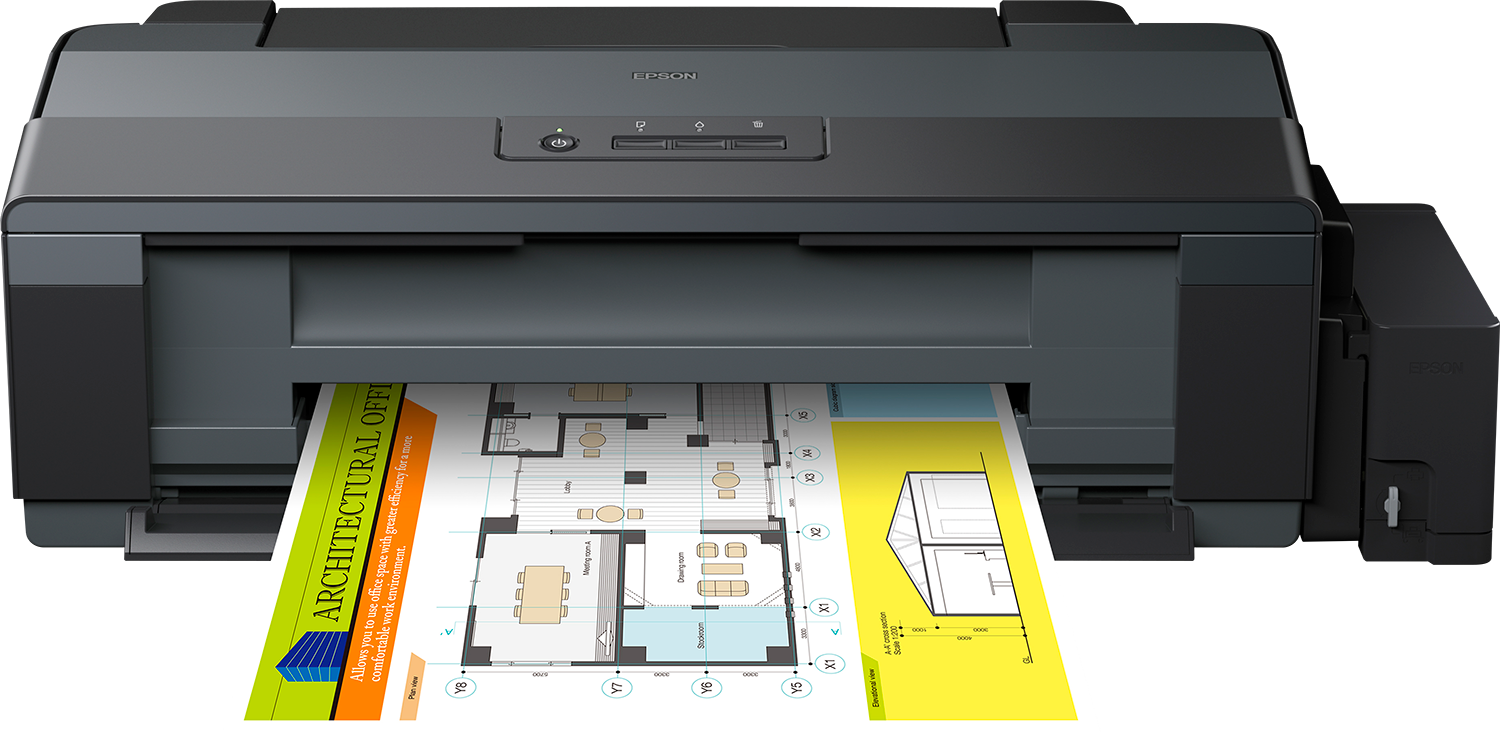
The Epson EcoTank L1300 Inkjet Printer is a high-volume A3+ color inkjet printer designed for users who need reliable, low-cost printing without the recurring expense of cartridges. Built around Epson’s Micro Piezo print head and EcoTank refill system, it delivers sharp text, vivid color output, and excellent page yields for offices, creative professionals, schools, and home businesses. The Epson EcoTank L1300 Inkjet Printer is especially appealing to anyone printing posters, spreadsheets, reports, design drafts, marketing materials, or large-format documents on a regular basis.
Its biggest advantage is the cartridge-free ink tank design, which helps reduce printing costs over time while simplifying maintenance. The printer supports A3+ media, offers a maximum resolution of up to 5760 x 1440 dpi, and produces fast print speeds for everyday office work. In practical use, it is ideal for graphic designers, architects, accountants, and small business owners who need dependable large-format printing at an affordable operating cost. Typical availability varies by region, but this model generally appears in the mid-range business printer category, with an estimated price range of about $350 to $600 depending on market, condition, and seller inventory. As a compact A3+ tank printer, it remains a strong choice for users prioritizing value, print quality, and ink efficiency.
Specifications of the Epson EcoTank L1300 Inkjet Printer
- Print technology: Epson Micro Piezo inkjet with variable-sized droplet technology.
- Ink system: Four-color EcoTank refillable ink bottles: Black, Cyan, Magenta, Yellow.
- Print resolution: Up to 5760 x 1440 dpi for detailed documents and graphics.
- Print speed: Up to 30 ppm black and 17 ppm color in standard mode; ISO speed approximately 15 ipm black and 5.5 ipm color.
- Paper size support: A3+, A3, A4, A5, A6, B4, B5, Legal, custom sizes, envelopes, and photo media.
- Paper capacity: Around 100 sheets of plain paper input, with output support commonly listed around 50 sheets.
- Nozzle configuration: 360 black nozzles and 59 nozzles per color.
- Weight and size: About 12.2 kg; approximately 705 x 322 x 215 mm.
- Connectivity: USB connection only, making it best suited for single-PC environments.
- Comparison: Compared with cartridge-based A3 printers, the L1300 offers much lower ink costs. Compared with wireless EcoTank models, it has fewer convenience features but remains a strong budget choice for large-format printing.
Detailed Description of the Epson EcoTank L1300
The Epson EcoTank L1300 Inkjet Printer works by drawing ink from large refillable tanks instead of disposable cartridges, feeding it through Epson’s Micro Piezo print head for precise droplet placement. This design helps maintain stable output quality while keeping running costs low. The printer is optimized for documents that require both speed and scale, especially A3+ layouts used in business presentations, technical drawings, charts, classroom materials, and promotional graphics.
Its build quality feels practical and business-focused, with a sturdy chassis and a tank layout that makes ink level monitoring easy. The refill bottles are designed for simple, mess-reduced filling when handled correctly. In real-world use, the printer is valued for consistent black text, respectable color output, and dependable performance across large print jobs. Users often appreciate the balance of affordability and productivity, though the USB-only design means it is less flexible than networked or wireless alternatives. For offices that need a straightforward, high-yield A3 printer, the Epson EcoTank L1300 Inkjet Printer remains a sensible long-term solution.
Setup Guide for the Epson EcoTank L1300 Inkjet Printer
- Unpack the printer, remove all packing materials, and place it on a flat, stable surface with adequate ventilation.
- Check the ink tanks and fill each tank carefully with the matching Epson ink bottle color before powering on if required by the setup process.
- Connect the power cable directly to a grounded outlet and press the power button to initialize the printer.
- Load plain paper into the input tray and adjust the paper guides so the sheets feed smoothly.
- Install the printer driver on your Windows or compatible system, then connect the printer using the USB cable.
- Run a nozzle check and alignment test from the printer utility to confirm proper ink flow and printhead calibration.
- Select your preferred paper size, print quality, and color settings in the driver before printing a test page.
Keep the printer upright during setup, avoid overfilling tanks, and never use incompatible ink. If print quality appears faded or lines are missing, run cleaning cycles and check for air bubbles in the ink lines. For safety, keep bottles away from children and do not move the printer while ink tanks are open.
Troubleshooting the Epson EcoTank L1300 Inkjet Printer
- Blank pages or faded prints: Run printhead cleaning, verify ink levels, and confirm that the correct paper type is selected.
- Paper jams: Remove jammed sheets gently, check the paper path for torn pieces, and reload paper with proper alignment.
- Ink not flowing properly: Make sure tank caps are open during operation and that the printer has been properly primed after refilling.
- Driver or connection issues: Reinstall the printer driver, try another USB port, and confirm the cable is secure.
- Carriage or error light problems: Power cycle the device, inspect for obstructions, and consult the printer utility for status alerts.
- Prevention: Print regularly, use genuine or compatible approved ink, and keep the printer in a dust-free area.
Common error conditions are usually linked to ink delivery, paper feeding, or USB communication rather than complex hardware faults. If problems continue, check the user guide, service documentation, or local Epson support center. Warranty coverage and service terms vary by country, so users should contact their regional Epson customer support team or authorized service provider for help. Keep your proof of purchase ready when requesting assistance.
Pros and Cons of the Epson EcoTank L1300 Inkjet Printer
Pros
- Low running cost thanks to refillable ink tanks.
- A3+ printing support for larger documents and creative work.
- Good print quality with up to 5760 x 1440 dpi resolution.
- High ink yield makes it suitable for frequent printing.
- Reliable choice for small businesses and offices with heavy document output.
Cons
- No Wi-Fi, Ethernet, or mobile printing features.
- USB-only connectivity limits shared office use.
- Lacks advanced multifunction features such as scanning and copying.
- Bulkier than compact A4 printers.
For buyers comparing value for money, the Epson EcoTank L1300 Inkjet Printer stands out for cost-efficient A3 printing, but users needing wireless convenience or all-in-one functionality may prefer newer EcoTank alternatives. It is a strong fit for people who care more about ink economy and large-format output than premium connectivity options.
Customer Reviews of the Epson EcoTank L1300 Inkjet Printer
Customer feedback for the Epson EcoTank L1300 Inkjet Printer is generally positive, with many users praising its low ink consumption and dependable A3 print quality. Typical ratings often fall around 4 out of 5 stars for users who need a practical office printer with affordable long-term operation. Reviewers frequently highlight the excellent value for frequent printing and the convenience of the tank-based system.
Common complaints include the lack of wireless connectivity and the absence of scanning or copying features. Users also mention that setup requires careful ink handling and that the printer works best for those comfortable using USB connections. A typical customer comment might read: “Excellent for large documents and business reports, and the ink costs are much lower than my old cartridge printer.” Another common remark is: “Great print quality, but I wish it had Wi-Fi.” Overall, the model is recommended for buyers who prioritize cost savings, reliability, and large-format output over modern smart features.
Faqs
How do I set up epson EcoTank L1300 Inkjet Printer for the first time?
What should I do if epson EcoTank L1300 Inkjet Printer is printing blank pages or faded colors?
Is epson EcoTank L1300 Inkjet Printer compatible with Windows and Mac computers?
What paper sizes can epson EcoTank L1300 Inkjet Printer handle for everyday and large-format printing?
Why does epson EcoTank L1300 Inkjet Printer show a paper jam error even when no paper is stuck?
How can I improve print speed on epson EcoTank L1300 Inkjet Printer without losing too much quality?
How often should I maintain epson EcoTank L1300 Inkjet Printer to keep it working reliably?
What are the key features of epson EcoTank L1300 Inkjet Printer for home office and business use?
More epson manuals
Leave a Comment