
Epson BrightLink 1480Fi Projector User Manual
Content
Introduction
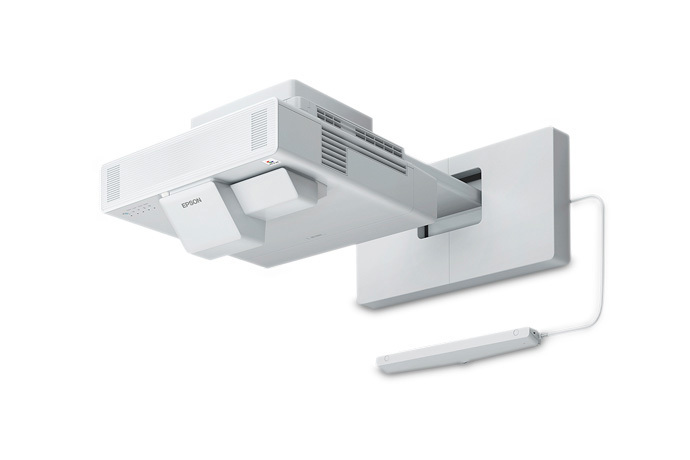
The Epson BrightLink 1480Fi projector is an ultra-short-throw interactive laser display designed for classrooms, meeting rooms, and collaborative workspaces. Built for high-visibility presentations in bright environments, it delivers 5,000 lumens of color and white brightness, 1080p display resolution, and a laser light source rated for up to 20,000 hours in normal mode. Its interactive features support hands-on teaching, whiteboard-style collaboration, and touch-based presentations, making it a strong fit for education and business environments that need reliable large-screen interaction without frequent maintenance.
One of its biggest advantages is the ultra-short-throw design, which allows it to project large images from very close to the wall or screen while reducing glare and presenter shadows. The BrightLink 1480Fi also supports wireless connectivity, multiple HDMI and VGA inputs, Ethernet, USB, and content sharing tools, so it can integrate into modern AV setups with minimal friction. For schools, training centers, and conference rooms, this model offers a practical alternative to flat-panel displays when a larger interactive surface is needed.
Estimated pricing typically falls in the premium interactive projector range, often around the low-to-mid $3,000 range depending on condition, reseller, and whether it is new or certified refurbished. Availability is generally strongest through Epson, AV integrators, educational suppliers, and major office technology retailers. If you are comparing options, the Epson BrightLink 1480Fi projector stands out for brightness, interactivity, and ease of deployment in shared spaces.
Specifications
- Display technology: Epson 3LCD, 3-chip laser projection for consistent color and brightness.
- Native resolution: 1080p display output with 16:9 aspect ratio support.
- Brightness: 5,000 lumens color brightness and 5,000 lumens white brightness.
- Contrast ratio: Up to 2,500,000:1 for improved image depth and clarity.
- Throw ratio: Ultra-short-throw design around 0.27:1, ideal for close-wall installation.
- Screen size: Approximately 65 to 100 inches for common classroom and meeting room use.
- Light source life: Up to 20,000 hours in normal mode, with extended life in eco use cases.
- Connectivity: HDMI, VGA, USB, Ethernet, wireless networking, and mobile casting support.
- Audio: Integrated stereo speakers for basic room audio without external hardware.
- Installation: Ceiling, wall, or table mount support depending on room layout.
Compared with standard classroom projectors, the BrightLink 1480Fi offers brighter output, better collaboration features, and a far more installation-friendly ultra-short-throw format. Compared with many flat-panel interactive displays, it provides a much larger image area at a similar or lower total deployment cost.
Detailed Description
The Epson BrightLink 1480Fi projector combines laser projection with interactive display functionality to create a shared digital workspace. It works by projecting a large image onto a wall or compatible screen and allowing users to interact directly with the projected surface using supported touch or pen-based input. This makes it useful for brainstorming sessions, classroom lessons, whiteboarding, annotation, and multimedia presentations.
Its build is designed for frequent professional use, with a sturdy chassis and installation-oriented form factor that suits fixed-room setups. The laser light engine reduces the need for bulb replacement and helps keep long-term maintenance low. Epson’s 3LCD architecture also helps preserve color accuracy, which is important for charts, diagrams, educational materials, and branded presentations.
In real-world use, the projector performs well in bright rooms where ambient light can wash out weaker systems. Teachers can display lesson content and annotate live, while business teams can share slides, spreadsheets, and video during meetings. The user experience is generally shaped by the unit’s bright output, responsive collaboration tools, and the convenience of a large interactive surface without needing a massive display panel.
Setup Guide
Setting up the Epson BrightLink 1480Fi projector begins with choosing a stable wall or mount position and ensuring the projection surface is flat, clean, and properly sized for the intended image. Because it is ultra-short throw, precise placement is important for image alignment and touch accuracy.
- Mount or position the projector according to the room layout and recommended throw distance.
- Connect power, then attach HDMI, VGA, USB, or network cables as needed.
- Turn on the unit and use the on-screen menu to select the correct input source.
- Adjust focus, image size, keystone, and alignment until the picture fills the desired area.
- Enable wireless display or mobile sharing if you plan to use laptops, tablets, or phones.
- Configure interactive features and calibrate touch or pen controls if applicable.
For safety, avoid looking directly into the lens and keep hands clear during installation. Use a stable mount and verify that all cables are secured to prevent strain or accidental disconnection. If the image appears distorted, recheck wall flatness, projector alignment, and input settings before changing advanced configurations. For best results, perform calibration after installation and again whenever the projector position changes.
Troubleshooting
Common issues with the BrightLink 1480Fi usually involve signal detection, alignment, wireless connectivity, or touch calibration. If the projector does not turn on, confirm power connections and inspect the power button sequence. If there is no image, verify the selected input, HDMI source, and cable integrity. If the image is fuzzy or cropped, adjust focus, position, and geometry settings.
- No signal: Reconnect the source device, switch inputs, or replace the cable.
- Touch not working: Recalibrate the interactive surface and confirm USB or network connection.
- Wireless display issues: Restart the projector and client device, then reconnect to the correct network.
- Image misalignment: Reposition the unit and redo geometry or keystone adjustments.
- Overheating or shutdown: Check ventilation and remove dust from intake areas.
If an error code appears, consult the on-screen message and the user guide for the specific fault category. Preventive care includes keeping vents clear, using clean power, and performing periodic firmware updates when available. Warranty coverage and support are typically handled through Epson support channels, authorized dealers, and AV installation partners. For hands-on help, contact Epson customer support or the reseller that supplied the unit.
Pros & Cons
Pros
- Very bright 5,000-lumen output for well-lit rooms.
- Ultra-short-throw design reduces shadows and presenter obstruction.
- Interactive functionality supports teaching and collaboration.
- Laser light source lowers maintenance compared with lamp-based projectors.
- Large-screen projection can be more cost-effective than some interactive flat panels.
Cons
- Installation takes planning and calibration for best performance.
- Premium pricing may be high for small teams or limited budgets.
- Best results depend on a smooth, properly prepared wall or screen surface.
- Interactive features may require extra configuration compared with basic projectors.
For schools and businesses that need a large interactive display, the Epson BrightLink 1480Fi projector offers strong value. Compared with lower-cost classroom projectors, it delivers better brightness and collaboration features. Compared with large touchscreen displays, it can provide a much bigger viewing area at a lower overall cost.
Customer Reviews
Customer feedback for the Epson BrightLink 1480Fi projector is generally positive, with many users praising the bright image, easy-to-see content in daylight, and the convenience of a large interactive workspace. A common rating pattern is around 4 to 4.5 out of 5 stars, especially among education and corporate users who value reliability and room-filling presentation size.
Typical praise includes clear text, good color performance, and the ability to replace traditional whiteboards in training rooms. Common complaints usually focus on setup complexity, calibration time, and the need for a suitable mounting environment. One typical user-style comment is, “The picture is bright and the interactive tools are useful, but installation took more planning than expected.” Another recurring sentiment is, “Excellent for meetings and lessons once it is properly configured.”
It is a solid choice for buyers who want an interactive projector with premium brightness and long-term laser reliability. Users looking for simple plug-and-play portability may prefer a smaller portable projector instead.
Faqs
How do I set up the Epson BrightLink 1480Fi Projector for the first time in a classroom or meeting room?
What should I do if the Epson BrightLink 1480Fi Projector image is distorted or not aligned correctly?
Why is the Epson BrightLink 1480Fi Projector pen or touch function not responding properly?
What devices and connections are compatible with the Epson BrightLink 1480Fi Projector?
How many users can interact at the same time on the Epson BrightLink 1480Fi Projector?
How do I improve wireless screen sharing performance on the Epson BrightLink 1480Fi Projector?
What routine maintenance does the Epson BrightLink 1480Fi Projector need?
How do I get the best image quality from the Epson BrightLink 1480Fi Projector in a bright room?
More epson manuals
Leave a Comment