
Epson SureColor Garment Printer F1070 User Manual
Content
Introduction to the Epson SureColor F1070 Garment Printer
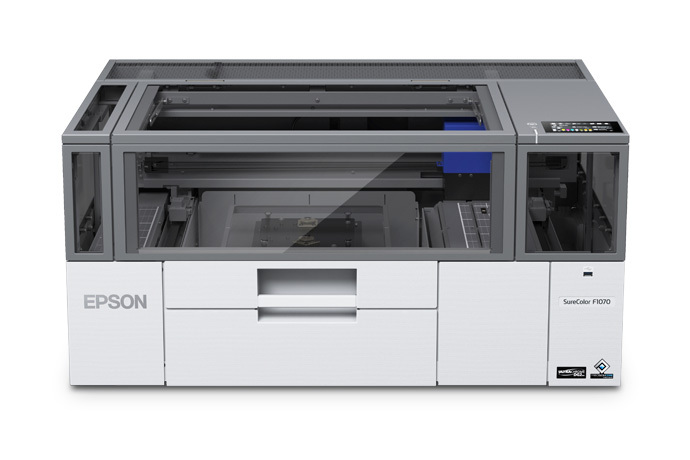
The Epson SureColor F1070 garment printer is a hybrid direct-to-garment and direct-to-film printing solution built for small businesses, print shops, custom apparel brands, and creators who need professional-quality textile output in a compact footprint. Designed for on-demand production, it delivers crisp detail, rich color, and reliable white ink performance for printing on both light and dark garments. Its hybrid workflow makes it especially attractive for shops that want to handle a wider range of apparel jobs without investing in separate DTG and DTF systems.
One of the biggest advantages of the Epson SureColor F1070 is its balance of speed, print quality, and ease of use. The printer uses Epson’s PrecisionCore MicroTFP printhead and UltraChrome DG2 ink system to produce sharp graphics, smooth gradients, and durable prints. With wireless, Ethernet, and USB connectivity, it fits easily into modern production environments. The touchscreen interface and Epson software ecosystem also simplify day-to-day operation for users at different skill levels.
This model is ideal for custom T-shirt printing, merchandise production, short-run apparel orders, promotional products, and startup print businesses. The estimated price range is typically around $4,995 to $7,995 depending on configuration and seller, with broad availability through Epson resellers and business supply distributors. For buyers searching for a versatile garment printer with strong output quality and production flexibility, the Epson SureColor F1070 stands out as a practical, professional-grade option.
Specifications for Epson SureColor F1070 DTG and DTFilm Printer
- Print technology: PrecisionCore MicroTFP printhead with Nozzle Verification Technology
- Ink system: UltraChrome DG2, 5-color configuration
- Ink colors: Cyan, Magenta, Yellow, Black, White
- Nozzle configuration: 400 nozzles x 6 channels
- Maximum resolution: 2400 x 1200 dpi
- Connectivity: USB 3.0, Gigabit Ethernet, Wi-Fi, Wi-Fi Direct
- Supported systems: Windows 8.1 64-bit or later, macOS 10.12 or later
- Printer dimensions: 35 x 28 x 17 inches
- Weight: 152 lb
- Power input: AC 100–120V, 50/60Hz
- Media thickness support: Up to 1 inch in common reseller specifications
- Touchscreen: 4.3-inch color LCD interface
In performance terms, the printer is positioned as a compact production machine for small-to-medium garment workflows rather than high-volume industrial manufacturing. Compared with many entry-level DTG printers, it offers stronger white ink handling, better wireless integration, and a more modern hybrid DTG/DTFilm workflow. Against larger commercial systems, it trades raw throughput for lower footprint, simpler operation, and a more accessible investment level.
Detailed Description of the Epson SureColor F1070
The Epson SureColor F1070 is designed to streamline garment decoration by combining direct-to-garment printing and direct-to-film capabilities in one machine. In practical use, that means users can print directly onto cotton apparel or produce transfer graphics for application onto a broader range of materials. The white ink system helps produce strong results on dark fabrics, while the high-resolution print engine supports logos, detailed illustrations, and photo-quality designs.
Build quality is solid and business-focused, with a robust chassis, a compact desktop-style footprint, and a 4.3-inch touchscreen that simplifies operation. The printer is engineered for Epson ink packs only, which helps maintain predictable results and consistent color performance. For production shops, the workflow is intuitive: load artwork, prepare garment settings, print, cure, and finish. That makes it suitable for custom apparel stores, print-on-demand businesses, local event merchandise, and brand fulfillment operations.
User experience is generally strongest for operators who need dependable output without a steep learning curve. The combination of Ethernet, Wi-Fi, and Wi-Fi Direct makes it easy to integrate into a modern setup, while Epson software support helps manage garment jobs efficiently. For many users, the Epson SureColor F1070 offers the right balance between print quality, flexibility, and manageable operating complexity.
Setup Guide for Epson SureColor F1070 Garment Printer
- Place the printer on a stable, level surface with enough clearance for ventilation, loading, and maintenance access.
- Unpack the unit carefully and verify that the printer, ink packs, power cable, documentation, and accessories are included.
- Install the printer in a temperature-controlled room between 10°C and 35°C with non-condensing humidity for best results.
- Connect power, then choose your preferred connection method: USB 3.0, Ethernet, or Wi-Fi.
- Load the recommended Epson ink packs and follow the on-screen setup prompts for initialization and ink charging.
- Install the driver and garment printing software on a supported Windows or macOS computer.
- Run a nozzle check and print alignment test before the first production job.
- Configure garment presets, print mode, and color management settings based on the fabric type and job requirements.
For safety, avoid moving the printer while ink is installed, and never use third-party ink systems. Keep liquids away from the control panel and ensure the machine is grounded properly. If setup stalls, restart the printer, recheck network settings, and confirm that the correct software version is installed.
Troubleshooting Common Epson SureColor F1070 Problems
- Blank or missing nozzles: Run a nozzle check, perform a cleaning cycle, and inspect ink levels. Repeated issues may indicate maintenance needs.
- White ink inconsistencies: Gently verify white ink circulation procedures and confirm that the printer has completed proper startup routines.
- Connectivity problems: Restart the printer and router, confirm network credentials, and use Ethernet for a more stable production connection.
- Poor print quality: Check garment pretreatment, resolution settings, and artwork preparation. Low-quality source files can reduce output sharpness.
- Paper or media handling errors: Reposition the garment, confirm platen setup, and ensure the media thickness is within supported limits.
- Error messages during startup: Power cycle the device, verify ink pack installation, and consult the on-screen guidance before repeating the process.
Preventive maintenance is the best way to avoid downtime. Keep the printer clean, perform regular nozzle checks, and use only approved Epson consumables. Warranty support and product assistance are available through Epson’s support channels and authorized resellers. For users in the United States, Canada, and Puerto Rico, Epson technical support can be reached at the toll-free number listed in the warranty documentation.
Pros and Cons of the Epson SureColor F1070
Pros
- Hybrid DTG and DTFilm workflow adds flexibility for more garment types and production methods.
- High-resolution output at 2400 x 1200 dpi supports detailed graphics and small text.
- White ink capability improves results on dark garments and colored fabrics.
- Compact footprint makes it easier to fit into small studios and retail environments.
- Wireless, Ethernet, and USB connectivity support modern shop workflows.
- Strong value for businesses that want professional garment printing without an industrial-sized footprint.
Cons
- Uses Epson ink packs only, limiting consumable flexibility.
- Not designed for very high-volume industrial production.
- Requires proper maintenance and setup discipline for consistent white ink performance.
- Initial investment may still be significant for hobby users or very small startups.
Compared with lower-cost desktop garment printers, the Epson SureColor F1070 offers better professional capability and broader workflow support. Compared with larger commercial machines, it is more affordable and easier to deploy, but it is not the fastest option for mass production.
Customer Reviews of the Epson SureColor F1070
Users commonly rate the printer around 4 out of 5 stars, with praise centered on color quality, compact design, and the flexibility of the hybrid printing workflow. Many customers say it delivers clean results on both light and dark apparel, especially when paired with proper pretreatment and curing. One frequent comment is that the printer feels like a strong upgrade for small shops moving beyond entry-level garment printing.
Common complaints include the need for routine maintenance, the reliance on Epson-branded consumables, and the learning curve for operators new to white ink printing. Still, many buyers recommend it for print shops, custom merch businesses, and growing apparel brands that want dependable output and a modern setup. For users who value professional quality and flexibility, the Epson SureColor F1070 is often considered a worthwhile purchase.
Faqs
How do I set up the Epson SureColor Garment Printer F1070 for the first time?
What software and operating systems are compatible with the Epson SureColor Garment Printer F1070?
Why is my Epson SureColor Garment Printer F1070 printing with missing lines or weak colors?
Can the Epson SureColor Garment Printer F1070 print both DTG and DTFilm jobs?
What are the ink requirements for the Epson SureColor Garment Printer F1070?
How often should I clean and maintain the Epson SureColor Garment Printer F1070?
What should I do if the white ink on my Epson SureColor Garment Printer F1070 is not flowing properly?
What are the key performance features of the Epson SureColor Garment Printer F1070?
More epson manuals
Leave a Comment