
Epson PowerLite Projector 975W User Manual
Content
Introduction
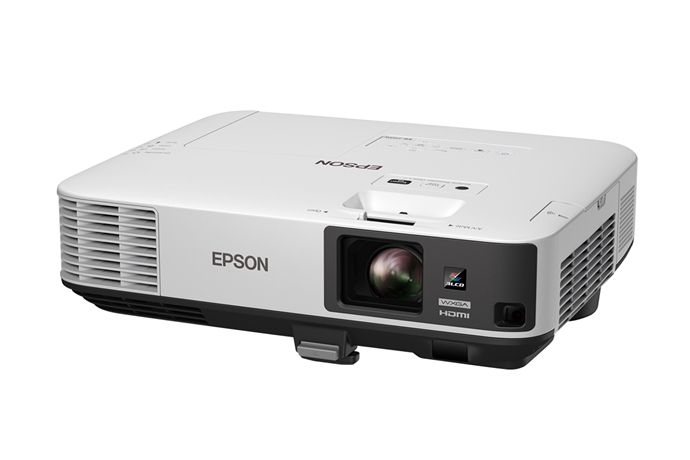
The Epson PowerLite 975W is a WXGA 3LCD projector built for classrooms, meeting rooms, training spaces, and small to mid-size conference environments. With 3,600 lumens of color brightness and 3,600 lumens of white brightness, it delivers vivid images in well-lit rooms while maintaining strong color accuracy and readable text. Its 1280 x 800 native resolution and 16:10 aspect ratio make it especially well suited for presentations, spreadsheets, and widescreen content.
One of the biggest advantages of the Epson PowerLite 975W is its balance of brightness, image quality, and low maintenance. The ultra long-life lamp is rated up to 10,000 hours in Bright Mode, helping reduce downtime and operating costs. Built-in 16-watt audio, wireless-ready connectivity options, and a flexible 1.6x optical zoom make setup easier in a variety of room layouts. The projector is designed for users who need a dependable business projector with clear images, simple controls, and consistent performance.
This model is a strong fit for educators, corporate teams, presenters, and IT buyers looking for an affordable projector with solid brightness and reliable day-to-day usability. The estimated price range is typically around $950 to $1,300 depending on condition, retailer, and whether it is sold as new or Certified ReNew. It remains available through Epson and selected resellers, though stock can vary by region and seller.
Specifications
- Projection technology: 3LCD, 3-chip system
- Native resolution: 1280 x 800 WXGA
- Aspect ratio: 16:10
- Brightness: 3,600 lumens color and 3,600 lumens white
- Contrast ratio: up to 15,000:1 dynamic contrast
- Light source: 250W UHE lamp
- Lamp life: up to 10,000 hours in Bright Mode
- Throw ratio: 1.38 to 2.24:1
- Optical zoom: 1.6x
- Speaker power: 16W mono
- Noise level: approximately 29 dB
- Power consumption: about 334W in normal operation
- Ports: dual HDMI, dual VGA, composite video, audio inputs, USB support
- Weight: about 4.4 kg
Compared with many entry-level business projectors, the Epson PowerLite 975W offers higher brightness and better color performance than basic office models, while remaining more affordable than higher-resolution WUXGA units. It is a practical middle-ground choice for users who want strong presentation quality without moving to a premium laser projector.
Detailed Description
The Epson PowerLite 975W uses 3LCD imaging to create bright, balanced images without the rainbow effect often associated with some single-chip projectors. This makes it a good option for slides, video clips, charts, and classroom instruction. Its WXGA resolution is ideal for widescreen laptops and modern presentation software, giving users more horizontal space for content.
The projector is housed in a durable, professional-grade chassis designed for daily use. Its build quality supports both desktop and ceiling-mounted installation, while the optical zoom and vertical keystone correction help align the picture in different rooms. The 16-watt speaker adds convenience for smaller meetings or lessons where external audio is not required.
In real-world use, the Epson PowerLite 975W performs well in bright offices and classrooms where ambient light cannot be fully controlled. It is especially effective for PowerPoint presentations, spreadsheets, and training sessions. Users typically appreciate the clear image, dependable lamp life, and straightforward controls, while also valuing the low maintenance design.
Setup Guide
Start by placing the projector on a stable surface or mounting it to the ceiling. Make sure the intake and exhaust vents remain unobstructed for proper airflow. Connect the power cable, then attach your source device using HDMI, VGA, or another supported input.
Turn on the projector and select the correct input source from the control panel or remote. Use the optical zoom and focus ring to size the image, then adjust keystone correction if the picture appears skewed. For wireless or network use, connect the projector to your office network or supported display system following the on-screen setup prompts.
For best results, set the image mode according to the room: brighter settings for presentations in lit rooms and more balanced modes for video playback. If the image does not appear, check the cable connection, input selection, and source device output settings. If audio is weak, confirm the source volume and speaker settings. Keep the projector away from heat, moisture, and dust, and allow the lamp to cool before unplugging after use.
Troubleshooting
Common issues with the Epson PowerLite 975W usually involve input selection, image alignment, lamp status, or connectivity. If there is no picture, verify that the source device is powered on, the correct input is selected, and the cable is securely connected. If the image looks blurry, clean the lens gently and refocus the unit.
If the projector shows a lamp warning, the lamp may be nearing the end of its life and should be replaced with a compatible Epson lamp. Overheating problems are often caused by blocked vents or heavy dust buildup, so keep the air paths clear and clean the filters regularly. If the image flickers, try another cable or input port to isolate the problem.
Preventive care helps extend performance: keep firmware and source settings updated, use surge protection, and avoid running the projector in extreme temperatures. Epson typically provides manufacturer support, replacement parts, and warranty coverage through authorized channels. For help, contact Epson customer support or an authorized service provider in your region.
Pros & Cons
Pros
- Bright 3,600-lumen output works well in lit rooms and classrooms
- WXGA resolution is ideal for business presentations and widescreen laptops
- 3LCD technology delivers strong color accuracy and natural-looking images
- Long lamp life lowers maintenance costs over time
- Built-in speaker and flexible connectivity make it easy to deploy
- Good value for money compared with many higher-end projectors
Cons
- WXGA is not as sharp as Full HD or WUXGA models
- It uses a lamp rather than a laser light source
- Internal audio is suitable for small rooms, but not large venues
- Some newer alternatives offer stronger wireless and smart features
Overall, the Epson PowerLite 975W is a strong choice for buyers who want reliable performance and solid brightness without paying premium laser projector prices. Compared with newer alternatives, it is less advanced in resolution and smart functionality, but it remains highly practical for standard office and education use.
Customer Reviews
Typical customer feedback for the Epson PowerLite 975W is positive, with many users giving it around 4.4 out of 5 stars. Buyers often praise its brightness, easy setup, and clear text quality in meeting rooms and classrooms. One user noted, “It handles daylight presentations better than expected, and the image stays readable from the back of the room.”
Common complaints include the lamp-based design, which requires eventual replacement, and the fact that WXGA resolution is not ideal for users who want sharper media playback. Some users also mention that the built-in speaker is fine for small spaces but limited for larger audiences. Even so, most reviewers recommend it for business presentations, office training, and education use where dependable performance matters more than premium extras.
Frequently Asked Questions
Is the Epson PowerLite 975W good for classrooms? Yes. Its brightness, WXGA resolution, and 3LCD image quality make it well suited for teaching environments.
Does it work in bright rooms? Yes. The 3,600-lumen output is designed to remain visible in well-lit spaces.
Is it worth buying today? Yes, if you need a dependable business projector with strong image quality and good value, especially for presentations and training.
Faqs
How do I set up the Epson PowerLite Projector 975W for the first time?
What should I do if my Epson PowerLite Projector 975W is not turning on?
Why is the image on my Epson PowerLite Projector 975W blurry or out of focus?
Which devices are compatible with the Epson PowerLite Projector 975W?
How do I connect a laptop to the Epson PowerLite Projector 975W using HDMI or VGA?
What features make the Epson PowerLite Projector 975W good for bright rooms?
How can I optimize picture quality on the Epson PowerLite Projector 975W?
How often should I maintain the Epson PowerLite Projector 975W, and what care does it need?
Tags
More epson manuals
Leave a Comment