
Epson EpiqVision Mini Laser Projector EF11 User Manual
Content
Introduction to the Epson EpiqVision Mini Laser Projector EF11
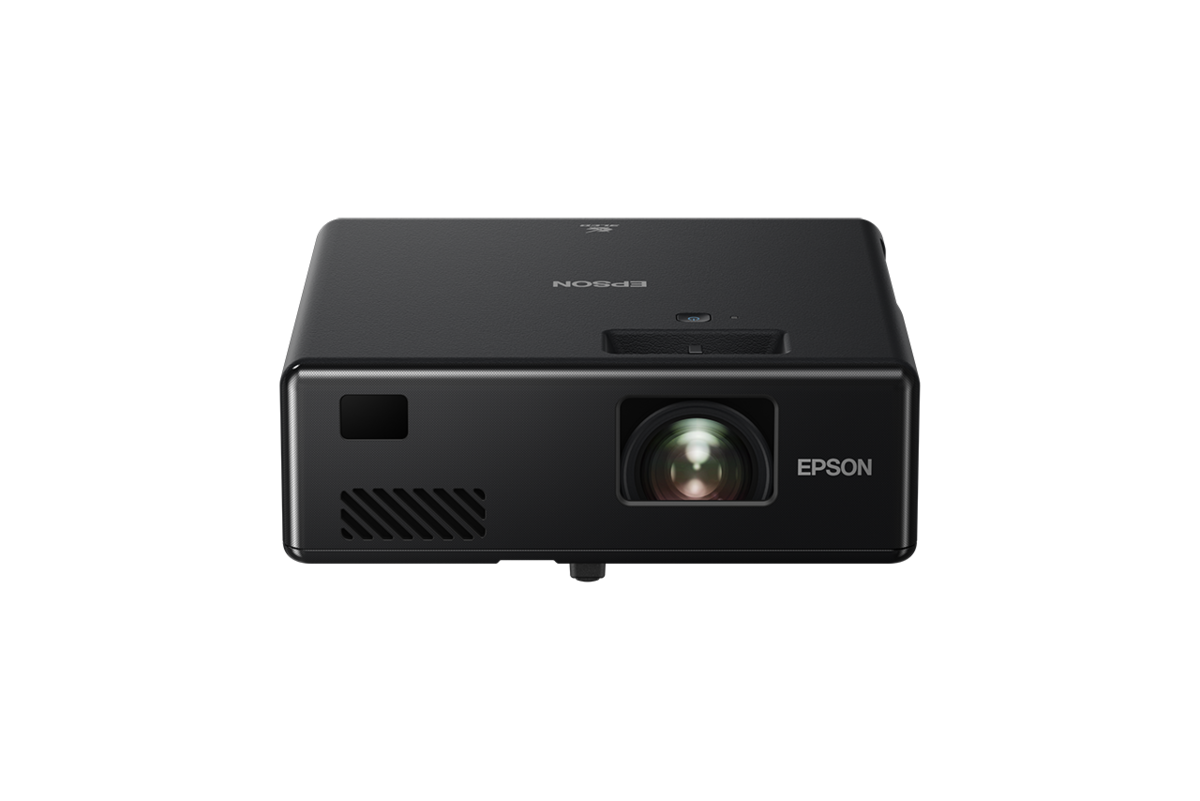
The Epson EpiqVision Mini Laser Projector EF11 is a compact Full HD home entertainment projector designed for users who want a big-screen experience without the bulk of a traditional projector. Built with Epson 3LCD laser technology, it delivers 1,000 lumens of color and white brightness, making it a strong fit for casual movie nights, streaming, gaming, and presentations in dim to moderately lit spaces. Its portable footprint and modern design make it especially appealing for apartments, dorm rooms, bedrooms, and flexible living spaces where a permanent projection setup is not practical.
One of the main advantages of the Epson EpiqVision Mini Laser Projector EF11 is its long-lasting laser light source, which is rated for up to 20,000 hours in normal and quiet modes. That means less maintenance and no lamp replacements, which is a major benefit for users who want convenience and lower long-term ownership costs. It also supports image sizes from about 30 inches up to 150 inches, giving it impressive versatility for home viewing or small-event use.
The projector is commonly positioned in the midrange portable projector market, with estimated prices typically around $699 to $799, though retail pricing can vary by seller and availability. It is widely available through major electronics retailers and Epson support channels. For buyers searching for a compact laser projector with Full HD resolution, easy setup, and reliable picture quality, the Epson EpiqVision Mini Laser Projector EF11 remains a compelling option.
Specifications for Epson EpiqVision Mini Laser Projector EF11
- Display technology: Epson 3LCD laser projection with 3-chip design
- Native resolution: Full HD 1920 x 1080
- Brightness: 1,000 lumens color brightness and 1,000 lumens white brightness
- Contrast ratio: Up to 200,000:1 to 2,500,000:1 depending on source and measurement method
- Screen size: Approximately 30 inches to 150 inches
- Projection ratio: 1.0:1 with digital zoom support
- Light source: Laser diode with up to 20,000-hour life
- Keystone correction: Auto vertical and manual horizontal correction
- Audio: Built-in 1.5W mono speaker plus stereo mini audio output
- Ports: HDMI, USB-A, USB-B, and audio out
- Wireless connectivity: Miracast support and Wi-Fi capability in select configurations
- Operating noise: Around 27 dB in normal mode and 22 dB in eco mode
- Power use: About 102W in normal mode and 73W in eco mode
- Dimensions: Roughly 175 x 175 x 58 to 65 mm
- Weight: About 1.2 kg
Compared with many portable LED projectors, the Epson EpiqVision Mini Laser Projector EF11 offers better brightness consistency, sharper Full HD output, and a laser light source that reduces maintenance. Against larger home theater models, it trades advanced lens controls for portability and simplicity.
Detailed Description of the Epson EpiqVision Mini Laser Projector EF11
The Epson EpiqVision Mini Laser Projector EF11 is built around Epson’s 3LCD laser engine, which uses three separate LCD panels to reproduce color more accurately and avoid the rainbow artifacts often associated with some single-chip DLP projectors. The result is a bright, clean image with balanced color output that works well for films, sports, streaming apps through connected devices, and casual gaming.
This model is especially useful in real-world home settings where portability matters. It can be moved between rooms, placed on a table, or taken to a friend’s house for a movie night. Its compact size, light weight, and simple controls make it approachable for first-time projector buyers. The manual focus and digital zoom provide flexibility, although the lack of optical zoom means placement must be planned carefully for the desired screen size.
Build quality feels solid for a mini projector, with a clean black chassis and a design that emphasizes compactness over premium theater-style hardware. Since the projector uses a laser light source, startup and shutdown are quick, and long-term ownership is easier because there is no lamp to replace. User experience is generally strongest when the projector is used in a darkened room, where its brightness and Full HD clarity are most noticeable.
Setup Guide for Epson EpiqVision Mini Laser Projector EF11
Setting up the Epson EpiqVision Mini Laser Projector EF11 is straightforward and suitable for beginners. Start by placing the projector on a stable, level surface with enough distance from the wall or screen to achieve the desired image size. Connect the power cable, then press the power button and wait for the laser light source to initialize.
- Connect your source device using HDMI for the best picture quality.
- Use USB if you need compatible media playback or service functions.
- Adjust focus manually until the image is sharp.
- Use auto vertical keystone to correct tilt, then fine-tune horizontal keystone manually if needed.
- Pair wireless devices or enable Miracast if supported by your source device.
- Select the correct input source from the menu if the image does not appear automatically.
For best results, keep the projector well ventilated and avoid blocking the air intake or exhaust areas. Safety precautions include not staring directly into the lens, avoiding use in high heat or humidity, and unplugging the unit before cleaning. If the image appears distorted, recheck the throw distance, focus, and keystone settings before assuming a hardware issue.
Troubleshooting Epson EpiqVision Mini Laser Projector EF11
Common issues with the Epson EpiqVision Mini Laser Projector EF11 usually involve input selection, image alignment, or wireless pairing. If there is no picture, confirm the HDMI cable is fully seated and the correct source is selected. If the image looks blurry, adjust manual focus and verify that the projector is positioned at the right distance. If colors look dull, reduce ambient light and disable any overly aggressive picture-saving modes.
- No signal: Check HDMI source, cable connection, and device output resolution.
- Image is crooked: Reapply auto vertical keystone and manual horizontal correction.
- Blurred picture: Re-focus and adjust placement distance.
- Wireless connection fails: Reboot the projector and source device, then reconnect Miracast or Wi-Fi.
- Overheating warning: Clear ventilation paths and allow the unit to cool down.
There are no widely publicized consumer-facing error codes for routine use, so most issues are solved through connection checks and placement adjustments. Preventive care includes keeping the lens clean, avoiding dusty storage areas, and using the projector in the recommended temperature range. Warranty and support assistance are available through Epson’s official support channels, including setup guides, user manuals, and regional customer service numbers listed in the documentation.
Pros and Cons of the Epson EpiqVision Mini Laser Projector EF11
Pros
- Compact and portable design makes it easy to move between rooms.
- Full HD 1080p resolution delivers sharp image quality for movies and streaming.
- Laser light source offers long life and low maintenance.
- 3LCD technology provides strong color performance and smooth image rendering.
- Quiet operation is suitable for bedrooms and small living spaces.
- Simple setup is beginner-friendly and fast.
Cons
- No optical zoom, so placement must be more precise than on higher-end projectors.
- Built-in speaker is basic and may not satisfy users who want immersive audio.
- Brightness is best for dark or dim rooms rather than daylight viewing.
- Manual focus and limited lens adjustment make installation less flexible than premium models.
- Value is strong for portability, but alternatives may offer more features at similar prices.
Overall, the Epson EpiqVision Mini Laser Projector EF11 offers excellent value for buyers who prioritize portability, long laser life, and dependable Full HD performance over advanced installation features.
Customer Reviews for Epson EpiqVision Mini Laser Projector EF11
Customer feedback for the Epson EpiqVision Mini Laser Projector EF11 is generally positive, with many owners praising its compact size, sharp image, and low-noise operation. Common ratings typically fall around 4 out of 5 stars, especially among users who want a simple bedroom or apartment projector.
- “Great picture for the size.” Users frequently highlight the clarity and color quality.
- “Easy to move and set up.” Portability is one of the most appreciated features.
- “Speaker is only okay.” Some buyers add external speakers for better sound.
- “Works best in the dark.” Several reviews note that room lighting affects perceived brightness.
Frequent complaints focus on the lack of optical zoom and the limited internal audio. Buyers who want a compact laser projector for casual viewing are usually satisfied, while those expecting full home theater flexibility may prefer a more advanced model.
Frequently Asked Questions About Epson EpiqVision Mini Laser Projector EF11
Is the Epson EpiqVision Mini Laser Projector EF11 good for movies? Yes, it is a strong choice for movies in dark or dim rooms thanks to its Full HD resolution and balanced 3LCD color performance.
Does the Epson EpiqVision Mini Laser Projector EF11 need bulb replacement? No, it uses a laser light source rated for long life, so there is no traditional lamp replacement.
Is it suitable for gaming? Yes, for casual gaming it works well, especially when paired with a low-latency source and an external sound system.
What is the best room type for this projector? Small to medium rooms with controlled lighting offer the best results.
Faqs
How do I set up the Epson EpiqVision Mini Laser Projector EF11 for the first time?
Why is my Epson EpiqVision Mini Laser Projector EF11 showing a blurry or distorted image?
What devices are compatible with the Epson EpiqVision Mini Laser Projector EF11?
Can I use the Epson EpiqVision Mini Laser Projector EF11 with a streaming stick like Roku, Fire TV, or Apple TV?
Why is the Epson EpiqVision Mini Laser Projector EF11 not turning on or showing a signal?
How can I improve picture quality and brightness on the Epson EpiqVision Mini Laser Projector EF11?
What audio options does the Epson EpiqVision Mini Laser Projector EF11 support?
How do I maintain and clean the Epson EpiqVision Mini Laser Projector EF11 for long-term use?
More epson manuals
Leave a Comment