
Epson CO-FH02 Projector User Manual
Content
Epson CO-FH02 Projector Manual: Overview, Setup, Troubleshooting, and Buying Guide
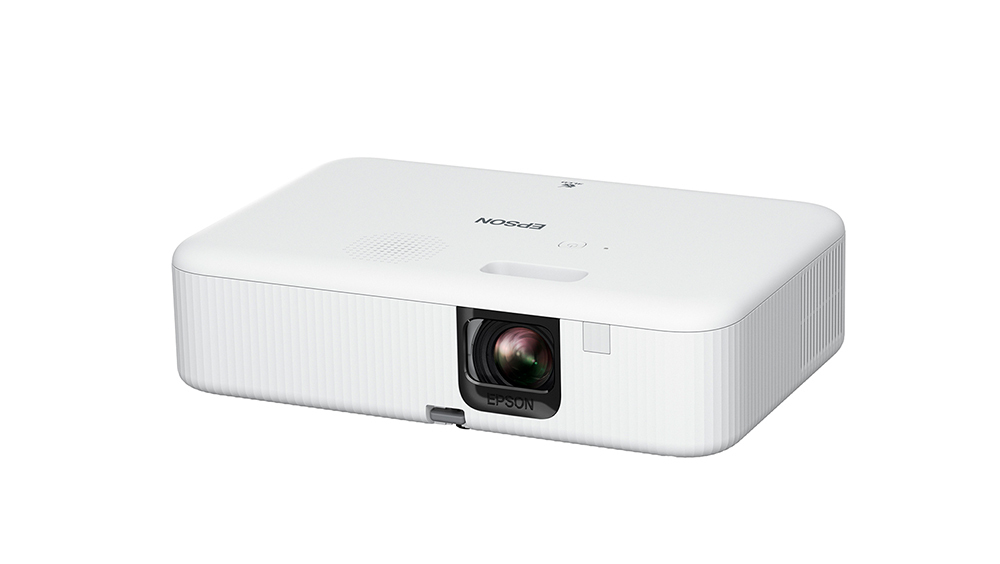
The Epson CO-FH02 Projector is a Full HD 1080p portable home entertainment projector designed for movies, streaming, gaming, and casual presentations. It uses 3LCD technology to deliver 3,000 lumens of color and white brightness, which helps it perform better in rooms with some ambient light than many entry-level mini projectors. With a 188W UHE lamp, built-in smart media player functionality, Wi‑Fi support, HDMI connectivity, and a 5W speaker, it is built for simple, all-in-one use. The Epson CO-FH02 Projector is a strong option for users who want a large-screen experience without needing a complex installation or separate streaming device.
This model is aimed at families, students, streamers, and small-space users who want an affordable projector for home cinema, sports nights, and weekend gaming. Its 16:9 native aspect ratio, manual focus, digital zoom, and vertical/horizontal keystone correction make setup flexible, while the 26-inch to 391-inch screen size range gives it impressive projection versatility. Typical pricing has been seen around the mid-range entry level, often near $449.99 to $599 depending on retailer, region, and promotions, and availability is usually through Epson’s official store and major electronics sellers.
For buyers searching for a reliable Epson home projector, the Epson CO-FH02 Projector stands out for brightness, easy operation, and overall value. It is not a premium laser projector, but it offers a practical balance of image quality, portability, and everyday convenience. If you want a user-friendly Full HD projector with solid brightness and built-in streaming support, it is one of the most accessible choices in its class.
How to Use the Epson CO-FH02 Projector: Setup and Basic Operation
Quick Start Guide
- Place the projector on a stable surface or mount it at the correct throw distance for your screen size.
- Connect power, then press the power button and allow the lamp to warm up.
- Connect a source device through HDMI or use the built-in smart media player for streaming.
- Adjust focus manually until the image is sharp.
- Use keystone correction to align the picture if the projector is not centered.
- Set your desired image mode, brightness level, and audio output.
Best Setup Tips for Clear Picture Quality
- Use a white projection wall or proper screen for the best contrast and color accuracy.
- Keep the lens clean to avoid softness and dim spots.
- Reduce ambient light for movie viewing, especially in darker scenes.
- Position the unit as level as possible to minimize keystone correction loss.
- Use a quality HDMI cable for stable playback from laptops, consoles, and streaming devices.
Troubleshooting the Epson CO-FH02 Projector
Common issues with the Epson CO-FH02 Projector usually involve lamp warnings, connection problems, or image alignment concerns. If the power light flashes orange, the projector may be reporting a lamp issue, fan or sensor problem, or an internal projector error. If there is no image, check the HDMI source, confirm the input selection, and make sure cables are firmly connected. If the image looks blurry, clean the lens and adjust manual focus carefully. If colors appear washed out, reduce room light and change the picture mode.
Preventive care helps reduce downtime: let the projector cool before unplugging it, avoid blocking ventilation openings, and keep dust away from the air intake and lens. The lamp is a consumable part, so brightness will gradually decrease over time. Regular cleaning and proper shutdown routines can help extend lamp life. Epson offers warranty and support options for the CO-FH02, with regional coverage varying by market. In the U.S. and Canada, Epson support includes phone assistance at (562) 276-4394, and warranty status can also be checked through Epson’s support pages. For persistent error indicators or internal fault messages, users should contact Epson support or an authorized service center rather than attempting internal repairs.
Pros and Cons of the Epson CO-FH02 Projector
Pros
- Bright 3,000-lumen output makes it usable in rooms with moderate light.
- Full HD 1080p resolution delivers sharp streaming, movie, and sports playback.
- 3LCD technology provides balanced color brightness for more natural image performance.
- Built-in smart media player support reduces the need for extra streaming hardware.
- Lightweight and portable enough for flexible room-to-room use.
- Good value for users wanting a budget-friendly home cinema projector.
Cons
- No optical zoom, so placement flexibility is limited compared with higher-end projectors.
- Manual focus requires hands-on adjustment during setup.
- Built-in 5W speaker is fine for casual viewing but not ideal for larger rooms.
- Not a 4K projector, so it is less suitable for users seeking premium resolution.
- Fan noise and lamp operation may be noticeable in quiet scenes.
Overall, the Epson CO-FH02 Projector offers strong value for money if your priority is brightness, simplicity, and reliable Full HD performance. Compared with compact portable projectors, it is noticeably brighter and better suited to everyday home viewing. Compared with premium 4K home theater models, it is more affordable but less advanced in image refinement and placement flexibility.
Customer Reviews and Real-World Feedback on the Epson CO-FH02 Projector
Users commonly praise the Epson CO-FH02 Projector for its brightness, easy setup, and solid image quality for the price. Many buyers highlight that it works well for streaming movies, family viewing, and casual gaming. A frequent positive theme is that the picture remains visible in rooms that are not fully dark, which is a major benefit for everyday use.
Common complaints usually focus on the built-in speaker being limited, the lack of optical zoom, and the need for careful placement because the projector relies on manual focus and digital correction. Typical user sentiment can be summarized as: “Great brightness and easy to use, but better with external speakers.” Star ratings from many reviewers generally fall around 4 out of 5, reflecting strong satisfaction balanced by a few practical compromises. For shoppers who want a budget-friendly projector for home entertainment, the Epson CO-FH02 Projector is often recommended, especially if paired with a soundbar or external speaker system.
Frequently Asked Questions About the Epson CO-FH02 Projector
Is the Epson CO-FH02 good for movies?
Yes. Its 1080p resolution and bright 3LCD image make it a strong choice for movie nights, especially in a dim room.
Can it be used for gaming?
Yes. It works well for casual gaming through HDMI, though serious competitive gamers may prefer a display with lower latency.
Does it need a streaming device?
No, not always. It includes smart media player functionality, but many users still prefer an external streaming stick for easier app access.
What is the best use case?
The best use case is home entertainment: movies, sports, streaming, and occasional presentations.
Final Verdict
The Epson CO-FH02 Projector is a practical, bright, and easy-to-use Full HD projector that delivers excellent everyday value. It is a smart pick for users who want a portable home cinema projector with strong brightness, simple controls, and dependable performance without spending premium-model money. If you want an affordable projector that is versatile enough for streaming, casual gaming, and family movie nights, this model deserves serious consideration.
Faqs
How do I set up the epson CO-FH02 Projector for the first time?
Why is the epson CO-FH02 Projector image blurry, and how can I fix it?
What devices are compatible with the epson CO-FH02 Projector?
How can I get the best picture quality from the epson CO-FH02 Projector in a bright room?
Why does the epson CO-FH02 Projector keep losing signal from my laptop?
Does the epson CO-FH02 Projector support streaming apps without a separate device?
How do I maintain the epson CO-FH02 Projector to keep it running well?
What should I do if the epson CO-FH02 Projector turns on but shows no picture?
More epson manuals
Leave a Comment