
Epson ELPMB64 Short-Throw Projector Wall Mount User Manual
Content
epson ELPMB64 Short-Throw Projector Wall Mount: Complete Product Manual
Introduction
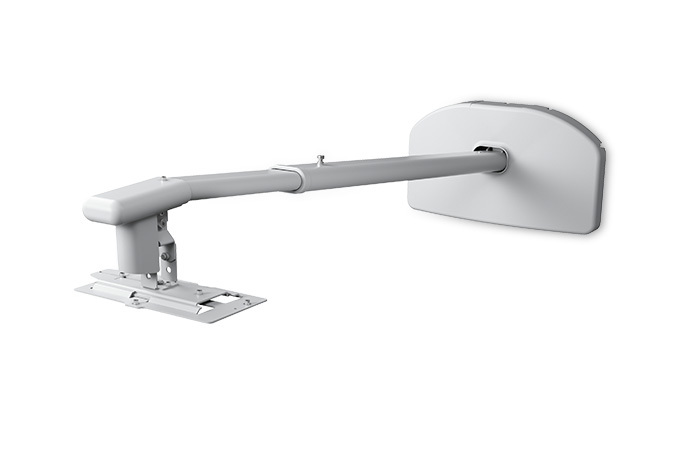
The epson ELPMB64 Short-Throw Projector Wall Mount is a purpose-built mounting solution designed for Epson PowerLite short-throw projectors, especially the L200SX, L200SW, EB-L200SX, and EB-L200SW series. It is engineered to deliver a stable, professional installation for classrooms, meeting rooms, training spaces, and collaborative work environments where a fixed projector setup is preferred.
One of the biggest advantages of the epson ELPMB64 Short-Throw Projector Wall Mount is its adjustability. The telescopic arm supports flexible positioning, while vertical, horizontal, pitch, roll, and swivel adjustments make image alignment much easier during installation. This helps users achieve a clean projection without excessive keystone correction or repeated repositioning.
The mount is a strong choice for schools, businesses, and AV installers who need reliable wall-mounted short-throw projection above interactive whiteboards or dry-erase boards. It supports larger projected images and is designed to keep the projector securely positioned in rooms with frequent daily use. The wall mount weighs about 21.4 lb and supports a maximum load of 14.3 lb, making it a robust hardware accessory for compatible Epson projectors.
Estimated pricing typically falls in the mid-range accessory category, often around $155 to $186 depending on region and seller availability. Availability is generally good through Epson resellers, office equipment retailers, and projector accessory stores. For buyers seeking a stable short-throw installation with precise alignment, the epson ELPMB64 Short-Throw Projector Wall Mount remains a practical and highly specialized option.
Troubleshooting: Common Problems and Fixes
If the projected image looks misaligned, first confirm that the wall plate and arm are installed on a solid concrete or properly reinforced surface. Then adjust the mount using the vertical, horizontal, roll, pitch, and swivel controls before relying on projector settings.
- Image is too high or too low: Adjust the vertical height setting and re-check projector placement.
- Image is tilted: Use pitch and roll adjustments to level the image on the screen or whiteboard.
- Image is shifted left or right: Fine-tune the horizontal slide and swivel alignment.
- Projector does not match the intended throw distance: Verify arm extension is within the supported range of 27 to 47 inches.
- Mount feels unstable: Check anchor hardware, wall integrity, and bolt tightness before continuing use.
There are no common electronic error codes for the mount itself, since it is a mechanical accessory rather than a powered device. Most issues come from incorrect installation, incompatible projector models, or insufficient wall support. Preventive measures include using the included hardware correctly, measuring the projection area before mounting, and confirming compatibility before purchase. Epson provides product support for mount-related questions, and warranty coverage is typically offered through the standard limited warranty from the seller or manufacturer channel. For help, customers can contact Epson support by phone at (562) 276-4394 or through Epson’s support department in Los Alamitos, California. If the product was purchased from a retailer, the retailer may also handle return or replacement requests.
Pros & Cons of the epson ELPMB64 Short-Throw Projector Wall Mount
Pros
- Highly adjustable installation: Vertical, horizontal, pitch, roll, and swivel adjustments help installers achieve accurate alignment.
- Built for Epson short-throw projectors: Designed specifically for compatible PowerLite and EB-L200 series models.
- Professional appearance: Ideal for classrooms and meeting rooms where a clean wall-mounted setup is preferred.
- Strong image support: Works well for large projected images on interactive whiteboards and presentation screens.
- Reliable build quality: Steel and plastic construction offers solid support for daily use.
Cons
- Limited compatibility: It is not a universal projector mount, so it is unsuitable for many non-Epson models.
- Installation requires care: Proper wall structure and accurate measurements are essential for best results.
- Higher cost than generic mounts: The specialized design makes it more expensive than basic universal wall brackets.
- Best for fixed setups only: Users who need frequent repositioning may prefer a mobile cart or adjustable universal mount.
Overall, the epson ELPMB64 Short-Throw Projector Wall Mount offers strong value for users who want precision and compatibility over universal flexibility. Compared with cheaper third-party mounts, it is better suited to Epson short-throw projection workflows and tends to reduce alignment frustration.
Customer Reviews: What Users Say About the Epson ELPMB64
Customer feedback is generally positive, with many buyers giving it around 4.5 out of 5 stars for stability, ease of alignment, and fit with compatible Epson projectors. Users often praise the solid construction and the convenience of fine adjustments during setup.
Common praise includes comments such as, “Installation was straightforward once the wall measurements were confirmed,” and “The image lined up perfectly over our classroom whiteboard.” Frequent complaints usually involve the need for careful installation and the fact that it only works with specific Epson models. A few users also note that the mount is not the cheapest option, but most agree the price is justified for the quality and fit.
Recommended for schools, businesses, and AV professionals who need a dependable short-throw mounting solution. Buyers who want a universal or low-cost option may prefer alternative wall mounts, but those needing a precise Epson-compatible solution will find this accessory well worth considering.
Frequently Asked Questions
What projectors are compatible with the epson ELPMB64 Short-Throw Projector Wall Mount?
It is designed for Epson PowerLite EB-L200SX, EB-L200SW, L200SX, and L200SW short-throw projectors.
What is the throw distance range?
The telescopic arm supports a throw distance from 27 to 47 inches, depending on projector model and setup.
How much weight can it support?
The mount supports a maximum load capacity of 14.3 lb, or 6.5 kg.
Is the epson ELPMB64 Short-Throw Projector Wall Mount worth buying?
Yes, if you need a dedicated Epson short-throw projector wall mount with precise adjustment options and a professional fixed installation.
Faqs
How do I install the epson ELPMB64 Short-Throw Projector Wall Mount correctly for a secure first-time setup?
What projectors are compatible with the epson ELPMB64 Short-Throw Projector Wall Mount?
Why is my image still misaligned after installing the epson ELPMB64 Short-Throw Projector Wall Mount?
How can I adjust the epson ELPMB64 Short-Throw Projector Wall Mount for the best image size and focus?
What should I do if the epson ELPMB64 Short-Throw Projector Wall Mount feels loose or vibrates during use?
Does the epson ELPMB64 Short-Throw Projector Wall Mount support cable management for a cleaner installation?
How do I maintain and clean the epson ELPMB64 Short-Throw Projector Wall Mount over time?
What are the main performance benefits of using the epson ELPMB64 Short-Throw Projector Wall Mount in classrooms or meeting rooms?
More epson manuals
Leave a Comment