
Epson EX3280 Projector User Manual
Content
Epson EX3280 Projector Manual: Overview, Setup, and Performance
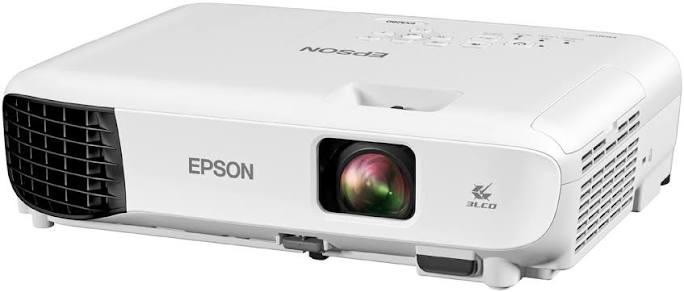
The Epson EX3280 Projector is a compact 3LCD business and classroom projector designed for users who need bright, reliable presentations without a complicated setup. With 3,600 lumens of color and white brightness, XGA resolution, and a 15,000:1 contrast ratio, it delivers clear text, spreadsheets, charts, and slides in well-lit rooms. Its 3LCD technology helps reduce the “rainbow effect” common in some single-chip projectors, making it a practical choice for office meetings, training sessions, and small-to-medium classrooms.
One of the biggest advantages of the Epson EX3280 Projector is its straightforward connectivity. It includes HDMI, VGA, and USB-B plug-and-play support, so it works well with laptops, older PCs, and many classroom setups. The built-in mono speaker is useful for basic audio, and the lightweight design makes it easy to move between rooms or mount permanently. The projector supports screen sizes up to about 350 inches, giving users flexibility for both small conference rooms and larger presentation spaces.
This model is best suited for educators, office teams, trainers, and home users who want a dependable presentation projector rather than a home theater model. Typical pricing usually falls in the mid-range budget category, often around $350 to $500 depending on retailer and availability. The Epson EX3280 Projector is commonly sold through major electronics retailers and online marketplaces, though stock may vary by region.
How to Use the Epson EX3280 Projector for the Best Results
Quick Setup Tips
- Place the projector on a stable surface or ceiling mount with enough distance for the desired screen size.
- Connect your device using HDMI for the best digital signal quality.
- Adjust the focus ring manually until text and images appear sharp.
- Use the keystone correction only when needed, since heavy correction can soften the picture.
- Select Eco mode when possible to reduce lamp wear and lower fan noise.
Best Use Cases
- Business presentations
- Classroom lessons and training rooms
- Slide decks, charts, and spreadsheets
- Portable presentation setups
Troubleshooting the Epson EX3280 Projector
Common issues with the Epson EX3280 Projector usually involve input selection, lamp warnings, image alignment, or no signal problems. If the projector shows a blank screen, confirm that the correct input source is selected and that the HDMI or VGA cable is firmly connected. If the image looks blurry, clean the lens gently and refocus manually. If colors appear uneven or the picture is dim, check the lamp usage hours and make sure Eco mode is not limiting brightness more than expected.
If you see a warning light or an error message related to the lamp, temperature, or filter, power off the unit and let it cool completely before restarting. Replace the lamp when brightness drops significantly or when the projector indicates end-of-life behavior. Preventive care includes keeping vents clear, avoiding dusty environments, and shutting the unit down properly after use. The projector includes a one-year limited warranty, while the lamp typically has a shorter 90-day coverage period. For support, users can contact Epson through the official support line at 1-800-GO-EPSON in the U.S. or the projector support team at 562-276-4394 in the U.S. and 905-709-3839 in Canada. Epson PrivateLine support is also available during the warranty period at 800-637-7661.
Pros and Cons of the Epson EX3280 Projector
Pros
- Bright 3,600-lumen output performs well in rooms with ambient light.
- 3LCD technology delivers strong color accuracy for presentations and charts.
- HDMI, VGA, and USB-B connectivity support both modern and legacy devices.
- Lightweight, portable design makes it easy to move between rooms.
- Built-in speaker adds convenience for quick meetings and lessons.
Cons
- Native XGA resolution is fine for presentations but not ideal for Full HD or 4K content.
- No built-in wireless connectivity, so cable management or a streaming adapter is needed.
- The internal speaker is useful for basic audio but not for large rooms.
- Best suited for business and education rather than home cinema use.
In terms of value for money, the Epson EX3280 Projector offers a strong balance of brightness, simplicity, and reliability. Compared with higher-resolution alternatives, it is less advanced for video playback, but it often costs less and is easier to deploy in classroom and office environments.
Customer Reviews: What Buyers Say About the Epson EX3280 Projector
Customer feedback for the Epson EX3280 Projector is generally positive, with many users giving it around 4 out of 5 stars for brightness, setup simplicity, and dependable performance in meeting rooms. Users frequently praise the sharp presentation text, strong daylight visibility, and easy plug-and-play use with laptops.
Common complaints include the XGA resolution, which some buyers feel is dated for movie viewing or detailed HD content, and the lack of wireless streaming features. A few users also note that the built-in speaker is only suitable for small spaces. Typical testimonials mention that it is a “great office projector for the price,” while others recommend it specifically for PowerPoint, classroom slides, and training sessions. Buyers who want a simple presentation projector usually find it a smart purchase, while users looking for home entertainment often prefer a higher-resolution alternative.
Frequently Asked Questions
What is the Epson EX3280 Projector best for?
The Epson EX3280 Projector is best for business presentations, classroom teaching, and training rooms where brightness and easy setup matter more than high-definition home theater features.
Does it support wireless projection?
No, it does not include built-in wireless connectivity. A cable or external streaming solution is required for wireless-style use.
How long does the lamp last?
The lamp life is commonly rated up to 6,000 hours in normal mode and up to 12,000 hours in Eco mode, depending on usage conditions.
Is the Epson EX3280 Projector worth buying?
Yes, if the goal is a bright, reliable, budget-conscious presentation projector for offices or classrooms. It is less suitable for users who need native Full HD video quality.
Faqs
How do I set up the epson EX3280 Projector for the first time in a small office or classroom?
What should I do if the epson EX3280 Projector shows a blurry image after setup?
Which devices are compatible with the epson EX3280 Projector through HDMI and USB connections?
Why is the epson EX3280 Projector not displaying my laptop screen?
How bright is the epson EX3280 Projector in daylight or office lighting?
What is the best way to optimize image quality on the epson EX3280 Projector?
How long does the lamp last in the epson EX3280 Projector, and when should I replace it?
How should I clean and maintain the epson EX3280 Projector for long-term use?
More epson manuals
Leave a Comment