
Hp 570 Series Smart Tank Plus User Manual
Content
HP Smart Tank Plus 570 Series Smart Tank Plus: Complete Product Manual and Buying Guide
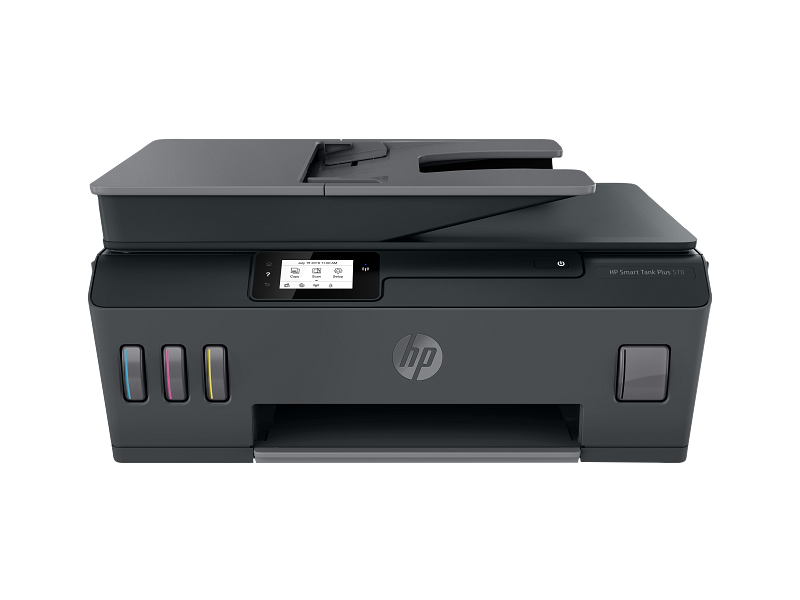
Introduction to the HP Smart Tank Plus 570 Series Smart Tank Plus
The HP Smart Tank Plus 570 Series Smart Tank Plus is a wireless all-in-one ink tank printer designed for households, home offices, and small businesses that need low-cost, high-volume printing. It combines printing, scanning, copying, and automatic document feeding in one compact device, making it a practical choice for everyday document workflows. With refillable ink tanks and spill-free bottles, this model is built to reduce running costs while delivering reliable text and color output.
One of the biggest advantages of the HP Smart Tank Plus 570 Series Smart Tank Plus is the included ink supply, which can last for thousands of pages before a refill is needed. It supports dual-band Wi-Fi, Wi-Fi Direct, USB connectivity, and mobile printing through the HP app, AirPrint, Mopria, and Android print services. The 35-sheet automatic document feeder helps streamline multi-page scanning and copying, while the 100-sheet input tray handles routine office tasks efficiently.
This printer is best suited for users who print frequently, such as remote workers, students, teachers, and small business owners. It is also a strong fit for anyone searching for an affordable wireless printer with refillable ink tanks and ADF support. Estimated street pricing typically falls in the mid-range for ink tank printers, often around the equivalent of $150 to $250 depending on region, promotions, and availability. The HP Smart Tank Plus 570 Series Smart Tank Plus is widely available through major electronics retailers and HP channels in many markets.
Troubleshooting the HP Smart Tank Plus 570 Series Smart Tank Plus
If the printer will not connect to Wi-Fi, restart the router and printer, then use the HP Smart app to reconnect the device to a 2.4 GHz or dual-band network. If print quality is poor, run printhead cleaning, check ink tank levels, and confirm that the protective seals were removed during setup. Paper jams are usually caused by overfilled trays, damaged sheets, or incorrect paper alignment, so reload plain paper and remove any obstructions carefully.
Common status issues may appear as blinking light patterns or setup errors rather than numeric error codes. Typical fixes include re-seating the printheads, performing a power reset, updating firmware, and ensuring the scanner lid is closed properly. If scanning fails, verify the HP app permissions on your computer or mobile device and check that the printer is on the same network.
To prevent problems, use recommended paper sizes, keep firmware updated, and refill ink tanks only with the correct HP bottles. Warranty and support options vary by region, but HP generally provides online support, driver downloads, diagnostic tools, and repair services. For help, use HP customer support through the official support portal, HP Smart app diagnostics, or local HP service centers and retailer support channels.
Pros and Cons of the HP Smart Tank Plus 570 Series Smart Tank Plus
Pros
- Low running costs thanks to refillable ink tanks and high page yields.
- Good for high-volume home or small office printing, especially documents and forms.
- Wireless printing is flexible, with support for mobile apps and Wi-Fi Direct.
- The 35-page automatic document feeder saves time on multi-page scanning and copying.
- Strong value for money for users who print regularly and want to avoid cartridge replacements.
Cons
- Print speed is moderate, so it is not ideal for very fast office workloads.
- Initial setup can take time for users unfamiliar with ink tank systems.
- Photo printing is serviceable, but dedicated photo printers usually produce richer results.
- Bulkier than compact cartridge printers, so it needs more desk space.
- Some alternatives may offer touchscreen controls or faster duplex handling at a higher price.
Compared with standard cartridge printers, the HP Smart Tank Plus 570 Series Smart Tank Plus offers better long-term savings. Compared with premium ink tank rivals, it is usually more affordable but may have fewer advanced features.
Customer Reviews for the HP Smart Tank Plus 570 Series Smart Tank Plus
Users commonly rate this printer around 4 out of 5 stars for value, ink economy, and easy refilling. A frequent positive comment is that the printer is ideal for families and home offices because it prints many pages at a low cost. One typical testimonial is: “Great for everyday work documents and school projects, and the ink lasts much longer than cartridge printers.”
Common complaints include slower print speeds, occasional Wi-Fi setup frustration, and the lack of advanced finishing features. Another common remark is: “Excellent value, but the setup took longer than expected.” Buyers who want a budget-friendly wireless tank printer with scanning and copying usually give it strong recommendations, while heavy-duty office users may prefer a faster model.
Quick Buying Summary
If you need an affordable all-in-one ink tank printer for frequent document printing, the HP Smart Tank Plus 570 Series Smart Tank Plus is a practical and cost-effective choice. It delivers dependable everyday performance, low ink costs, and useful wireless features for modern homes and small offices.
Faqs
How do I set up hp 570 Series Smart Tank Plus for the first time?
Why is my hp 570 Series Smart Tank Plus not connecting to Wi-Fi?
What should I do if hp 570 Series Smart Tank Plus prints blank pages or faded colors?
Which devices and operating systems work with hp 570 Series Smart Tank Plus?
How do I get the best print quality from hp 570 Series Smart Tank Plus?
How often should I clean and maintain hp 570 Series Smart Tank Plus?
What should I do if hp 570 Series Smart Tank Plus shows paper jam errors?
Can hp 570 Series Smart Tank Plus handle high-volume home or small office printing?
More hp manuals
Leave a Comment