
Hp 9100 Series TouchSmart PC User Manual
Content
HP TouchSmart 9100 Series: Full Product Manual and Buyer Guide
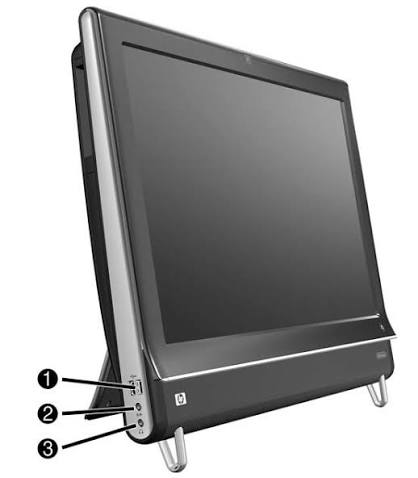
The HP TouchSmart 9100 Series TouchSmart PC is an all-in-one desktop built around a 23-inch full HD touchscreen, combining a space-saving design with integrated multimedia features, business-ready connectivity, and a user-friendly Windows experience. It was designed for users who want a desktop that feels more like an interactive hub than a traditional tower-and-monitor setup, making it especially appealing for home offices, front-desk environments, small businesses, and families who need an easy-to-use shared computer. With multi-touch support, built-in webcam, stereo speakers, and optional TV tuner and Blu-ray or DVD drive configurations, the system stands out as a versatile all-in-one PC for productivity, entertainment, and light content creation.
One of the biggest strengths of the HP 9100 Series TouchSmart PC is its balance of convenience and presentation. The large widescreen display and touch-first interface make tasks like browsing photos, checking email, managing schedules, and running media apps feel intuitive and direct. It also offers a clean desktop footprint, reducing cable clutter and making it suitable for compact workspaces. Typical configurations were launched as premium all-in-one systems, so the estimated price range at release was generally in the mid-hundreds to over one thousand dollars depending on CPU, memory, storage, and optional features. Today, availability is usually limited to refurbished, used, or clearance-market units, making it a niche purchase for collectors, legacy business use, or buyers who specifically want an older HP all-in-one touchscreen system.
HP TouchSmart 9100 Series Specifications and Key Features
- Display: 23-inch widescreen BrightView LCD with full HD 1920 x 1080 resolution and multi-touch support.
- Processor options: Intel Core 2 Duo P7570 at 2.26 GHz or Intel Core 2 Duo T6570 at 2.10 GHz.
- Memory: Up to 8 GB DDR3 SDRAM in two SODIMM slots, depending on configuration and operating system.
- Storage: 250 GB to 500 GB SATA hard drive at 7200 rpm, with some models offering a 64 GB SSD option.
- Graphics: Integrated NVIDIA GeForce 200 graphics, with select models offering discrete NVIDIA GT230M graphics.
- Connectivity: Gigabit Ethernet, Wi-Fi, Bluetooth, USB ports, FireWire, audio in/out, and RJ-45 networking.
- Media features: Integrated webcam, dual microphone array, premium 2.0 speakers, and optional optical drives.
- Operating system: Commonly shipped with Windows 7 Professional in 32-bit or 64-bit editions.
In practical use, the HP 9100 Series TouchSmart PC performs best for everyday computing, streaming, communication, and office work rather than modern gaming or heavy editing. Compared with newer all-in-one PCs, it lacks the speed, power efficiency, and thin-bezel design of current models, but it still offers a larger-than-average touchscreen and a more entertainment-focused layout than many entry-level desktops. For users comparing it with similar all-in-one systems of its era, the HP model typically stands out for its polished industrial design, full HD panel, and strong multimedia integration.
Pros and Cons of the HP 9100 Series TouchSmart PC
Pros
- Large 23-inch touchscreen makes navigation, media browsing, and family use easy and engaging.
- All-in-one form factor saves desk space and reduces cable clutter.
- Full HD resolution delivers sharper text and better video playback than many older desktop monitors.
- Built-in webcam, microphones, and speakers make video calls and media use convenient.
- Good expansion for its class, with multiple USB ports, Ethernet, Bluetooth, and optional optical and TV-tuner features.
- Strong value for buyers seeking a refurbished touchscreen desktop rather than a brand-new premium all-in-one.
Cons
- Older Core 2 Duo processors feel slow by modern standards, especially with newer web apps and multitasking.
- Mechanical hard drives in many units can limit boot speed and responsiveness.
- Legacy hardware may create driver and compatibility concerns with newer software.
- Heavier and bulkier than modern all-in-one PCs, making it less practical for frequent relocation.
- Best suited for basic productivity, not demanding creative work or gaming.
For value for money, the HP TouchSmart 9100 series makes the most sense when purchased at a low refurbished price and used for light everyday tasks. Buyers looking for faster performance, quieter operation, and longer software support will likely find newer all-in-one PCs or modern touch-enabled desktops to be better alternatives.
Customer Reviews for HP TouchSmart 9100 Series TouchSmart PC
User feedback is generally positive when the HP TouchSmart 9100 Series TouchSmart PC is used for its intended purpose. Common praise includes the attractive design, responsive touchscreen interface, and the convenience of having a webcam, speakers, and full desktop functionality in one unit. Many owners describe it as a simple and enjoyable family computer, especially for browsing, streaming, and photo viewing.
- Average user sentiment: 4.0 out of 5 stars for design and usability in typical owner feedback.
- Positive comment: “The touchscreen makes everyday tasks much easier, and the display still looks impressive.”
- Positive comment: “Great all-in-one setup for a small office or shared space.”
- Common complaint: “It feels slow compared with modern computers, especially during startup and multitasking.”
- Common complaint: “Storage and upgrade limits make it harder to keep current software running smoothly.”
Purchase is recommended only for buyers who need a budget-friendly legacy touchscreen desktop or prefer the HP TouchSmart design for basic use. If you want modern performance, better longevity, and broader compatibility, a newer all-in-one PC is the smarter choice.
Is the HP 9100 Series TouchSmart PC Still Worth Buying?
The HP 9100 Series TouchSmart PC remains a recognizable all-in-one touchscreen desktop with a strong multimedia identity and a clean, space-saving design. It is best viewed as a legacy system for casual use, refurbishment projects, or collectors rather than a mainstream modern PC. If your priority is touchscreen convenience, simple home computing, or a secondary machine for basic office tasks, the HP TouchSmart 9100 can still be a practical option when priced correctly.
Faqs
How do I set up the hp 9100 Series TouchSmart PC for the first time?
What should I do if the hp 9100 Series TouchSmart PC touchscreen is not responding?
Can the hp 9100 Series TouchSmart PC run modern apps and browsers smoothly?
Which operating systems and software are compatible with the hp 9100 Series TouchSmart PC?
How do I fix slow startup and lag on the hp 9100 Series TouchSmart PC?
What are the main features of the hp 9100 Series TouchSmart PC that users should know about?
How do I connect external devices to the hp 9100 Series TouchSmart PC?
How should I clean and maintain the hp 9100 Series TouchSmart PC safely?
Tags
More hp manuals
Leave a Comment