
Hp MFP-M282 Color LaserJet Pro User Manual
Content
HP Color LaserJet Pro MFP M282: Complete Product Manual and Buyer Guide
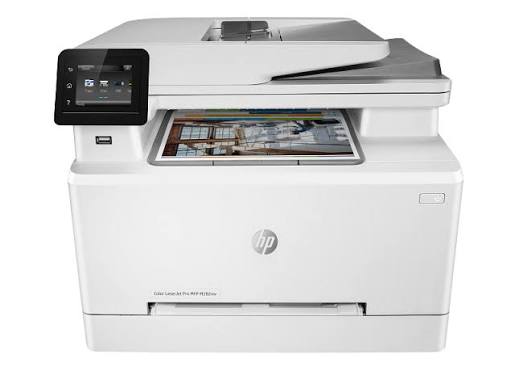
The HP Color LaserJet Pro MFP M282 is a compact color laser multifunction printer designed for small offices, home offices, and teams that need fast, reliable everyday printing, scanning, and copying. It combines business-grade laser output with an easy-to-use touchscreen, wireless connectivity, and automatic two-sided printing, making it a practical choice for users who want sharper text, consistent color documents, and lower maintenance than many inkjet alternatives. The hp MFP-M282 Color LaserJet Pro is especially appealing for workgroups that print invoices, reports, presentations, labels, and client-facing documents on a regular basis.
One of its biggest strengths is balance: it is not overly large, yet it still delivers up to 21 pages per minute in both black and color, a 250-sheet input tray, a 50-sheet automatic document feeder, and mobile printing support through popular wireless standards. For users who need a dependable office all-rounder, the hp MFP-M282 Color LaserJet Pro offers strong everyday performance without requiring constant cartridge attention or frequent paper reloads.
Estimated pricing typically falls in the mid-range for color laser all-in-one printers, often around $300 to $500 depending on region, retailer, and whether the unit is new, refurbished, or bundled with starter toner. Availability remains common through major office retailers, online marketplaces, and HP-authorized resellers, though exact stock can vary by country and model variant such as the M282nw.
Specifications: HP Color LaserJet Pro MFP M282 Key Features and Performance
- Print technology: color laser multifunction printer with print, scan, and copy functions
- Print speed: up to 21 ppm in black and up to 21 ppm in color
- First-page output: fast startup for office-ready document handling
- Print resolution: up to 600 x 600 dpi for black and color
- Processor speed: 800 MHz for responsive job processing
- Monthly duty cycle: up to 40,000 pages
- Recommended input capacity: 250-sheet standard tray
- Automatic document feeder: 50-sheet ADF for multi-page scanning and copying
- Connectivity: USB 2.0, Fast Ethernet, and dual-band Wi-Fi 802.11n on supported variants
- Mobile printing: HP ePrint, Apple AirPrint, Mopria, Wi-Fi Direct, and mobile app support
- Display: 2.7-inch color graphic screen for simple navigation
- Duplex printing: automatic two-sided printing on supported configurations
- Dimensions: approximately 420 x 388.6 x 334.1 mm
- Power use: about 361 W during active printing, 7.8 W ready, and 0.8 W sleep
Compared with entry-level color laser printers, the hp MFP-M282 Color LaserJet Pro stands out for having both scanning and copying in a compact body, while offering faster wireless convenience than many older office printers. Compared with larger business models, it is less expandable but easier to place on a desk or shelf.
Pros and Cons of the HP Color LaserJet Pro MFP M282
Pros
- Fast output for small-office use, with consistent 21 ppm print speeds for both black and color
- Sharp text quality and solid color documents for reports, presentations, and client materials
- Automatic duplex printing helps reduce paper usage and operating costs
- Wireless, Ethernet, and USB connectivity make setup flexible for shared environments
- 50-sheet ADF improves productivity for scanning and copying multi-page documents
- Compact footprint makes it easier to fit into home offices than many competing laser MFPs
Cons
- Color laser toner costs can be higher than inkjet refill costs, especially for frequent photo printing
- Print resolution is good for office work, but not ideal for premium photo output
- Paper capacity is suitable for small teams, but heavy-duty offices may want a larger tray
- Some users may prefer a model with more advanced paper handling or cloud workflow features
For value for money, the hp MFP-M282 Color LaserJet Pro is strongest when used for everyday business documents rather than graphics-heavy or photo-focused jobs. It compares well against compact competitors from Brother and Canon when wireless printing, laser reliability, and all-in-one convenience matter most.
Customer Reviews: What Users Say About the HP Color LaserJet Pro MFP M282
Typical customer feedback for the HP Color LaserJet Pro MFP M282 averages around 4 out of 5 stars, with many buyers praising its fast setup, clean output, and dependable wireless printing. Users frequently mention that text looks crisp, scanning is straightforward, and the printer feels well suited to a busy home office or small business environment.
Common praise includes the quiet operation, compact size, and the convenience of duplex printing. Common complaints focus on toner replacement cost, occasional wireless setup frustration, and the fact that print speed is solid rather than exceptional for larger office workloads. A frequent buyer testimonial theme is that it “does the job reliably every day without much maintenance,” while critical feedback often notes that running costs should be considered before purchase.
Purchase recommendation: choose the hp MFP-M282 Color LaserJet Pro if you need dependable color laser output, mobile printing, and scanning in a space-saving design. It is a smart buy for users who prioritize office documents, not high-volume photography.
Who Should Buy the HP Color LaserJet Pro MFP M282?
- Small business owners who print invoices, letters, and presentations
- Home office users who want a reliable color laser all-in-one printer
- Teams that need wireless printing and basic document scanning
- Users who prefer crisp text, consistent performance, and lower day-to-day maintenance
Frequently Asked Questions About the HP Color LaserJet Pro MFP M282
- Does it print in color? Yes, it is a color laser multifunction printer built for business documents and general office use.
- Does it support wireless printing? Yes, supported variants include Wi-Fi and mobile printing features such as AirPrint and Mopria.
- Is it good for home offices? Yes, the compact design and multifunction features make it a strong fit for home and small office setups.
- Is it expensive to run? Toner costs are typically higher than inkjet ink, but laser systems often provide better consistency and lower maintenance.
Faqs
How do I set up hp MFP-M282 Color LaserJet Pro for the first time on Wi‑Fi?
Why is my hp MFP-M282 Color LaserJet Pro not connecting to the wireless network?
How do I fix print quality problems on hp MFP-M282 Color LaserJet Pro?
What paper sizes and media types work best with hp MFP-M282 Color LaserJet Pro?
Can hp MFP-M282 Color LaserJet Pro scan and copy documents from the control panel?
Why does my hp MFP-M282 Color LaserJet Pro keep showing paper jam errors?
How do I get the best performance and faster printing from hp MFP-M282 Color LaserJet Pro?
What routine maintenance does hp MFP-M282 Color LaserJet Pro need to stay reliable?
Tags
More hp manuals
Leave a Comment