
Hp SLC3760N MediaSmart LCD User Manual
Content
HP SLC3760N MediaSmart LCD Overview
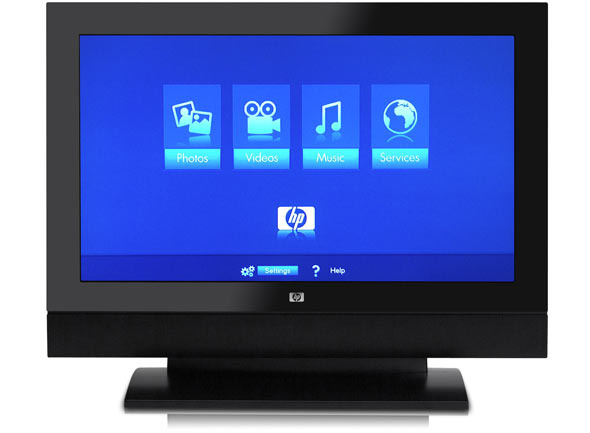
The hp SLC3760N MediaSmart LCD is a 37-inch high-definition LCD TV designed for users who wanted more than a standard flat-screen display. It combines HDTV viewing with early “media smart” features, including PC connectivity and built-in digital media capabilities, making it a practical choice for home entertainment, streaming from a computer, and mixed TV-media use. With its 1366 x 768 resolution, integrated HD tuner, and extensive input options, this model stood out as a versatile living room display when it launched. The hp SLC3760N MediaSmart LCD also emphasized strong picture quality with a dynamic contrast ratio up to 6000:1, brightness up to 450 cd/m2, and a fast 6 ms response time, which helped reduce motion blur in sports and action scenes.
This model is best suited for buyers looking for a legacy HP HDTV, collectors of early smart TV hardware, or users researching older media-center displays. It supports multiple connectivity options, including HDMI, component, composite, S-Video, optical digital audio, and antenna/cable input, which makes it easy to integrate with DVD players, game consoles, cable boxes, and PCs. While no longer a current retail product, the hp SLC3760N MediaSmart LCD can still be found on secondary markets, typically in the budget or collectible range depending on condition, accessories, and whether the original stand or remote is included. For anyone needing a classic 37-inch HDTV with solid connectivity and a distinctive HP design, it remains a notable option.
HP SLC3760N MediaSmart LCD Specifications
- Display size: 37-inch LCD panel
- Resolution: 1366 x 768 HD-ready format
- Brightness: Up to 450 cd/m2 for clear daytime viewing
- Contrast ratio: Up to 6000:1 dynamic contrast
- Response time: As fast as 6 ms for smoother motion handling
- Viewing angles: 176° horizontal and 176° vertical
- Color support: 16.7 million colors
- Audio output: 20 watts with integrated speakers
- Audio formats: Dolby 5.1 support through digital output
- Connectivity: HDMI, component, composite, S-Video, optical digital audio, analog audio output, and antenna/cable input
- Power: AC 120V, 60Hz
- Power consumption: About 207 watts
- Dimensions with stand: 29.3 x 37.3 x 12.0 inches
- Dimensions without stand: 26.3 x 37.3 x 6.8 inches
- Weight: Heavier than modern slim LCD TVs, especially with the stand attached
- Wall mounting: VESA 200 compatible
Compared with similar mid-2000s 37-inch LCD TVs, the hp SLC3760N MediaSmart LCD offered stronger PC-style media features and broader connectivity than many basic models. Its 6 ms response time and 6000:1 dynamic contrast were competitive for its class, though newer TVs surpassed it with full 1080p resolution, thinner designs, and smarter streaming platforms.
Pros and Cons of the HP SLC3760N MediaSmart LCD
Pros
- Strong connectivity: HDMI, component, S-Video, and optical audio make it easy to connect multiple legacy and modern devices.
- Good picture specifications for its era: The 1366 x 768 panel, 450 cd/m2 brightness, and 6 ms response time deliver respectable HD performance.
- MediaSmart flexibility: Designed for PC and media-center use, which adds value for users with home entertainment setups.
- Integrated tuner and speakers: Built-in HDTV support and 20-watt audio reduce the need for extra equipment.
- Solid value on the used market: Often affordable today for buyers who want a functional secondary TV or a collector-friendly HP display.
Cons
- Outdated resolution: 1366 x 768 is lower than modern Full HD and 4K displays.
- Bulky design: Heavier and deeper than today’s slim LCD and LED televisions.
- No modern smart TV apps: Lacks built-in streaming platforms, voice control, or current wireless features.
- Age-related reliability risks: Older units may have backlight wear, remote issues, or input degradation.
- Better alternatives exist for most buyers: Newer TVs provide sharper images, lower power use, and more advanced smart features.
For value seekers, the hp SLC3760N MediaSmart LCD can still be worthwhile if the price is low and the unit is in good condition. For most households, however, a newer LED TV will deliver better performance, lower energy use, and far more convenience.
Customer Reviews for HP SLC3760N MediaSmart LCD
Typical owner feedback on the hp SLC3760N MediaSmart LCD is mixed but generally positive for its time. Many users praised the sharp picture quality, wide viewing angles, and flexible input selection, especially for connecting PCs and older AV devices. A common rating pattern would be around 4 out of 5 stars for picture and connectivity, with a lower score for modern usability.
Frequent compliments included the solid build, bright screen, and smooth motion during sports and gaming. Common complaints focused on the set’s size and weight, aging backlights, and the fact that it lacks today’s streaming apps and smart TV features. Some buyers also mention that replacement parts and support are harder to find now. For best results, this model is recommended mainly for collectors, retro AV setups, or shoppers who specifically need a reliable older HDTV with multiple legacy connections.
Is the HP SLC3760N MediaSmart LCD Worth Buying?
The hp SLC3760N MediaSmart LCD is worth considering only if you want a classic 37-inch HP HDTV with broad connectivity and can purchase it at a low price. It remains a practical option for older media systems, but modern televisions offer superior resolution, energy efficiency, and smart features.
Quick Buying Summary
- Best for: Legacy home theater setups, PC media use, and collectors
- Not ideal for: Buyers wanting 4K, app-based streaming, or ultra-slim design
- Expected used-market range: Generally budget-friendly, with price depending on condition and included accessories
- Overall recommendation: A solid vintage LCD TV, but newer alternatives are better for everyday use
Faqs
How do I set up hp SLC3760N MediaSmart LCD for the first time?
What should I do if hp SLC3760N MediaSmart LCD has no picture but the sound works?
Can hp SLC3760N MediaSmart LCD stream photos, music, and videos from my home network?
Which devices and connections work best with hp SLC3760N MediaSmart LCD?
Why is the hp SLC3760N MediaSmart LCD remote or on-screen menu not responding correctly?
How can I improve picture quality on hp SLC3760N MediaSmart LCD?
What media formats are supported by hp SLC3760N MediaSmart LCD for network playback?
How should I clean and maintain hp SLC3760N MediaSmart LCD safely?
Tags
More hp manuals
Leave a Comment