
Setup: Logitech G G335 Wired Gaming Headset User Manual
Content
Logitech G335 Wired Gaming Headset
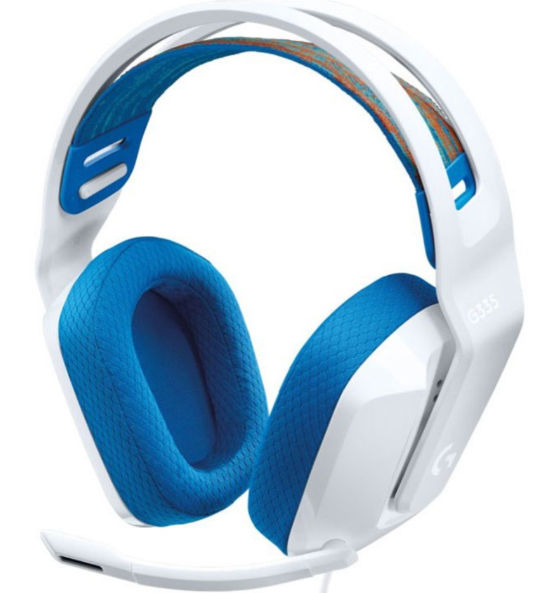
Introduction: Lightweight Gaming Audio Excellence
The Logitech G335 Wired Gaming Headset represents an exceptional entry-point into premium gaming audio, combining affordability with professional-grade sound quality. This lightweight gaming headset weighs just 240 grams (8.5 ounces) and features custom-tuned 40mm neodymium drivers that deliver crisp, immersive stereo sound across all your favorite games, music, and voice communications. Designed for gamers who prioritize both performance and comfort during extended play sessions, the Logitech G G335 Wired Gaming Headset offers plug-and-play simplicity without requiring software installation or complex configuration.
The Logitech G335 Wired Gaming Headset is engineered for maximum versatility, supporting PC, PlayStation 5, PlayStation 4, Xbox One, Xbox Series X|S, Nintendo Switch, and most mobile devices through a standard 3.5mm audio jack connection. The suspension headband design with adjustable elastic straps and soft memory foam ear pads ensures all-day comfort, while built-in controls, including a flip-to-mute microphone and convenient volume roller, provide instant access to essential functions without interrupting gameplay.
Available in three vibrant colorways—black, white, and mint—the Logitech G335 Wired Gaming Headset is priced at just $69.99, making it one of the most affordable gaming headsets from a trusted manufacturer. The headset includes a PC splitter for separate microphone and headphone jacks, comprehensive user documentation, and a 2-year limited hardware warranty. Whether you're a casual gamer, content creator, or esports enthusiast, this versatile gaming headset delivers Discord-certified audio clarity and communication quality.
Technical Specifications and Performance Metrics
The Logitech G335 Wired Gaming Headset boasts impressive technical specifications designed to deliver professional-grade audio performance at an affordable price point:
- Driver Size: 40mm neodymium drivers for rich, detailed sound reproduction
- Frequency Response: 20 Hz to 20 kHz, covering the full audible spectrum
- Impedance: 36 ohms for optimal compatibility across devices
- Sensitivity: 87.5 dB SPL/mW for powerful audio output
- Microphone Type: Cardioid (unidirectional) pickup pattern with flip-to-mute functionality
- Microphone Frequency Response: 100 Hz to 10 kHz for clear voice communication
- Weight: 240 grams (8.5 ounces) including cable for exceptional portability
- Physical Dimensions: 189mm length × 180mm width × 79mm depth
- Connection Type: 3.5mm analog audio jack with universal compatibility
- Sound Mode: Stereo for immersive gaming and entertainment experiences
The Logitech G G335 Wired Gaming Headset features a suspension headband design that distributes weight evenly across your head, reducing pressure points during marathon gaming sessions. The soft, breathable memory foam ear cups combined with sports mesh material provide optimal comfort while maintaining a secure fit. This gaming headset is Discord Certified, ensuring crystal-clear audio and communication clarity for online multiplayer gaming and team coordination.
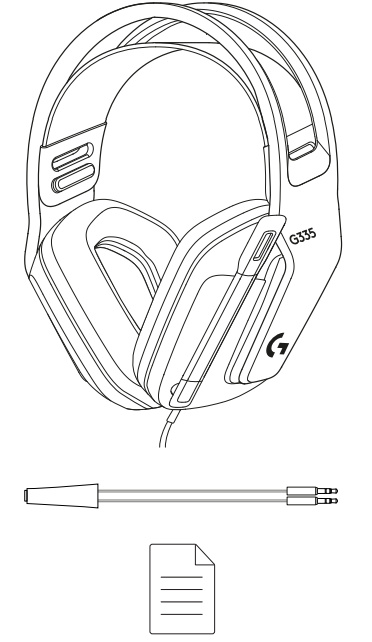
In Box
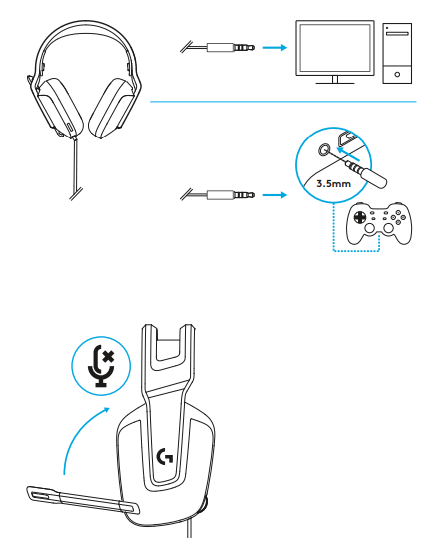
SETUP INSTRUCTIONS
- Plug the 3.5mm connector into the platform, PC,, or Console controller (Xbox or PlayStation).
- Flip the boom up to mute.
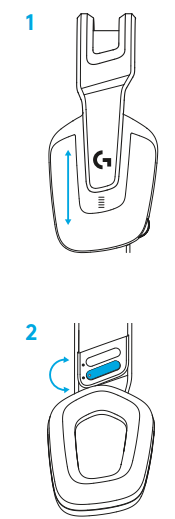
SIZE ADJUSTMENT
- Adjust the earcup to adjust the size.
- Adjust the strap to adjust the size.
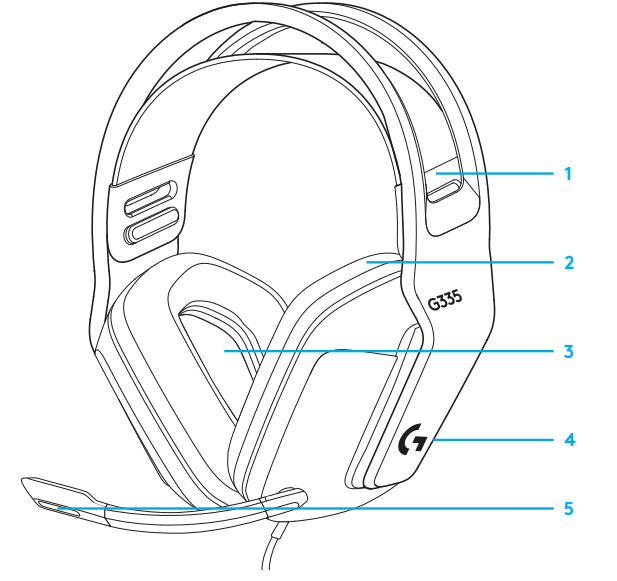
FEATURES
- Adjustable, reversible suspension band
- Memory foam earpads
- 40 mm drivers
- On-ear volume control
- Flip-to-mute 6-mm mic
Setup Guide and Configuration Instructions
- Initial Setup - Quick Start (Under 2 Minutes): The Logitech G335 Wired Gaming Headset requires absolutely no software installation or driver downloads. Simply unbox the headset and locate the 3.5mm audio jack cable. For PC, laptop, and most devices, insert the 3.5mm connector directly into your device's headphone jack. For gaming consoles like PlayStation 5, insert the 3.5mm jack into the controller's headphone port. The headset will be immediately recognized and ready for use.
- PC and Laptop Setup: Connect the 3.5mm jack to your PC's audio port. If your computer has separate microphone and headphone jacks, use the included PC splitter (Y-splitter) to connect both audio input and microphone output. Adjust your system audio settings to ensure the Logitech G335 is selected as your default audio device.
- Console Setup: For PlayStation 5 and PS4, connect the 3.5mm jack to the controller's headphone port. For Xbox One, Xbox Series X|S, and Nintendo Switch, connect to the respective device's 3.5mm audio jack. The headset will automatically activate for game audio and voice chat.
- Mobile Device Setup: Insert the 3.5mm connector into your smartphone, tablet, or portable gaming device's headphone jack. The Logitech G G335 Wired Gaming Headset will immediately provide audio output and enable microphone input for calls and voice applications.
- Microphone Configuration: The flip-to-mute microphone activates automatically when positioned downward toward your mouth. Flip the microphone upward to instantly mute your audio transmission. No additional configuration is required. The cardioid microphone pickup pattern effectively isolates your voice while minimizing background noise from surrounding environments.
- Volume and Audio Control: Use the volume roller located directly on the left ear cup to adjust volume levels without removing the headset. Rotate the wheel upward to increase volume and downward to decrease volume. This convenient control allows instant audio adjustment during gameplay without interrupting your gaming experience.
Troubleshooting Common Issues and Solutions
- No Audio Output: First, verify the 3.5mm jack is fully inserted into your device's audio port. Some devices require the connector to be pushed in firmly until it clicks. Check your device's audio settings to confirm the Logitech G335 is selected as the active audio device. Test the headset on a different device to determine if the issue is with the headset or the original device.
- Microphone Not Working: Ensure the microphone is flipped downward (not muted). Check your device's microphone settings and confirm the Logitech G335 microphone is selected as the active input device. Test the microphone in your operating system's audio settings. If using a PC with separate audio jacks, ensure you're using the included PC splitter correctly.
- Intermittent Audio or Crackling Sounds: Inspect the 3.5mm jack connector for dirt or debris. Gently clean the connector with a dry cloth. Check for bent pins on the connector that may prevent proper contact. Try adjusting the jack position slightly to ensure optimal connection. If the issue persists, test with a different device to isolate the problem.
- Uneven Audio Between Left and Right Channels: Verify the headset is positioned correctly on your head with both ear cups properly seated. Check your device's audio balance settings and adjust to the center position. Ensure the 3.5mm jack is fully inserted. If the problem continues, contact Logitech support for potential replacement under the 2-year limited hardware warranty.
- Microphone Pickup Issues: The cardioid microphone is designed to pick up voice from directly in front of the microphone while rejecting side and rear noise. Position the microphone boom approximately one to two inches from your mouth for optimal voice capture. Avoid placing objects between your mouth and the microphone. If background noise is excessive, check your device's microphone sensitivity settings.
- Comfort Issues During Extended Use: Adjust the elastic headband straps to ensure an even, comfortable fit without excessive pressure. The suspension design should distribute weight evenly across your head. If ear cups feel too tight, gently stretch the headband. Clean the memory foam ear pads regularly to maintain cushioning properties. The Logitech G G335 Wired Gaming Headset includes washable, reversible headband straps for customization and maintenance.
Advantages and Disadvantages
Key Advantages:
- Exceptional value at $69.99 with professional audio quality and build standards
- Ultra-lightweight 240-gram design ideal for all-day gaming comfort
- Universal 3.5mm compatibility with PC, consoles, and mobile devices
- Plug-and-play simplicity with zero software requirements or driver installation
- Discord is certified for crystal-clear communication and audio clarity
- Custom-tuned 40mm neodymium drivers deliver impressive stereo sound quality
- Suspension headband with memory foam ear pads provides extended comfort
- Convenient flip-to-mute microphone for instant privacy and communication control
- Available in three vibrant colorways with customizable reversible straps
- Comprehensive 2-year limited hardware warranty
Potential Disadvantages:
- Wired connection limits mobility compared to wireless gaming headsets
- 3.5mm jack connector may require firm insertion on some devices
- No active noise cancellation technology included
- No surround sound processing, limited to stereo audio
- Microphone quality, while good, may not match premium gaming headset standards
- Limited to 3.5mm connection only; no USB alternative available
- Not ideal for users requiring wireless freedom and mobility
User Reviews and Customer Feedback
- The Logitech G335 Wired Gaming Headset has received positive feedback from gaming communities and users worldwide. Customers consistently praise the headset's lightweight design, comfortable fit for extended gaming sessions, and exceptional value for the price point. The microphone quality receives particular recognition, with users reporting that the cardioid microphone effectively isolates voice while minimizing background noise,, even rejecting sounds from nearby activities like opening beverages a foot away from the microphone.
- Users appreciate the plug-and-play simplicity, noting that setup across multiple gaming platforms requires no technical expertise or software installation. The suspension headband design with memory foam ear pads consistently receives positive comments for all-day comfort during marathon gaming sessions. The convenient flip-to-mute microphone and accessible volume roller controls are frequently mentioned as practical features that enhance the gaming experience.
- Common praise highlights include reliable performance across PC, PlayStation, Xbox, Nintendo Switch, and mobile platforms, making the Logitech G G335 Wired Gaming Headset a versatile choice for multi-platform gamers. The affordable $69.99 price point,nt combined with professional audio quality,ity makes this headset an excellent recommendation for budget-conscious gamers seeking quality gaming audio without premium pricing. The three available colorways allow personalization to match individual gaming setups and style preferences.
Warranty and Support Information
The Logitech G335 Wired Gaming Headset includes a comprehensive 2-year limited hardware warranty covering manufacturing defects and hardware failures. This warranty provides peace of mind for your investment and reflects Logitech's confidence in product quality and durability. For warranty claims, technical support, or product inquiries, contact Logitech's customer support team through their official website or customer service channels.
Conclusion and Recommendations
The Logitech G335 Wired Gaming Headset represents an outstanding value proposition for gamers prioritizing comfort, audio quality, and multi-platform compatibility. At just $69.99, this lightweight gaming headset delivers professional-grade performance with Discord Certification, custom-tuned drivers, and practical features like flip-to-mute microphone functionality. Whether you're a casual gamer enjoying single-player adventures, a competitive esports player requiring reliable voice communication, or a content creator needing quality audio input, the Logitech G G335 Wired Gaming Headset provides the tools needed for success without breaking your budget.
More logitech g manuals
- Pairing: Logitech G G735 Wireless Gaming Headset User Manual
- Pairing & Setup: Logitech G A50 Wireless Headset Casque Sans Fil User Manual
- Pairing: Logitech G ASTRO A20 X Wireless Gaming Headset User Manual
- Setup: Logitech G G535 LightSpeed Wireless Gaming Headset User Manual
- Pairing & Setup: Logitech G A50 X Wireless Headset User Manual
- Setup: Logitech G PRO X SE Wired Gaming Headset User Manual
Leave a Comment